



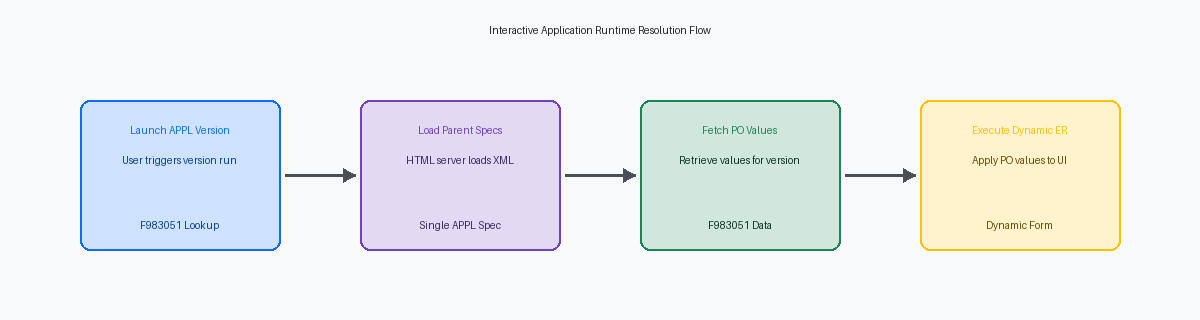
In over two decades of rescuing custom JDEJD Edwards, a comprehensive Enterprise Resource Planning (ERP) software suite. codebases, the most persistent architectural failure I see is treating Interactive Application (APPL)A JD Edwards program with a user interface for viewing or entering data. versions like Batch Application (UBE)A JD Edwards background process used for reports or bulk data processing. versions. While a UBE version contains independent data selection and sequencing specs, an APPL version is simply a pointer to Processing OptionUser-defined parameters that control how a program behaves without changing its code. values stored in the F983051The central database table in JD Edwards that stores version definitions and parameters. table. Misunderstanding this distinction leads to developers hardcoding version names inside Event RulesThe proprietary scripting language used to program logic within JD Edwards objects., which forks the codebase and inflates your upgrade footprint.
To resolve this, you must enforce a strict JDE APPL application versioning strategy for custom objects that relies on polymorphismA programming principle where a single interface can represent different underlying forms or data types.. By routing conditional execution through a single Processing Option template and reading those values at runtime, you can run dozens of distinct business flows through one APPL. This eliminates the need to duplicate objects, keeps your custom inventory clean, and ensures your interactive applications transition seamlessly to the latest Tools ReleaseThe technical foundation and middleware layer that powers JD Edwards applications..
The Fatal Misconception of APPL vs UBE Versions
Junior developers and hurried configurators frequently treat interactive application (APPL) versions as if they behave like Universal Batch Engine (UBE)The JD Edwards reporting engine that processes data in bulk without user interaction. versions. They do not. While a UBE version can override section layouts, select alternative tables, and execute distinct event rules, an APPL version is structurally inert. It is nothing more than a metadata row in the F983051 (Versions List) table, mapped directly to a processing option template, such as T550101. It contains zero layout specifications, zero event rules, and zero independent logic paths.
When an enterprise user launches a specific version of P4210 or a custom P554210, the HTML server does not parse a unique specification set for that version. Instead, the JAS engineThe Java Application Server component that manages the web-based runtime for JD Edwards. loads a single, unified XML specificationA structured file format used to define the properties and layout of JD Edwards objects. file for the parent application object from the serialized database cache. The runtime engine then applies the specific processing option values stored in the F983051 record to configure the form's initial state. The version itself acts solely as a parameter sheet, not an execution branch.
I regularly audit JDE environments where teams have created dozens of distinct APPL versions of a single custom application to handle minor UI variations, such as hiding a grid column or disabling an input field. This design anti-pattern introduces massive technical debtThe future cost of rework caused by choosing an easy but limited solution now. during Tools Release upgrades, such as moving from 9.2.5 to 9.2.8. Instead of managing a streamlined application, administrators must validate and migrate dozens of redundant version records, ballooning the upgrade testing cycle.
To prevent this overhead, design your interactive applications to use dynamic processing options that drive form behavior programmatically. Use the Set Action Control or Set Grid Column Attribute system functionsBuilt-in commands used within Event Rules to perform specific actions like hiding fields. within the Dialog Is Initialized event to conditionally format the UI based on runtime values. This keeps your version count to a minimum per application, simplifies your F983051 footprint, and ensures that future Application Updates require minimal retrofitting.

How Hardcoded Version Checks Fork Custom Codebases
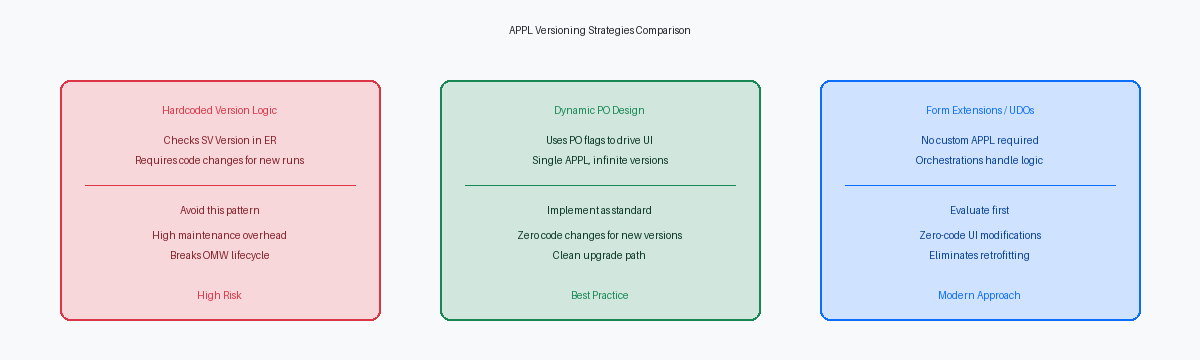
I regularly audit custom interactive applications where developers have written lines like If SV Version is equal to "ZJDE0001". This design pattern is an architectural failure that guarantees future technical debt. By binding execution logic to a specific, static version name inside the Event Rules of an APPL, you strip the runtime environment of its native flexibility. The moment a business unit requires a variation of that application—such as a different default branch/plant or a modified search query—you cannot simply copy the version in Interactive Versions (P983051). You are forced to open the parent APPL in Object Management Workbench (OMW)The central development and lifecycle management tool for JD Edwards software objects., modify the ER, check it in, build a package, and deploy it.
This hardcoding practice breaks the standard OMW promotion lifecycle entirely. When a business analyst copies ZJDE0001 to create USR0002 directly in a production environment to bypass a change advisory board, the application silently fails because the underlying code does not recognize the new version name. The developer is then pulled into an emergency troubleshooting cycle for an issue that should have been resolved via simple configuration. In a typical enterprise running hundreds of custom interactive versions, this anti-pattern accounts for a notable portion of post-go-live modification requests, often around ten to twenty percent.
The correct approach is to drive behavior through processing options rather than hardcoded string comparisons. Developers must use the standard business functionA reusable module of code used to perform specific logic or calculations in JD Edwards. B9800240 (Get Version Processing Options) to retrieve the specific runtime values assigned to the active version. Instead of checking if the version is ZJDE0001 to hide a grid column, define a processing option flag on the template, read that flag using the business function in the Post Dialog is Initialized event, and branch the logic based on the returned value. This shifts the control plane back to the processing option template where it belongs, preserving the polymorphic nature of JDE applications across environments.
Designing Processing Options for True APPL Polymorphism
Hardcoding application logic for distinct business units is an architectural failure that turns a simple Tools Upgrade into a multi-week refactoring nightmare. Instead of copying P554210 three times for three different operating divisions, you must design a single, polymorphic APPL driven by a highly configurable Processing Option (PO) template, such as T554210. By utilizing generic, reusable data items like EV01 for binary toggles or USEY for user-defined routing codes within this template, you construct a runtime engine that adapts its interface on the fly. This single-APPL design pattern easily scales to support dozens of distinct business units without requiring a single line of version-specific custom code.
The execution of this polymorphism occurs entirely within the 'Post Dialog Is Initialized' event of the primary form. Here, the Event Rules (ER) read the PO values from T554210 to programmatically alter the presentation layer before the user sees the screen. You can use system functions like Hide Grid Column or Disable Control based on an EV01 flag, or dynamically toggle the form's entry capabilities—such as disabling the Add or Delete actions—depending on the user's business unit context. If a division in Europe requires strict VAT field visibility while a US division does not, a single PO flag controls this grid column visibility instantly, eliminating the need for separate interactive applications.
Managing this level of dynamic control requires strict structural discipline within the PO template itself. You must implement a rigid naming convention for your PO tabs, explicitly segregating operational preferences from administrative or security-related toggles. For instance, label your first two tabs "1-Display" and "2-Defaults" for standard user-level adjustments, while reserving a dedicated "3-Security" or "4-Permissions" tab for controls that restrict transactional capabilities. This segregation prevents CNCThe technical architecture and administrative role responsible for JD Edwards system infrastructure. and security administrators from accidentally overriding critical process locks when they deploy new versions across the standard JDE promotion path.
Managing Custom APPL Versions Across Environments
Allowing business analysts to create interactive versions directly in the production environment is a fast track to environment desynchronization and package build failures. Interactive versions must be managed as distinct Object Management Workbench (OMW) objects under Object Type VER and promoted through the standard path codeA specific set of JD Edwards objects and data representing an environment like Development. lifecycle from DV to PY, and finally to PD. To enforce this control, you must configure OMW Transfer Activity Rules (TARs) that explicitly block the creation or modification of local-only versions in production. This restriction forces all version changes through the defined change management pipeline, ensuring that the central objects repository remains the single source of truth.
When versions bypass this pipeline, the F983051 (Versions List) table records in production diverge from the central objects database. This mismatch between the F983051 specs and the active path code metadata triggers runtime memory leaks and metadata kernelA server process that manages the definitions and properties of JD Edwards objects. crashes on the Enterprise Server when the HTML server attempts to serialize the invalid XML specs. In a high-volume environment processing tens of thousands of daily transactions, a single corrupted interactive version spec can halt the callObject kernelsServer processes that execute business logic and functions on the JD Edwards Enterprise Server., requiring a full services restart to clear the zombie processes.
To mitigate these discrepancies, utilize the batch version copy utility (R9830512) to audit and synchronize processing option values across environments during package deployments. Running R9830512 with a data selection targeted at your custom system codes (usually 55 through 59) allows you to compare processing option templates and values between DV920 and PD920 before a full package build. This proactive audit identifies orphaned version records and mismatched PO structures, saving your CNC team from post-go-live troubleshooting during weekend maintenance windows.
Future-Proofing APPL Customizations Against Upgrades
Every upgrade assessment I run reveals dozens of custom clone applications, such as a copied P554210, created solely to hide a form control, make a grid column read-only, or call a custom validation routine. In Tools Release 9.2, this invasive code-modification approach is obsolete. Before modifying a standard APPL or creating a custom copy, evaluate if Tools Release 9.2 Form ExtensionsA tool allowing users to modify screen layouts and logic without traditional custom coding. can achieve the desired layout and logic changes. Form Extensions allow developers to associate OrchestrationsAutomated workflows that connect JD Edwards with other systems and automate complex tasks. directly to control events, bypassing the need for custom C BSFNs or custom APPL versions.
Shifting custom logic from the interactive application toolset to User Defined Objects (UDOs)Web-based customizations, like grid formats or queries, that do not require traditional development. directly translates to a massive reduction in lifecycle costs. By avoiding custom APPL development and utilizing standard versions with UDOs, retrofitting efforts during a Tools upgrade are reduced by a significant portion, often up to three-quarters or more. When Oracle delivers an Application Update to P42101, a Form Extension built on the standard version persists without manual merge intervention in the Object Management Workbench (OMW). The upgrade team avoids the traditional, error-prone three-way merge process entirely for these objects, saving dozens of hours of developer testing per application.
If a business requirement absolutely mandates a custom APPL version, keep these versions clean of event rule overrides to ensure seamless compatibility with future Oracle continuous delivery updates. Placing complex logic inside the Version Override event rules of an APPL introduces a maintenance trap; these overrides do not inherit standard code fixes delivered via ESUsSoftware patches provided by Oracle to fix bugs or add features to JD Edwards.. Instead, isolate your custom logic within Orchestrations triggered by the standard form, or use standard processing options to drive conditional branching in your custom business functions. This clean separation ensures your application architecture remains upgrade-ready through 2034 and beyond, turning what used to be a multi-week development cycle into a simple validation exercise.
Ultimately, a disciplined versioning strategy for your P55 applications is the most reliable way to prevent your custom code estate from bloating beyond a manageable threshold—typically around a quarter to a third of the codebase—during a Tools Release 9.2.8 upgrade. Decoupling execution logic from static version names and embracing dynamic processing options allows organizations to maintain a clean, upgrade-ready architecture that minimizes retrofitting overhead and preserves operational stability.
