




Applying an Oracle ESUElectronic Software Update; a package of fixes or enhancements released by Oracle for JD Edwards software. to a heavily modified core application like Sales Order Entry (P4210The JD Edwards application identifier for the Sales Order Entry program.) or Requisition Entry (P4312) is where upgrade timelines frequently derail. While tools like ER CompareA JD Edwards utility used to compare and merge Event Rules between different versions of an object. have existed for decades, developers still routinely corrupt local specsShort for specifications; the metadata definitions that describe how JD Edwards objects look and behave. or drop critical business logic because they treat the merge as a mechanical copy-paste exercise. In a typical 9.1 to 9.2 upgrade, interactive applications (APPLsInteractive Applications in JD Edwards that provide the user interface for viewing and entering data.) represent a relatively small portion of the modified object footprint, typically around 10% to 20%, yet they account for over a third of post-go-live defect reports due to poorly executed manual merges.
To prevent these regressions, developers must move beyond basic automated merges and adopt a disciplined isolation protocol. This technical guide walks through a practical JDE APPL code retrofit example to merge Oracle and custom changes, demonstrating how to align Form Design Aid (FDA)The JD Edwards tool used to create and modify the user interface (forms) of applications. layouts and Event RulesThe proprietary scripting language used in JD Edwards to add business logic to applications and reports. without introducing spec mismatch errors. By systematically isolating custom event logic from Oracle's updated base specs, you can preserve custom validation rules while safely adopting the latest Tools ReleaseThe foundational software layer of JD Edwards that provides the environment where applications run. functionality.
Anatomy of an Impacted APPL: The Retrofit Scenario
When an ESU or a major Application Update drops, the Sales Order Entry application, P4210, is almost always on the hit list. In a typical enterprise environment running 9.1 or 9.2, P4210 is heavily customized, often carrying between 5,000 and 15,000 lines of custom Event Rules (ER) and dozens of custom form controls designed to handle complex pricing or validation logic. The standard upgrade utility attempts to merge these, but automated tools inevitably choke when they encounter modifications from both Oracle and your development team on the exact same event points.
Consider what happens in the 'Post Dialog Is Initialized' event of form W4210A. Oracle might introduce a critical patch to fix a caching issue in business functionAn encapsulated program that performs specific processing tasks, like tax calculations or currency conversion. B4200310, while your custom code at that same event point controls a proprietary credit-check routine. Standard JDE merge tools cannot intelligently resolve this collision; they will either overwrite the standard Oracle fix, breaking baseline logic, or wipe out your custom code, halting your order entry process. This conflict demands a surgical manual merge to preserve the integrity of both codebases.
To isolate these conflicts before they hit your DV environment, you must bypass guesswork and go straight to the data. Run the Specification Merge report, R98700, immediately after applying the ESU or running your initial upgrade plan. For a faster, more precise analysis, query the central objects spec tables like F98741The JD Edwards database table that stores Event Rule specifications. for event rules and F98751The JD Edwards database table that stores form override specifications. for form overrides directly in SQL, comparing your custom path codeA pointer to a specific set of central objects and specifications in a JD Edwards environment. against the pristine environment. This query-driven approach cuts down your initial assessment time from days to under two hours, giving your development team an exact hit list of impacted forms.
Setting Up the Workspace with FDA Compare
Skipping layout validation before merging Event Rules is a recipe for spec corruption that will cost you days of troubleshooting. Form Design Aid (FDA Compare) is your mandatory first step to isolate layout, control, and property changes before touching a single line of code. If you attempt to merge ER that references a grid column or button that does not yet exist in your target specifications, the tool will throw validation errors or silently drop the code. You must align the visual canvas first, ensuring every group box, tab page, and input field is structurally represented in your workspace.
To set up this workspace, configure Object Management Workbench (OMW)The primary change management and development tool in JD Edwards. on your fat clientA Windows-based workstation with a full installation of JD Edwards development tools and local specifications. to point to the correct comparison target. In a typical 9.1 to 9.2 upgrade, you will compare your active development environment (DV920), which already contains the newly applied Oracle ESU, against a static backup environment like PY920 or a dedicated custom SAVE path code. This configuration is managed through the OMW Activity Rules and the standard jde.iniThe primary configuration file for JD Edwards software on workstations and servers. settings on your development workstation. Pointing the utility to the custom SAVE location ensures you are comparing pristine custom production specs against the incoming Oracle base code, rather than a half-baked hybrid spec.
When you launch the utility, FDA Compare presents a dual-pane visual layout highlighting differences with distinct color-coded indicators: blue for modified properties, green for custom additions, and red for deleted elements. You must systematically review these differences, focusing on grid columns, hidden controls, and form-level properties like "Associate Description" which frequently conflict during upgrades. Once you identify these visual deltas, manually recreate or copy the missing layout controls into your DV920 workspace. Only after the visual canvas matches the combined functional requirements of both Oracle's update and your custom footprint can you safely proceed to the Event Rules merge.
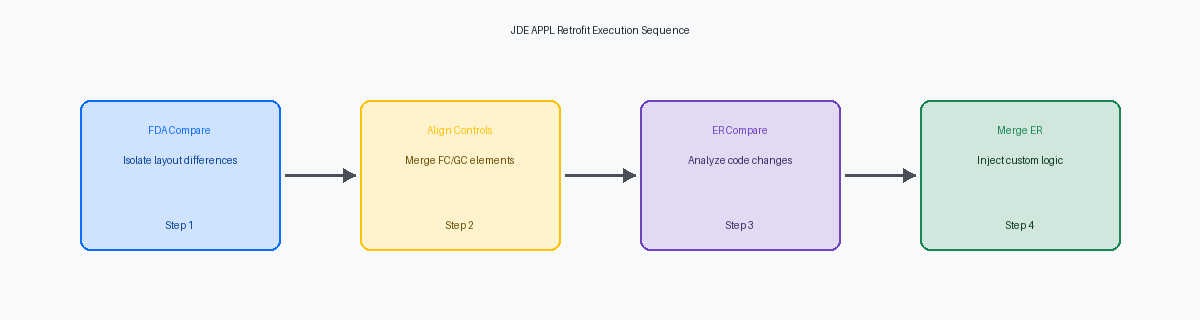
Executing the ER Compare for Event Rules
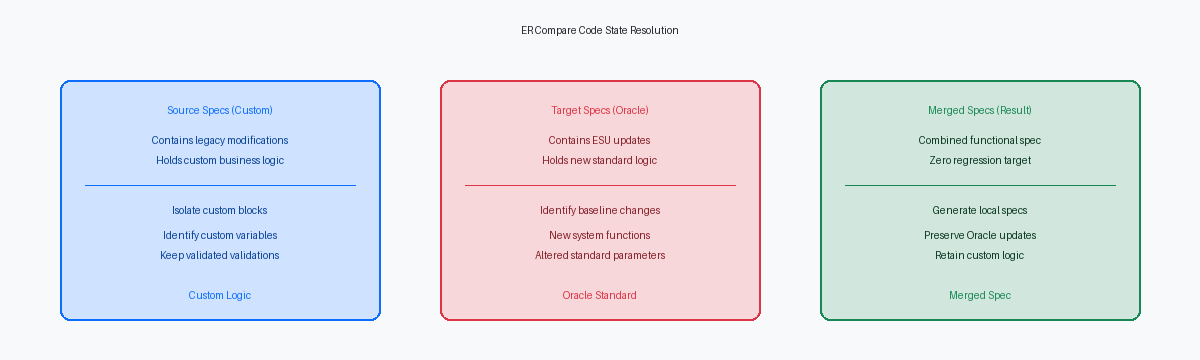
Fire up ER Compare on a heavily modified Sales Order Entry (P4210/W4210A) after applying a major cumulative ESU, and you will immediately see why automated merges fail. In the 'Post Dialog Is Initialized' event of W4210A, we frequently see custom tax calculation logic written years ago colliding directly with Oracle’s newly introduced application security checks. ER Compare acts as the surgical tool here, rendering a side-by-side visual delta of your custom ER code in the source environment against the pristine, updated Oracle standard code in the target.
The utility classifies every line of code into three distinct states: code present only in your source specification (your custom validations), code present only in the target (Oracle’s new ESU logic), and modified code blocks that exist in both but differ in syntax. Developers must systematically audit high-impact events like 'Button Clicked' or 'Write Grid Line-Before' where variable structures often shift. A shift in a single dictionary item or a renamed event rules variable can silently break your custom parameters if not mapped correctly during this visual alignment.
A common mistake during rapid retrofits is taking a binary, "all-or-nothing" approach to resolving these deltas. Blindly accepting all target changes to ensure ESU compliance will instantly wipe out your custom tax calculations, halting shipping operations. Conversely, blindly preserving your source code to protect those custom validations will cause runtime memory violations, or even zombie processes in the JDENET kernelThe core networking process in JD Edwards that manages communication between clients and servers., if the new Oracle standard code expects a newly initialized pointer or a mandatory system variable that your old code lacks. To prevent this, manually copy the target's new security initialization variables into your custom blocks, ensuring both code paths execute sequentially without corrupting the memory stack.
Step-by-Step Custom Merge of Conflicting Code
Blindly clicking the 'Copy' action button in ER Compare will corrupt your specs if local variables do not align. Before moving custom lines of Event Rules into the target 9.2 specification, verify that any custom variables are defined identically in both the source and target event scopes. If a variable exists in your custom 9.1 code but is missing in the pristine 9.2 object, create it in the target workspace first to prevent the ER compiler from silently failing upon save.
Consider a common scenario where Oracle has altered a standard Business Function (BSFN) data structure. When you merge your custom logic within the 'Row Is Selected' grid event, ER Compare flags the BSFN call as a conflict because the parameters no longer align. Because the tool cannot auto-merge these parameters, you must open the BSFN parameter mapping interface and manually re-map the custom values to the modified structure, ensuring that the data dictionaryA central repository that defines the attributes and properties of all data items in the system. overrides match your custom logic.
Wrap every merged block of custom code with clear comment headers containing your initials, the current date, and the modification ID—for example, '// START: MJD - 10/24/2023 - MOD001 - Custom Tax Call'. This practice ensures that during the next Tools Release update or ESU application, any developer can immediately distinguish Oracle's baseline code from your custom extensions without running a full side-by-side comparison.
Finally, validate that newly added custom Form Controls (FC) or Grid Columns (GC) do not conflict with Oracle's native naming conventions. If Oracle added a new standard field in 9.2 that uses the same variable name or alias as your custom field, rename your custom object to prevent compiler errors. This verification step prevents runtime memory violations and ensures the APPL compiles cleanly in your local environment.
Local Spec Generation and Unit Testing Protocols
Generating local specs for a heavily modified interactive application like P4210 is where many developers cut corners, leading to failed package builds and broken deployments. After completing the merge of the Oracle ESU changes and your custom logic in Form Design Aid (FDA), you must run a local spec generationThe process of converting JD Edwards metadata into a format that the local web client can execute. to compile the APPL's XML specifications and generate the HTML components required for the local web client. This ensures the local JVMJava Virtual Machine; the engine that runs Java-based components like the JD Edwards web client. can render the updated W4210A form layout and interpret the newly merged event rules without relying on a centralized HTML server.
Testing a retrofitted P4210 requires dual validation: you must confirm that the new Oracle functionality delivered in the ESU operates correctly while proving that your custom logic remains intact. Open the JDE Debugger (ActiveEra) to step through the W4210A Event Rules, specifically targeting the Post Dialog Is Initialized and Row Exit & Changed events where custom modifications often conflict with Oracle's baseline code. Pay close attention to variable assignments and verify that custom memory caches, such as those tracking temporary order lines, are explicitly initialized during form startup and destroyed upon exit to prevent memory leaks in the call object kernelA server process that handles the execution of business functions in JD Edwards..
To definitively prove a clean retrofit, edit your local jde.ini to set Output=FILE under the [DEBUG] section, activating the jdedebug.logA detailed trace file used to troubleshoot JD Edwards application and system errors. trace before launching the W4210A form. Run a complete sales order entry cycle, then analyze the resulting trace file to confirm that business functions like F4211FSEditLine run without throwing silent BSFN errors or memory violations. This log file serves as your quality gate; only when the trace confirms zero unhandled database failures and clean cache terminations should you check the P4210 back into Object Management Workbench (OMW) to clear it for the promotion and package build cycle.
