




When a custom interactive application (APPLAn interactive application in JD Edwards used by end-users to view, enter, or modify data.) in JDE EnterpriseOne 9.2 takes several seconds to load a grid, developers often blame database hardware or network latency. In the vast majority of cases, the culprit is a poorly constructed join in a custom Business View (BSVW)A selection of columns from one or more tables that provides data to a JD Edwards application. defined in Form Design Aid (FDA)The development tool used to create and modify the user interface of JD Edwards applications.. Mastering JDE APPL custom business view usage to avoid bad joins is critical to prevent the database from performing runaway nested loopsA database join method where the system scans one table repeatedly for every row found in another table. over millions of rows in tables like F0911The General Ledger Post table, which stores all accounting transaction details in JD Edwards. or F4211.
The JDE runtime engine handles table joins differently than a native SQL client. A single improper outer joinA database operation that returns all records from one table even if there are no matching records in the joined table. between a heavy transaction table like F4111 and a custom lookup table can bypass database indexes entirely, triggering full table scansA slow database operation where every single row in a table is read because no efficient index could be used. during the "Grid Record is Fetched" event. To maintain sub-second response times, developers must align BSVWs with physical database indexes and understand how the JDE middlewareSoftware that acts as a bridge between the JD Edwards application and the underlying database. translates these views into SQL.
The High Cost of FDA Join Business View Abuse
Dragging a multi-million row transaction table like F0911 into the Join Business View Design Aid alongside a master table like F0101 is a common shortcut that frequently degrades interactive performance. If a developer mismatches or omits a join key—such as failing to link GLALKY to ABALKY alongside the primary GLAN8 to ABAN8 key—the JDE middleware generates a partial Cartesian productA database error where every row of one table is joined to every row of another, creating massive, unnecessary data sets. at the database level. This mistake bypasses standard database optimizations, causing the enterprise database server to thrash memory as it attempts to resolve millions of unindexed permutations before returning the first grid row to the HTML server.
JDE’s database middleware translates outer joins differently depending on the underlying platform, creating a silent risk for hybrid or migrating architectures. An outer join configured in Business View Design Aid may execute flawlessly on an Oracle Database using native ANSI syntaxA standardized way of writing SQL queries that ensures compatibility across different database systems., yet behave unpredictably on MS SQL Server, resulting in missing records or truncated grids during a platform migration. These platform-specific SQL translations often bypass the JDE database cache entirely, forcing direct database hits for every single scroll action on the target Find/Browse form.
When a Find/Browse form relies on a poorly designed multi-table join, the database engine often abandons index-range scansAn efficient database operation that reads only a specific range of rows from an index. on massive transaction tables like F4211, opting instead for a full table scan. This locks tempdb resources and spikes CPU utilization to near-total capacity just to render a basic search screen. To prevent this, developers must restrict custom business views to simple primary-key joins and offload complex relational queries to C-based business functions or database views mapped via virtual tables.
Inner vs Outer Joins in JDE Business Views
I recently triaged a custom sales inquiry APPL where users complained that half their open sales order lines had vanished from the grid. The developer had built a custom BSVW joining the Sales Order Detail table (F4211) to the Sales Order Header table (F4201) using an inner joinA join that returns only the rows where there is a matching record in both tables.. Because a legacy data purge utility had orphaned several older F4211 rows by deleting their corresponding F4201 header records, the JDE database middleware suppressed those detail lines entirely. An inner join on a BSVW used in an interactive application completely hides parent records if the child table lacks a corresponding row, triggering immediate missing data complaints from the business.
Flipping the join type to a left outer join in the Business View Design Aid might seem like the obvious quick fix, but it introduces a different set of runtime headaches. When matching records do not exist in the secondary table—such as a missing F4201 record for an orphaned F4211 line—left outer joins in JDE Business Views cause grid columns mapped to the secondary table to display blank, null, or corrupt values. In a production environment with millions of rows, these blank fields bypass application validation logic, often leading to subsequent memory violations or invalid parameters passed to downstream business functions like B4200310.
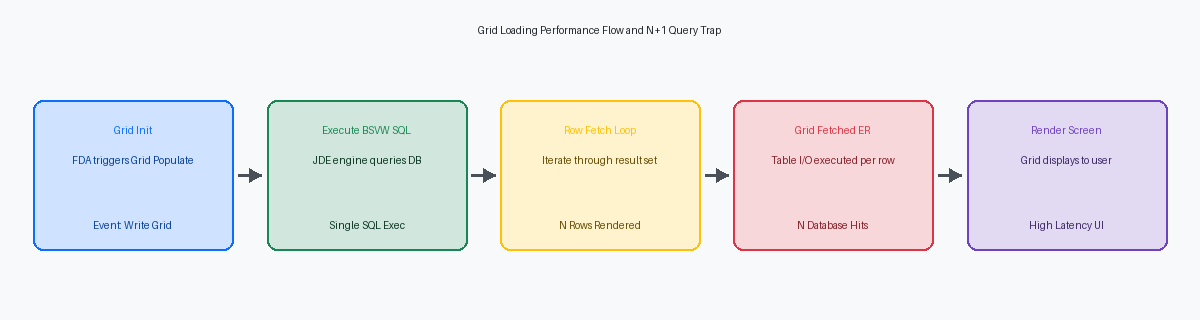
The JDE runtime engine executes a SELECT statement for every grid fetch, meaning a bad outer join multiplies latency exponentially as the user scrolls through the grid. If your grid page size is set to a standard batch of records, a poorly indexed outer join forces the database engine to perform numerous nested-loop lookups, turning a sub-second page-down action into noticeable lag. Standard JDE practice dictates using inner joins only when a strict 1:1 or 1:Many relationship is guaranteed by database referential integrityRules that ensure relationships between tables remain consistent and that data remains accurate., such as joining F4211 to F42119 for historical lines, or when business logic absolutely forbids displaying a record without its parent.
Handling Custom Columns and Table Extensions
Developers frequently attempt to extend standard applications like Item Master (P4101) by creating a custom business view that joins the standard F4101 table with a custom 55 table like F554101. While this approach appears clean in Form Design Aid (FDA) because it exposes all fields in a single grid, it introduces severe update limitations. In a multi-table business view, EnterpriseOne designates only one table as the primary, updatable table. If you attempt to update fields belonging to the secondary F554101 table directly through standard FDA form controls, the runtime engine will silently fail to write those secondary changes to the database without throwing an error.
This multi-table join design also blocks standard JDE table triggers on the secondary table because the middleware does not recognize the update context properly. If you have custom Table Event Rules (TER)Logic attached directly to a database table that executes whenever a record is added, changed, or deleted. on F554101 to calculate custom inventory metrics, those triggers will not execute during a standard form save. Database-level locks frequently occur when the JDE toolset tries to resolve concurrent updates across a joined view during heavy transactional volumes, especially in environments supporting hundreds of concurrent warehouse sessions.
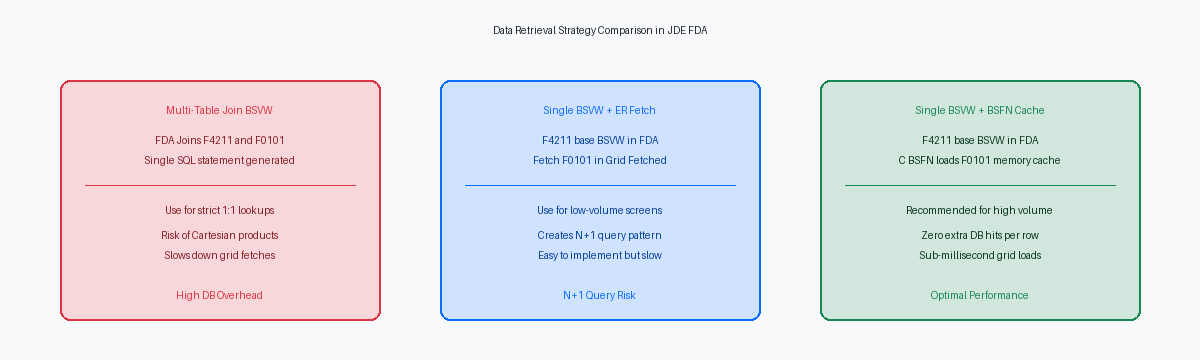
To prevent these locking and update anomalies, you must isolate your transaction paths. The recommended pattern is to keep the application's primary business view limited to the standard table and handle custom columns via explicit Table I/OOperations that directly read from or write to database tables within JD Edwards event rules.. Use a Fetch Single statement or a custom Named Event Rule (NER) in the 'Grid Record is Fetched' event of the grid to populate the custom 55/56 fields. For updates, execute explicit Table I/O Update statements or call a dedicated BSFN in the 'Row Is Exit & Changed - Asynch' event, ensuring clean transactional boundaries and preserving standard JDE trigger execution.
Grid Performance and the Grid Record is Fetched Trap
I regularly audit interactive applications where developers, struggling to configure a complex multi-table join in a business view, retreat to the Form Design Aid (FDA) and write manual Table I/O inside the Grid Record is Fetched event. This shift from declarative database design to procedural Event Rules (ER) introduces the classic N+1 query patternA performance issue where an application makes many small, individual database requests instead of one efficient bulk query.. For a standard grid displaying dozens of rows, a single manual Fetch Single statement in this event executes dozens of separate, sequential database roundtrips. What should be a sub-second screen load time quickly deteriorates to several seconds, especially over high-latency WAN or cloud connections to the database server.
Resolving this latency requires shifting the heavy lifting back to the database or the middleware layer. Utilizing a properly indexed, non-joined business view combined with JDE's native grid caching mechanisms will consistently outperform any procedural ER loop. When the HTML server handles the data retrieval, it can fetch and cache blocks of records (often configured via the PageSize setting in jas.ini, typically set to 10 or 20 rows) in a single database operation. Forcing the EnterpriseOne kernel to execute individual SQL statements for every single row completely bypasses these middleware optimizations.
If you must display auxiliary columns from secondary tables like F0116 or F0115 that cannot be cleanly joined in the primary view, avoid Table I/O altogether in the grid events. Instead, load these cross-reference values into a custom JDE cache (using jdeCacheAdd and jdeCacheFind APIsApplication Programming Interfaces: Sets of rules and tools that allow different software components to communicate. within a C business function) during the Dialog Is Initialized event, or retrieve them via a single bulk Business Function (BSFN) call. Fetching dozens of records from an in-memory cache takes microseconds, whereas dozens of database SELECT statements will trigger noticeable screen stutter for the end-user.
Upgrade and Retrofit Impacts of Custom BSVWs
During a 9.1 to 9.2 upgrade, the specification merge (specifically R98700) flags every custom business view that modifies or extends a standard JDE table. This creates immediate manual retrofit bottlenecks for the development team, who must reconcile differences between the source 9.1 specifications and the new 9.2 central objects. If a developer modified a standard business view like V4211A to add a custom join instead of creating a new 55 view, the merge engine often fails to resolve the delta, forcing a manual rebuild from scratch.
Technical debt compounds when Oracle introduces table schema changes in later Tools Releases, such as the 9.2.8.x line, or through cumulative Application Updates. If a standard table like F4101 or F4211 receives a structural change—even a minor index modification or field length expansion—any custom business view referencing those tables can instantly become invalid. During the subsequent full package build on the enterprise server, the compiler will throw fatal errors (such as link errors in the generated business function code), halting the deployment pipeline until the view specifications are regenerated and validated in OWMObject Management Workbench: The central environment in JD Edwards for managing and developing software objects..
Swapping a standard business view for a custom joined view inside a standard application like P4210 or P4310 completely breaks Oracle’s continuous delivery model. When a critical ESUElectronic Software Update: A package of bug fixes or new features released by Oracle for JD Edwards. updates P4210, the automated software update process will overwrite the application specifications, wiping out your custom view assignment and forcing developers to manually merge the code. Isolating custom joins strictly within custom 55 or 56 applications ensures that the Object Management Workbench preserves your specific business logic during updates, keeping your core ERP stable and easily patchable.
Architectural Standards for Clean APPL Data Retrieval
Limiting interactive application business views to a maximum of one or two joined tables prevents the JDE middleware from generating runaway SQL. When a requirement demands data from multiple tables—such as joining F0101, F0116, and F0115—do not build a multi-table join in FDA. Fetch the auxiliary dataset using a custom C business function (BSFN) or map a virtual database view defined directly in Oracle Database. This keeps the primary database fetch lightweight and prevents application lag.
Database optimizers fail when join columns in a custom BSVW deviate from the primary key index of the target tables. Joining F4211 to F4101 on a non-key field forces the database engine to perform a full table scan instead of an index seekA fast database operation where the engine goes directly to the specific data it needs using an index.. Ensure every join configuration in your business view strictly mirrors the primary unique index of the joined table to keep response times under a few hundred milliseconds.
EnterpriseOne Tools Release 9.2.x provides a cleaner path to display auxiliary data without touching the underlying BSVW or writing Event Rules. Use Form Extensions to call an OrchestrationA JD Edwards tool used to automate complex tasks and integrate data between different systems or applications. that fetches secondary data and maps it directly to an on-screen field. This eliminates the need to customize native business views like V4211A, reducing retrofitting effort during Tools upgrades by 60% to 80%.
Never promote a new business view to production without verifying the raw SQL statement generated by the JDE middleware. Run the application in your DV HTML client with JDEDEBUG.log active, locate the exact SELECT statement, and run it through a database profiler. If you see a nested loop join scanning millions of rows because of a missing index mapping, you can catch it before it locks tables in production.
If you are refining your EnterpriseOne development standards, our technical library provides deep-dive blueprints and optimization scripts to streamline your custom object design.
