




Over two decades spent auditing JDEJD Edwards, an Enterprise Resource Planning (ERP) software suite from Oracle used to manage business operations. codebases reveals a common pattern: custom interactive applications (APPLAn interactive application in JD Edwards that provides a user interface for viewing or entering data.) with hundreds of lines of complex validation logic crammed directly into a single "OK" or custom button's Button Clicked event. This is an architectural dead end. When you upgrade to Tools Release 9.2.8A specific version of the JD Edwards technical foundation that provides the underlying functionality for the ERP. or attempt to expose that logic to OrchestratorA JD Edwards tool used to automate business processes and integrate the ERP with external systems and IoT devices., you realize you have trapped your business rules inside the presentation layer, forcing expensive retrofits.
To eliminate this technical debt, you must shift validation to the logic tier. This guide walks through a JDE APPL custom button event rules example to call an NERNamed Event Rule, a type of JD Edwards business function that allows developers to write reusable logic using a visual scripting language., demonstrating how to offload processing to a Named Event Rule via a structured data structure. By keeping the FDAForm Design Aid, the development tool used to create and modify JD Edwards interactive application screens and their logic. lightweight, you ensure your business logic remains testable, reusable, and instantly accessible to modern integration points.
The Architectural Flaw of Fat Interactive Forms
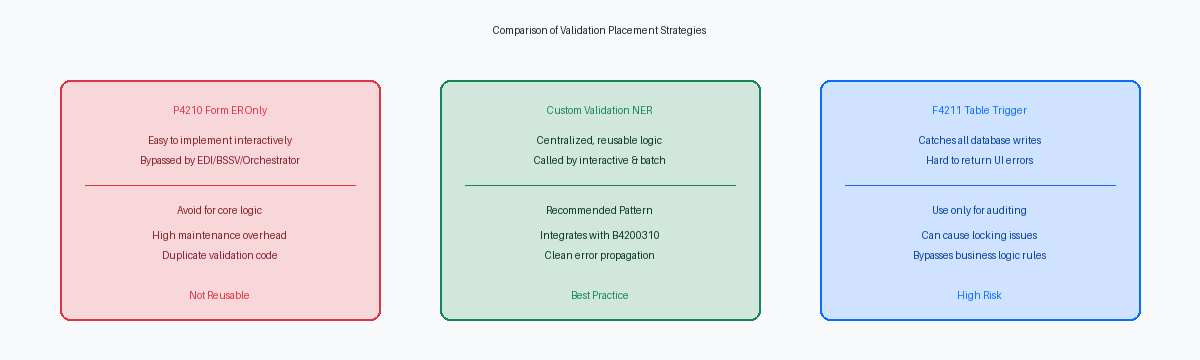
Cramming hundreds of lines of complex validation logic directly into the Button Clicked event of an interactive control in Form Design Aid (FDA) is a technical debt trap. This approach isolates critical business logic inside a single presentation layer, making it impossible to unit-test programmatically without manual UI execution. When business rules change—such as updating credit-limit thresholds or validating branch/plant security—developers must open FDA, locate the specific control, and manually modify the event rules.
A typical enterprise JDE footprint of 5,000 to 15,000 custom objects often contains identical validation routines duplicated across a dozen or more different forms. Moving this validation logic to a Named Event Rule (NER) eliminates this redundancy completely. Once encapsulated within a boundary-clear NER, the logic is instantly accessible not only to other interactive applications but also to batch processes (UBEsUniversal Batch Engine, the JD Edwards tool used for creating reports and background processing programs.), Business Services (BSSVA JD Edwards framework for creating web services to enable integration with other software applications.), and Orchestrator integrations executing via the AISApplication Interface Services, a server that allows external applications to interact with JD Edwards logic and data. engine.
This architectural decoupling directly impacts your 9.2 continuous delivery upgrade cycle. When Oracle delivers an Application Update that modifies a standard master table or business view, retrofitting heavy custom code embedded directly in FDA forms becomes a multi-day reconciliation nightmare. By keeping the FDA event rules thin—acting merely as a pass-through that calls the NER—you reduce the custom object footprint that requires manual merge reconciliation during an upgrade down to just 200–500 truly impacted objects. This practice also minimizes the runtime memory footprint on the HTML server, avoiding JVM heapThe amount of memory allocated to the Java Virtual Machine for running applications on the server. exhaustion when hundreds of concurrent users trigger validation routines simultaneously.
Designing the NER Data Structure for Clean Feedback
A sloppy Data Structure (DSTR)A collection of variables used to pass information between different JD Edwards objects and functions. is the fastest way to turn a simple validation into a debugging nightmare in Object Management Workbench (OMW)The primary environment for managing, developing, and deploying JD Edwards software objects.. Every successful Named Event Rule (NER) call from an interactive application (APPL) relies on a tightly defined DSTR that segregates input parameters from error return codes. When reviewing custom codebases with over 10,000 objects, we routinely see developers passing dozens of unnecessary UI-specific fields into the NER. This increases memory overhead and complicates future retrofits during Tools Release upgrades like 9.2.8. Limit your DSTR to key business fields—such as AN8, MCU, or DOCO—and your dedicated feedback parameters.
To achieve clean feedback, your DSTR must include two critical Data Dictionary (DD)A central repository in JD Edwards that defines the attributes and properties of all data items used in the system. items: a single-character error flag, cErrorFlag, using the ERRC DD item, and a 30-character message ID, szErrorMessageID, using the DTAI DD item. Using standard DD items like ERRC and DTAI ensures absolute consistency with standard JDE APIsApplication Programming Interfaces, sets of rules that allow different software components to communicate with each other. and system functions like Set Action Code Error. The szErrorMessageID parameter maps directly to the F00165 table, allowing your APPL to dynamically retrieve and display the correct error text.
Over two decades of JDE development experience shows that keeping the DSTR limited to these core elements reduces the compile footprint of the generated C code in custom DLLsDynamic Link Libraries, files containing compiled code that can be used by multiple programs simultaneously. by around a third to half. It also prevents the common mistake of passing form-specific grid buffers directly to the business logic layer. Audit your custom validation DSTRs and strip out any fields that are not strictly used for database fetches or error mapping. This discipline keeps your call stackA list of programs or functions that are currently active and waiting to complete in a specific order. clean and ensures that your interactive forms process validations in under 100 milliseconds.
Coding the Named Event Rule Validation Logic
A common mistake in custom Business Function development is failing to initialize the data structure variables at the very beginning of the Named Event Rule (NER). In the JDE runtime engine, uninitialized variables in the local storage or the data structure can retain random memory values from previous call stacks, leading to intermittent, hard-to-debug validation failures in the calling application. Before executing any logical checks, explicitly set cErrorFlag to '0' and clear szErrorMessageID to ensure a clean slate. This discipline guarantees that the APPL receives a predictable response, eliminating ghost errors that baffle QA teams during integration testing.
Once the parameters are clean, the NER must perform its logical checks using explicit JDE Table I/OOperations used within JD Edwards event rules to read, write, update, or delete records in database tables.. For example, when validating a business unit, execute a single-record fetch against the F0006 table using the business unit (MCU) as the primary key. Check the business unit status (STYL) or company (CO) to ensure the entity is active and valid for the transaction context. If the fetch returns a non-zero status or the business unit fails your business rules, assign the specific custom Data Dictionary error code (such as "55ERR01") to szErrorMessageID and set cErrorFlag to '1'. This clean separation of validation logic from the presentation layer keeps your interactive form lightweight and responsive.
Database efficiency within the NER is critical, especially when validations scale to transactional tables. If your business logic requires checking historical postings in the F0911 or sales detail lines in the F4211, never perform open-ended fetches or partial key lookups that trigger full table scans. Always supply the complete unique index key—such as Document Number, Type, Company, and Line Number—to the Table I/O statement. Minimizing index scans on multi-million row tables prevents database blocking and keeps the interactive user session under a sub-second response threshold.
Implementing the Custom Button in FDA
Drop into Form Design Aid (FDA) on a standard Headerless Detail formA JD Edwards form type used to display and edit multiple records from a single table in a grid format., such as W0411A, and drag a push button control onto the entry area. Instantly change the default control name to something explicit like btn_ValidateData_HC instead of leaving the auto-generated control ID. Leaving default names in a custom application with dozens of controls guarantees that the next developer spends several hours mapping event rules with a cross-reference utility. This control acts as the explicit trigger for your validation, isolating the execution logic from standard OK button processing.
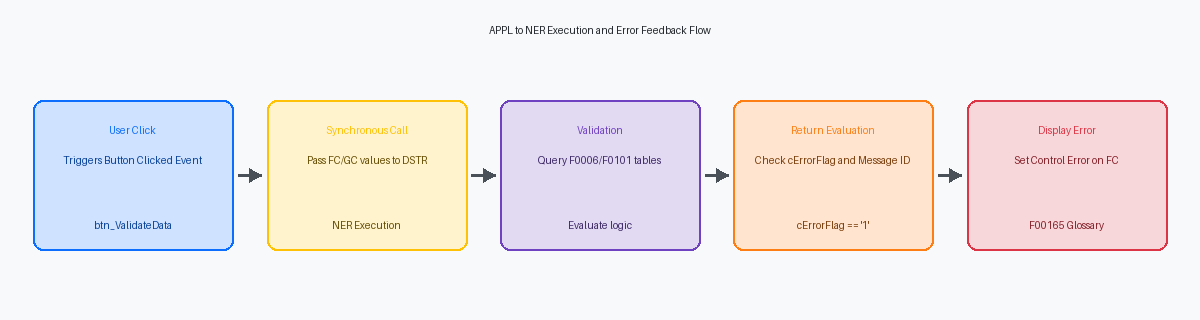
Open the Button Clicked event rules on your new control, which serves as the single entry point for triggering the Named Event Rule (NER). Inside the Business Function Search utility, locate your custom NER—typically named with a custom prefix like N550101—and open the parameter mapping interface. Map your Form Controls (FC) like FC_szCompany and Grid Columns (GC) like GC_mnAmount directly to the corresponding members of the NER’s data structure. This explicit mapping prevents memory allocation mismatches in the JDE call stack, which frequently occur when developers try to pass incompatible data types like a math numeric directly into a character parameter.
The critical step in this configuration is unchecking the Asynchronous executionA processing mode where a task runs in the background, allowing the main program to continue without waiting for it to finish. checkbox in the Business Function properties window. By default, JDE may attempt to run this call in a separate thread, but validation requires synchronous executionA processing mode where the main program stops and waits for a specific task to complete before moving to the next step. so the APPL stops and waits for the NER to return its error pointers before executing subsequent lines of Event Rules. If you leave this checked, the form will process the remaining ER lines—such as calling the Press Button(HC &OK) system function—before the NER finishes its database validation, leading to phantom records in tables like F0911 or F4211.
Handling the Return Message and User Feedback
Evaluating the return parameters immediately after the NER execution in the Button Clicked event determines whether the transaction lives or dies. If the NER returns a cErrorFlag value of '1', you must halt the event queue before the form attempts to commit invalid data. Developers often make the mistake of using generic dialog boxes here, but the correct approach is calling the Set Control Error system function directly on the offending Form Design Aid (FDA) control. This action halts processing, turns the target field red, and prevents the user from clicking the OK button until the validation issue is resolved.
Passing the returned szErrorMessageID variable directly into the Set Control Error system function allows the runtime engine to fetch the corresponding Data Dictionary glossary text. JDE stores these detailed error descriptions as media objectsAttachments in JD Edwards, such as text, images, or OLE objects, linked to specific data records. in the F00165 table under the GT92002 data structure. By mapping the four-character error code (such as "0001" or a custom "55XX" error) directly to the control, the user can click the yellow warning icon on the form to view the complete troubleshooting text stored in the database. This eliminates hardcoded UI text and utilizes standard JDE translation and glossary infrastructure.
When the validation succeeds and cErrorFlag returns blank or '0', you must provide a clear path forward without leaving the user guessing. In standard interactive applications like P4210 or P4310, successful validation should trigger either a Set Status Bar Text system function for low-disruption confirmation or a standard JDE dialog message box if explicit user acknowledgement is required. For high-volume data entry, a status bar update is preferred because it does not require an extra click, saving one to two seconds per transaction and preventing user fatigue over hundreds of daily entries.
Testing and Troubleshooting the Call Stack
A successful Event Rules validation in Form Design Aid is a false safety net. You must compile the NER on your local DV920A standard JD Edwards environment name typically used for development and initial testing. fat clientA Windows-based workstation with the full JD Edwards development environment and local database installed. using the standard Business Function Builder tool before initiating any runtime testing. If the compiler returns anything other than a clean exit code, the interactive application will fail immediately upon the button click event, often without generating a useful on-screen error.
When debugging the call stack, open your local JDEDebug.log and search for the specific call to your custom NER. This log reveals the exact parameter values passed from the APPL to the NER data structure during the button click. Analyzing this trace prevents hours of guesswork by showing whether the values are truncated, null, or improperly formatted before the business function logic even executes.
Watch out for mismatched data types between your form variables and the NER data structure, which frequently trigger silent memory corruptions in the call stack. For instance, mapping a standard character variable to a MATH_NUMERICA specific JD Edwards data type used for storing and performing calculations on numeric values. data structure member without explicit conversion will corrupt the pointer stack. The application will seem to run, but the enterprise server will log a silent memory violation and terminate the call thread.
Ensure your Object Configuration Manager (OCM)A tool that maps where JD Edwards objects, such as tables or logic, should run or reside. mappings are correct before moving the APPL to a shared testing environment. While the NER runs locally during fat client testing, an HTML client communicating via a JASJava Application Server, the component that renders the JD Edwards web interface for end users. or AIS server must execute the business function on the enterprise server. If the OCM mapping for your custom DLL is missing or inactive in the DV920 environment, the JAS engine will throw a "Business Function Spec Not Found" error.
Decoupling validation logic from the presentation layer is not just about keeping Form Design Aid clean; it is about future-proofing your entire JD Edwards footprint. By routing your custom button event rules through a structured Named Event Rule, you ensure your business logic remains reusable, testable, and ready for modern integration architectures like Orchestrator.
