




Every 9.1 to 9.2 upgrade project reveals the same self-inflicted wound: custom interactive applications (APPLsInteractive applications in JD Edwards used by end-users to view and manipulate data.) with thousands of lines of Event Rules (ER)The JD Edwards scripting language used to add logic to applications and reports without writing C code. crammed directly into Form Design Aid (FDA)The development tool used to create and modify the user interface of JD Edwards interactive applications. control events. When upgrading, these bloated forms turn what should be a straightforward, multi-day spec mergeAn automated process during a JD Edwards upgrade that combines custom modifications with new standard code from Oracle. into a multi-week debugging cycle. Achieving a resilient JDE APPL custom form design to avoid future retrofit pain requires strict architectural discipline, not faster merge tools.
The root cause is architectural laziness during the initial build, where complex validation is permanently fused to UI controls like "Row Exit & Changed" instead of being delegated to Business FunctionsReusable blocks of code, written in C or Named Event Rules, that perform specific business logic or database operations.. When Oracle updates a standard master business function like B4200310, these tightly coupled custom forms break. Shifting this logic into reusable Named Event Rules (NERs)A type of business function created using the JD Edwards Event Rules language instead of C programming. isolates your presentation layer, ensuring your custom APPLs survive the next Tools ReleaseAn update to the underlying JD Edwards technology foundation that provides new features and system improvements. upgrade untouched.
The Real Cost of Bloated Form Event Rules
Dumping thousands of lines of complex validation logic directly into Form Design Aid (FDA) events breaks the automated Spec Merge during upgrades. Oracle's merge utilities fail when faced with deeply nested inline Event Rules (ER) within standard form structures. When an application like P4210 receives an Application Update in 9.2, custom ER written directly on controls must be manually reconciled in the Visual ER CompareA utility used by developers to compare and merge different versions of Event Rules code during an upgrade. tool.
Analysis of upgrade logs from recent 9.1 to 9.2 migrations shows that the vast majority of custom APPL conflicts—typically three-quarters to 80%—occur in heavily modified grid and control events. Events like Grid Cell Has Been Clicked or Write Grid Line-Before become battlegrounds where standard Oracle fixes clash with bespoke client logic. Developers spend days untangling variables and event execution sequences that should have been isolated from the UI.
Hardcoding business rules inside the presentation layer forces your team to duplicate validation across multiple entry points. If a credit limit check is written inside the Control Exited/Changed-Inline event of P42101, you must manually recreate that logic for P4210 and the R47011A standard JD Edwards batch program used to import sales orders from external systems into the database. batch import. This duplication compounds technical debt, making minor policy changes a multi-week development and testing effort.
The math on the retrofit floor is merciless. Upgrading an APPL with thousands of lines of inline ER typically takes three to four times longer to retrofit than an application that delegates its processing to modular business functions. By shifting validations out of FDA and into C-based BSFNsReusable blocks of code, written in C or Named Event Rules, that perform specific business logic or database operations., you reduce the interactive application to a display shell, ensuring the UI merges cleanly during the next Tools Release.
Logic Placement: Why FDA is a Poor Repository
Developers routinely treat Form Design Aid (FDA) as a presentation layer tool, yet audits of custom environments reveal that in a significant majority of modifications—typically around three-quarters—FDA is misused as a database and business logic container. When you write hundreds of lines of Event Rules (ER) directly inside a form, you lock that logic inside a visual container that the JDE runtime cannot access without an active user session.
Unlike Business Functions (BSFNs), ER code written directly inside FDA cannot be unit tested independently of the user interface. Consider a common scenario: validating custom branch category codes against the F4101 Item MasterThe primary database table in JD Edwards that stores basic information about every inventory item. table during order entry. If you write this validation logic directly inside the 'Col Exited/Changed-Inline' event of an APPL grid column, you cannot test it without launching the application, navigating to the form, and manually typing into the field. This dependency turns simple unit tests into multi-step manual QA cycles.
Placing validation logic in highly frequent events like 'Col Exited/Changed-Inline' causes redundant database roundtrips and degrades interactive performance. Every time a user tabs out of a field, the system initiates a separate SQLStructured Query Language; the standard language used to communicate with and retrieve data from databases. statement to the database to check the F4101. This creates massive network chatter, which quickly bogs down remote warehouse users working over high-latency connections.
Moving validation to Named Event Rules (NER) or C BSFNs ensures that rules execute consistently whether triggered by an interactive APPL, a batch UBEUniversal Batch Engine; the tool used to create and run reports and background processing jobs in JD Edwards., or an AISApplication Interface Services; a server that enables communication between JD Edwards and external applications via REST services. call. When a client decides to automate item creation via an OrchestratorA powerful JD Edwards tool used to automate business processes and integrate with external systems. REST callA standard method for applications to exchange data over the internet using web protocols., a decoupled NER can be executed directly by the AIS engine. This completely bypasses the presentation layer while guaranteeing identical data integrity across all entry channels.
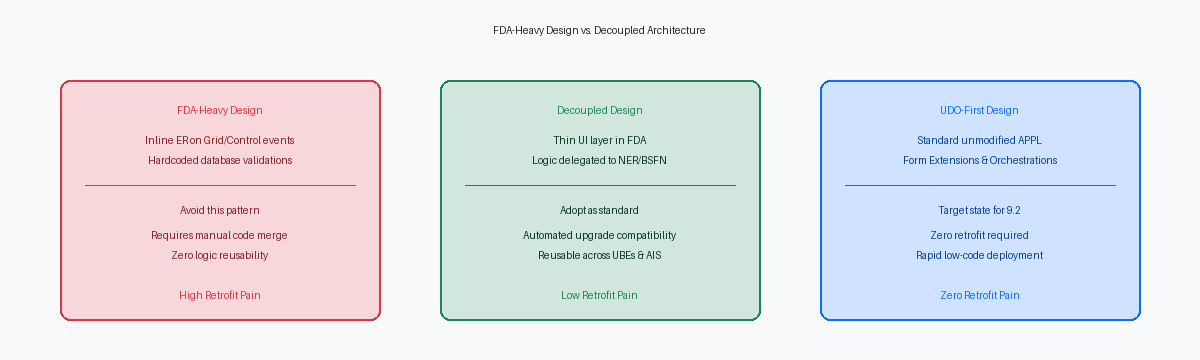
Decoupling the UI Layer from Core Business Rules
Opening a custom sales order entry application like P554210 and finding thousands of lines of Event Rules crammed into the "Row Exit & Changed - Asynchronous" grid event is a diagnostic nightmare. A clean APPL design limits Form Design Aid (FDA) Event Rules strictly to UI-specific behaviors such as hiding or showing controls, setting focus, or basic grid formatting. This separation ensures that the presentation layer remains completely agnostic of the database schema, functioning purely as a visual conduit rather than an execution engine for business logic.
Establish a strict rule of thumb: No more than 15 to 20 lines of ER in any single FDA event. Adhering to this threshold forces developers to delegate complex validation, math, and table I/O to external objects like Business Functions (BSFNs) or Named Event Rules (NERs). If a validation routine requires checking inventory availability across the F41021, that database lookup belongs in a parameterized NER, not inside the "Control Exited/Changed-Inline" event of a form field. This discipline keeps the interactive application lightweight and prevents the ER from bloating into an unreadable script.
Standardizing on this thin client APPL model ensures that subsequent UI changes—such as moving a form control or modifying a grid layout—do not disrupt the underlying business logic.
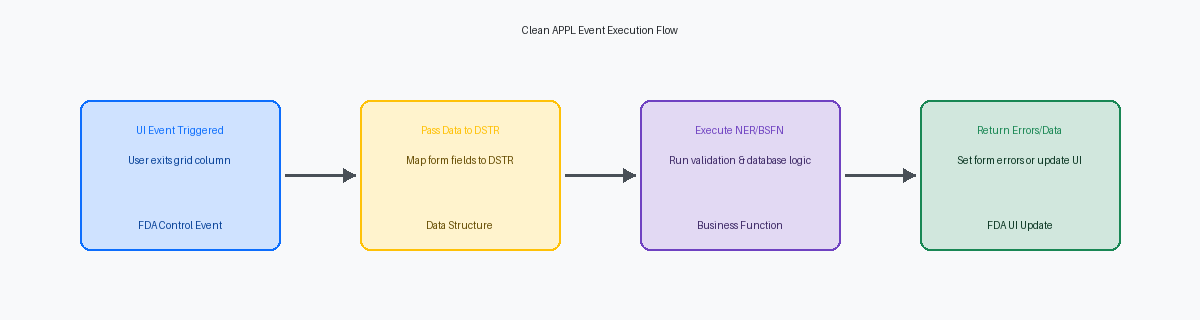
Building Reusable NERs to Eliminate Form Complexity
I recently audited a custom procurement APPL where a developer wrote hundreds of lines of validation logic inside the Grid Cell Changed event. Every time Oracle issued an ESUElectronic Software Update; a patch released by Oracle to fix bugs or add minor features to JD Edwards. affecting the form, this event rules (ER) pile-up required manual line-by-line reconciliation. Moving this logic into a Named Event Rule (NER) isolates the validation from the interactive form engine, keeping the Form Design Aid (FDA) clean.
To execute this transition, define a custom data structure (DSTR)A definition of the input and output parameters used to pass data between different JD Edwards objects. to act as the interface between the APPL and the NER. Instead of dragging dozens of form variables directly into logic statements, map your grid columns to a structured template like D554301A. This creates a strictly typed contract, allowing any developer to instantly understand what data goes in and what returns to the grid without opening the APPL.
Consolidating those repetitive Grid Event ER lines into a single, parameterized NER call reduces interactive form complexity by 80% to 90%. During a 9.1 to 9.2 migration, the Specification Merge tool evaluates a single business function call rather than hundreds of lines of nested IF/ELSE statements. This shift cuts the retrofit window for a complex APPL from several days of manual merging to a brief validation session.
This design pattern also prepares your architecture for modern integration. Because the validation logic lives inside a standard business function rather than the UI layer, you can easily expose the NER as a REST service via the AIS Server. This allows external platforms to run the exact same validation rules without rewriting your core interactive application logic.
The Retrofit Math: Custom Form Design vs. Code Merge
A poorly architected interactive application (APPL) stuffed with thousands of lines of Event Rules (ER) in Form Design Aid is a liability that costs roughly 12 to 18 hours of developer time to retrofit during an upgrade. When you modularize that same APPL, moving the heavy lifting to external business functions and keeping the UI layer thin, that retrofit time drops to less than an hour. The developer simply verifies the data structure mapping and runs a quick generation check rather than manually merging overlapping lines of custom and pristine ER code in Visual ER Compare.
During a typical 9.1 to 9.2 upgrade, decoupled custom objects bypass the standard, painful merge cycle entirely. Because the custom UI does not touch standard Oracle objects, and the underlying business logic resides in custom BSFNs, these objects can be promoted directly to the new environment. This approach eliminates the risk of human error during manual ER comparison operations, which frequently introduce regressions in standard master data validation or inventory commitment logic.
The financial savings of this decoupled architecture scale exponentially when applied across a mature enterprise repository, which typically contains between 5,000 and 15,000 custom and modified objects. If only 10% of those objects are interactive applications, shaving the bulk of the retrofit window off each object translates to thousands of hours of senior developer billing saved. This directly reduces the critical path of the upgrade timeline, turning what is often a stressful multi-month project into a predictable six-to-nine-week run.
Investing a modest upfront investment of extra time, typically 15% to 25%, during the initial APPL design phase to separate the UI from the business logic yields a threefold return on investment during the first subsequent upgrade or Tools Release update. You pay a minor premium upfront to enforce strict design patterns, but you claw that time back three times over the moment Oracle delivers an ESU or an Application Update that touches your functional area.
Form Extensions and Orchestrations as the New Standard
Applying standard ESUs to P42101 or P4312 used to mean spending two to three days manually re-merging custom Form Design Aid (FDA) event rules. In Tools Release 9.2.x, we eliminate this overhead entirely by utilizing Form ExtensionsA JD Edwards tool that allows users to add fields and logic to forms without traditional development. to inject custom fields, toggle control properties, and map Orchestrations directly to control events. This shift bypasses the central objects database entirely, storing modifications as XMLA standard format for storing and transporting data in a way that is readable by both humans and machines. metadata in the User Defined Object (UDO)Custom components like grid formats or form extensions that can be created and shared without traditional development. tables (F9860W/F9861W) rather than modifying the base toolset specification.
Consider a typical validation scenario where a business needs to restrict sales order entry based on a third-party APIApplication Programming Interface; a set of rules that allows different software programs to communicate with each other. credit check. Historically, this required writing custom C business functions or heavy FDA validation logic on the "Set Focus on Grid" or "Row Is Selected" events. By routing this validation through the Application Interface Services (AIS) gateway using an orchestration built in Orchestrator StudioThe web-based interface used to design and build JD Edwards orchestrations and service requests., you execute the validation externally and return the warning or error directly to the form. This approach completely bypasses the Object Management Workbench (OMW)The central project management system used to develop and move JD Edwards objects between environments. promotion lifecycle, significantly compressing deployment timelines.
Preserving the pristine Oracle standard code line allows your team to apply weekly Application Updates without fearing regression failures. Transitioning your development guidelines from legacy APPL modifications to a UDO-first methodology is the only viable path to maintaining a zero-retrofit 'Code CurrentA strategy of keeping JD Edwards software updated with the latest patches and releases to minimize technical debt.' posture. When you decouple the user interface from the underlying business logic, your next Tools Release upgrade ceases to be an expensive multi-week migration and becomes a technical non-event that takes a few days to validate across your environments.
Moving logic out of the Dialog is Initialized or Button Clicked events and into C-based BSFNs or Orchestrations reduces the footprint of custom objects that typically require manual intervention during upgrades. By shifting from legacy, event-heavy interactive applications to a decoupled, service-oriented architecture, enterprise IT leaders can transform their upgrade cycles from high-risk development bottlenecks into predictable, low-effort maintenance events.
Ready to modernize your JD Edwards architecture and eliminate upgrade friction? Contact our enterprise consulting team to schedule an application design audit.
