




When a custom Find/Browse APPLA JD Edwards interactive application used by end-users to view or manipulate data. querying the F4211The Sales Order Detail table in JD Edwards, containing line-item information for sales orders. or F0911The General Ledger Postings table, storing all financial transaction details. takes more than several seconds to return grid rows, developers immediately blame database indexingThe process of creating data structures to speed up the retrieval of rows from a table. or network latencyThe delay or time it takes for data to travel across a network between a client and server.. In the vast majority of the performance audits I conduct, the bottleneck is self-inflicted inside JDE. The correlation between JDE APPL custom search form performance and business viewA JDE object that selects specific columns and joins tables to provide data to applications. design is direct: joining dozens of unnecessary columns in a custom BSVWShort for Business View, the data selection layer between the database and the application. forces the database to perform costly table scansA slow operation where the database must read every row in a table to find matches. instead of clean index seeksAn efficient operation where the database uses an index to jump directly to specific records..
To fix a sluggish search screen, do not simply ask your DBADatabase Administrator, the person responsible for managing and optimizing the database environment. to build another custom composite index. Instead, refactor the application to align the Grid Line-to-Business View mappings with existing primary keysUnique identifiers for each record in a database table., and audit the Grid Record is FetchedA JDE event that runs every time a row is loaded into the application grid. event for hidden F4101The Item Master table, containing basic information about products and parts. or F0101The Address Book Master table, storing names and addresses for customers and suppliers. table I/O loops. Restricting your custom BSVW to only the essential fields (typically fewer than a dozen) required for the search criteria and initial grid display can cut SQL execution times on a table with tens of millions of rows down to under a quarter of a second.
The Cost of Bloated Business Views on Large Tables
Let's look at what happens in the database when a developer creates a custom find/browse form using a standard business view like V4211A, or a custom one that pulls in all fields from the F4211 Sales Order Detail table. The JDE database middleware (JDBThe JD Edwards database middleware layer that translates JDE commands into SQL for the database.) generates a SELECT statement containing every single column defined in that business view, regardless of whether those fields are placed on the form or in the grid. For the F4211, which contains more than a hundred columns, this lazy design pattern forces the database to fetch and transmit hundreds of bytes of useless data per row, inflating the network payload and wasting database buffer poolA memory area used by the database to cache data pages from disk for faster access. memory on data that will never be displayed to the user.
To prevent this overhead on high-volume search forms, developers must build a trimmed-down, dedicated business view containing only the bare essentials. This means selecting only the primary keys (SDKCOO, SDDOCO, SDDCTO, SDLNID), the specific fields used as search filters in the header, and the handful of columns actually rendered in the grid. Reducing a business view from more than a hundred columns down to a dozen or two can slash SQL execution times and reduce application serverThe server that handles the business logic and processes for the JD Edwards environment. memory consumption significantly, often by up to two-thirds, during heavy user sessions.
Another common performance killer is joining tables inside the business view to display description fields, such as joining F4211 to F4101 on the short item number (SDITM). If these join keys are not properly aligned with existing database indexes, the database optimizerSoftware within the database engine that determines the most efficient way to execute a query. will bypass the primary index of F4211 entirely. Instead of a fast index range scan, the database executes a costly nested loopA join method where the database iterates through rows of one table for every row in another. or hash joinA join method used for large data sets where the database builds a temporary map to match rows. that triggers a full table scan on millions of sales order rows, turning a sub-second search into a multi-minute system freeze.
How Search Criteria Mapping Dictates Index Selection
When a user clicks "Find" on a Find/Browse form, the EnterpriseOne HTML serverThe component that manages the web interface and communicates between the browser and the application server. translates Form Control (FC)Individual elements on a JDE form, such as text boxes or checkboxes, used for input or display. fields mapped as filter fields into a dynamic SQL WHERE clauseThe part of a SQL query that specifies the criteria used to filter records.. If your custom application queries a high-volume table like the F4211, which frequently exceeds several million rows, the database optimizer relies on those filter fields matching index structures. Mapping a filter field to a non-indexed column forces the database to evaluate every row, turning a millisecond query into a multi-second system drain.
Unrestricted wildcard searches using the percentage sign on columns that lack proper indexing cause severe performance degradation. When a user enters a partial value in a non-indexed description field, the database engine abandons index range scans and resorts to a full table scan. To prevent this, developers must configure the form properties to restrict wildcard usage on high-volume search fields or enforce mandatory entry on indexed fields.
Developers must match the search criteria controls directly to the leading columns of the table's primary or secondary indexes. For example, if you have a custom secondary index on the Sales Order Detail table (F4211) defined with Business Unit (MCU), Order Type (DCTO), and Line Number (LNID), the search form's FC fields must be presented in that exact hierarchical order. Omitting the leading MCU column and filtering only by DCTO renders the secondary index useless, as the optimizer cannot perform an index seek without the leftmost key column.
Configuring the comparison operator in Form Design AidThe JD Edwards development tool used to create and modify interactive applications. is equally critical. Selecting a "Like" comparison operator instead of "Equal To" on numeric fields, such as Short Item Number (ITM), prevents the database optimizer from executing precise index seeks. The database is forced to treat the numeric field as a character string to evaluate the pattern, which can increase CPU utilization on the database server by nearly half during peak hours.
The Grid Rec is Fetched Trap and ER Execution Loops
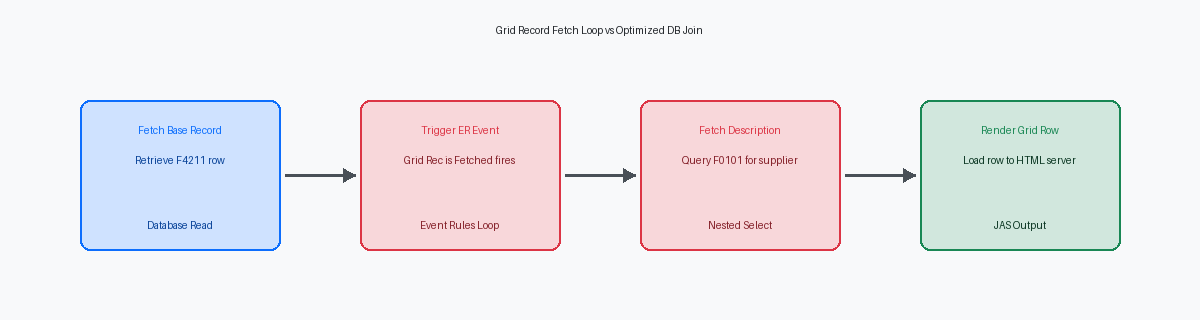
Placing database fetches or complex C business functionsPre-compiled programs written in C that perform specific business logic or database operations in JDE. inside the Grid Record is Fetched event is the most common architectural error I see in custom Find/Browse applications. Developers often use this event to retrieve supplemental data, such as fetching an alpha name from the Address Book Master table (F0101) for every row. If a user query returns several hundred grid records, a single F0101 fetch business function inside this event executes hundreds of times. What looks like a negligible millisecond-level database call during local development escalates into a compounding multi-second delay in production when multiplied across those hundreds of rows.
To eliminate this execution loop, you must shift the data retrieval burden back to the database engine or memory. Instead of executing serial JDB_Fetch or BSFNShort for Business Function, a reusable piece of logic used throughout JD Edwards applications. calls per row, modify the underlying business view to join the description tables directly, such as linking F4211 to F4101 for item descriptions. If a direct table join is impossible due to complex business logic, replace the row-by-row database hits with a memory-based cache pattern. Using JDE cache APIA set of functions that allow developers to store and retrieve data in high-speed memory. functions like JDEDB_CreateCache and JDB_FindKey within your Event RulesThe JDE scripting language used to define logic for applications and reports. allows you to retrieve reference data once and perform high-speed in-memory lookups.
For high-volume search forms processing thousands of rows, the most effective strategy is to disable the Grid Record is Fetched event entirely. You can pre-load static master data, like payment terms or cost centers, into a custom runtime cache during the Post Dialog is InitializedA JDE event that runs after the form has finished loading but before the user interacts with it. event. By querying these static tables once at form startup, you can populate grid columns using fast memory lookups rather than triggering repetitive SQL statements. Implementing this change on a high-use work order search form typically reduces screen load times from several seconds down to fractions of a second.
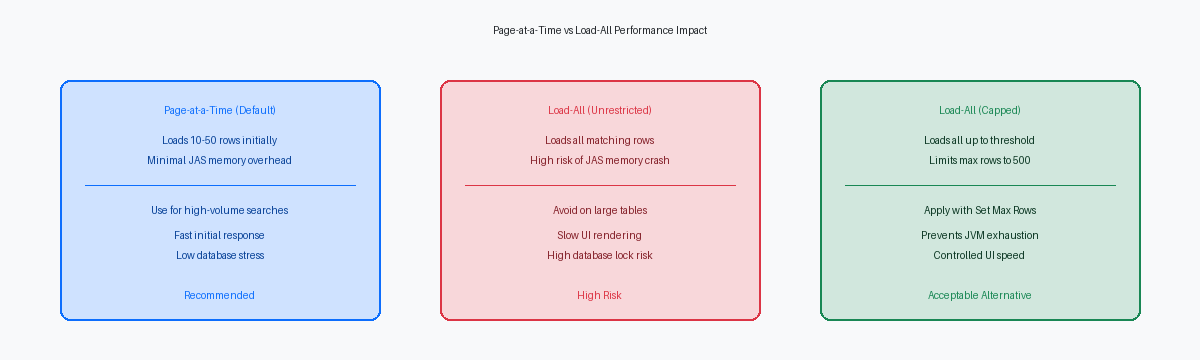
Grid Load Configuration: Page-at-a-Time vs. Load-All
Standard JDE grids operate in Page-at-a-TimeA grid mode that only fetches a small number of records at once to save memory. mode, fetching only 10 to 50 records to satisfy the initial display requirements. This default behavior minimizes the memory footprint on the HTML server and keeps the initial SQL execution time under a quarter of a second. Problems arise when developers enable the Load All Grid RecordsA property that forces the application to fetch every matching record from the database at once. property to support client-side sorting or export requirements without considering the underlying table volume. In a production environment where the F4211 contains tens of millions of rows, a Load All configuration without mandatory filters is a stability risk for the middlewareSoftware layers, like JAS, that sit between the user interface and the database..
When a user executes a wide-open search on a Load All grid, the JAS serverJava Application Server, the component that renders the JDE web interface for the user. attempts to build the entire grid object in memory before rendering the response. We consistently see JAS JVM heap exhaustion at approximately 10,000 to 15,000 records, depending on the width of the business view and the number of hidden columns. This memory pressure triggers aggressive Garbage CollectionAn automatic process that clears out unused data from the server's memory to free up space. cycles, spiking CPU utilization on the web server and eventually resulting in a 504 Gateway Timeout or a Web Client Exception for the end user.
Developers must mitigate this risk by using the Set Max Rows SpokenA JDE system function used to limit the number of records a grid will fetch from the database. system function within the Dialog is Initialized or Find Button Clicked events. Capping the return at 500 or 1,000 records provides enough data for functional use while ensuring the JAS heapThe specific portion of memory allocated to the JAS server for running applications. remains stable. If the query exceeds this limit, the system stops fetching, preventing the XML payload from ballooning to a size that the browser or the Java heap cannot handle.
Validation logic in the Button Clicked event should explicitly block searches where critical index fields like DCTO, KCO, or AN8 are left null. By checking the status of these filter fields and using the Set Control Error function, you force users to provide selective criteria that the database can actually optimize. This architectural guardrail is more effective than any database-level query governorA database setting that automatically kills queries that exceed a certain time or resource limit., as it stops the resource drain at the application layer, reducing the frequency of JAS "Out of Memory" errors by up to 80% to 90% in high-volume distribution environments.
Analyzing SQL Execution via CallObject and JAS Logs
A search form hanging for ten seconds or more is rarely an application logic error; it is almost always an unoptimized SQL statement hitting a table with multi-million rows like the F4211 or F0911. You cannot diagnose these bottlenecks from the Form Design Aid (FDA) alone because the JDB middleware abstracts the physical database layer. You must capture the raw SQL by enabling CallObject loggingA diagnostic log (jdedebug.log) that records business function calls and SQL statements. (jdedebug.log) on the fat clientA full JDE installation on a Windows workstation used for development and administration. or through Server ManagerThe web-based tool used to manage and monitor JD Edwards server components and logs. for a specific web session to see exactly what the database is being asked to do.
In the jdedebug.log, search for the "SELECT ... FROM" string followed by the "OCI Execute" or "SQL Execute" line. This provides the jdedebug.log SQL statement execution time in microseconds, allowing you to pinpoint which specific fetch is stalling the user interface. Simultaneously, JAS debug logs allow you to correlate the JDE user action to a specific thread IDA unique identifier for a specific process or task running on the server., ensuring you aren't chasing a ghost statement from a background UBEUniversal Batch Engine, used for running reports and background processing in JD Edwards. or a different user session.
Copy the literal SQL statement from the log—including the parameter markers—and run an EXPLAIN PLAN in your database management studio. It is a common misconception that JDE always uses the index defined in the Business View (BSVW). If the user filters on a non-indexed column in a grid header, the database optimizer may default to a full table scan, regardless of how you intended the search to behave during the development phase.
Performance degradation also stems from high-frequency, low-duration SQL statements that indicate nested loops. If the log shows hundreds of identical SELECT statements hitting the F0101 within a brief window of a few seconds, you likely have logic in the Grid Rec is Fetched event performing a manual fetch for master data. This row-by-row processing adds massive overhead to the JAS-to-Enterprise server communication. Moving these fetches into the initial BSVW join or using a C BSFN with a cached handle can reduce those hundreds of database trips to a single execution.
Optimizing a custom APPL business view involves more than selecting columns; it requires a deep dive into the underlying SQL execution plan and index selection. When your EnterpriseOne 9.2A specific version of the JD Edwards EnterpriseOne ERP software suite. environment is tuned to align application design with database realities, you eliminate the latency that end-users mistake for system instability.
