




When building JDE interactive applications (APPLJD Edwards interactive applications used for data entry and user interaction.), implementing a reliable JDE APPL custom table insert update example from form is critical for data integrity. Relying solely on standard EnterpriseOneThe modern suite of JD Edwards ERP software. automatic form processing for custom tables—typically 55-prefix tablesCustom database tables in JD Edwards, reserved for user-defined development to avoid conflicts with standard system tables. like F550101—often backfires. In an estimated 75% to 85% of complex custom development scenarios, standard Fix/InspectA JDE form type used to view or modify a single database record. auto-commits bypass multi-table validation rules or fail to maintain transactional integrity. To prevent orphan records and database locks, developers must bypass automatic mapping and take manual control of the database write phase.
This guide outlines a production-tested transactional write pattern using explicit Event Rules (ER)The proprietary scripting language used to define logic in JD Edwards. Table I/OOperations that read from or write to database tables within JDE logic.. By disabling automatic table processing in the Form Design Aid (FDA)The development tool used to create and modify JDE application screens. properties and managing transaction boundaries manually via the Start Transaction and Commit Transaction system functions, you eliminate the risk of partial commits. We will walk through the exact ER logic required to detect the form mode, validate input fields against standard Master Business Functions (MBFs)Centralized logic modules used to ensure consistent data validation and processing. like B0100016, and execute safe SQLStructured Query Language, the standard language used to manage and manipulate databases. writes.
Designing the Form and Mapping Custom Columns
In over two decades of auditing custom JDE code, I have seen dozens of production failures caused by a simple mismatch between Form Control (FC) variables and their underlying Data Dictionary (DD)A central library defining the characteristics, size, and formatting of every data field in the system. items. When designing a Fix/Inspect form to interact with a custom table like F550101, aligning these variables precisely is non-negotiable. If you map a 10-character string FC to a 30-character DD item, or mismatch numeric precisions, EnterpriseOne will compile but truncate data or fail silently at runtime. Fix/Inspect forms provide the ideal canvas for single-record transactional updates, separating the UI layer from the database mapping.
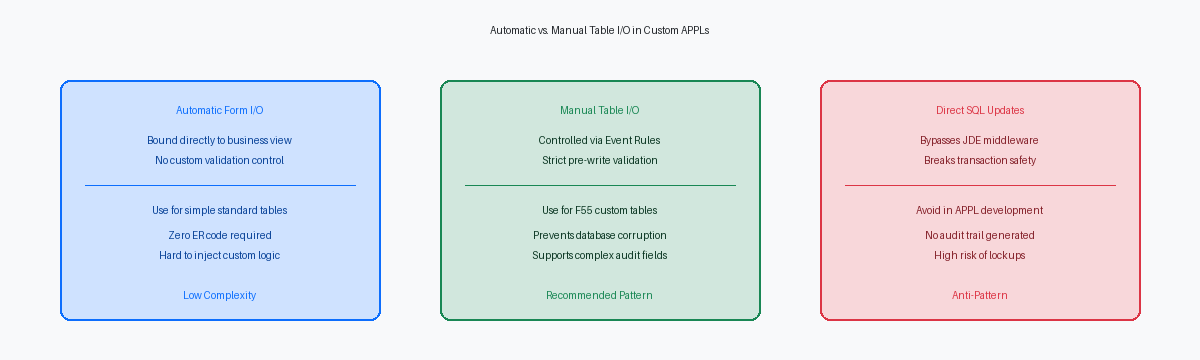
Relying on JDE automatic database commits can lead to partial writes if custom business logic fails mid-transaction. If a user updates a custom field on a form linked to a standard business viewA JDE object that links database tables to an application form., the runtime engine attempts to handle the update automatically. If subsequent validations or updates to secondary tables fail, you end up with orphaned records in F550101. Manual Table I/O gives developers absolute control over when and how data is written to the custom table F550101. By bypassing standard automatic engine mapping and managing the Table I/O in the "OK - Button Clicked" event, you decouple the user interface from the database commit cycle.
To execute this safely, build your Fix/Inspect form without associating it directly with a Business View on F550101. Place unmapped FC variables directly on the form canvas, ensuring each control uses the exact DD item defined in the target table. This decoupling prevents the Form Design Aid runtime engine from triggering implicit database writes, allowing you to explicitly coordinate validation and custom Table I/O statements within your Event Rules.
Implementing Strict Validation Before Database Write
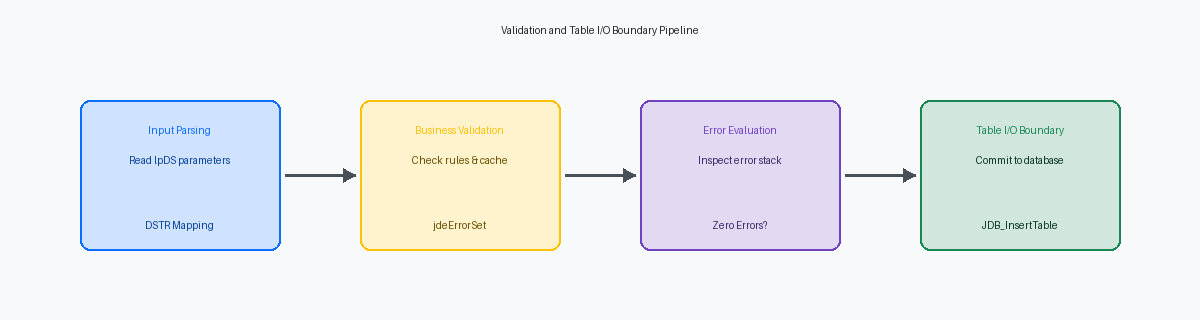
Triggering database writes without absolute validation guarantees database corruption in custom 55 tables within your first week of go-live. You must execute 100% of your validation logic in the 'OK - Button Clicked' event, specifically before any Table I/O or business function calls occur. If validation fails here, you can cleanly halt the event rules engine before it ever reaches the 'OK - Post Button Clicked' event where the actual physical database insert or update is committed.
To halt execution immediately, use the Set Action Error system function on the OK button, or target specific inputs using Set Control Error. This forces the HTML client to render a native red error banner, blocking the runtime engine from proceeding to the database commit phase. For example, if a user attempts to save a record with an empty primary keyA unique identifier for a specific record in a database table., checking for a blank or zero value in your mandatory Form Controls (FC) must trigger this system function instantly, preventing the insertion of a null primary key into your custom table.
Beyond simple null checks, you must validate relational integrity against core JDE tables. For a custom table containing an Address Number field, your code must perform a fetch-single against the F0101 table using the entered value. If the F0101 record does not exist, or if the Search Type (AT1) is invalid for your business context, trigger a custom DD error code like 0002 (Address Number Invalid) to block the transaction. This simple check eliminates the orphaned records that I routinely clean out of legacy custom tables during 9.1 to 9.2 migrations.
Detecting the Form Mode for Insert or Update
Relying blindly on automatic FDA behavior in a Fix/Inspect form often backfires when keys are passed dynamically via Form InterconnectsMechanisms used to pass data between different JDE forms.. In standard JDE logic, the SV Form_Mode system variable automatically switches between ADD_MODE (value of 'A') and COPY_MODE or UPDATE_MODE (value of 'C') based on whether the primary keys are populated during launch. Evaluating this system variable during the 'Post Dialog Is Initialized' event is your first line of defense to programmatically determine if the user is adding a new record or modifying an existing one.
To prevent database corruption, immediately execute a Fetch Single operation against your custom table's primary key in the 'Post Dialog Is Initialized' event. If the fetch succeeds (where the system variable SV CO_File_IO_Status equals CO_SUCCESS), store this operational state in a custom Form variable such as evt_cIsUpdateMode_EV01 set to '1'. This explicit check overrides any ambiguous form states caused by custom mapping and provides a highly reliable, persistent flag to drive conditional branching when the user clicks the OK button.
Using a dedicated state variable instead of relying solely on runtime engine assumptions prevents the form from executing an insert on an existing record. In multi-user environments, this simple safeguard completely eliminates primary key violations—such as Oracle's ORA-00001 or SQL Server's Error 2627—which typically account for a significant portion of custom application crashes, in our experience around three-quarters of these failures, during parallel data entry. By branching your OK button clicked logic based on evt_cIsUpdateMode_EV01, you guarantee that the runtime executes either a clean Insert or a targeted Update statement, keeping your custom table's integrity intact.
Writing the Insert and Update Table I/O Statements
Placing database write operations in the wrong event is a common mistake that leads to orphaned records. You must execute your explicit Table I/O Insert or Update statements inside the 'OK - Post Button Clicked' event, ensuring the runtime engine has already executed all field-level and form-level validation rules in 'OK - Button Clicked' without errors. If validation fails, the runtime halts processing before reaching 'Post Button Clicked', preventing invalid data from reaching your custom F550101 table.
In the Table I/O mapping wizard, you must map every primary key and non-key column explicitly to either a form control, a grid column, or a designated variable. Leaving unmapped columns in an insert statement does not default them to null or blank; instead, the middlewareSoftware that acts as a bridge between different applications or between an application and a database. often writes garbage memory values or uninitialized pointers into the database. For F550101, explicitly map the primary keys—such as Address Number (AN8) and Line Number (LNID)—alongside every custom flag and description field to maintain data integrity.
Standardize your database audit trail by populating the five critical audit fields for every database write. Map the User ID (USER) to the system value SL UserID, the Program ID (PID) to SL programId, and the Work Station ID (MKEY) to SL MachineKey. For the Date Updated (UPMJ) and Time of Day (UPMT) fields, assign SL DateToday and a system utility to format the time, ensuring your F550101 audit trail matches standard Oracle tables like F0101.
Many legacy developers still call complex, generic Business Functions to execute basic single-table writes, which adds unnecessary overhead. Native Table I/O statements provide clearer, self-documenting Event Rules (ER) that any developer can troubleshoot during an upgrade from 9.1 to 9.2. Relying on native statements instead of custom C-based BSFNs reduces your custom object footprint, making future Tools Release upgrades cleaner.
Enabling Transaction Processing and Rollbacks
Failing to bind parent-child writes into a single logical unit of work is how custom tables end up with orphaned detail records. In Form Design Aid (FDA), you must explicitly enable the 'Transaction Processing' property in the Form Properties dialog. This single checkbox tells the runtime engine to group all subsequent database operations within the form's execution thread into a single, bound commit unit, preventing partial writes to tables like F550101 and F550102 if a network glitch or database constraint violation occurs mid-stream.
When managing these parent-child writes manually via Table I/O inside the OK button's event rules, you cannot rely on the default auto-commit behavior. You must call the Begin Transaction system function before executing the first insert on the header table (F550101). This opens the database transaction boundary, ensuring that the subsequent inserts to the detail table (F550102) run on the same connection handle. Once all records are successfully processed, you call the Commit Transaction system function to finalize the writes to the database.
Relying on the database to handle errors silently is a recipe for corrupt data. Immediately after every Table I/O statement, you must evaluate the SV File_IO_Status system variable. If this system variable returns any value other than CO_SUCCESS—such as a duplicate key error or a database timeout—you must immediately execute the Rollback Transaction system function. This rolls back the entire unit of work to the pre-transaction state, preventing a scenario where a header record is committed without its corresponding detail lines, and allows you to gracefully set an enterprise engine error on the form.
Debugging Table I/O and SQL Statements in jdedebug.log
When a custom form fails to save silently, the local jdedebug.logA diagnostic file that records detailed technical activity for troubleshooting JDE issues. is your only source of truth. Developers often waste hours staring at Event Rules when they should analyze the raw SQL statements generated by the JDB database middlewareThe JDE layer that translates application requests into database-specific SQL commands.. Opening large log files, often dozens of megabytes in size, and searching for your custom table name (e.g., F550101) immediately reveals whether the runtime is constructing a malformed INSERT or UPDATE statement.
A common failure point is a unique constraint violation, manifesting as an ORA-00001 error on Oracle databases or SQL Server Error 2627. If your form relies on a next number bucket that has fallen out of sync, the log shows the duplicate key values causing the database to reject the transaction. I recommend setting Output=FILE and Debug=TRUE under the [DEBUG] section of your local jde.iniThe configuration file defining settings for a JDE client or server environment. to capture the SQL statement preceding the failure.
To trace how those invalid values reached the table I/O, run the Event Rules DebuggerA tool used by developers to step through and test JDE logic line by line. (ActiveEra) to step through your validation branches. Placing breakpoints on the OK button's "Button Clicked" event allows you to inspect the runtime values of Form Control (FC) variables before the database call. This prevents writing blank or uninitialized values into primary keys.
Finally, inspect the log to verify that the time last updated (UPMT) audit field is written in the correct HHMMSS format. JDE expects a strict 6-digit numeric format, such as 143025. If your Event Rules pass a truncated string, the middleware will either reject the write or write 0, corrupting your application audit trail.
Executing safe table I/O within Form Design Aid is a baseline requirement for any 9.2.x environment. If your custom code estate contains more than 200 custom objects, evaluating these transactional boundaries during upgrades is critical to avoiding post-go-live database corruption.
If you are planning a JDE upgrade or need to audit your custom application portfolio for transaction safety, contact our enterprise ERP architecture team to schedule a technical code review.
