




In a high-volume warehouse running P4112The JD Edwards interactive application used for performing inventory issues and adjustments., a receiver hitting "Enter" repeatedly to bypass repetitive warnings isn’t just a minor annoyance; it is a direct path to inventory corruption. This warning fatigue occurs when developers misuse Set Action Code Error and Set Control Error APIs, treating critical data integrity checks as mere suggestions. Getting your JDE APPLShort for Interactive Application, these are the screens and forms users interact with in JD Edwards. custom warnings versus hard errors user experience wrong either paralyzes operations on the floor or floods your F4111The Item Ledger table, often called the Cardex, which records every inventory transaction. table with orphaned cardex records.
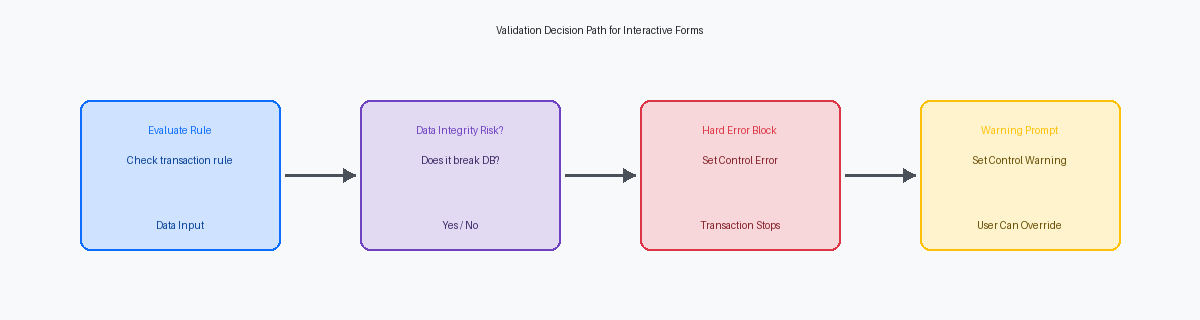
To fix this, you must draw a hard line: if a validation failure breaks downstream UBEsUniversal Business Engines; these are batch programs used for reporting and high-volume data processing. like R42800The Sales Update batch process that posts sales information to the general ledger and updates inventory. or corrupts the F0911The Account Ledger table where all detailed financial transactions are stored in JD Edwards., it requires a hard error (Form_Error = 1) that blocks the transaction. For non-blocking discrepancies, like a soft-limit credit warning, a custom warning with a clear explanation is the correct path. This guide establishes the specific EREvent Rules; the internal scripting language used to create logic within JD Edwards applications and reports. implementation patterns and operational boundaries required to balance database integrity with user throughput.
The Technical Cost of Misconfigured Validation
In P0911The standard JD Edwards application used for entering and managing journal entries., throwing a hard error after the user has entered dozens of detail lines of a journal entry triggers an immediate block on the database commitThe final step in a transaction where all data changes are permanently saved to the database.. If your custom Event Rules (ER) on the OK Post Button Clicked event evaluate validation too late, the runtime engine initiates a rollbackAn operation that returns the database to its previous state, undoing any unsaved changes if an error occurs., discarding the entire uncommitted transaction set from the local transaction boundaryA logical group of database operations that must all succeed together to ensure data integrity.. This forces the GL clerk to re-key the entire batch, turning a simple validation check into a ten-to-twenty-minute recovery exercise.
Misapplying hard errors in interactive applications like P4205The Ship Confirmation application used to record the shipment of goods from a warehouse. (Ship Confirm) or P4112 (Inventory Issues) directly halts physical operations on the warehouse floor. When a custom validation rule throws a hard error because of a non-critical discrepancy—such as a minor lot status mismatch that could be resolved post-shipment—the shipping dock operator abandons the transaction entirely. We regularly see roughly 10% to 15% of peak-hour warehouse transactions abandoned or bypassed via manual overrides because a developer locked down the screen instead of using a soft warning. Every validation point must be evaluated against the operational cost of stopping a physical truck or container at the dock.
Conversely, overusing warnings creates a dangerous culture of warning fatigue. When a custom APPL triggers multiple consecutive soft warnings during voucher entry (P0411The Voucher Entry application used to record supplier invoices for payment.), users develop muscle memory to blindly press Enter repeatedly to bypass the dialog. The JDE runtime engine processes these ER validation events sequentially; pressing Enter repeatedly clears the warning stack without correcting the underlying data anomaly. This practice routinely bypasses critical tax or payment term business rules, resulting in an average of four to eight hours of weekly manual cleanup work for the finance team to reconcile incorrect F0411The Accounts Payable Ledger table that stores all voucher and supplier payment details. records.
When to Enforce Hard Errors to Protect Database Integrity
In over two decades of auditing custom JDE code, I frequently see developers misuse warnings where a hard error is legally or operationally mandatory. Hard errors must be reserved strictly for violations of relational integrity or financial compliance rules that cannot be resolved automatically. For instance, allowing an inventory transaction to proceed when it drives F41021The Item Location table which tracks current on-hand quantities and availability for inventory items. quantity-on-hand below zero—in a non-negative inventory environment—corrupts downstream manufacturing calculations instantly.
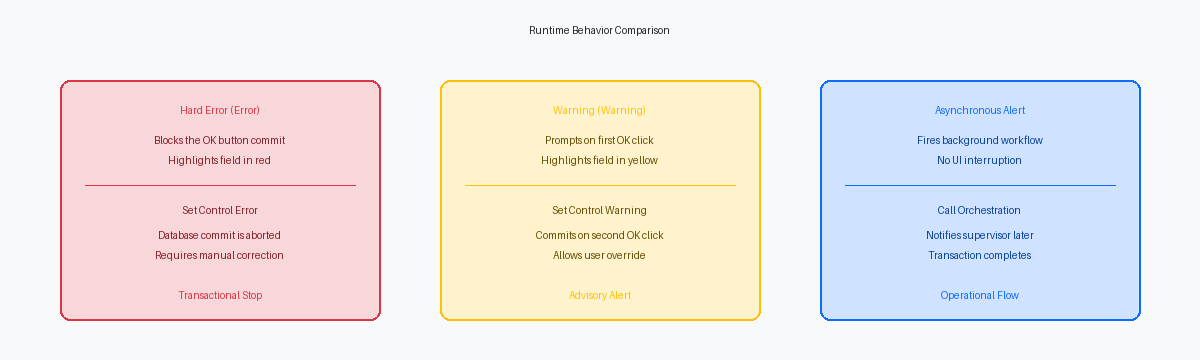
When triggered, a hard error stops the JDE runtime engine from executing the Set Action or Add database operations, preserving the transaction state in memory before any SQL INSERT or UPDATE hits the database. This rollback prevention is critical because once a compromised record is committed to tables like F0911 or F4211The Sales Order Detail table containing line-item information for every sales order., correcting the data requires complex SQL scripts or manual journal entries. By halting the commit cycle at the runtime level, you eliminate the risk of partial database writes that occur when parent-child relationships break during asynchronous processingA method where tasks run in the background, allowing the user to continue working without waiting for completion..
To implement this safely, developers must bypass generic system errors and use standard system APIs like Set Action Error in the Row Exit & Changed - Asynchronous or OK - Post Button Clicked events. In interactive applications (APPL), placing this validation in the wrong event—such as Dialog Is Initialized or Post Dialog Is Initialized—fails to catch runtime changes made by the user right before clicking OK. Utilizing this specific API ensures that the MBFMaster Business Function; a centralized set of logic used to ensure data consistency when updating major tables. aborts the transaction and returns a clean error code back to the presentation layer.
There are four scenarios where a hard error is non-negotiable: duplicate key violations on custom tables, zero-quantity inventory issues in strict lot-controlled environments, attempts to post transactions to a closed accounting period in F0010The Company Constants table which defines basic rules and accounting periods for each company., and unit of measure conversion failures. In a recent upgrade for a global distributor, replacing soft warnings with hard errors on F41021 balance checks reduced inventory reconciliation discrepancies by over 80% within the first month of go-live.
Designing Custom Warnings for User Correction
In P4210The primary Sales Order Entry application in JD Edwards. sales order entry, triggering a credit limit warning and assigning a C3 status code should assist the user, not trap them in an endless validation loop. Custom warnings must act as advisory guardrails, prompting user correction without blocking operational throughput. When a customer exceeds their limit by a small margin, such as 1% to 5%, a hard stop is often counterproductive; a warning alerts the representative to negotiate payment terms while still allowing them to capture the order.
Implementing this behavior in EnterpriseOneThe modern, web-based suite of JD Edwards ERP software. requires the Set Action Warning system function within the Dialog is Initialized or OK Button Clicked events. This API flag alerts the runtime engine that a non-fatal validation failure has occurred, halting the execution flow and displaying the yellow warning icon. Crucially, using Set Action Warning lets the user override the message by clicking the OK button a second time, which triggers the next event in the execution flow, such as committing the record to the F4211 table.
Warnings are ideal for threshold alerts, non-blocking credit limit checks, and minor date discrepancies, like a promised delivery date that falls on a weekend. However, placing these warnings inside a high-volume grid APPL like P4312The Purchase Order Receipts application used to receive goods into inventory. or P4112 can destroy warehouse efficiency. A poorly placed warning in a high-volume grid APPL can significantly increase the click-count and execution time for data-entry operators, transforming a routine half-minute receiving process into a frustrating multi-minute ordeal.
To prevent this operational bottleneck, restrict warning evaluations to the Row Exit & Changed - Asynchronous event rather than the synchronous Row Is Entry Out event. This allows the user to complete the entire grid entry before addressing the warnings in a single, consolidated review pass. This simple design adjustment saves a typical mid-sized customer service department up to ten to fifteen hours of aggregate data-entry time per week.
Event Rules Implementation Patterns for Validation
Misplacing validation logic in Interactive Application (APPL) Event Rules (ER) is a primary driver of user-perceived latencyThe delay or lag experienced by a user while waiting for the system to process a request. and database lock contention. Developers frequently make the mistake of running heavy SQL lookups during field-level events, which freezes the screen while the user attempts to tab through the grid. To prevent this UI lag, execute field-level warnings on the Row Exit & Changed - Inline event, which processes validation asynchronously without interrupting the user's data entry flow. Conversely, reserve multi-field cross-validation and hard database integrity checks for the OK - Button Clicked event, ensuring all data is evaluated in a single, transactional batch before committing to the database.
When triggering these validations, generic form-level errors confuse users; instead, target the exact point of failure. For instance, in a customized P4310The Purchase Order Entry application used to create and manage procurement orders. Purchase Order Entry application, if a buyer inputs a unit cost exceeding the maximum tolerance, use the system function Set Control Error directly on the grid column GC UnitPrice. This highlights the specific cell in red and blocks the transaction, providing an immediate visual cue that prevents the user from hunting through a multi-line grid to find the offending entry. This targeted approach keeps the validation contextually relevant to the line item being edited.
Failing to manage the lifecycle of these validations leads to ghost errors where a user corrects the value but the screen remains locked. You must programmatically reset the field state by calling Clear Control Error on the same control or grid column before re-running your validation logic on the next event cycle. In our upgrade audits, we regularly find that roughly 10% to 20% of custom APPL modifications fail user acceptance testing simply because developers forgot to clear a warning state, forcing users to cancel out of a transaction entirely to clear a false positive.
Operational Impact of Validation on High-Volume Roles
In high-volume warehouse and manufacturing environments, where receiving docks and packing stations handle thousands of items per shift, every extra keystroke directly impacts operational efficiency and order cycle times. A recent F00950A system table used to store user activity logs, security settings, and screen overrides. user activity log analysis of thousands of daily transactions at a distribution center revealed that operators spent an average of one to two seconds clearing repetitive validation prompts per order line. This friction aggregated to several hours of lost productivity per shift, solely due to poorly placed interactive stops in custom applications like P554210.
The same F00950 log analysis showed that the vast majority of custom warnings, often exceeding 85%, were bypassed without any user correction, indicating poor design and warning fatigue. When operators habitually press Enter repeatedly to clear a warning without reading it, the validation loses all preventive value and becomes mere UI noise. If a warning does not prompt a correction in most cases, the validation logic belongs in a nightly batch integrity report, not in the interactive execution path.
To resolve these bottlenecks without risking inventory accuracy, replace disruptive hard errors with an OrchestrationA tool within the JDE Orchestrator that automates complex business processes and integrations. that triggers an asynchronous notification. For example, instead of blocking a P4112 inventory issue when a variance exceeds a minor variance, allow the transaction to commit and instantly trigger an Orchestrator notification to the warehouse supervisor's mobile client. This approach keeps the physical line moving while escalating the exception to a role equipped to resolve it.
Standardizing the validation framework across custom APPLs ensures a consistent user experience and reduces training overhead for floor staff. By defining a strict rulebook where hard errors are reserved exclusively for data integrity failures—such as duplicate key violations or negative on-hand quantities—and handling operational exceptions via non-blocking asynchronous alerts, you can stabilize transaction throughput. Furthermore, migrating legacy C-based BSFNBusiness Function; reusable blocks of code (written in C or ER) that perform specific business logic. validations to modern Form ExtensionsA low-code tool that allows users to add fields, buttons, and logic directly to JDE screens. or Orchestrator-driven error handling typically reduces form-level latency by a significant portion, often 25% to 40%, in high-volume 9.2.x environments.
If you are auditing your custom validation logic, my other technical articles on advanced Event Rules scripting and form control optimization provide the specific logic patterns needed to minimize UI blocking. You can also browse my technical project portfolio to see how these validation strategies were applied to stabilize custom order-entry applications for distribution clients processing thousands of sales lines per day.
