




A significant majority of interactive application (APPL)A JD Edwards program that users interact with through a web browser to perform business tasks. failures root back to broken event ruleCustom logic triggered by specific user actions, such as clicking a button or entering data. path logic, environment-specific specShort for specifications; the metadata that defines the structure, appearance, and behavior of a JDE object. corruption, or incorrect event mapping, yet developers still waste hours blindly stepping through C business functionsReusable code modules written in the C language that perform complex calculations or database updates. in Visual Studio. When troubleshooting these issues, mastering JDE APPL debugging event rules with jde logs and ER compareA utility used to visually identify differences in logic between two versions of the same object. allows you to isolate the root cause of validation failures or spec divergence in under an hour. By standardizing on a structured troubleshooting protocol, you bypass the instinct to immediately start a full C++ debug session on Tools ReleasesThe underlying software version that provides the foundation and runtime environment for JD Edwards applications. like 9.2.7.
This approach relies on mapping the precise event rule flow, isolating clean runtime logs, and comparing specification differences across environments. Combining runtime log analysis with object specification comparisons allows you to bypass the noise of a massive jdedebug.log and target the exact event—such as Row Exit & Changed - Asynchronous—where the validation failed. Here is how to execute this methodology on complex interactive forms without losing days to trial-for-error.
Mapping the Event Rule Path in Interactive Applications
Debugging a misbehaving interactive application begins with a rigorous trace of the execution path, not a random dive into C code. On a standard Headerless DetailA standard JDE form layout used to display and edit multiple rows of data simultaneously. form like W9011A, the HTML web server and enterprise server coordinate to execute a strict sequence of Form Patches and the 12 primary events. This sequential execution starts at Dialog is Initialized, moves through Post Dialog is Initialized, and finishes only when the form is fully rendered. If you do not understand this initialization sequence, you will spend hours chasing variables that have not yet been allocated in memory.
The complexity multiplies when the grid control initializes. Events like Grid Record is Fetched and Write Grid Line-Before loop continuously, executing hundreds of times for a modest 100-row dataset on a single form load. I frequently see custom modifications grind to a halt because a developer placed a heavy table I/ODirect commands used within logic to read, write, update, or delete records in a database table. fetch inside these repetitive grid loops. This creates a massive database bottleneck, transforming a sub-second load time into a multi-second screen freeze for the end user.
A classic failure point is misplacing validation logic in Control Exited and Changed-Inline. Executing synchronous table fetches or business functions here blocks the user interface thread on every tab-out. Moving this validation to Control Exited and Changed-Asynchronous allows the runtime engine to process the database call on a background thread, keeping the user interface completely responsive. Before cracking open a single raw log file, map the exact event rule path using the FDAForm Design Aid; the primary development tool used to build and modify JDE interactive applications. Event Flow diagram to pinpoint where the execution actually breaks down.
Configuring and Isolating Runtime Logs for APPL Debugging
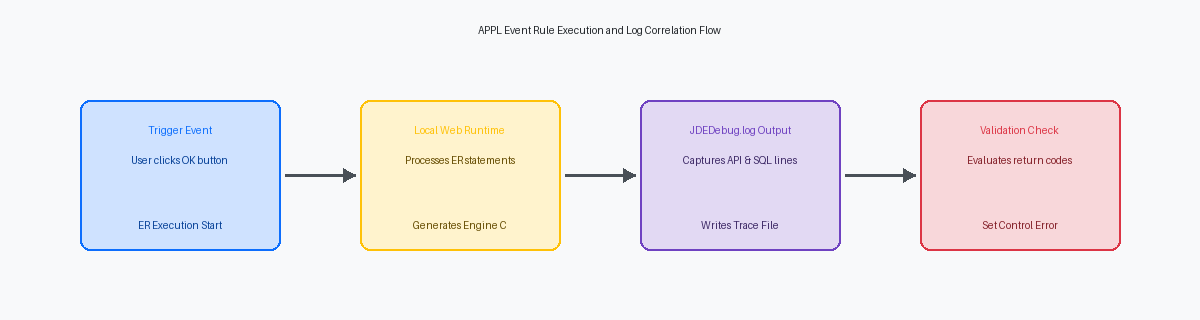
To capture the execution path of an interactive application on a development client, modify the local jde.iniA configuration file that controls how the JD Edwards software behaves on a specific machine. file under the [DEBUG] section. Set Output=FILE, DebugLevel=9, and ensure KeepLogs=1 is active to prevent the engine from overwriting your target run. A standard jdedebug.logA comprehensive log file that records every database call and logic step for troubleshooting. grows at a rate of several megabytes per minute of active user interaction. Without restricting the scope of your capture, you will search through millions of lines of SQL statements and spec fetches just to find a single grid column validation failure.
Isolating the bug requires a disciplined execution sequence. Delete or rename any existing log files in your local E920\client\log directory before launching the target application from the local web server. Open the application, navigate to the specific form, clear the newly generated log files one last time, and perform exactly one user action—such as clicking "OK". Immediately copy the resulting jde.log and jdedebug.log to a separate directory to stop the web server from appending background metadata queries to your trace.
Once you open the isolated log, immediately identify the specific thread ID associated with your HTML client session. JDE runtimes run concurrent background processes, like security checks and metadata caching, on separate threads. By identifying the thread ID of the primary event rule execution block—visible right next to the timestamp in the log entries—you can filter out the vast majority of the log volume using a text editor. This focus allows you to trace the exact sequence of business function calls triggered by your single action.
Correlating Event Rule Flow with jdedebug.log Statements
When debugging a custom F4211 update in P4210 or P42101, you often face a silent failure where the form halts execution via a Set Action Code(HC_OK, ER_ERROR) call. To find out why, you must open the jdedebug.log and search for the Entering Event and Exiting Event markers. These boundaries confirm whether the runtime engine actually evaluated the suspected Event Rule, such as the "Row Exit & Changed - Asynchronous" event where custom F4211 validation logic typically resides. If these markers are missing, the runtime bypassed your event entirely due to a prior validation failure or mapping mismatch.
Within those event boundaries, the log maps the ER execution path by recording database operations and business function calls. Look for Entering JDB_Fetch or Entering JDERT_CallBusinessFunction lines to trace the exact sequence of data retrieval and processing. When a custom F4211 validation fails, search backwards from the Set Action Code or Set Control Error API calls in the log. This backward search reveals the precise business function or database fetch that returned a non-zero warning or error status immediately before the validation failed.
To pinpoint the culprit control on a complex form like W4210A, match the internal Object ID (OID) and Control ID (CID) printed in the log directly to the controls inside Form Design Aid. For example, a log entry showing a failed validation on Grid Control ID 1 tells you precisely which column in the F4211 grid triggered the error. By aligning these IDs, you bypass the guesswork of manual code inspection and go straight to the offending ER line in FDA, shaving hours off the troubleshooting cycle.
Using ER Compare to Detect Spec Divergence
A critical P42101 sales order entry customization that ran flawlessly in your DV920 development environment often breaks post-deployment during a PY920 promotion. This failure is rarely a database schema issue; it is a classic case of specification corruption or a missing modification during the OWMObject Management Workbench; the system used to manage the development, versioning, and promotion of JDE objects. promotion path. When teams rush packages, critical elements like Form Extension event rules or custom grid formatting frequently get dropped.
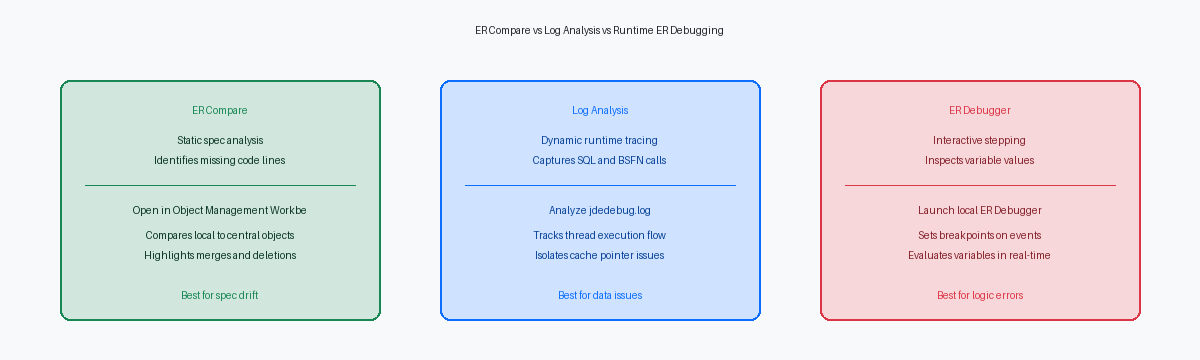
To isolate this spec divergence, launch the Event Rules Compare tool directly from your fat clientA developer's workstation that has the full JD Edwards development environment and local specifications installed. to compare your local DV920 specifications against the Central ObjectsA central database repository that stores the master definitions and code for all JD Edwards objects. database of PY920 or PD920. The utility parses the underlying XML specifications—which replaced the old TAM specifications in newer Tools Releases—and displays a side-by-side visual difference engine. It highlights deleted lines in red, modified lines in blue, and added lines in green, making a missing Form Extension event rule stand out immediately against the baseline JDE code.
While the temptation is to immediately copy the missing logic over using the merge directional arrows, exercise extreme caution. Merging complex Grid event rules—specifically those tied to Grid Record is Fetched or Write Grid Line-Before events—out of sequence can corrupt the target XML specifications. Instead of blind merging, manually validate the sequence of event execution, or perform a clean, full get of the object from the source environment to ensure the integrity of the spec layout remains intact. This prevents the runtime engine from throwing a Web Client Exception when a user clicks the find button.
Executing a Structured Test Case to Isolate the Bug
Debugging a sporadic failure based on vague user reports is a guaranteed way to burn dozens of hours of consulting budget with zero resolution. You must establish a 100% reproducible test case before opening any log or debugger. For instance, when troubleshooting a custom P4312 receiving application that throws a "Record Invalid" error specifically on line type S, you must replicate the exact state of the F4311 purchase order detail record.
Documenting the precise input values is critical because fields like Branch/Plant (MCU), Item Number (LITM), and Order Type (DCTO) directly dictate which branch lines execute inside the underlying F4312EndDoc business function (B4300010). A line type S behaves differently because it bypasses inventory quantity updates in the F41021 but still validates the general ledger account structure. Recording these exact parameters ensures you are not chasing a red herring caused by master data setups.
Once you stage this exact data in your DV920 environment, run the test case inside a local web development client. This setup allows you to attach the Event Rules Debugger to the active local jas.ini process, setting breakpoints directly on the Row Exit & Out - Asynchronous event. Stepping through the ER line-by-line reveals exactly which variable assignment or BSFN call mapping fails right before the error is set.
Finally, compare this local execution directly against the behavior on the enterprise HTML Server. If the local client processes the line type S receipt successfully but the HTML Server fails, you can immediately rule out ER logic bugs and focus on serialization mismatches or stale JAS database cache in the F989998 tables. This comparison saves days of unnecessary code refactoring by pointing you directly toward a web server generation issue.
Advanced Techniques for Intercepting Cache and BSFN Errors
When debugging interactive applications like P4210 or P4112, the Event Rules (ER) often act as a mere wrapper for complex C-based validation. When ER calls a Business Function like F4211FSEditLine, the actual validation happens inside C code, which writes errors to the JDE cacheA temporary storage area in memory used to hold data during a transaction before it is committed to the database. structures rather than immediately throwing a visible control error. If your application silently fails or halts without a clear on-screen error, you must look beyond the ER level.
To diagnose issues in multi-event transactions, analyze the jdedebug.log to trace the pointer addresses of JDE cache structures passed between sequential ER events. For instance, tracing the hCache pointer for F4111EditLine across the Row Exit & Changed and OK Button Clicked events reveals whether the cache is persisting or being prematurely cleared. If the memory address of the pointer changes from 0x0A2B3C4D during the row change to a completely different address or 0x00000000 during the OK button click, the transaction boundary is broken, causing subsequent validation steps to fail.
Inspect the jde.log for database errors, such as ORA-00001 or SQL Server Error 2627, that occur immediately after a BSFN call. These database-level failures often cascade back into the application as generic failures, masking the root cause. If a BSFN returns an error code of 2, check the parameters passed in the ER Call Business Function mapping to ensure no null pointers are passed. A missing or unmapped required math numeric or character variable in the ER mapping will cause the underlying C API to dereference a null pointer, terminating the thread or corrupting the cache.
Isolating the specific line of Event Rules causing a form-level validation failure in a jdedebug.log is what separates senior developers from those just guessing. When retrofitting 200–500 impacted objects during a 9.2.8 upgrade, ER Compare is your primary tool for protecting custom logic against Oracle's base code changes. To see these debugging patterns applied to large-scale migrations across large-scale object estates, browse our other technical articles on APPL development or review my project portfolio for specific code-level case studies.
