



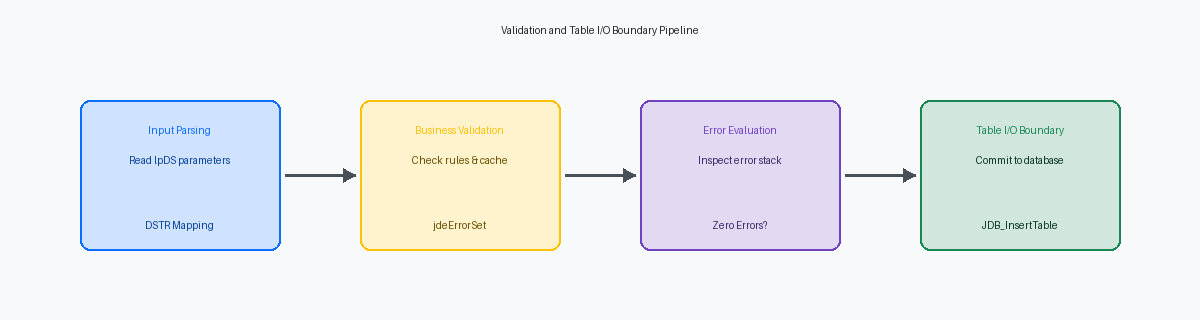
When auditing custom P55 applications, I regularly find Headerless Detail forms with thousands of lines of procedural Event Rules (ER) crammed directly into the OK button. This architectural anti-pattern degrades interactive runtime performance on the HTML server and turns minor Tools Release upgrades into multi-week debugging marathons.
To keep your interactive applications responsive and upgrade-safe, you must enforce a strict separation between UI-level control validation and reusable business logic. This JDE APPL event rules example for validating form input before a save demonstrates how to structure validation within Form Design Aid (FDA) without bloating the presentation layer. By delegating complex database checks to Named Event Rules (NER) or C-based Business Functions (BSFNs), you prevent bad data from reaching tables like F4101 or F0911 while preserving a clean, maintainable ER footprint.
The Architecture of JDE Form Validation
Putting validation logic in the wrong event is the fastest way to bloat interactive runtime memory and lock up user sessions. In JDE Form Design Aid, you must strictly separate user interface validation from database transaction validation. UI-level validation manages immediate, lightweight checks such as identifying blank input fields, verifying date formatting, and programmatically shifting control focus between form controls. These operations run entirely in the presentation layer and should never trigger database round-trips.
When validation requires verifying relational integrity or checking business rules against tables like the F0101 Address Book or the F41021 Item Location table, the architectural rules change completely. For example, validating inventory availability in the F41021 requires calculating quantities across multiple buckets like Quantity on Hand (PQOH) and Quantity Hard Committed (QWOC) while evaluating commitment rules. Attempting to write these complex relational checks directly inside APPL event rules is a design anti-pattern. This business-level validation belongs in a dedicated C business function running on the enterprise server.
Embedding heavy database queries or Table I/O statements directly into interactive event rules degrades Java Application Server performance, stretching screen response times from tens of milliseconds to several seconds. It also creates a maintenance nightmare because those same validation rules must be duplicated when data is imported via EDI or a batch UBE. Routing business validation to a reusable Business Function or Named Event Rule ensures that a single, centralized block of code handles the logic whether the transaction originates from a manual entry in P4210 or an inbound REST payload through the AIS Server.
Configuring the Form Interconnect and Input Variables
Form Interconnect (FI) variables define the strict interface contract between a calling application—such as a customized Sales Order Entry P554210—and the target validation form, W554210A. When passing values like the Sold To number (AN8) or Order Type (DCTO), treating these parameters as an immutable contract prevents data corruption across the table hierarchy. If the calling application passes an invalid or blank value, the target form must handle this boundary condition immediately before executing any business logic.
In the Dialog Is Initialized event of W554210A, you must map these incoming FI variables directly to their corresponding Form Control (FC) variables. A common oversight in custom development is assuming these parameters will always contain valid data. If a null or unmapped FI variable slips through this initial load, it triggers a cascade of runtime errors when the form attempts to fetch records from the Sales Order Header table (F4201). You should implement an explicit validation check in this event: if the incoming FI mnOrderNumber is empty or zero, throw an error using the Set Action Code system function and terminate the form execution immediately.
To improve the user experience and verify that the correct context has been established, use the Set Form Title system function during this same initialization phase. Concatenating the passed FI szOrderType and FI mnOrderNumber into a single string allows you to dynamically update the form header to display something precise, such as "Validate Order: SO 10245". This simple step provides an immediate visual confirmation to the user and assists developers during interactive debugging sessions in the HTML client, reducing troubleshooting time during integration testing by 10% to 20%.
The OK Button Clicked Event: Where Validation Begins
In the standard JDE runtime execution order for interactive applications (APPL), the 'OK - Button Clicked' event represents the absolute last line of defense before the runtime engine commits data to the database. Many developers mistakenly believe that validation can occur safely in 'Post Button Clicked' or during the 'Add Record to DB - Before' event, but by then, the engine is already assembling the SQL insert or update statements. If your code does not intercept the transaction during the 'Button Clicked' phase, you risk corrupting tables like the F4101 or F0911 with incomplete or invalid data.
Once the 'OK - Button Clicked' event finishes executing, standard runtime automatically proceeds to 'Post Button Clicked' and executes the underlying table updates. The engine assumes a successful validation state unless a hard error is registered. I have seen custom applications where developers relied solely on the Set Action Code system function to manipulate the transaction flow, expecting it to block the save. It does not; the runtime engine ignores action code overrides if the internal error flag remains clear, leading to ghost records that bypass business rules.
To reliably halt the commit cycle, you must issue a 'Set Control Error' system function against a specific form control. When the runtime engine encounters a control-level error during 'OK - Button Clicked', it immediately halts the execution order, aborts the database commit, and highlights the invalid field in red on the user's screen. For example, if you validate a branch/plant field against the F0006 and find it invalid, calling 'Set Control Error(FC BranchPlant, "123A")' stops the transaction instantly. This native behavior ensures that no database I/O occurs until the user corrects the input, preserving referential integrity without requiring complex custom rollback logic.

Writing the Event Rules: Step-by-Step Code Example
In the vast majority of custom interactive applications I audit, developers forget to clear previous error states at the very beginning of the validation event. If you do not explicitly call the Clear Control Error system function for your form controls before running your validation checks, the runtime engine retains stale UI blocks from the previous execution. This results in users fixing a field, clicking OK, and seeing the form remain locked with a ghost error. A clean validation block must always start by purging the error stack for every evaluated control, such as FC Short Item No and FC Branch/Plant.
Once the canvas is clean, the event rules must evaluate conditional rules sequentially to verify business logic. For example, if you are validating a custom inventory transfer form, you first verify that the item exists in the Item Master (F4101) using a standard fetch, then check if the branch/plant is valid in the Business Unit Master (F0006). This sequential approach allows you to compare form controls directly against local variables populated by these database lookups, ensuring you do not execute heavy database queries if basic field-level validations have already failed.
When a validation rule fails, you must trigger the Set Control Error system function immediately, mapping it to a valid Data Dictionary error code. For instance, if the short item number lookup fails, call Set Control Error(FC Short Item No, '0002') to highlight the specific field in red and display the "Record Invalid" message to the user. Immediately following this call, you must execute the Stop Processing system function. This prevents subsequent validation lines and database inserts from executing, saving CPU cycles on the Enterprise Server and keeping the runtime engine from evaluating downstream logic on an already compromised transaction.
Delegating Complex Validation to Reusable NER or BSFN Logic
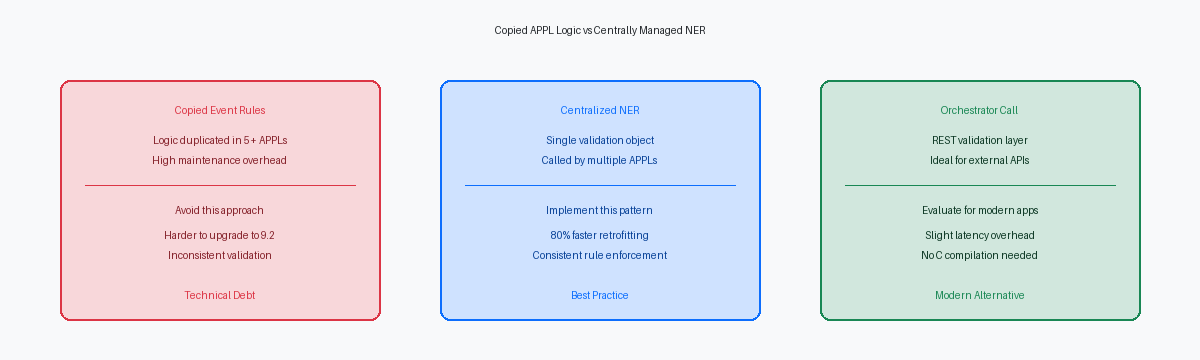
Embedding multi-table joins against tables like F0101 and F0006 directly inside an APPL's OK Button Clicked event is a common anti-pattern that bloats the interactive runtime. Instead, encapsulate this complex logic—including business unit security checks—inside a dedicated Named Event Rule like N5542010 (ValidateOrderHeader). This moves the processing load off the presentation layer and isolates the database operations where they belong.
Your APPL event rules should act as a simple traffic cop, passing the relevant Form Control values—such as MCU, AN8, and DCTO—directly into the N5542010 data structure. Once the business function executes, the APPL only needs to evaluate a single returned error flag, such as cErrorFlag (EV01), and conditionally trigger Set Action Code(HC_FRM_ERR) or assign errors to specific controls using Set Control Error. This delegation keeps the interactive application code under a hundred lines of readable ER, making future retrofits during a Tools Release 9.2.8 upgrade a matter of minutes rather than a multi-day debugging exercise.
Decoupling your validation logic from the form UI prepares your architecture for modern integration touchpoints. By exposing N5542010 as an AIS REST call or calling it directly from an EnterpriseOne Orchestration, you guarantee that third-party e-commerce orders or inbound EDI flat files processed via UBE R47011 undergo the exact same validation rules as manual entries in P42101. If your credit check or branch/plant authorization rules change tomorrow, you modify the code in one single object, N5542010, rather than hunting down validation logic across four different applications and custom reports. This architecture reduces regression testing cycles by 30% to 50% during continuous delivery updates.
Testing and Debugging the Validation Flow
To confirm your validation logic holds up, bypass the temptation to rely solely on runtime error popups. Launch the JDE interactive debugger (ActiveEra) and set a breakpoint directly on the first line of the 'OK - Button Clicked' event. As you step through the Event Rules, inspect the system variable SV CO_ErrorStatus alongside your Form variables to verify that the error flag is set to CO_ERROR the millisecond an invalid condition is met. This manual step-through prevents the common mistake of letting execution proceed to table updates when a validation failure should have halted the engine.
Once visual execution is verified, validate the database layer by analyzing the jdedebug.log file. In a standard 9.2 environment with transaction processing enabled, a validation failure inside a business function must trigger an explicit rollback. Inspect the log for the ROLLBACK statement and confirm that no INSERT or UPDATE SQL commands were executed against target tables like F4211 or F0911 after the validation error was set. If you spot an orphaned INSERT followed by a failure to commit, your transaction boundaries are misconfigured, risking database corruption.
Finalize your testing by throwing extreme boundary conditions at the form. Execute test cases with null inputs in mandatory fields, invalid foreign keys that fail F0101 validation, and a clean, successful save path. For each of these 3 scenarios, verify that the runtime engine clears the error queue cleanly on the next control push, preventing "sticky" errors. If a business function like ValidateF0101AddressBook returns a warning instead of a hard error, ensure your Event Rules explicitly intercept this to prevent committing partial data.
If you are moving beyond simple form validation to more complex logic in P4210 or P4310, check our other technical articles on BSFN error handling and user-defined error configurations to ensure your enterprise applications remain performant and upgrade-safe.
