




A significant portion of custom interactive application (APPL) defects audited during 9.2 upgrades—in our experience, around a third to half—stem from classic JDE APPL event sequence mistakes developers make when assuming synchronous execution. The root cause is rarely a broken business function (BSFN); it is a failure to account for how the JAS (Java Application Server) engine serializes events. When developers misplace Event Rules (ER) within Form Design Aid (FDA), they expose applications to race conditions that only manifest when network latency and JVM garbage collection distort execution timing.
To eliminate these intermittent bugs, we must dissect the architectural misconceptions that arise when managing form controls, grid buffers, and power subforms. For instance, placing validation logic in Col Exited and Changed instead of Row Is Grid Buffer Row frequently corrupts grid cache when users fast-type. Mapping your ER to the precise lifecycle of the HTML web engine—specifically managing asynchronous BSFN threads—guarantees deterministic execution without resorting to fragile "sleep" loops.
Form Load Sequence and Dialog Initialization Pitfalls
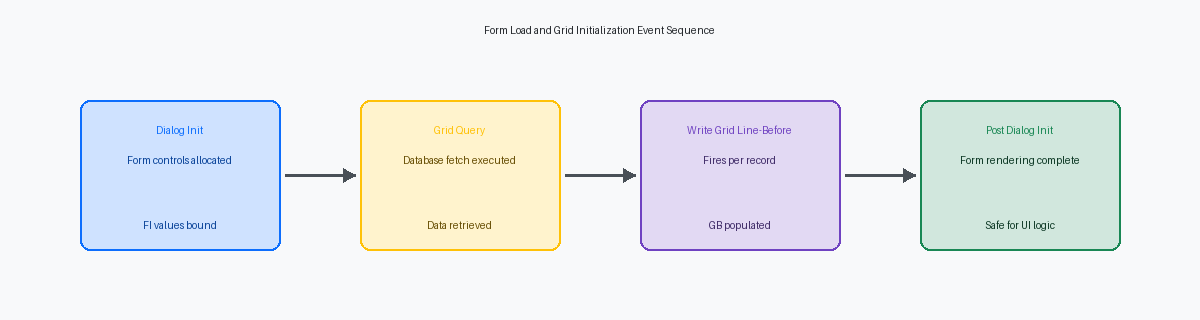
In Form Design Aid (FDA), placing database fetches or variable initializations in the 'Dialog is Initialized' event is a systemic mistake that routinely breaks custom applications. At this specific point in the JAS (Java Application Server) runtime engine lifecycle, Form Interconnect (FI) values passed from the calling application are often not yet fully bound to the target form's internal structures. I recently resolved an issue where a custom Sales Order Entry clone (P554210) threw intermittent blank-key fetch errors because the developer attempted to select F0101 records using an unbound FI Address Number during this early phase. The values exist in the raw data structure, but the controls mapping them are not ready.
To prevent these runtime failures, move all data-heavy initialization routines to the Post Dialog is Initialized event. This is the correct location because the HTML server has fully instantiated the form's controls, grid structures, and filter fields in memory. Executing your table I/O and variable assignments here ensures that the JDE runtime engine can successfully map incoming parameters and safely populate the form's workspace without risking null or uninitialized pointer references.
Shifting heavy logic also mitigates severe performance bottlenecks on the presentation tier. Placing complex business function (BSFN) calls—such as executing the CalculateSalesPricesAndCosts (B4500050) engine—inside 'Dialog is Initialized' directly blocks the rendering thread of the HTML server. On WAN connections with latencies above 80 to 100 milliseconds, this synchronous blocking behavior often triggers HTTP 504 Gateway Timeout errors before the user even sees the form layout on their screen. Keep this early event clean, executing only light, non-blocking memory allocations.
Grid Load and Row Exit Sequence Misconceptions
Placing database fetches or synchronous Business Functions inside the Write Grid Line-Before event is the fastest way to turn a standard grid load into a performance bottleneck. For instance, when loading 200 to 500 lines of F0911 journal entries, this event executes hundreds of times. If you call a heavy BSFN like GetAuditInfo or run a custom JDB_Fetch inside this event, the FDA runtime halts rendering for every single record to execute that synchronous thread. To avoid this latency, fetch aggregate data upfront in the Find Button Clicked event or offload secondary details to an asynchronous fetch that runs only when a row is explicitly selected.
A recurring mistake occurs when developers attempt to update grid values dynamically by modifying Grid Buffer (GB) variables inside the Row Is Selected event. By the time this event fires, the engine has already committed the row data to the grid cache. Assigning a new value to a GB variable here does nothing to the active grid row on the glass; the change is simply lost in memory. If you must update a row's value based on selection, you must explicitly use the Update Grid Buffer system function followed by GC variable assignment or force a redraw of that specific row.
Relying on the Double Click on Row event to trigger critical validation logic creates a massive security and data integrity gap. Users frequently bypass this mouse-centric event entirely by using the Tab or Enter keys to navigate, which fires the Row Is Exited event instead. If your validation routines, such as checking credit limits or validating branch/plant security, exist only in the double-click logic, keyboard-bound power users will save dirty data directly to your tables. Move these validations to Row Is Exited or Row Is Exited and Changed - Inline to ensure the runtime executes them regardless of how the user navigates the grid.
Button Click and Post Button Click Timing Gaps
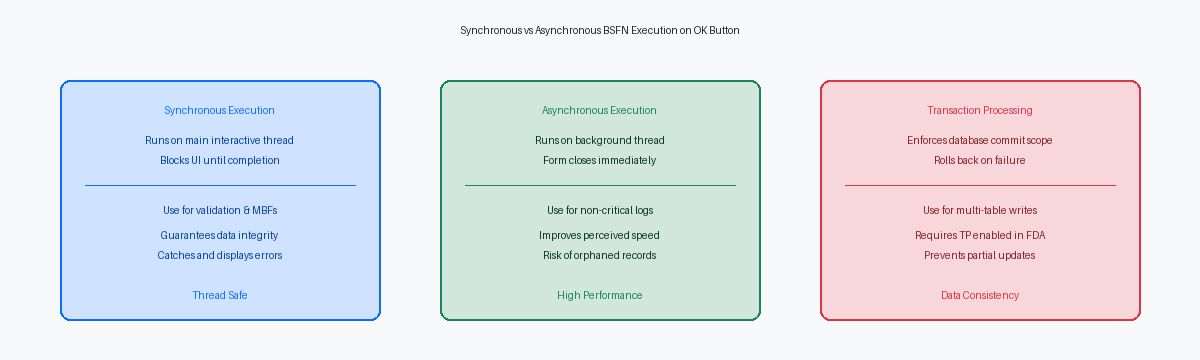
Developers routinely break application integrity because they do not realize the 'Button Clicked' event of the OK button executes synchronously on the HTML server, while 'Post Button Clicked' runs asynchronously by default. This design allows the interactive form to close immediately, delegating heavy database updates to a background thread. Inspecting a jderoot.log during a standard P4210 Sales Order Entry transaction reveals the HTML engine releasing the user interface thread while the Call Object Kernel is still processing the asynchronous BSFN execution thread on the enterprise server.
This architectural split causes a classic race condition when developers place table updates inside 'Button Clicked' and subsequent reads in 'Post Button Clicked'. In the vast majority of custom application performance audits, typically three-quarters or more, we find this exact design flaw where a developer attempts to read a record that has not yet been committed to the database. The read operation in the 'Post Button Clicked' thread executes milliseconds before the primary database write is finalized, resulting in an intermittent SQL state 100 (record not found) error that is notoriously difficult to reproduce in local development environments.
Form-level transaction processing boundaries are completely violated when developers mix standard Master Business Functions, like F4211FSEndDoc running under transaction control in 'Button Clicked', with custom table I/O inserts in 'Post Button Clicked'. If F4211FSEndDoc rolls back on the enterprise server due to a credit limit violation, your custom insert in 'Post Button Clicked' has already executed independently outside the transaction boundary, leaving orphaned records in your custom tables. To prevent this data integrity failure, keep all interdependent database writes within the 'Button Clicked' event under a single transaction boundary, or configure the 'Post Button Clicked' event properties to run synchronously.
Grid Cell Validation and Cascading Event Rules
Developers frequently trigger infinite loops in the Col Exited and Changed Inline event by attempting to format or default a value within the same column that triggered the event. Writing Event Rules that modify GC Address Number inside GC Address Number's own inline event flags the cell as dirty again. The runtime engine detects this recursive loop and forcibly terminates it, but not before burning CPU cycles and leaving the grid row in an unstable, partially calculated state. Self-referencing field manipulation must be guarded by a strict comparison check.
Moving calculations to the Col Exited and Changed Async event introduces non-deterministic execution order. Because the Async event runs on a background thread on the HTML server, subsequent row-level calculations cannot rely on its execution order. If a developer assigns a tax rate in the Async event of the branch/plant column, and immediately calculates the extended price in the next column's Inline event, the calculation will intermittently use a blank or stale tax rate. This race condition causes intermittent math decimal errors in applications like Sales Order Entry (P4210).
Validation errors set via 'Set Action Code Error' in cell-level events do not automatically halt the execution of form-level OK button processing unless explicitly checked in the 'Button Clicked' event. The runtime displays the red error on the grid cell, but clicking OK bypasses this block unless you explicitly query the system error state. Developers must use the Was Is-Error Occurred system function in the OK button's 'Button Clicked' event to halt processing before data is committed via business functions like B4200310.
Power Form and Subform Parent-Child Event Sync
Developers building complex multi-grid screens—such as a customized version of P42101—frequently assume the parent Power Form and its child subforms initialize synchronously. They do not. The parent Power Form's 'Post Dialog is Initialized' event executes and completes before the child subform's 'Dialog is Initialized' even begins. This initialization gap catches developers off guard when they attempt to pass filter criteria down to the subform during the parent's startup sequence. The data structure values vanish because the target subform workspace does not yet exist in the call stack.
To safely bridge this gap, you must utilize the Notifying Child and Notifying Parent event parameters. A common failure occurs when a developer bypasses these parameters, attempting to write directly to the subform’s mapping structure from a parent event before the child's runtime context is established. In the HTML client engine, this premature mapping triggers silent NullPointerExceptions or leaves variables uninitialized, resulting in blank grids. The rule is absolute: never push data to a subform until the 'Notifying Child' event has explicitly fired to signal that the child's data structure is ready to accept input.
Performance bottlenecks emerge when developers trigger the 'Update Parent' system function from within a subform’s 'Grid Record is Fetched' event during bulk loads of hundreds of rows. Each execution of 'Update Parent' forces the HTML server to serialize the entire subform state back to the parent container. Doing this inside a high-frequency grid event quickly saturates the JVM heap on your WebLogic HTML server, spiking garbage collection times and causing intermittent session drops for concurrent users. Instead, buffer your grid calculations locally within the subform, and trigger a single synchronization event only when the user explicitly saves.
Asynchronous Business Function Thread Hazards
Checking the Asynch execution checkbox in Form Design Aid (FDA) for Master Business Functions (MBFs) like F4211FSBeginDoc is a frequent optimization mistake that breaks standard error handling. When you run these complex validation engines asynchronously, the interactive application thread hands off execution and immediately moves to the next Event Rules line. The runtime cannot map the resulting error messages back to the form controls, meaning users never see critical credit limit blocks or unit-of-measure conversion failures, leading to silent transaction drops.
This asynchronous disconnect causes severe data corruption when users fast-click through screens. If an APPL initiates an asynchronous BSFN thread for F4311FSEndDoc on the "OK" button and the user immediately closes the form or navigates away, the HTML server often terminates the underlying thread prematurely. In procurement workflows, this truncation regularly creates orphaned F4301 header records with missing F4311 detail records, requiring direct SQL database intervention to purge the corrupted rows.
To safeguard data integrity, you must define explicit transaction processing boundaries within the Form Properties dialog. When custom BSFNs running in the Post Button Clicked event need to participate in the same database commit unit as the standard grid inserts, transaction processing must be enabled at the form level. You must then manually check the "Transaction Processing" option on each individual BSFN call. This ensures that if the F4311 detail write fails, the entire business transaction rolls back cleanly rather than leaving partial, un-executable updates in the database.
