




Most performance lag in custom interactive applications (APPLJD Edwards interactive application used by end-users to view or modify data.) does not stem from database latency, but from poorly timed Event Rules (ER)The proprietary scripting language used in JD Edwards to define business logic. fetching data during form initialization. When developers need to fetch standard Address Book data alongside custom configurations, they often trigger redundant database roundtrips that can more than double or triple screen load times. Implementing a clean JDE APPL example of default values from F0101The standard JD Edwards database table that stores Address Book master information. and custom tables requires strict adherence to Form Design Aid (FDA)The development tool used to create and modify JD Edwards interactive applications. event flow to prevent double-fetching.
Instead of stacking multiple F0101 and F550101 table IOOperations that read from or write to database tables. fetches in the Post Dialog is InitializedA runtime event that occurs after a form is created but before it is displayed to the user. event where they block UI rendering, senior developers must split the initialization. By isolating the primary key validation to Control Exited and Changed InlineAn event that triggers when a user changes a value in a field and moves the cursor away. and using lean direct indexed fetches for the custom table, you can keep execution overhead under 100 milliseconds per form launch. This approach ensures the interactive runtime remains highly responsive, even on high-latency WANA Wide Area Network that connects computers over long distances, often resulting in slower speeds. connections.
The Architecture of Clean Defaulting in JDE APPLs
Watch any junior developer build an interactive application in Form Design Aid (FDA) and you will likely find the Dialog Is Initialized event choked with a dozen sequential table I/O fetches. This brute-force approach introduces a 200 to 500-millisecond latency before the form even renders on the user's HTML client. When scaled across hundreds of concurrent users in a high-volume distribution center, this unnecessary overhead degrades JVMThe Java Virtual Machine that runs the JD Edwards web server components. performance on your WebLogicAn Oracle application server used to host the JD Edwards web client. servers and creates a sluggish user experience.
A clean defaulting architecture separates standard Address Book (F0101) retrieval from custom business unit or category code assignments. Instead of hardcoding conditional branch logic directly within your Event Rules, you should decouple these lookups by querying a dedicated custom mapping table like F550101. This table acts as a centralized registry for user-specific or branch-specific overrides, ensuring that future schema changes or Tools ReleaseThe version of the underlying JD Edwards system software and foundation. upgrades do not break your core application logic. For example, routing a transaction's default branch/plant based on the user's terminal ID should be a simple single-line fetch to F550101, not a complex nested IF statement in the ER.
You can achieve an immediate performance gain by allowing the JDE runtime engine to resolve standard Data Dictionary (DD)A central repository in JD Edwards that defines the properties and default values of all data fields. default values first, before triggering any custom ER fetches. Properly relying on DD defaults for basic fields like search type (ATY) or tax explanation code (EXR1) eliminates redundant database roundtrips, reducing database I/O by a third to a half on high-volume entry forms. Only after the runtime engine completes its native initialization should your custom ER step in to query F0101 and F550101 for the specialized business overrides.
Database Schema Setup for F0101 and Custom Table F550101
Relying solely on the standard Address Book Master table (F0101) for application defaulting limits your flexibility when users require distinct behaviors based on their operational roles. While F0101 houses critical master fields like Search Type (AT1) and Business Unit (MCUA standard JD Edwards field name representing a Business Unit or Cost Center.), these fields represent static entity attributes rather than user-specific or context-specific defaults. In a standard distribution or manufacturing flow, retrieving MCU directly from F0101 works for basic routing, but it fails when different departments processing the same Address Book record require different default cost centers.
To bypass this limitation, we deploy a custom mapping table, F550101, which acts as an override matrix. This table maps specific Search Types (AT1) to targeted default values, including a default Cost Center (MCU) and custom Category Codes (GPH1). By decoupling these default values from the core entity record, you prevent the need to constantly modify standard master data when business rules shift.
Structuring the custom table with a composite primary keyA unique identifier for a database record made up of two or more columns. containing the User ID (USER) and Search Type (AT1) enables granular, role-based defaulting logic. For example, when a customer service representative queries an Address Book record with an AT1 of "C", the application fetches a specific default cost center, whereas a procurement user querying the same record might pull a different default inventory business unit. This structure allows the application's Event Rules to perform a direct, two-key fetch without executing nested, conditional logic.
Database indexing for this table must be precise to prevent performance degradation during high-concurrency application launches. Creating a single primary index defined exactly on USER and AT1 ensures that the database engine performs efficient index-only scansA database performance optimization where the engine retrieves data directly from the index without reading the actual table rows. during the application initialization phase. This design eliminates the overhead of full table scans or unnecessary row lookups, keeping database response times under 10 milliseconds even when hundreds of concurrent sessions query the defaulting matrix.
Mastering Event Timing: Dialog Is Initialized vs Post Dialog
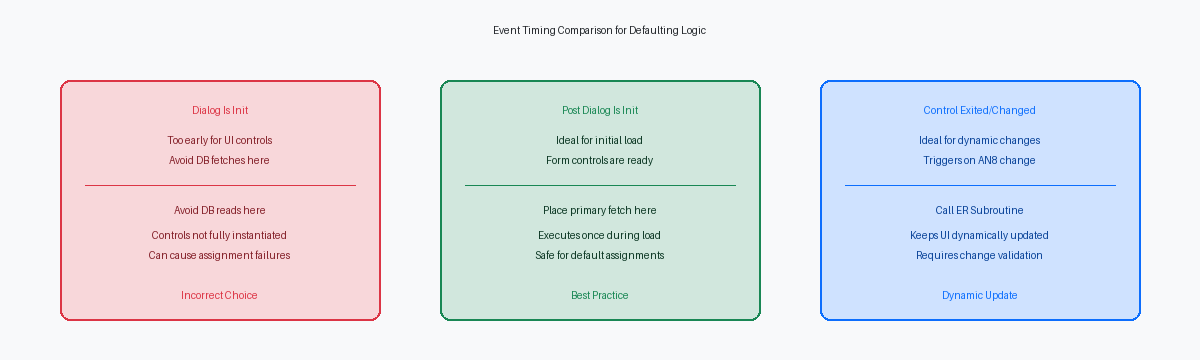
Placing database fetches and UI assignments in the Dialog Is Initialized event is a classic mistake that still slips into custom Find/Browse and Headerless Detail forms. In the FDA runtime engine execution flow, Dialog Is Initialized fires before the form controls are fully instantiated and mapped to their underlying data structures. If you attempt to assign a fetched value from F0101 or your custom F550101 table to a form control here, the runtime engine will frequently discard the assignment, leaving your screen fields blank despite the business function returning a successful CO ER_SUCCESSA system constant indicating that an Event Rule operation completed successfully. status.
Moving this logic to the Post Dialog Is Initialized event guarantees that all form controls, filter fields, and grid columns are completely allocated in memory and ready to accept input. This event executes immediately after the dialog is initialized but before the user gains control of the application or the initial find action occurs. It represents the safest, most stable hook for populating default filter values, such as retrieving a user's default branch/plant or fetching primary address book details from F0101 to pre-populate search criteria.
Developers often muddy this clean separation by duplicate-coding the same F0101 fetch in both the dialog startup events and the Control Exited and Changed Inline event of the Address Number (AN8The standard JD Edwards data item for Address Number, used to identify entities like customers or employees.) control. Doing so triggers a costly double-fetching scenario, where the HTML server queries the database during the initial form load and immediately executes the exact same SQL statementA structured query used to communicate with and retrieve data from a database. again when the control validates. Reserve the Control Exited and Changed Inline event strictly for dynamic re-defaulting when a user manually overrides or inputs a new AN8 value, keeping your startup logic isolated and efficient.
Step-by-Step ER Code for F0101 and F550101 Fetching
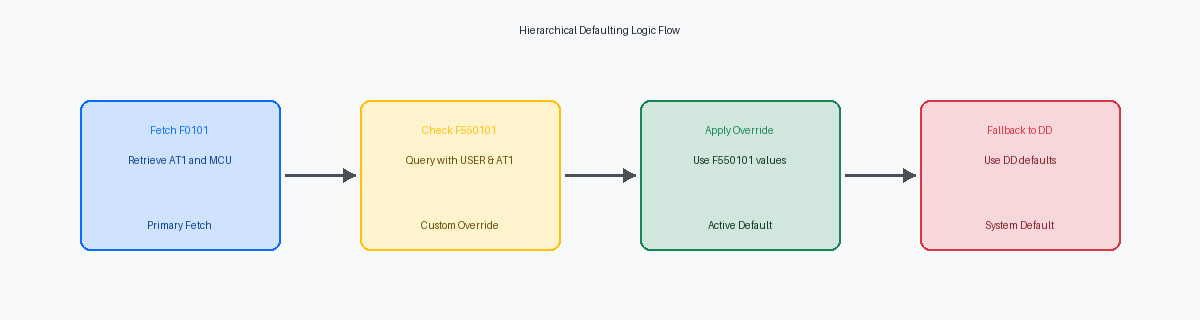
In the vast majority of custom JDE APPLs I audit, developers mistakenly trust form controls to populate sequentially without explicit validation. To prevent database corruption, the Event Rules must first execute a Table I/O Fetch Single against F0101 using the form's Address Number (FC AN8) as the key. This fetch must retrieve the Search Type (AT1) and Alpha Name (ALPH) into local variables. Store these in evt_szSearchType_AT1 and evt_szAlphaName_ALPH to maintain strict control over the execution flow.
Next, query the custom F550101 table using a composite key of the retrieved AT1 and the system variable SL UserIDA system variable in JD Edwards that contains the ID of the currently logged-in user.. This isolates user-specific and department-specific overrides, such as when a planner in warehouse 10 needs different defaults than a clerk in warehouse 20. This Fetch Single targets the custom Business Unit (MCU) mapped to that specific user-role combination in your custom table.
The critical pivot point lies in evaluating the SV File_StatusA system variable that tracks the success or failure of the last database operation. system variable immediately after the F550101 fetch. If SV File_Status equals CO ER_SUCCESS, assign the custom F550101 values to your form controls. If the system returns CO ER_RECORD_NOT_FOUNDA system constant indicating that a database fetch failed to find a matching record., your ER must fall back to a second Fetch Single against the standard F0101 to retrieve the standard MCU, and finally to Data Dictionary defaults if that also fails.
Neglecting this immediate check is how ghost records end up in transaction tables. Without it, the JDE engine carries over register values from the previous successful fetch, causing a user to accidentally write warehouse 10 data to a warehouse 20 record. This three-tier check adds under 5 milliseconds to form load time but eliminates the risk of these cross-contamination errors.
Handling Dynamic Re-Defaulting on Control Validation
Triggering default logic dynamically when a user manually changes the Address Number (FC AddressNumber) requires absolute control over event execution. If you duplicate your F0101 and F550101 database fetches across both the Post Dialog Is Initialized event and the Control Exited and Changed Inline event of the AN8 control, you instantly double your future maintenance footprint. The correct approach is to encapsulate this entire defaulting block inside a single internal ER SubroutineA reusable block of Event Rules that can be called from multiple events within an application.: SetControlDefaults, which you then call from both execution points.
Executing database fetches on every cursor exit can degrade interactive performance, especially over high-latency WAN connections where a single F0101 fetch adds noticeable overhead. To prevent redundant processing and potential infinite loops when setting dependent controls, you must compare the newly entered AN8 against the previous value. Initialize a hidden event variable, evt_szPreviousAN8, during dialog initialization, and wrap the subroutine call in an ER If statement that only executes if the current input is not equal to evt_szPreviousAN8.
Once the validation check passes, call the subroutine to fetch and populate the target controls, then immediately map the current FC AddressNumber to evt_szPreviousAN8 to lock in the new state. This design pattern ensures the application remains highly responsive, executing the SQL SELECT statements against F0101 and F550101 exactly once per actual value change. In a typical order entry application handling thousands of transactions daily, this simple state-check pattern eliminates thousands of unnecessary database queries per user session.
Performance Impact and Debugging ER Defaulting Logic
Every database fetch executed during interactive form initialization adds round-trip latency between the HTML server and the database engine. In high-concurrency environments with hundreds of active users, sequential fetches from F0101 and F550101 compound into screen lag. Combining these tables into a single custom join view, such as V550101A, eliminates one database round-trip, saving valuable milliseconds on each transaction.
To verify the efficiency of this defaulting logic, analyze the JDEDEBUG.logA detailed trace file used by JD Edwards developers to troubleshoot logic and database issues. or the local jdedebug.log generated during a local web client run. Inspecting this trace allows you to isolate the precise SQL statements generated during the Post Dialog Is Initialized event. You must confirm that the runtime is not executing redundant select statements or full-table scans due to poorly constructed Event Rules (ER).
Search the log file directly for the SELECT ... FROM PRODDTA.F550101 statement to verify that the database optimizer is utilizing the composite index correctly. If you see a table scan where a custom composite index was intended, your SQL execution plan is compromised. This trace analysis prevents performance degradation before the custom APPL is promoted to the production environment (PD920The standard name for the JD Edwards Production environment in version 9.2.).
Developers frequently lose hours troubleshooting why their ER defaulting logic fails to populate a form control, only to find the culprit in the control properties. Ensure that the 'Suppress Default Update' property is not checked on the Form Design Aid (FDA) properties for the target controls. When this property is active, the runtime blocks manual ER overrides during the initialization phase, rendering your custom fetch logic useless.
Implementing this defaulting pattern in your APPL code reduces the dozens of lines of repetitive ER often found in legacy 9.1 applications. If you are refining your custom applications, isolating your database fetches to the proper event windows is the most direct path to maintaining a highly responsive EnterpriseOneThe comprehensive suite of ERP software provided by Oracle/JD Edwards. environment.
