




Every time a developer checks out a standard application like P4210The standard JD Edwards Sales Order Entry application. or P4312 in Object Management Workbench (OMW)The central tool in JD Edwards for managing development objects and project lifecycles. to add a single field, they add roughly four to eight hours of retrofit debt to their next Application Update. Form Extensions bypass traditional Form Design Aid (FDA)A development tool used to create or modify JD Edwards application forms and user interfaces. modifications by storing UI changes as XML metadata in User Defined Object (UDO)Customizations stored as data rather than hard-coded modifications, making them easier to manage during upgrades. tables like F9860WA JD Edwards system table that stores master information for User Defined Objects., keeping the base software pristine.
Evaluating when to choose a JDE APPL form extension versus a custom modification requires understanding where low-code capability ends and hard architecture begins. While a Form Extension can map a business view column or trigger an Orchestration without a line of custom C code, it cannot override core business function (BSFN)Reusable pieces of business logic written in C or Named Event Rules that perform specific tasks. validation or manipulate complex grid loops. This guide establishes the technical boundaries to help you protect your upgrade path.
The Architectural Shift from FDA to UDO
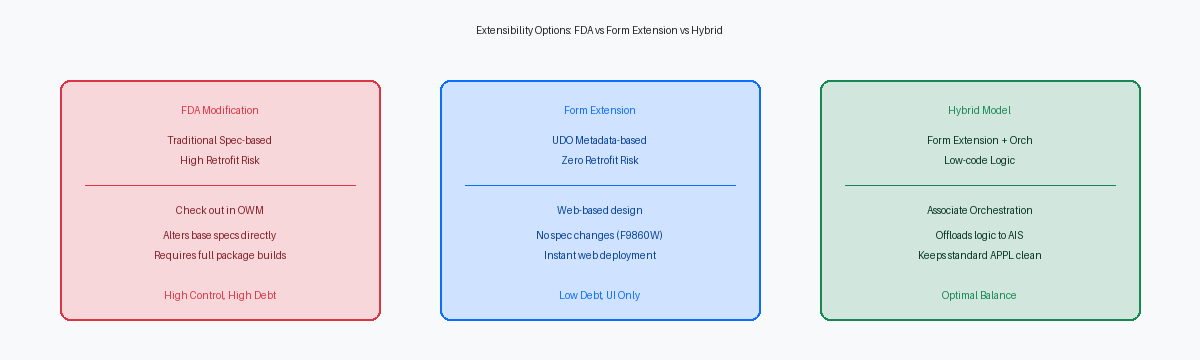
Traditional Form Design Aid (FDA) modifications alter central specifications directly in the JDE database, forcing teams into a rigid lifecycle. To change a single label in P4210, you must check out the object in Object Management Workbench (OMW), apply the change, and build and deploy an update package. This process easily consumes two to four hours of administrative overhead for a minor layout tweak.
Form Extensions completely bypass this pipeline by storing changes as XML-based metadata in the F9860W (User Defined Object Master) and F9861W (User Defined Object Layout) tables. Instead of modifying underlying spec files like gbrspec, the HTML server reads these tables at runtime and merges layout changes on the fly. This shift reduces deployment from hours to seconds, allowing promotion via the UDO administration application (P98220U) without a package build.
Relying on FDA for simple tasks like hiding fields in P4101 or renaming column headers in P4310 creates unnecessary technical debt. Every minor spec modification must be retrofitted during an upgrade, adding dozens of hours to a typical 9.1 to 9.2 migration project. Leaving the base standard APPL specifications pristine eliminates manual merge comparison in Visual ER Compare during your next Tools Release.
Form Extensions execute dynamically on the Application Interface Services (AIS)A server that enables communication between JD Edwards and external systems using REST services. server layer rather than the JASThe Java Application Server that provides the web interface for JD Edwards users. server alone. When a user launches a modified form, the AIS engine intercepts the request, applies the metadata rules, and injects the new fields directly into the presentation layer. This separation of concerns ensures that the core logic of standard C business functions remains isolated, protecting transactional processing integrity.
Quantifying Retrofit Risk and Upgrade Impact
Manual retrofitting remains one of the most volatile phases of any JDE upgrade. When you run an Application Update or a major release upgrade, custom modifications in standard APPLs force your development team into Visual ER Compare, where they must painstakingly merge spec-level changes line by line. This manual process is highly susceptible to human error, particularly when developers must reconstruct event rules across complex form events like Post Dialog Is Initialized or Grid Record is Fetched.
Form Extensions bypass this entire conflict because they do not alter the underlying central objects or merge toolset specifications. Instead, Oracle stores these customizations as XML metadata in the F9860W70 table, which sits completely separate from the standard application specs. Consequently, when you apply an ESUElectronic Software Update; a package of fixes or enhancements released by Oracle for JD Edwards software. or upgrade to a new Tools Release like 9.2.8, these user-defined objects survive completely untouched, eliminating the traditional retrofit cycle for those screens.
In an upgrade project involving a portfolio of over a hundred custom APPL modifications, migrating simple layout changes—such as adding standard table columns, hiding unused fields, or reordering grid columns—to Form Extensions reduced the overall retrofit timeline by approximately 30% to 40%. This shift allowed the development team to compress a projected six-week retrofit window down to under four weeks. More importantly, it freed up senior developers to focus on complex custom C business functions rather than tedious visual alignment tasks.
Because the standard code remains pristine, the risk of introducing regressions during standard object merges drops to absolute zero. When you use Form Extensions to expose fields or associate orchestrations, the pristine JDE code path executes exactly as Oracle designed it. To capitalize on this, establish a strict gatekeeping policy tomorrow morning: any request for APPL modifications must first be vetted for Form Extension viability, and standard FDA modifications should only be approved as a last resort.
Functional Limits Where Form Extensions Fail
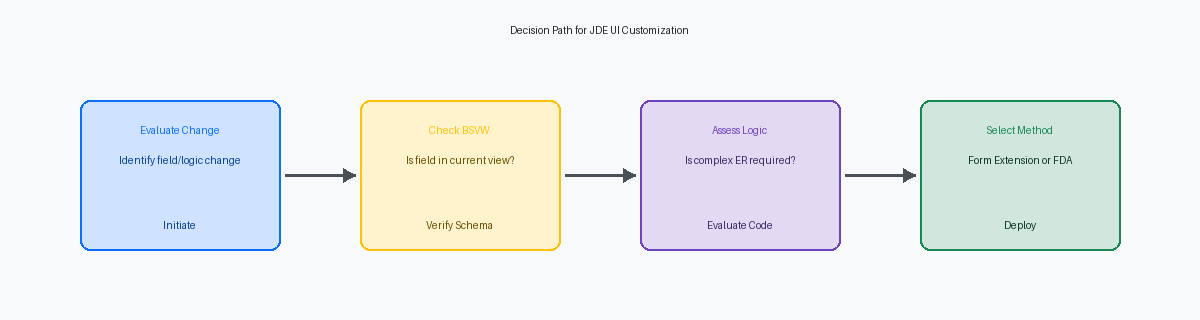
Form Extensions operate strictly within the boundaries of the form's existing Business View (BSVW)A selection of columns from one or more tables used by an application to interact with data.. If a client running EnterpriseOne 9.2 needs to pull a custom field from the F550101 table into the P4210 Sales Order Entry grid, but that table is not part of the primary BSVW join, you cannot resolve this with a Form Extension. To join tables or modify the underlying view structure, you must open Form Design Aid (FDA) and modify the application directly. This architectural boundary prevents developers from bypassing the SQL generation logic defined at the specifications level.
Another hard stop occurs when you need to introduce new grid columns that do not map directly to BSVW columns. In standard FDA development, we frequently use temporary work fields or DD items like MATH01 to hold runtime calculations or flag values. Form Extensions do not allow you to inject these variables into the grid layout or create the data structures required to pass them. If your functional specification requires a calculated column—such as dynamically converting currency rates using custom logic on the glass—you are forced back into traditional FDA development.
Transactional control and complex Event Rules (ER)A JD Edwards scripting language used to add logic to applications and reports without writing C code. remain entirely outside the scope of Form Extensions. If you must execute a custom C Business Function (BSFN) like B550101 within the "OK - Post Button Clicked" event to handle custom inventory allocations, a Form Extension cannot manage the commit boundaries or handle the rollback logic. Similarly, complex grid looping to evaluate multi-row detail data, custom table I/O statements to update non-standard tables, and multi-form interconnects passing custom data structures still require traditional ER coding in FDA. Attempting to force-fit these requirements into UDOs via nested Orchestrations often introduces latency and debugging challenges.
The Hybrid Approach: Orchestrations and Form Extensions
Placing a custom button on P42101 using a Form Extension to trigger an Orchestration eliminates the need to modify Event Rules (ER). By mapping form controls directly to Orchestration inputs via control events, you bridge the gap between simple UI modifications and complex business logic. In one upgrade from 9.1 to 9.2.8, we replaced a multi-thousand-line custom ER modification in P4310 with a single Form Extension button that calls an Orchestration to validate procurement limits. This hybrid pattern keeps the standard application intact, meaning zero retrofit work during the next Tools Release update.
This architecture offloads heavy processing from the HTML web server to the Application Interface Services (AIS) engine, reducing the local web client footprint. Instead of executing nested BSFN loops within the web client's thread, the browser issues a lightweight REST callA lightweight way for different software applications to communicate over the internet using standard web protocols.. This shift reduces the JVMJava Virtual Machine; the engine that runs Java applications and manages system memory. memory footprint on your WebLogicAn Oracle application server used to deploy and manage enterprise Java applications. servers, allowing for higher user concurrency. Shifting a custom inventory allocation routine from native APPL ER to an AIS-driven Orchestration reduced average JVM heap usage by 10% to 15% during peak order entry hours.
Evaluate the performance overhead of AIS REST calls versus native BSFN execution before implementing this pattern on high-volume grid loops. A native BSFN execution running on the enterprise server executes in milliseconds, whereas an AIS REST call introduces network latency and JSON serialization overhead. If you loop through a multi-hundred-line grid in P4210 to perform calculations, triggering an Orchestration per row will degrade performance, adding significant latency, often exceeding ten seconds. For these high-frequency scenarios, stick to native BSFN execution within the standard APPL.
Performance and Caching Implications of UDOs
Traditional APPL modifications compile directly into the F989999 and F989998 serialized spec tables, allowing the JAS server to load pre-parsed Java objects almost instantly. Form Extensions bypass this static generation, storing XML-based metadata that must be retrieved and parsed dynamically at runtime. This dynamic execution adds a minor serialization overhead to the HTML server’s UDO cache the first time a user opens the modified application. While a single user will not notice a minor rendering delta of under a hundred milliseconds, the cumulative CPU impact on your web servers is real when hundreds of users open the same modified P4210 simultaneously.
In high-concurrency environments with more than 500 active users, this architectural difference becomes a scaling bottleneck if your Form Extensions rely heavily on synchronous Orchestration bindings. Every button click that triggers an Orchestration from a Form Extension initiates an outbound REST call from the HTML server to the AIS server. If the AIS thread pool is left at its default limit of 30 concurrent threads, a sudden spike in order-entry traffic will saturate the pool, causing HTTP 503 timeouts. To prevent this, increase the maxThreads setting in your AIS Server server.xml to at least 150.
Proper JVM tuning for both the HTML and AIS WebSphere or WebLogic instances is critical to handle the increased garbage collection overhead from runtime UDO evaluation. I recommend increasing the initial and maximum heap sizes to a minimum of 4096MB for HTML instances running heavy Form Extensions. You must also adjust your garbage collection policy to use G1GCA modern Java garbage collector designed to reduce processing pauses in applications with large memory. to eliminate the stop-the-world pauses that occur when the JVM sweeps expired UDO cache objects. This ensures that dynamic flexibility does not degrade the stability of your production environment.
A Decision Matrix for JDE Tech Leads
Drawing a hard line between configuration and customization saves dozens of hours per modified application during an upgrade. Tech leads must restrict Form Extensions to non-invasive tasks: exposing existing business view columns, hiding or disabling controls, overriding labels, and mapping events to simple Orchestrations. Conversely, route requirements to Form Design Aid (FDA) when you must alter form interconnect data structures, implement custom transaction processing, or override standard grid fetchThe process where the application retrieves data from the database to populate a table on the screen. logic. Trying to force these behaviors into a Form Extension via convoluted Event Rules creates an unmaintainable hybrid that fails during Tools Release updates.
To enforce this boundary, rewrite your Object Management Workbench (OMW) checkout policies tomorrow morning. Establish a strict "UDO-first" development policy requiring architect approval before any standard FDA object is checked out in OWM. If a modification can be solved by extending a form and mapping an Orchestration, developers must not touch base code. This operational guardrail prevents the casual code drift that quietly inflates repositories from 300 modified objects to over 2,000 bloated custom artifacts.
Justifying this shift requires a realistic 3-year total cost of ownership (TCO) calculation. While building a hybrid solution using Form Extensions and Orchestrator adds 15% to 20% to the initial design phase compared to a quick FDA hack, the long-term savings are lopsided. Factoring in the elimination of retrofit analysis, object merge conflicts, and regression testing across three years of continuous delivery Tools Releases, the net TCO drops by more than half per application, often up to 60%. You trade a minor upfront premium for a highly insulated upgrade path during every subsequent Electronic Software Update.
If you are evaluating your custom code estate ahead of a 9.2.8 Tools Release upgrade, the next logical step is mapping legacy P4210 or P4310 modifications against Orchestrator design patterns. Transitioning event rule logic into Form Extensions and UDOs can reduce your retrofit workload by approximately 30% to 40% during subsequent ESU applications. For deeper technical dives, explore my other articles on advanced UDO management or browse my project portfolio to see how these decision matrices were applied to real-world 9.2 retrofit optimization projects for environments with over 10,000 custom objects.
