



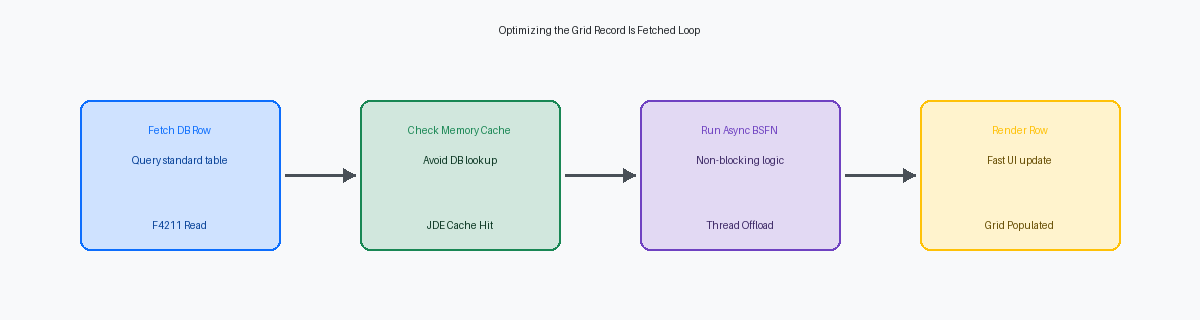
When a custom grid in an application like P554210A custom JD Edwards application, typically a modified version of the standard Sales Order Entry program. takes over ten seconds to load 500 records, basis teamsTechnical administrators responsible for the underlying infrastructure, installation, and maintenance of the enterprise software environment. immediately blame database indexes or WebLogicAn Oracle application server that hosts the JD Edwards web interface and manages Java-based services. JVM heap sizesThe memory allocated to the Java Virtual Machine for running applications; if too small, it can cause system crashes.. In the vast majority of performance audits conducted on EnterpriseOne 9.2, the infrastructure is perfectly fine; the bottleneck is synchronous Event Rules (ER)The JD Edwards programming language used to create logic within applications and reports without writing traditional code. running on the JAS serverJava Application Server; the component that translates JD Edwards logic into a web format for browsers. for every single row. Achieving sub-second response times requires moving away from infrastructure finger-pointing and focusing on JD Edwards APPL grid performance tuning for large datasets within the JDE runtime engine itself.
Effective grid optimization relies on eliminating the overhead of iterative database roundtrips and synchronous Business Function (BSFN)A modular piece of code used to perform specific tasks like calculations or database updates. execution. By shifting heavy validation logic from the Grid Record Is FetchedA specific event that triggers every time the system retrieves a single row of data for a grid. event to asynchronous table I/O or background processing, developers can reduce database calls by 70% to 80%. If your development team is still writing procedural ER loops that fetch the same constants table for every grid row, they are severely degrading user experience.
The Grid Loop Trap and Row-by-Row Execution
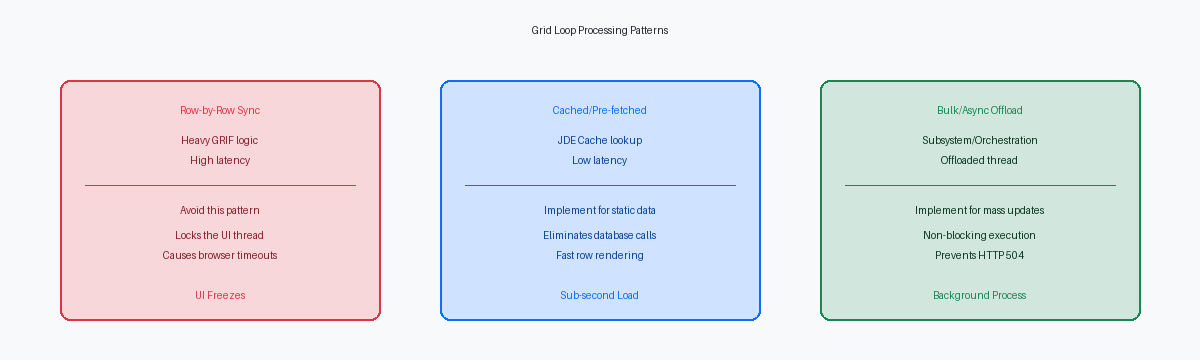
Technical audits of custom APPLs frequently reveal hundreds of lines of Event Rules dumped directly into the Grid Record Is Fetched (GRIF) event. This event fires synchronously for every single database row retrieved before it is rendered on screen. If a user queries 500 sales order lines in a custom version of P4210, the JAS engine is forced to execute that entire block of ER 500 consecutive times before presenting data to the browser.
The performance penalty compounds when developers place heavy Master Business Functions or custom C BSFNs like GetAuditInfo (B9800100) inside this loop. What should be a clean two-second SQL database fetch quickly degrades into a browser freeze lasting nearly a minute. This latency is driven by constant network roundtrips between the HTML server and the Enterprise logic server, as each individual row demands its own round-trip serializationThe process of converting complex data into a stream of bytes to send it over a network between servers. to execute the business logic.
To resolve this bottleneck, move non-essential validation logic out of GRIF entirely. Shifting visual formatting to the Write Grid Line-Before event ensures JDE only processes the 10 to 20 rows actually visible in the current grid page viewport. For heavy calculations, executing them asynchronously or deferring them until a row is selected can reduce initial page load times by 75% to 80%.
If you must calculate values on fetch, configure the grid properties to page-at-a-time processing rather than loading the entire record set. This change restricts synchronous GRIF execution to the active grid page size, preventing the web client from choking on tables containing tens of thousands of records.

Optimizing Data Selection with Selective Reads
Allowing a user to execute an unfiltered search on a Find/Browse form over a multi-million-row F4211The primary database table in JD Edwards used to store Sales Order Detail information. or F0911 table introduces severe operational risks. The resulting open-ended SQL query forces the JAS server to allocate heap memory for hundreds of thousands of grid rows, triggering a Java OutOfMemoryErrorA critical error that occurs when a Java application exhausts its available memory and can no longer function. and crashing the active HTML session. In a recent technical audit, we resolved an issue where a handful of concurrent open-ended queries on F4211 exhausted JVM memory and brought down an entire HTML instance, disrupting dozens of active users.
To prevent full table scans on tables exceeding several million rows, developers must enforce at least one indexed filter field on find/browse forms. Setting the "Filter Criteria" property to "Equal" on an indexed column like SDKCOO or SDDOCO forces the database optimizer to execute an index seek rather than a costly table scan. If the user leaves these required fields blank, the application should programmatically block the query in the "Button Clicked" event of the Find button before hitting the database.
When static filters are insufficient, using the Set Selection system function dynamically in the "Clear Select" and "Set Selection" event sequence restricts the SQL WHERE clause before the grid executes its primary fetch. Crucially, grid properties must be configured to "Page-at-a-Time" processing rather than loading all records into memory at once. This limits the initial database fetch to the grid page size—typically 10 to 50 rows—preventing memory exhaustion while maintaining sub-second response times.
The Cost of Repetitive BSFN and Database Calls
A single Business Function (BSFN) call execution that takes a seemingly negligible 10 milliseconds adds ten seconds of pure latency when executed sequentially across a 1,000-row grid. This latency compounding frequently occurs in the Grid Record is Fetched event, where developers routinely place standard or custom BSFNs to fetch auxiliary descriptions or validate codes per row. The performance degradation escalates when these inner-loop BSFNs repeatedly open and close table handles, such as calling 'F0005 Get UDC' to retrieve User Defined Code descriptions for every single line.
To eliminate thousands of redundant database select operations, developers should cache static or semi-static validation data in memory using JDE Cache APIsProgramming interfaces that allow developers to store and retrieve data in the server's memory for faster access than a database. like jdeCacheInit during the Dialog is Initialized event before the grid loads. Instead of hitting the database or executing F0005 table reads thousands of times for a large grid load, a custom C BSFN can load the required UDC values or cross-reference records into a memory-resident cache once. Sub-millisecond memory lookups then replace disk I/O and network hops, reducing the per-row processing time from 12 milliseconds to under a millisecond.
When complex calculations are unavoidable, shift from row-by-row execution to bulk processing. Pass pre-fetched arrays or data structures containing all key fields to a custom C Business Function in a single memory-mapped call, rather than calling the BSFN once per grid row. This structural change allows the BSFN to perform a single database open operation, execute bulk fetches, process the logic in RAM, and return the dataset to the application layer. Implementing this pattern on a high-volume inventory availability screen can slash transaction times by 80% to 85%, dropping screen load times from fifteen seconds to under three seconds.
Grid Buffer Manipulation and Memory Footprints
We frequently analyze production environments where the HTML server JVM crashes with OutOfMemoryError exceptions during peak shipping or billing runs. The culprit is typically a custom power form or a heavily modified P42101 containing grids with over 100 columns. Every single row loaded into these wide grids instantiates a massive set of grid buffer variables in the JAS memory heap. This multiplies the memory footprint when fifty or more concurrent users query large datasets.
Developers compound this memory pressure by using system functions like 'Copy Grid Row To Grid Buffer' inside Grid Record Is Fetched or Write Grid Line-Before events. This system function does not merely reference existing memory; it duplicates the entire 100-column data structure within the JAS memory heap. When executed sequentially across a 1,000-row fetch, this redundant allocation triggers aggressive JVM garbage collection pauses that freeze the web client.
A common mistake is hiding unused columns via Event Rules using the Set Grid Column Attribute system function. Hiding a column visually does nothing to prevent the JAS server from fetching, processing, and serializing that data. Deleting these dead columns from the grid layout entirely, rather than hiding them via ER, reduces the serialization payload size by more than half and stabilizes the web server's memory profile. For instance, reducing a 120-column grid down to the 20 actually required fields drops the per-row memory overhead by roughly 80%.
Handling Large Datasets with Asynchronous Processing
A hanging web session during a 500-line grid save is typically caused by synchronous execution of heavy validation logic. When placing a custom validation BSFN into the "Row Exit & Changed - Asynchronous" or "Row Is Selected" grid events, developers must explicitly flag that BSFN as asynchronous in the Event Rules properties. This configuration option tells the HTML server to yield control back to the presentation layer immediately, preventing the user interface from locking up while the enterprise server processes the business logic in a parallel thread.
To process heavy calculations on a large grid without degrading the user experience, offload execution to the "Post Button Clicked" event of a hidden button. In one distribution client's inventory allocation APPL, we replaced inline grid calculations with a system where the "OK" button writes modified rows to a memory cache and then programmatically clicks a hidden "Process" button. Executing the bulk calculation logic in the "Post Button Clicked" event of this hidden control ensures the primary grid thread remains responsive, avoiding the synchronous processing traps that trigger browser latency.
When a user attempts to mass-update more than 200 grid rows simultaneously, processing those changes within the interactive APPL thread is an architectural anti-pattern. A more efficient approach is to write the modified grid data to a custom staging table and immediately trigger a subsystem UBEUniversal Batch Engine; the JD Edwards system used for running background reports and high-volume data processing. (such as a custom R55-series driver) or call an AIS-based OrchestrationApplication Interface Services; a modern interface that allows external systems and mobile apps to communicate with JD Edwards. to process the batch in the background. This shift keeps the interactive runtime thread clean and eliminates the HTTP 504 gateway timeout errors that typically occur when WebLogic or an F5 load balancer terminates a connection after its default 120-second threshold.
Diagnostic Tools for Pinpointing Grid Bottlenecks
Database administrators frequently present a sub-millisecond SQL execution plan to prove database health, yet a standard grid like P42101 or P4312 can still take over ten seconds to render 200 rows. This disconnect occurs because database-level metrics miss the application-layer latency introduced by Event Rules (ER) execution. When ER executes on events like Grid Record Is Fetched, the time spent processing variable assignments and table I/O occurs entirely outside the database engine's view.
Isolate this latency by correlating the jas.log with a targeted call stack analysisA diagnostic technique that tracks the sequence of functions or subroutines called during a program's execution to find errors. in the jdedebug.log on the Enterprise Server. The jas.log captures the precise timestamp when the HTML server requests the grid data, while the jdedebug.log tracks the exact millisecond cost of every BSFN execution triggered by the ER. Parsing these logs reveals the cumulative overhead of hundreds of sequential F4101 fetches occurring per grid row.
Use the Performance Monitor within Server Manager to track JAS-to-Enterprise-Server roundtrips. This tool exposes the volume of network hops generated by excessive BSFN calls from the presentation tier. If a single grid load of 100 rows results in hundreds of roundtrips, you have a clear indicator that logic belongs in a consolidated C business function rather than individual ER lines.
Finally, use the Event Rules Debugger to step through the grid loops and observe variable states in real-time. This allows you to catch conditional logic errors that cause infinite loops or redundant fetches of the same master data records. This hands-on tracing is the most direct way to verify why a grid is executing dozens of unnecessary database reads for a single row.
Optimizing grid performance in a 9.2.x environment is only one layer of the stack; bottlenecks often reside in inefficient BSFN cache management or unoptimized SQL execution plans. If your custom applications are lagging, isolating these application-layer inefficiencies is the first step toward restoring system stability and user productivity.
For assistance in auditing your custom EnterpriseOne applications or optimizing your JAS server performance, contact our enterprise ERP consulting team to schedule a technical review.
