




Applying a cumulative Electronic Software Update (ESU)Oracle's method for delivering fixes and enhancements to JD Edwards software. to a stable JDE 9.2 environment can silently overwrite hundreds of hours of custom Form Design Aid (FDA)The JD Edwards tool used to create and modify interactive application screens. modifications in core applications like P4210 or P4310. When Oracle delivers a critical fix, standard Object LibrarianA central repository in JD Edwards that manages the source code and specifications for all software objects. specs are replaced, making a structured JDE APPL object comparison after ESU practical workflow non-negotiable for code preservation. Relying blindly on automated spec merges often results in corrupted specifications or lost event rulesThe JD Edwards-specific scripting language used to add logic to applications and reports., especially when dealing with complex power formsAdvanced JD Edwards form types that allow multiple sub-forms and complex data relationships on a single screen..
To prevent post-go-live regressions, developers must bypass automated merges for high-impact APPLs and execute a manual visual comparison. The common practice of trusting the "Merge" status in OWM (Object Management Workbench)The primary tool in JD Edwards for managing software development, object lifecycles, and project promotions. frequently misses layout deltas and custom vocabulary overrides. By isolating the ESU changes in a dedicated DV920 path codeA set of specifications and objects that define a specific JD Edwards environment, such as Development or Production. prior to PY920 promotion, technical leads can systematically audit FDA control IDs and event rules, ensuring no custom logic is dropped during spec reconciliation.
Isolating the Target: ESU Impact Analysis and Object Checkout
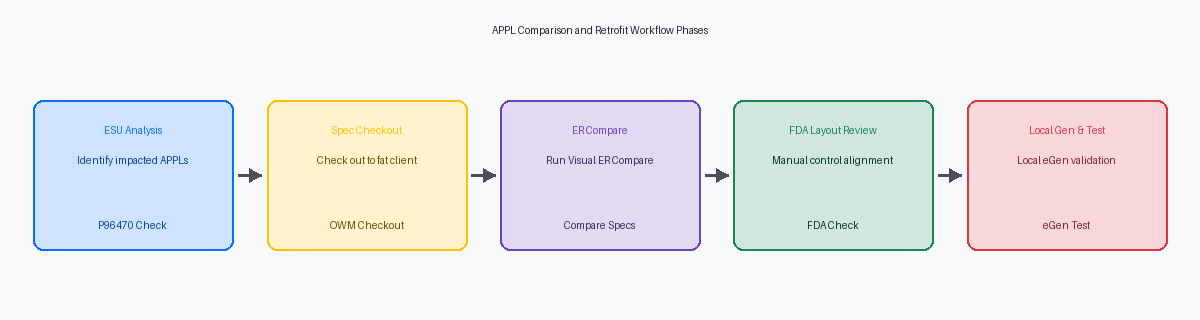
Blindly running Visual ER CompareA utility used to compare the Event Rules (logic) between two versions of a JD Edwards object. without verifying what an ESU actually altered is a highly inefficient process. Before opening Form Design Aid (FDA), you must run the Software Updates application (P96470) in your JDE planner environment to query the ESU history and isolate the exact APPL objects delivered in the update package. This step filters out unaffected forms, leaving you with a precise list of targets—typically fewer than 15 to 20 APPLs in a standard monthly cumulative ESU.
Once you have the target list, check out the custom or modified standard version of the APPL to a dedicated development fat clientA Windows-based workstation with a full JD Edwards installation used for development and administrative tasks. to establish a clean, local specification baseline. Do not trust the local workstation state blindly. Instead, run a quick SQL queryA standard language used to communicate with and manage the underlying database tables. against the F9860 (Object Librarian Master) and F98611 (Data Source Master) tables to verify the central objects source of truth. Confirming that the path code matches your target environment ensures you are not pulling specs from a stale development path or an unpromoted OMW project.
Skipping this validation leads to a classic JDE pitfall: comparing objects immediately using stale local specs. When developers bypass a fresh checkout from the deployment server, the comparison engine generates phantom delta reports, highlighting differences that do not actually exist in the central repository. A clean checkout takes under a minute, whereas chasing a phantom event rule mismatch caused by an outdated local specification can disrupt development schedules and inflate retrofit timelines by 15% to 25%.
Initiating the Visual ER Compare Session
In the Object Management Workbench (P98220), select the target APPL in your development project and click the 'Compare' row exit to fire up the Visual ER Compare utility. Map your comparison source directly to the pristine environment (typically PS920) or the specific ESU environment where the new Oracle code was applied. This isolation step ensures you compare your modified custom object against Oracle's clean baseline, rather than two modified versions in DV or PY. A common mistake here is comparing against local specifications, which fails to isolate the exact delta introduced by the software update.
When Oracle injects new validation logic or standard code blocks into an event like 'Post Dialog Is Initialized', the tool often struggles with line-number shifts. A brief addition of 10 to 15 lines by Oracle can shift your custom modifications down, causing the utility to flag perfectly aligned custom code as a mismatch. Developers must look past these artificial offsets; the actual logic might be identical, but the line index is skewed. In a standard interactive application like P4210 or P4310, these false positives can inflate your review list by dozens of non-existent code discrepancies.
To make this triage manageable, immediately toggle the comparison options to ignore cosmetic white-space differences and comment-only changes. This configuration adjustment filters out 30% to 50% of the visual noise generated by formatting variations between your local environment and the ESU specs. Focus strictly on functional logic changes, such as modified business functionReusable code modules, often written in C, used to perform specific tasks or calculations in JD Edwards. calls or altered table I/OOperations that read from or write data to database tables. statements. Eliminating the formatting noise allows a senior developer to complete the initial delta assessment of a complex APPL in under an hour.
Standardizing the FDA Form Layout and Control Inventory
ER Compare is blind to visual layout changes; it merely highlights the Event Rules backing them. When an ESU alters a complex application like P4210 or P4312, you must open the source and target forms side-by-side in Form Design Aid (FDA) to manually audit the physical layout. Visual control differences, such as a relocated group box or a resized grid, bypass the ER merge utility entirely, meaning any custom screen real estate adjustments must be manually re-applied to prevent overlapping controls.
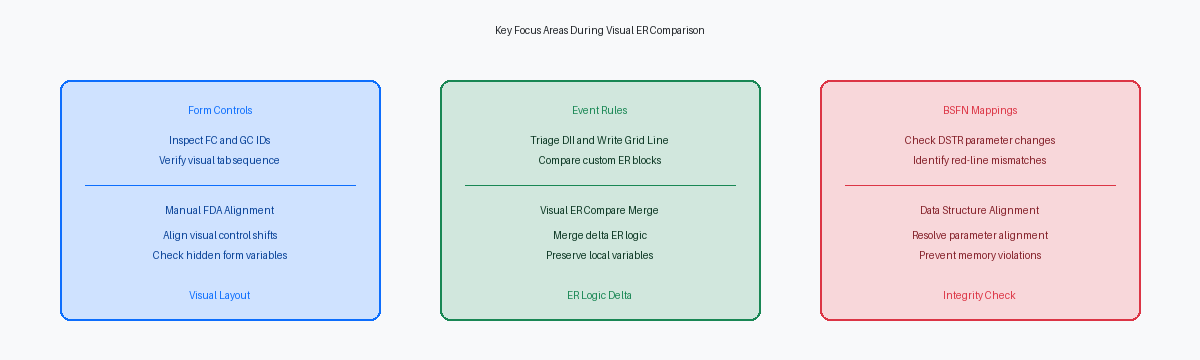
During this side-by-side inspection, map the Form Control (FC)Variables associated with specific fields or elements on a JD Edwards application screen. and Grid Column (GC)Variables associated with specific columns in a JD Edwards data grid. IDs meticulously. Oracle frequently inserts new standard controls or grid columns in ESUs, which can shift the internal ID sequencing of your custom controls. If your custom ER references a specific FC ID that Oracle’s update has reassigned or overwritten, the runtime engine will execute logic against the wrong control, leading to silent data corruption or memory violations at runtime.
Tab sequences and grid column overrides present another high-risk failure point because JDE stores these configurations as binary specification blobs. Manual merges or hasty drag-and-drop adjustments in FDA frequently corrupt these blobs, resulting in erratic cursor behavior or columns that refuse to respect user overrides. To mitigate this, rebuild the tab sequence from scratch on heavily modified forms rather than relying on the specs to merge cleanly.
Finally, scan the ESU's source form for newly introduced hidden controls or filter fields. Oracle developers often use these hidden elements to pass state variables or flag values between forms in 9.2. If your custom ER bypasses these new variables, you risk breaking standard processing logic, particularly in master business function (MBF)A complex business function that handles all the logic and database updates for a major transaction, like sales or purchasing. calls that rely on these hidden parameters to validate transactions.
Triaging Event Rules: What to Inspect First
Opening a massive application like P4210 or P4310 in FDA's Visual ER Compare after an ESU application often presents thousands of lines of delta. To avoid wasting 30 to 40 hours on false positives, target the Dialog Is Initialized (DII) and Post Dialog Is Initialized (PDII) events first. This is where Oracle frequently inserts security patches, processing option checks, or new data privacy routines, and where your custom branch/plant or line-level security logic is highly likely to be overridden. If you miss a delta here, the application may fail silently at launch.
Next, isolate the grid control and jump straight to the Write Grid Line-Before and Write Grid Line-After events. In distribution and manufacturing screens, these two events represent the primary location for custom unit-of-measure conversions, margin calculations, and direct table I/O. Oracle updates to standard grid fetching can completely wipe out custom variables or table fetches inserted into these events. A manual check of every ER line in these grid events is non-negotiable, as even a minor mismatch can result in incorrect inventory commitments in F41021 during runtime.
Pay close attention to standard business function calls within these events where Oracle has updated the underlying data structure (DSTR)A defined set of parameters used to pass data into and out of business functions.. When an ESU introduces new parameters to a function like B4200310, the existing custom ER call will show as mismatched in ER Compare. When resolving these discrepancies, never copy-paste entire blocks of code from the source panel to the target. Copying entire ER blocks destroys the internal GUIDs and local variable pointers within the Event Rules, causing corrupt specifications. Instead, manually insert the specific delta lines and map the new parameters line by line.
Resolving Business Function and Data Structure Deltas
When an ESU updates a standard business function like B4200310 (Sales Order Entry) or B0900049 (G/L Entry), the underlying data structure (DSTR) often receives new parameters at the end of the structure or, in rare cases, in the middle. If your custom APPL or cloned P42101 calls these updated BSFNs, the existing parameter mapping breaks instantly because the runtime engine expects a different memory layout. ER Compare flags these as 'red-line' mismatches, showing a distinct visual misalignment between your custom event rules and the new source specifications.
Ignoring these red lines is a fast track to production instability. A single misaligned BSFN parameter in your APPL can trigger a fatal COB0000012 memory violation error on the HTML server or, worse, cause silent data corruption in transaction tables like F0911 or F4211. For instance, if a short character flag maps into a larger pointer slot because of a shifted DSTR offset, the Enterprise Server will corrupt adjacent memory addresses during execution, leading to orphaned ledger records or broken inventory balances.
To resolve these deltas safely, you must regenerate the APPL's global table specs and header file inclusions, especially if the ESU introduced new table indices or modified business views (BSVW)A JD Edwards object that defines which database table columns are available to an application or report.. In Object Management Workbench (OMW), clear your local spec cache and force a local generation of the affected BSVW and DSTR objects before re-mapping the BSFN call in FDA. Taking a few minutes to rebuild these local specs prevents the active C-engine from referencing outdated typedefs in your local development environment during the final build.
Validating the Merge: Local Generation and Unit Testing
Skipping local HTML generation is the single biggest cause of broken package builds in DV. Once you complete the FDA merge, run the eGenA utility used to generate the Java and HTML files required to run JD Edwards applications in a web browser. utility locally on your fat client to generate the Java/HTML specs for the modified APPL. Do not rely on the enterprise generator; run this directly through your local Web Development Client using your local WebLogic or WebSphere Express instance. This local generation takes under two minutes for a standard application like P4210 or P4310 and immediately flags serialization errors before the code ever leaves your workstation.
Launch the application in your local web environment and execute a strict three-point test plan before checking the object back into Object Management Workbench (OMW). First, validate the standard Oracle execution path to ensure the ESU's core bug fix or enhancement functions exactly as designed. Second, step through your custom logic insertions—such as custom Event Rules on the "Row Is Selected" or "Button Clicked" events—to verify that your modifications still fire without overriding the standard event flow. Third, perform boundary and error injection testing, specifically forcing database constraint violations or passing null values into custom business function data structures to ensure the APPL gracefully throws error 0002 or custom DD itemsData Dictionary items: definitions of the properties and attributes of data fields in JD Edwards. errors instead of crashing the web session.
Only after local validation succeeds should you check the APPL back into OMW and promote it from your local development environment to the DV920 pathcode. Immediately request an update package build for both the client and enterprise server to verify that the spec merge compiles cleanly in a multi-user environment. In the vast majority of upgrade failures, in our experience around 90%, issues like missing DD items or mismatched data structures are caught at this package build stage rather than during user acceptance testing (UAT), saving several hours of troubleshooting per object.
Managing a 150- to 250-object retrofit after a major ESU requires more than just a cursory look at the Visual ER Compare tool. If you are refining your 9.2.8 readiness or cleaning up a legacy custom code estate, these comparison workflows ensure standard Oracle fixes do not overwrite your critical business logic. To bridge the gap between spec comparison and runtime stability, explore our other technical guides on advanced Event Rules debugging and OWM spec management. Alternatively, you can review our technical project portfolio to see how these methodologies scale across 5,000- to 15,000-object environments during multi-wave Tools ReleaseA set of foundation software updates that provide the underlying technology and infrastructure for JD Edwards applications. updates.
