




In FDAForm Design Aid: The JD Edwards development tool used to create and modify interactive application interfaces. (FDA), relying on implicit grid selection or unvalidated GCGrid Column: Variables that represent the data held within the columns of a grid control on a form. values to pass state between forms inevitably degrades database performance. Custom applications frequently generate massive table scans on tables like F4211The Sales Order Detail table in JD Edwards, containing line-item information for sales transactions. or F0911The Account Ledger table, which stores detailed general ledger transaction records. when a child form launches with an unassigned, blank key. This guide provides a concrete JDE APPL parent child form example to pass context correctly, replacing lazy EREvent Rules: The JD Edwards scripting language used to add logic to forms, reports, and table conversions. shortcuts with explicit, strictly typed Form Interconnect (FI)A mechanism used to pass data and parameters between different forms within a JD Edwards application. data structures.
Instead of assuming the JDE engine maintains state across form boundaries, enterprise developers must treat every Form Interconnect as an API contract. By explicitly mapping key fields—such as DOCOA standard JD Edwards data item representing a Document (Order) Number., DCTO, and KCOO—and validating them immediately in the child's Dialog Is InitializedA form-level event that executes logic when a form is first opened but before it is displayed. event, developers can eliminate runtime memory errors and ensure predictable query paths. Implementing this strict validation pattern across a custom APPL inventory requires minimal development effort per form but permanently stabilizes the interactive runtime.
The Fragility of Implicit Context in FDA
Code reviews of custom interactive applications (APPLs) on Tools ReleaseThe foundational software layer of JD Edwards that provides the technical environment for applications to run. 9.2.8 frequently reveal developers relying on the runtime to maintain implicit state between a parent Find/BrowseA standard form type used to search for and list records from a database table. and a child Fix/InspectA form type used to view or modify the details of a single database record. form. They assume the selected grid row remains locked in memory. This reliance leads to a classic GC vs FI scope mismatch where parent Grid Column (GC) values are implicitly referenced instead of being explicitly mapped to Form Interconnect (FI) variables.
Relying on implicit system variables like SV Form_ModeA system variable that indicates the current state of a form, such as Add, Change, or Copy mode. or active grid rows to govern child form behavior introduces severe runtime instability. In high-volume distribution environments, users execute rapid clicks. If a user double-clicks a row and immediately clicks another control, the active row pointer in the parent grid can shift before the child form completes its initialization. The child form then loads with corrupted contextual data, leading to orphaned records in tables like F4211 or F41021The Item Location table, which tracks inventory quantities across different warehouses and locations..
Standard JDE toolsets do not automatically synchronize asynchronous thread states with implicit Form Design Aid (FDA) variables. When the HTML server processes the event queue, the parent grid and the newly spawning child form run on independent lifecycles. If the parent form's execution thread updates an implicit variable while the child form's Dialog Is Initialized event is executing, the child reads the post-shift state.
Explicitly mapping keys through a dedicated Form Interconnect structure is the only supported way to guarantee transaction isolation. Passing primary keys—such as Short Item Number (ITMA unique numeric identifier for an item in the JD Edwards inventory system.) or Document Number (DOCO)—directly through the FI structure freezes the context at the millisecond of the user's action. This bypasses the volatile runtime memory of the parent grid, ensuring the child form operates within its own isolated transaction boundary.
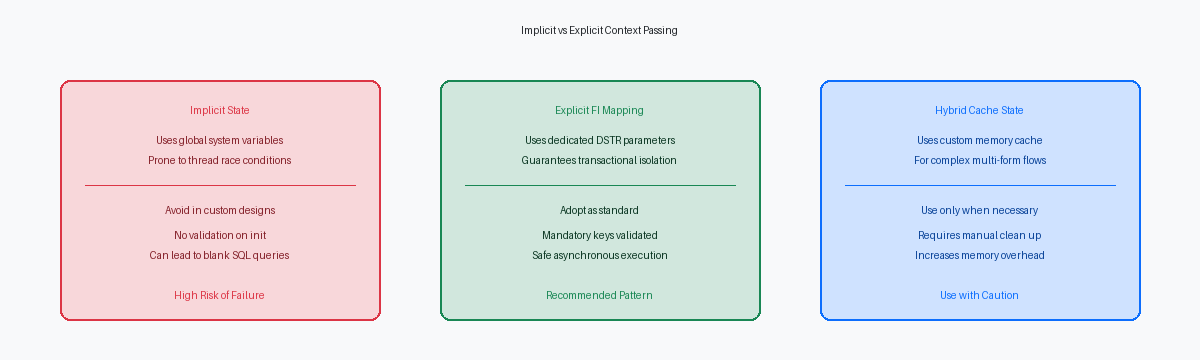
Designing the Form Interconnect Data Structure
In over two decades of auditing custom code, the most frequent cause of broken form transitions is attempting to pass state implicitly through global variables instead of defining a strict contract. A well-designed child form must define its input requirements strictly within its Form Interconnect (FI) data structure. Relying on the FI structure as the sole source of truth eliminates the risk of the child form reading stale memory from the parent's execution thread. This isolation is critical when users open multiple instances of the same application in HTML clients under Tools Release 9.2.8.
When designing this data structure, always match the data dictionary itemsCentralized definitions in JD Edwards that specify field attributes like size, type, and formatting. of the primary keys exactly, such as using AN8The standard data item for Address Number, used to identify entities in the Address Book. for address number lookup against the F0101 or DOCO for work orders in the F4801. Do not reuse generic character fields for primary keys as this bypasses the database-level validation rules during runtime execution. Using the exact DD item ensures that the JDE engine automatically inherits the correct formatting and business functionsReusable code modules, typically written in C, that perform specific business logic or database operations.. Passing an unpadded DOCO value to a child form expecting a F4801 key will invariably fail to select the record because of missing leading zeros.
Include a direction flag in the data structure to explicitly dictate whether the child form operates in ADD, COPY, UPDATE, or VIEW mode. I recommend using a single-character field like ACTION (DD item EV01) with defined values such as 'A', 'C', 'U', and 'V'. Relying on the child form to guess its mode based on whether the primary key is populated is a design flaw that leads to regression bugs. Explicitly passing this flag allows the Dialog Is Initialized event to cleanly disable controls or branch to custom initialization code without ambiguous conditional logic.
Passing Context from the Parent Form
Relying on implicit grid events to pass keys to a child form is a primary source of erratic APPL behavior. In a typical Find/Browse parent form, you must trigger the Form Interconnect call exclusively from explicit user actions, specifically the Row Double Clicked or Select Button Clicked events. If you attempt to trigger the call from grid selection changes or row entry events, you risk executing the interconnect multiple times during a single user scroll, causing unnecessary database fetches and memory leaks in the call stack.
When configuring the Form Interconnect dialog within Form Design Aid, map the Grid Column (GC) values directly to the target Form Interconnect (FI) parameters. Developers often route these through intermediate Business View (BC)A selection of fields from one or more tables used by a form to interact with the database. or Form Control (FC)Variables representing individual fields, checkboxes, or radio buttons on a JD Edwards form. variables, which introduces state synchronization bugs if a user clicks a row but the underlying form controls have not refreshed. Before executing this mapping, explicitly clear the target FI parameters in your Event Rules. This prevents residual, dirty memory values from a previous row execution from bleeding into the child form scope.
You must configure the Form Interconnect call to run synchronously whenever the parent form requires immediate return values or status updates, such as returning an updated order status or a newly generated line number. Running the call asynchronously (the default checkbox in FDA) allows the parent form to continue executing Event Rules while the child form is still open. This asynchronous execution breaks the transactional boundary, meaning any subsequent validation code on the parent form will execute with stale data before the child form has even committed its changes to the database.
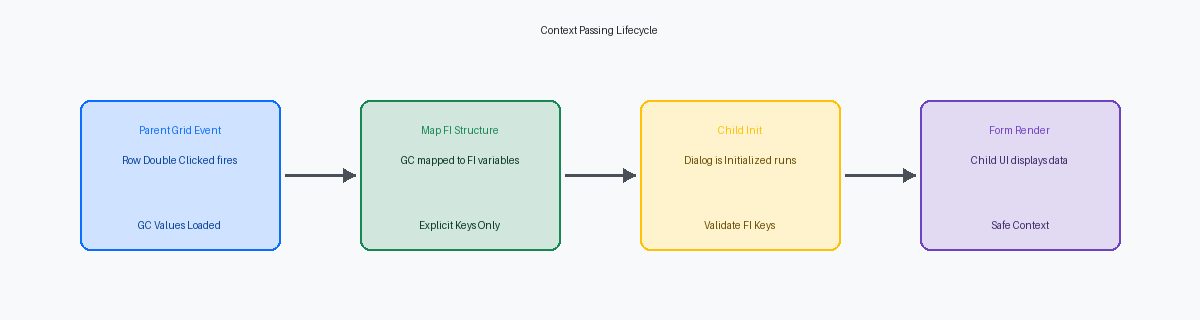
Receiving and Validating in the Child Form
A common failure point in custom JDE application design is allowing a child form to render with corrupt or missing data because validation was deferred. You must execute critical parameter validation inside the Dialog is Initialized event before any database fetches or UI rendering occur. If you wait until Post Dialog is Initialized, the runtime engine has already attempted to bind grid columns or fetch records based on null values, leading to SQL errors or ghost records in your custom tables.
If mandatory key parameters like Address Number (FI mnAddressNumber) or Document Number (FI mnOrderNumber) are blank, terminate the form immediately. Do not write complex nested if-else blocks to bypass the rest of your event rules. Instead, write a clean validation check at the top of the event and invoke the Press Button(HC Cancel) system function to kill the thread. This prevents the user from seeing a broken screen and stops invalid database requests from hitting the Enterprise Server.
Once validation passes, assign the incoming FI parameters to Form Control (FC) variables to make the context visible and editable for the user. Mapping FI directly to FC elements ensures that the form's filter fields or header controls are populated correctly. This mapping also preserves the integrity of the data dictionary overrides you have set up on those specific form controls.
Use the Post Dialog is Initialized event to handle secondary queries that depend on the successfully validated primary keys. For instance, once you know you have a valid DOCO in FC, you can safely call a business function like GetSalesOrderDetail (B4200110) in this event to fetch supplementary description fields or calculate tax rates. This separation of concerns keeps your initialization logic clean and prevents the performance lag associated with redundant database calls during the early phases of the form lifecycle.
Testing and Debugging Form Interconnects
Debugging form interconnects in EnterpriseOne requires moving past the old Active-X debugger and launching the modern HTML local runtime debugger. When you trigger the Call Form event from the parent Find/Browse, pause execution at the boundary of the child's Dialog is Initialized event. This allows you to inspect the memory space of the Form Interconnect (FI) data structure to verify that values like szCompany (CO) or mnAddressNumber (AN8) are not truncated or padded with unexpected trailing spaces before the child form loads.
Once the values pass the boundary, open your jdedebug.logA detailed trace file used by developers to monitor SQL statements and logic execution in JD Edwards. to trace the SQL statement execution. Look specifically for the first SELECT statement generated by the child form's primary business view fetch, typically occurring during the Write Grid Line-Before event or Dialog is Initialized. Verify that the WHERE clause contains the exact key values passed from the parent structure, ensuring the database engine executes an index-aligned query rather than a full table scan due to a null or mismatched key.
You must aggressively test the edge case where a user double-clicks an empty grid row or clicks the select button with no active row context. If the parent form fails to validate the grid selection, it passes null values to the child form, which can trigger unhandled BSFNBusiness Function: Reusable code modules that perform specific business logic or database operations. pointer errors or invalid database fetches. Your child form's initialization logic must intercept these null parameters, present a clean warning message, and terminate the initialization sequence before attempting to execute database operations.
Finally, monitor the engine's behavior when exiting the child form. Review the log to validate that the child form releases its database locks and clears any allocated JDE cache or memory pointers immediately upon executing the Close event. Incomplete cleanup at this stage leads to orphaned memory blocks in the local JVMJava Virtual Machine: The environment where the JD Edwards web client runs and manages memory for user sessions. or lock contention on critical tables like F41021 or F4211, which degrades performance across the entire interactive session.
Improper context passing in Parent/Child forms often accounts for a notable portion of unexplained web client performance lags reported during 9.2.x UATUser Acceptance Testing: The final phase of testing where business users verify that the software meets their requirements., typically estimated at ten to twenty percent. By strictly managing Form Interconnect structures and validating parameters at the entry boundary, enterprise IT teams can eliminate these transient errors, safeguard database performance, and deliver a seamless user experience.
If your organization is experiencing performance bottlenecks or erratic application behavior during a Tools Release upgrade, contact our enterprise architecture team to schedule a comprehensive code quality audit.
