




Cloning P4210 to P554210 to bypass standard modification rules is a classic JDE development shortcut that backfires during upgrades. While it keeps your pristine P4210 untouched, it severs your custom code from Oracle’s continuous delivery pipeline, leaving you to manually port hundreds of bug fixes, security patches, and schema changes. When upgrading from 9.1 to 9.2, or even applying major ESUsElectronic Software Updates; patches provided by Oracle to fix bugs or add features to JD Edwards software., this isolated code becomes a major liability. To execute a JDE APPLShort for Application; a JD Edwards interactive program that users interact with via a web browser. retrofit of a copied standard application safely, you must abandon the "copy and forget" mindset and adopt a structured reconciliation process.
The solution lies in systematically isolating the three distinct states of the code: the original base version from your legacy release, the modified P55 custom application, and the new standard APPL delivered in the latest 9.2 Application Update. By using Form Design Aid (FDA)The JD Edwards development tool used to create and modify interactive applications and their user interfaces. compare tools alongside targeted SQL queries against your Central ObjectsA set of database tables that store the metadata and specifications for JD Edwards objects like applications and reports. specifications, you can pinpoint exact control IDA unique numeric identifier assigned to every element on a form, such as buttons, fields, and grids. mismatches and event ruleThe JD Edwards-specific programming language used to define business logic within applications and reports. deltas. This approach reduces retrofitting time from weeks of guesswork to a predictable three-to-five-day technical task.
The Technical Debt of Copied Standard APPLs
Developers who cloned P4210 to P554210 in EnterpriseOneThe current flagship version of JD Edwards ERP software, designed for web-based enterprise resource planning. 9.1 to bypass the complexity of modifying standard objects traded long-term stability for short-term convenience. While copying a standard application initially isolates custom code from standard updates, it completely severs the object's connection to Oracle's continuous delivery pipeline. When you transition to EnterpriseOne 9.2, this isolated object remains frozen in its 9.1 code state, missing years of critical framework optimizations, security updates, and underlying business functionReusable blocks of C or Named Event Rule code that perform specific business logic or database operations. improvements.
Between the release of 9.1 and the current 9.2 continuous delivery model, standard sales order entry applications have received well over a hundred ESUs. These updates do not just fix minor UI bugs; they introduce critical regulatory compliance patches, support new database schema columns in the F4201 and F4211 tables, and optimize cache management within the underlying business function calls like B4200310. Leaving your legacy P554210 unretrofitted on a modern Tools ReleaseThe underlying technology layer of JD Edwards that manages the runtime environment, security, and communication between components. like 9.2.8 means executing outdated, potentially data-corrupting logic against an updated database schema.
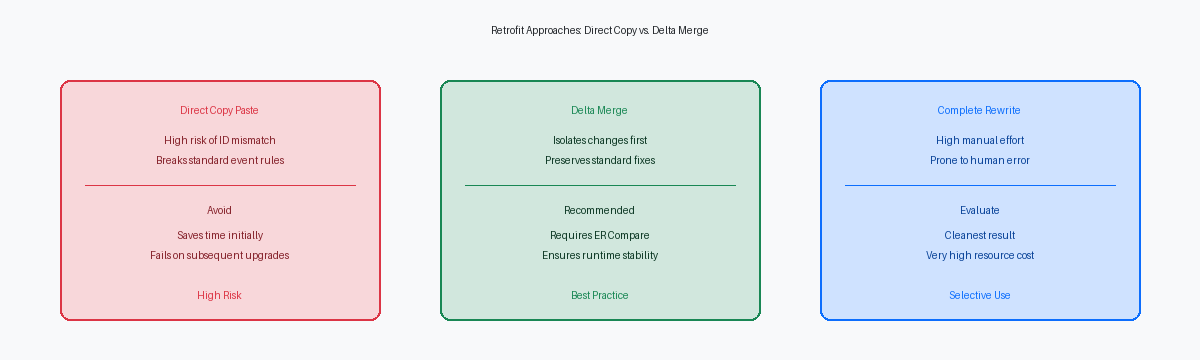
A structured retrofit strategy requires a complete shift in perspective: you must treat the legacy copied application as a customized variant of the new 9.2 standard application, rather than as an independent, static object. Instead of attempting to force-migrate the 9.1 P554210 directly into the 9.2 environment, you must identify every custom event rule, form control, and variable addition in your legacy object and re-apply them onto a fresh copy of the 9.2 P4210. This approach ensures your custom application inherits the latest security patches, performance enhancements, and native integration capabilities of the modern platform, preventing silent data corruption in your production environment.
Isolating the Oracle Delta and Custom Delta
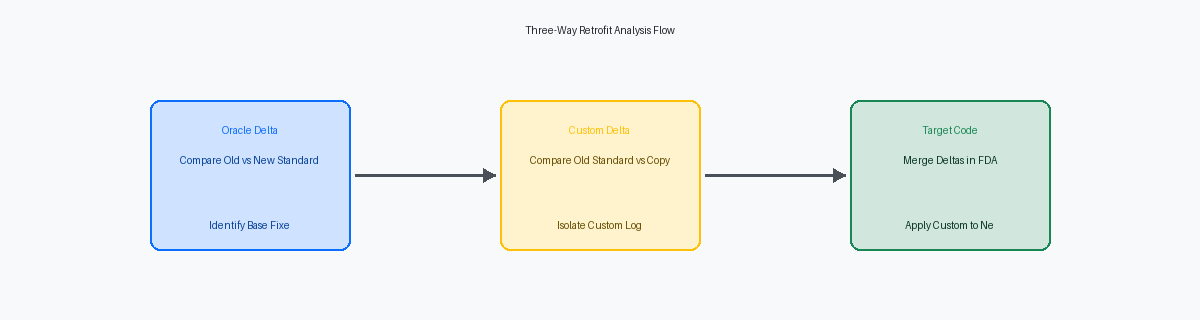
Developers routinely make the mistake of immediately comparing their custom 55-prefix copy against the new standard object in the target environment. This shortcut bypasses the critical step of establishing a clean three-way baseline. Before opening Form Design Aid (FDA) in the target environment, you must secure three distinct objects: the original standard APPL at the source release (e.g., P4210 at 9.1), the current custom copy (e.g., P554210), and the new standard APPL at the target release (e.g., P4210 at 9.2). Without these three reference points, you cannot distinguish between an intentional custom modification and a structural change introduced by Oracle.
Once these baselines are isolated, run the Visual Compare for Event Rules (ER Compare) tool to contrast the old standard APPL directly with the new standard APPL. This step isolates Oracle's functional evolution over the release gap, such as new database table columns, altered business function parameters, or modified form flow. You must generate a detailed delta report documenting every modified event rule, newly introduced form control, and changed business function call within the new standard object. For instance, if Oracle added a new grid column to handle a localizationSoftware adjustments made to meet the specific legal, cultural, or linguistic requirements of a particular country or region. requirement in the target release, this report flags the exact event rules where that column is initialized.
Next, execute a parallel comparison between the old standard APPL and your custom copy to extract the precise modifications your team introduced years ago. This comparison filters out the standard baseline, leaving you with a clean inventory of custom event rules, custom form controls, and overridden business function mappings. In a typical retrofit of a complex application like P4312, this process reduces the volume of code you must manually review by more than two-thirds. It prevents developers from accidentally re-implementing logic that Oracle has already standardly resolved in the newer release, saving dozens of hours of unnecessary coding and unit testing.
Reconciling Form Layouts and Control IDs
Form Design Aid (FDA) assigns sequential, internal Control IDs to every grid column, push button, and input field behind the scenes. These IDs—such as ID 12 for a grid or ID 48 for a custom Form Exit—are hardcoded directly into the compiled Event Rules (ER) specs. When a developer manually recreates a form or copies controls from a standard application like P4210 to a custom P554210, FDA assigns brand-new, sequential IDs based on creation order. This mismatch silently scrambles the underlying ER mappings, leading to immediate compilation failures or, worse, runtime memory violations (such as COB0000012 errors) on the HTML server when the engine attempts to write to a control ID that does not exist in the specifications.
In a 9.1 to 9.2 upgrade, Oracle frequently injects new grid columns or hidden filter fields into standard applications to support new database columns or business logic. If your custom copy lacks these new controls, or if their data dictionaryA central repository that defines the attributes, formatting, and validation rules for all data fields used in the system. overrides do not match exactly, any standard Business Function (BSFN) mapped to the form structures will fail during execution. For instance, if a modified P4312 receiving application calls F4312EndDoc and misses a newly required system-assigned grid column ID, the BSFN will fail to map the pointer, resulting in orphaned cache records in the F4311 work files.
To reconcile these layout differences without rebuilding from scratch, export both the new standard XML and your custom XML specs using the Object Management Workbench (OMW)The primary change management and version control tool used by JD Edwards developers. export tool. Comparing the raw XML files allows you to verify that control IDs, data dictionary overrides, and tab sequences match the 9.2 standard application exactly before checking the object into the shared path codeA set of folders or database locations that contain a specific version of JD Edwards objects (e.g., Development or Production).. For complex interactive applications with over 50 form controls, utilizing the FDA Compare tool in Tools Release 9.2.x.x is the most reliable way to visually isolate ID drift and manually align properties before generating the APPL on your development client.
Merging Event Rules and Business Function Calls
Copying and pasting massive blocks of Event Rules (ER) from a newly updated standard application into your custom clone is a fast track to memory leaks and runtime crashes. Form Design Aid (FDA) often fails to resolve internal variable IDs, control IDs, and grid columns during a bulk paste, corrupting the underlying specifications. When you force-paste ER, the tool frequently assigns orphaned pointers to variables that exist in the source but are missing or mapped differently in your target clone. The only reliable approach is to use the newly updated standard code as your immutable foundation and surgically reapply your custom logic on top of it.
This foundation-first approach becomes critical when dealing with core master business functions like F4211 Edit Line (B4200310). Between older releases and the latest 9.2 Application Updates, Oracle regularly alters BSFN data structures, adding new parameters for features like advanced pricing, real-time integration, or localized tax processing. If your custom application calls B4200310 using an outdated data structure mapping, the runtime engine will misalign the memory stack, leading to silent data corruption in the F4211 table or immediate web client failures. You must open the updated standard application, analyze how the new parameters are mapped in the standard events (such as Row Exited/Changed-Asynchronous), and mirror those exact mappings in your custom version.
To prevent the next Tools Release or ESUs from turning into another manual scavenger hunt, you must enforce strict documentation standards directly inside the ER. Every single custom ER insertion must be wrapped in standardized comment blocks detailing the developer's initials, the date of the modification, and the specific SARSoftware Action Request; a unique tracking number used by Oracle to identify a specific bug fix or enhancement. or internal task number. Placing these markers immediately before and after the custom code blocks allows comparison tools like Beyond Compare or the JDE ER Compare utility to instantly isolate custom overrides from standard Oracle logic during future upgrades. This discipline transforms a chaotic code-merging exercise into a predictable, repeatable process that takes hours instead of weeks.
Testing and Validating the Retrofitted APPL
A successful retrofit of a copied application like P554210 is only as good as the transactions it commits to the database. Unit testing requires executing every standard sales order entry transactional path—including order hold releases and tax calculations—alongside your custom modifications to guarantee zero regression. If custom logic triggers on the "OK Post Button Clicked" event, you must verify that standard master business functions like B4200310 still process the cache correctly without creating orphaned records.
Do not rely on the on-screen "Transaction Successful" message to confirm database integrity. Run a trace using SQL Server Profiler or Oracle Active Session History (ASH) during test runs to inspect the exact SQL statements hitting the F4201 and F4211 tables. This validation ensures that custom fields are written to the database in the correct sequence, and that no asynchronous business function failures are silently rolling back standard columns while leaving custom tables out of sync.
Upgrading to a newer Tools Release, such as 9.2.8, introduces changes to the web runtime container that can break custom web client behaviors. Monitor the jas.log on your HTML server in real time while navigating the retrofitted forms to catch silent Java null pointer exceptions or AISApplication Interface Services; a server component that enables mobile and external applications to interact with JD Edwards logic. rendering mismatches. A common point of failure occurs when custom form extensions interact with retrofitted grid controls, throwing Web Runtime errors in the log even if the form appears correct on screen.
The final validation step is to execute a full package buildThe process of compiling and assembling JD Edwards objects into a deployable format for servers and clients. and deploy the retrofitted APPL to a clean path code, such as DV920. This build verifies that all dependent objects—specifically custom data structures (DSTRs) and business functions (BSFNs) called by your APPL—compile cleanly in the enterprise server's C compiler. Skipping this step often leads to runtime errors in PY920, usually because a developer forgot to check in a modified data dictionary item or an auxiliary header file.
Maintaining a 55-prefix copy of a standard application like P4210 or P4310 is often a technical debt trap that doubles the retrofit effort during upgrades. By treating the upgrade as a structured reconciliation of Oracle's base updates and your custom delta, you preserve system stability and ensure your custom applications benefit from continuous delivery without the risk of silent data corruption.
If you are planning a complex JD Edwards upgrade and need to reconcile legacy customizations, contact our enterprise ERP consulting team to schedule a technical assessment.
