




In our audits of custom JDE 9.2The version of JD Edwards EnterpriseOne ERP software used for business management. codebases, we routinely find that a significant portion of performance bottlenecks in custom interactive applications—often between 30% and 50%—stem from poorly implemented Form InterconnectsA method in JD Edwards to pass data and open one application form from another.. Developers often configure a JDE APPLA JD Edwards application object that contains the forms and logic for a specific business task. row exit to open a related standard application as a simple point-and-click mapping, but calling a heavy standard application like P4210The standard JD Edwards application used for Sales Order Entry. (Sales Order Entry) from a custom grid without isolating the transaction boundary can lead to orphaned database locks in F41021The Item Location database table that tracks inventory quantities by location. or F4211.
To prevent these locking issues and memory leaks, you must precisely control how GC variablesGrid Column variables that hold the data for a specific row in a JD Edwards grid. map to the target FI structureThe Form Interconnect data structure used to pass parameters between different application forms.. This technical example demonstrates how to safely pass context from a custom grid, handle null pointer risks in the target form's Dialog Is Initialized event, and ensure the calling application releases its database cursor immediately. Implementing these precise Event Rules (ER)The proprietary scripting language used to create business logic within JD Edwards applications. mappings eliminates the ghost locks that frequently plague multi-threaded HTML client sessions.
Anatomy of a Row Exit Form Interconnect
A common failure point in custom FDAForm Design Aid, the development tool used to create and modify JD Edwards application interfaces. development is treating a row exit as a glorified button click rather than a context-aware transaction. When a user selects a row in a grid and clicks a row exit, the runtime engine executes the underlying event rules within the scope of that specific row, utilizing Grid Column (GC) variables. If your custom application has multiple rows selected or if the user clicks the exit without an active selection, the runtime will pass null or garbage values to the Form Interconnect (FI). To prevent this, you must explicitly validate that a row is selected by checking the system variable SV Selected_Grid_Row before triggering the call.
The mechanics of the transition rely entirely on mapping these GC variables to the target form's Form DSTRData Structure, a defined set of fields used to pass data between applications, reports, or functions.. When you configure the Form Interconnect in FDA, the tool exposes the target form's receiving structure, which acts as a strict contract between the calling and receiving applications. Mismatched data types or unmapped key fields in this interconnect will not trigger a compiler error in Event Rules, but they will cause silent runtime failures or cause the target application to default to an incorrect action code like Add instead of Update. For instance, passing a math numeric document number into a character string parameter will silently fail to load the target form's business viewA JD Edwards object that selects and joins specific columns from database tables for use in forms..
Standard applications such as P4210 (Sales Order Entry) or P0911 (Journal Entry) require a complete set of primary keysUnique identifiers in a database table that ensure each record can be specifically located. to bypass their initial find/browse screens and load a record directly into the revision form. For P4210, this means mapping the Order Number (DOCO), Order Type (DCTO), and Order Company (KCOO) from your custom grid columns directly to the corresponding FI parameters of the target form, typically W4210A or W4210B. Omitting even one key, such as KCOO, forces the target application to default to an inquiry state or display a "Record Not Found" error. This direct mapping bypasses the typical search-and-select latency, saving users 3 to 5 seconds per transaction and preventing unnecessary database queries.
Extracting Selected Row Context Safely in FDA
I regularly review custom FDA code where developers grab values from FCForm Control variables, which represent the individual data fields visible on a JD Edwards form. or Event Rules (ER) variables instead of Grid Column (GC) variables during a row exit execution. In the Button Clicked event of a Row Exit, the runtime engine points specifically to the active grid row. If you reference a stale ER variable populated during a previous 'Grid Rec is Fetched' loop, you will pass the wrong keys—such as a legacy Address Book number (AN8) or Order Number (DOCO)—to the target application. This mismatch results in either a blank screen or, worse, a user updating the wrong database record.
When users select multiple rows—say, 5 or 10 lines in a custom shipping grid—the default single-row logic breaks. To process this selection safely, you must implement a loop using the Get Selected Grid Row Count and Get Next Selected Row system functions. Initialize a counter using Get Selected Grid Row Count to determine if you have work to do, then loop through each index using Get Next Selected Row to fetch the specific GC values for that row pointer.
Before invoking the Form Interconnect within this loop, perform a strict null-value check on critical GC keys like Company (CO) or Document Type (DCTO). Passing an uninitialized or null key triggers an open-ended query in standard target applications like P4210 or P4310, which can lock up the user's HTML session or degrade database performance on the Enterprise ServerThe central server that processes business logic and manages database requests for JD Edwards.. If the target form does not support multi-select, your code must intercept the loop when the row count exceeds 1, warning the user with a standard JDE error message instead of spawning multiple separate application windows sequentially and crashing the browser call stack.
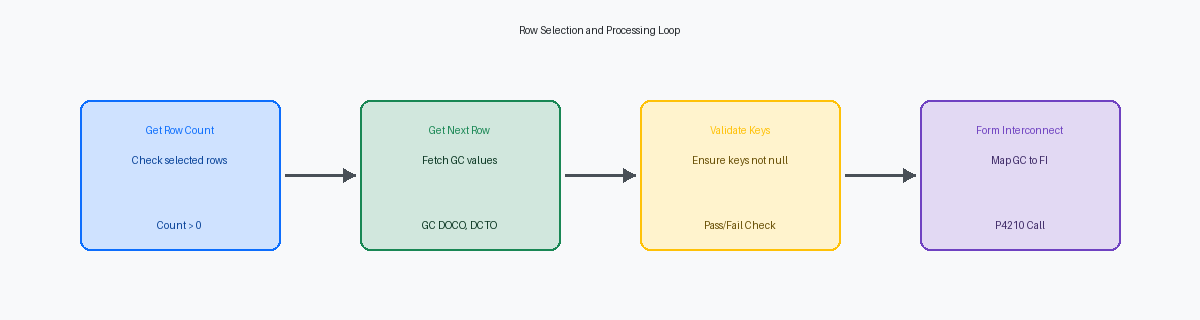
Code Example: Calling P4210 from Custom APPL
In 9.2 development, linking a custom workbench like P554211 to the standard Sales Order Entry application (P4210) requires strict adherence to Form Design Aid (FDA) mapping rules to prevent memory leaks or broken thread states. When a user triggers the row exit, the runtime must pass the unique key of the selected grid row directly into the target form’s data structure. For P4210, this target is typically the W4210A form, which expects a precise three-key composite to locate the correct record in the F4201 and F4211 tables.
Inside the "Row Exit & Changed - Instant" event of your custom row exit, you must explicitly map the Grid Column (GC) values to the Form Interconnect (FI) variables of W4210A. Failing to map all three key fields—order number, order type, and order company—forces P4210 to initialize a blank order, a frequent source of helpdesk tickets. The exact Event Rules mapping in FDA looks like this:
// Call Sales Order Entry (P4210) from Custom Row Exit
Call(App:P4210, Form:W4210A)
  GC OrderNumber       -> FI mnOrderNumber
  GC OrderType         -> FI szOrderType
  GC OrderCompany      -> FI szOrderCompany
  "2"                  -> FI cVersionMode
  "1"                  -> FI cActionCode
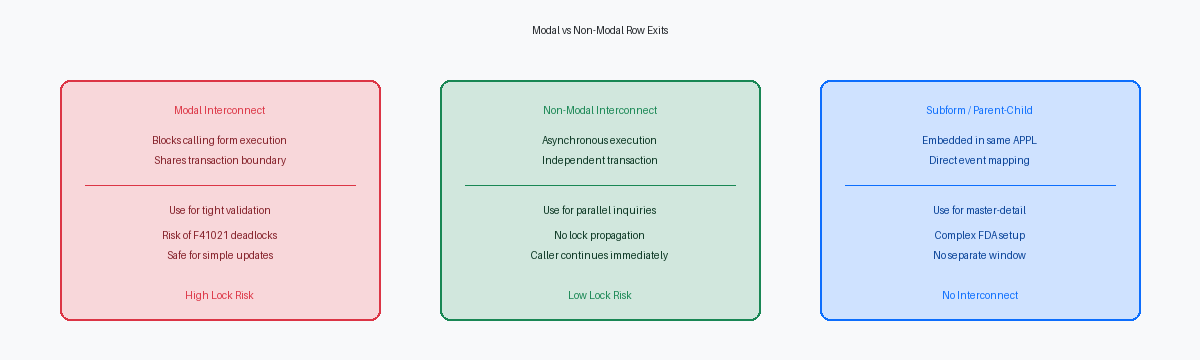
Choosing the correct execution flag determines how the HTML client manages the thread stack. If your P554211 needs to immediately refresh its grid with updated quantities or status codes when the user returns, you must set the Form Interconnect to ModalA window mode that locks the parent application until the child window is closed. execution. This blocks the calling thread, ensuring the user completes their work in P4210 before control returns to the custom application where a Press Button(HC Find) event can refresh the grid. Conversely, if the user only needs P4210 as a parallel reference window to verify line details without locking the caller's thread, configure the interconnect as Non-ModalA window mode that allows the user to interact with the parent application while the child window is open.. This allows the user to drag the P4210 window to a second monitor while keeping the P554211 grid active for continuous data entry.
Common Pitfalls in Standard App Row Exits
A common oversight in Form Design Aid (FDA) occurs when a developer passes a blank or uninitialized variable into a target form's primary key structure. In standard applications like P4101 or P4210, receiving a blank key causes the target runtime engine to default to 'Add' mode instead of the intended 'Update' or 'Inquiry' mode. To prevent this, you must explicitly verify the target form’s 'Form Properties' to ensure it is configured to accept the specific action code—such as Change or Inquiry—that your custom application is passing. If the target form is not configured to allow the incoming action, the runtime will fail silently or dump the user into an incorrect entry screen.
Managing transaction boundaries across form boundaries is critical to preventing database contention. When you trigger a modal interconnect, the called application runs within the caller's thread and shares its transaction boundary. If your custom application has already updated a record in the Item Location table (F41021) and then calls a standard application like P4112 modally, the secondary application may attempt to lock the same F41021 record. This mismatch in transaction processingA mechanism that ensures a group of database operations are all completed successfully or not at all. boundaries results in an immediate database deadlock, freezing the user's session until the database engine times out.
Another frequent issue occurs when developers process grid rows sequentially within a loop but fail to clear the Form Interconnect structure variables before the next iteration. If a subsequent row has a blank value in a field like Location (LOCN), the Form Interconnect structure will retain the value from the previous row. This leads to stale data being passed to the target application, corrupting the context of the secondary transaction. Explicitly clearing the data structure variables at the start of each loop iteration is the only reliable way to guarantee data integrity across multi-row execution paths.
Debugging the Row Exit Interconnect Stack
When a row exit to a standard application like P4210 fails to pass key data silently, guessing which variable is null is a waste of cycles. Open your local jdedebug.logA detailed log file used by developers to trace the execution of JD Edwards logic and SQL statements. and search directly for the string "Form Interconnect" to isolate the exact data structure parameters being passed at runtime. This log trace exposes the precise values of the incoming and outgoing structures, letting you verify if the grid column values actually mapped to the target form's data structure during the button clicked event.
If the values appear correct in the log but the target form still loads blank, the breakdown is happening during initialization of the target application. Attach your local C debugger and place a breakpoint inside the standard application's Dialog Is Initialized event or the underlying C business functions like B4200310. This allows you to step through the execution thread and confirm whether the target application's internal variables are overwriting your incoming form interconnect values before the form renders.
Spec mismatches between environments frequently cause silent failures where the row exit works in the development client but crashes on the web. Inspect the HTML server e1root.log files; you will find "Form Structure Mismatch" warnings if the local specifications on your development client do not align with the serialized packages deployed to the enterprise server. This mismatch typically happens when a developer modifies a standard form data structure or adds custom parameters without rebuilding and deploying both the client and server packages.
When the row exit executes flawlessly on your local development machine but completely fails to launch the standard application on the HTML web client, check your Object Configuration Manager mappings. Ensure the OCMObject Configuration Manager, the system that tells JD Edwards where to find specific data and where to run logic. mappings for the target application are active and pointed to the correct data source for the environment you are testing in, such as DV920. A misconfigured OCM mapping will block the web runtime engine from resolving the form interconnect call, leaving the user stuck on the source grid with zero visual feedback.
Refining row exit logic in Form Design Aid is a fundamental step toward building applications that survive the next Tools Release update without manual intervention. For enterprise IT leaders managing a custom JDE estate, establishing these rigorous development standards is essential to ensuring long-term upgradeability and system stability.
