




In over two decades of troubleshooting custom JDEJD Edwards, an Enterprise Resource Planning (ERP) software suite by Oracle used for managing business processes. applications, I routinely see custom APPLA JD Edwards interactive application used by end-users to view or manipulate data through a graphical interface. Find/Browse or Header Detail forms that take four to eight seconds to render simply because developers cram synchronousA process where the system waits for a task to finish before moving to the next one, potentially causing delays. F0101 or F4101 Table I/OOperations used within JD Edwards to read, write, update, or delete data directly from database tables. fetches into the Dialog Is InitializedA JD Edwards form event that executes logic before the application window is displayed to the user. event. This design flaw bypasses the JDE engine's native database-to-grid mapping, forcing the HTML server to wait on serialized database roundtrips before rendering the first pixel.
To fix this, we must transition from synchronous, procedural fetching to event-driven deferral. We will dissect a concrete JDE APPL table I/O example to avoid slow form load issues by shifting secondary validation fetches out of form initialization and into the Grid Record Is FetchedA JD Edwards event that runs automatically as each individual row of data is loaded into a grid. event. This single architectural adjustment regularly reduces interactive form launch latency by 75% to 80% while keeping the HTML server's JVM thread poolA collection of worker threads in the Java Virtual Machine that handle concurrent tasks for the web server. clean.
The Mechanics of Form Load Latency
When a user opens a custom interactive application, the JAS engineJava Application Server engine, the component that manages the web-based interface and communication for JD Edwards. processes the form creation lifecycle sequentially. The Dialog Is Initialized event blocks the presentation layer thread entirely until every synchronous line of Event Rules (ER)The proprietary scripting language used in JD Edwards to define business logic and automate tasks. finishes executing. If your developers treat this event as a dumping ground for setup logic, the HTML client cannot even begin to paint the screen.
Running multiple Table I/O operations like 'Fetch Single' or 'Select/Fetch Next' loops against heavy master tables like the Address Book Master (F0101) or Item Master (F4101) during this block phase creates an immediate performance bottleneck. Each individual fetch requires a round-trip from the HTML server to the enterprise server, and then to the database server. This chatty behavior compounds network latency, especially in hybrid cloud topologies where the database and HTML servers reside in different subnets.
While these database round-trips occur, the end-user stares at a blank or frozen web browser. The HTML client is stuck waiting for the JAS engine—and, in modern deployments, the AIS serverApplication Interface Services server, which provides a REST API interface for JD Edwards to interact with external apps.—to complete the synchronous metadata processing and return the initial data payload. Until that payload is delivered, the browser's rendering engine cannot execute the client-side JavaScript required to draw the form controls.
In our performance audits of legacy 9.1 systems upgraded to 9.2, a typical unoptimized custom APPL takes eight to twelve seconds to load when it executes more than a dozen sequential database reads before rendering the form. Replacing these sequential reads with set-based logic or lazy loading is the single fastest way to drop form load times below the one-to-two-second threshold.
Isolating Table IO from Database Performance
I regularly see developers waste days tuning database indexes on high-volume tables like the F0911 or F4111 to resolve a sluggish screen. They assume that if a form initialization is slow, the database must be struggling to find the records. The reality is counter-intuitive: the database is often performing perfectly, but the sheer volume of sequential round-trips between the Enterprise Server and the database engine is killing performance. If a custom application executes a Fetch Single inside a loop hundreds of times during startup, even a highly optimized index-read taking a few milliseconds aggregates into a multi-second delay before the grid loads.
This latency mismatch creates a classic disconnect between DBAsDatabase Administrators, professionals responsible for the performance, integrity, and security of a database. and JDE developers. Your database administrator will look at Oracle Database or SQL Server ProfilerA diagnostic tool used to monitor and analyze the performance of SQL Server database queries. and report zero issues, pointing to low CPU utilization and sub-millisecond execution times. Meanwhile, your JDE HTML server logs and jas.logA diagnostic log file on the JD Edwards HTML server used to track web-tier errors and performance issues. files show massive CallObject KernelA server-side process in JD Edwards responsible for executing business functions and logic on the Enterprise Server. elapsed times for the associated application. The bottleneck is not data retrieval speed at the disk level; it is the network and middlewareSoftware that acts as a bridge between different applications or system components, such as the JAS server. overhead of managing thousands of individual database operations in a serial fashion.
To bypass this architectural bottleneck, you must eliminate row-by-row processing during the Dialog Is Initialized event. Instead of executing individual Table I/O statements within an Event Rules loop, refactor the logic to use set-based processing or defer the loading of auxiliary data. For instance, instead of querying F4111 transactional data for every row in a 500-record grid, fetch the unique keys into a JDE cache once at form startup, reducing hundreds of database round-trips to a single, memory-speed lookup.
Strategic Event Placement for Table IO
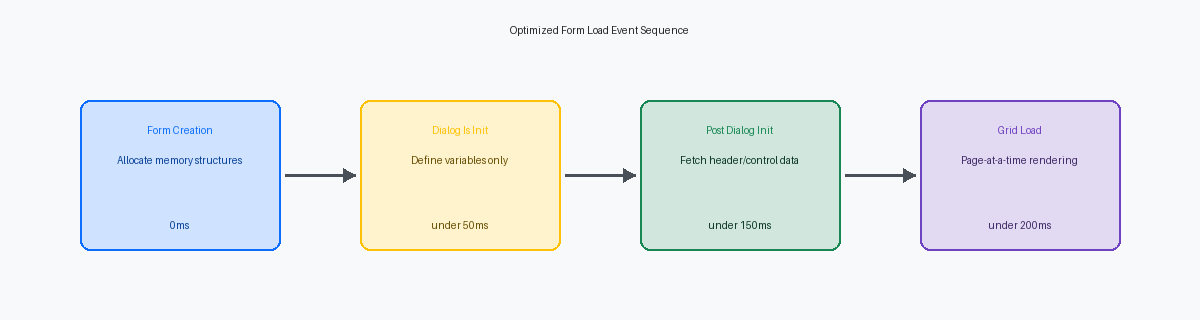
Placing heavy Fetch Single loops in the Dialog Is Initialized event is the fastest way to freeze an HTML client session for five to ten seconds. At this stage of the JDE runtime engine, the system is still preparing the form's structural layout, meaning the user sees a blank screen while the database churns. Shifting these non-blocking database operations to the Post Dialog Is InitializedA JD Edwards event that runs after the form structure is created but before control is given to the user. event ensures the form structure renders immediately, giving the user visual confirmation that the application is responsive.
A common architectural failure in custom JDE applications is fetching auxiliary grid-level data during initial form load. For a grid displaying 50 records, executing individual table lookups during initialization forces dozens of sequential database roundtrips. Developers must offload this work to the Grid Record is Fetched or Write Grid Line-Before events, which execute dynamically as each row is populated. This reduces the initial payload size and prevents JAS server timeouts.
In Find/Browse forms, developers often write manual Select and Fetch Next loops inside the Find button's event to filter grid results. This bypasses the JDE engine's built-in database cursor management. Executing the Set Selection system function within the Clear Screen Before Find event allows the native JDE engine to append custom WHERE clauses directly to the primary SELECT statement, letting the database index do the heavy lifting.
For multi-tab header/detail forms, loading child table records for all tabs during the initial open is an unnecessary performance tax. In a standard F4211 or F4311 entry screen, a user may only inspect secondary tabs in a small fraction of sessions, typically under 15%. Implementing conditional fetching—where detailed reads against tables like F42119 are triggered only when the user clicks a specific tab page—reduces the initial SQL execution overhead to a single, lightweight query.
Refactoring a Custom APPL Table IO Example
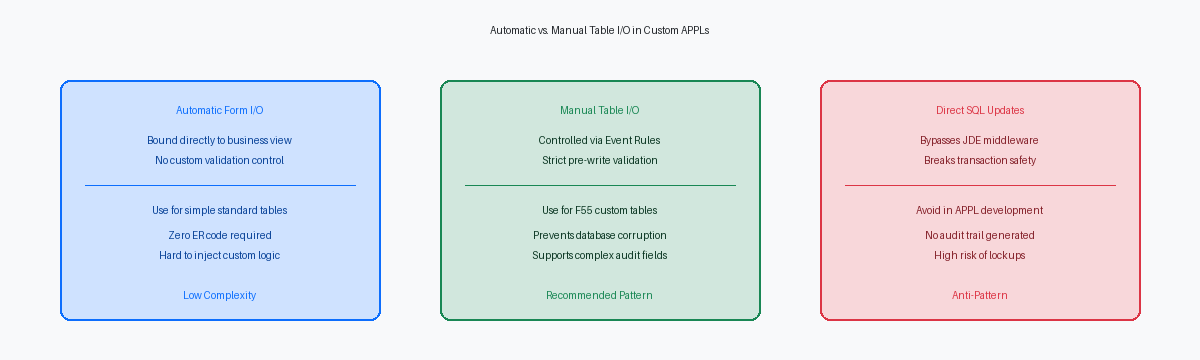
I recently audited a custom F4211 Open Order inquiry application where users experienced a painful delay every time they opened the search form. The root cause was a classic JDE anti-pattern: the developer had placed a manual Select/Fetch Next loop inside the Dialog Is Initialized event to retrieve customer names from the Address Book Master (F0101) and tax explanation codes from the Address Book Phone Numbers (F0116) for every sales order in the system before the grid even rendered. This procedural database thrashing completely bypasses the efficiency of the EnterpriseOne middleware.
To fix this, we stripped the procedural table I/O from the event rules and refactored the application's primary business view. By replacing the flat F4211 view with a simple left outer join between F4211 and F0101/F0116, the database engine handles the relational join in a single SQL operation. This design shift delegates the heavy lifting to the database query optimizer, eliminating hundreds of individual network roundtrips between the HTML server, the enterprise server, and the database server.
When a complex table join is not feasible due to cross-datasource mappings or volatile custom business logic, the correct fallback is to move the Table I/O to the Grid Record is Fetched event. Unlike initialization events that process the entire dataset upfront, this event executes lazily, firing only for the rows currently visible on the glass. If your grid page size is set to the standard 50 records, JDE will execute exactly 50 fetches instead of scanning the entire F4211 table.
Applying this refactoring pattern to the F4211 inquiry form yielded immediate, measurable results. The initial form load time dropped from a sluggish six-plus seconds to under half a second for a standard 50-row grid page. This simple change drastically reduces the database thread pool utilization on your enterprise server, freeing up resources for concurrent interactive users across the HTML instance.
Grid Loading Optimization and Virtual Tables
Developers frequently overlook the "Page-at-a-Time" grid property, resulting in APPLs that attempt to pull tens of thousands of records from the F4211 into the HTML web server memory on initial launch. Enabling Page-at-a-Time processing limits the initial database fetch to the grid page size—typically 10 to 20 rows—and only queries subsequent records when the user clicks the "Next" button. This single property change immediately stabilizes JVM memory usage on your WebLogicAn Oracle application server used to host and manage JD Edwards web components. or WebSphereAn IBM application server platform used to host JD Edwards web environments. instances during peak morning activity.
Standard JDE Business Views fail when you need complex multi-table joins, union queries, or aggregations across tables like F4101, F41021, and F4102. Instead of writing nested Table I/O statements inside the Grid Record is Fetched event to resolve these fields, you should build a native database view at the SQL Server or Oracle Database level and map it as a JDE virtual tableA JD Edwards object that maps to a database view, allowing complex SQL queries to be treated as a single table. via Object Management Workbench (OMW)The central tool in JD Edwards for managing development, version control, and object deployment.. This virtual table allows the JDE database middleware to execute a single, highly optimized SQL statement rather than forcing the JAS server to coordinate multiple sequential Table I/O operations.
Consolidating your data access layer into a virtual table reduces database round-trips by 80% to 90% on high-volume transactional screens like custom sales order entry or inventory lookup APPLs. In one recent project, replacing multiple nested Table I/O fetches in F41021 and F4105 with a single virtual table reduced a custom inquiry screen's load time from eight-plus seconds down to under half a second. This approach shifts the heavy lifting of indexing and joining to the database engine, where it belongs, keeping your EnterpriseOne logic engine clean and responsive.
Profiling Form Load with Server Manager
Resolving a multi-second form load delay requires moving past guesswork and opening the jdedebug.logA detailed trace log used by developers to troubleshoot JD Edwards logic and database operations. file. This log is your primary diagnostic tool for identifying the exact Table I/O statements that are stalling the user interface. By initiating a CallObject Kernel trace within Server ManagerA web-based management console used to monitor, configure, and manage JD Edwards server components., you can capture the exact millisecond duration of every SQL statement executed during the Dialog is Initialized and Post Dialog is Initialized events. This real-time tracking exposes the processing overhead of custom business functions before the form even renders on the user's screen.
When analyzing the trace, scan for repeated SELECT ... FROM PRODDTA.F0101 or PRODDTA.F4101 patterns occurring within the same second, each querying different address book or item numbers. This pattern indicates a loop executing Table I/O on a grid row-by-row basis, rather than using a single set-based fetch or a database view. Eliminating these iterative SQL calls can immediately compress a half-second database lag down to a few milliseconds, drastically reducing the time spent in the CallObject Kernel.
Once you refactor the offending events, you must lock in these gains before your next Tools ReleaseA JD Edwards software update that provides technical enhancements and middleware improvements without changing business logic. upgrade. Use the Performance Monitor application (P980060) to establish a clear transaction processing baseline for your critical interactive applications. Comparing these pre- and post-upgrade metrics prevents regression, ensuring that a Tools update to 9.2.8 or beyond does not silently re-introduce latency through altered middleware behavior or database driver changes. Run these benchmark tests under a simulated load of 50 concurrent users to verify the stability of your modifications.
If you are refactoring legacy APPL code to meet 9.2.8 performance standards, our other technical guides on BSFNBusiness Function, a reusable piece of code (C or NER) that performs specific business logic in JD Edwards. cache management and AIS-based form extensions offer deeper dives into optimizing EnterpriseOne environments.
