




A blank grid in a custom P554211 or P550911 application usually triggers an immediate, wasteful scramble to regenerate serialized objects in Server Manager or rebuild packages. In our experience, the vast majority of developer hours are wasted on blind Event RuleA proprietary scripting language used in JD Edwards to add logic, calculations, and data validation to applications and reports. modifications when the root cause is actually a silent database mismatch or a misconfigured business viewA JD Edwards object that selects specific columns from one or more tables to be used by applications or reports. join. When executing JDE APPL troubleshooting for blank grids, wrong data, and missing records, you must bypass surface-level assumptions and look directly at how the HTML server (JASThe Java Application Server, which acts as the web interface allowing users to interact with JD Edwards via a browser.) translates Form Design Aid (FDA)The graphical development tool used in JD Edwards to create and modify interactive applications and screens. specs into SQLStructured Query Language, the standard language used to communicate with and retrieve data from databases.. A single misaligned join in a custom Business View (V554211A) or an unmapped Grid Buffer (GB)A temporary memory area used by the JD Edwards runtime engine to hold data before it is displayed in a grid. variable in the "Write Grid Line-Before" event will silently drop rows without throwing a single runtime error.
Isolating Business View Joins and Key Mismatches
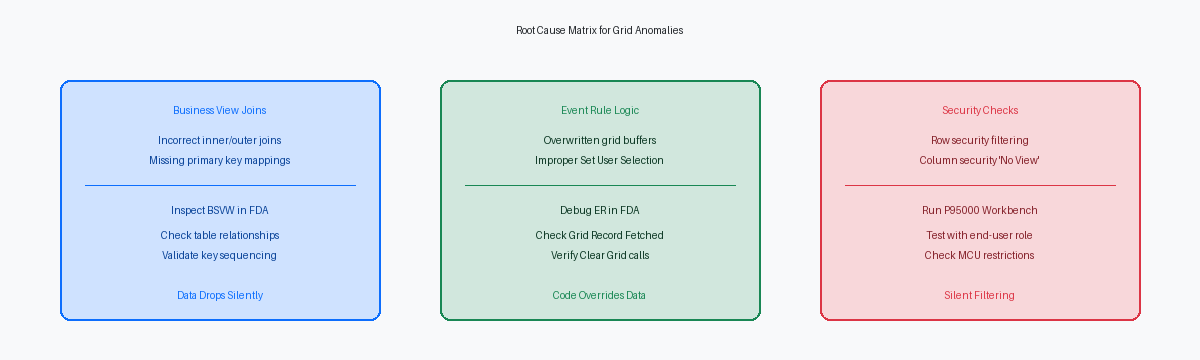
When a custom application displays a completely blank grid, the root cause is almost always found in the underlying business view (BSVW) join design. Developers frequently configure an inner joinA database operation that returns only the rows where there is a match in both joined tables. when the business logic demands a left outer joinA database operation that returns all rows from the left table and matched rows from the right table.. If you join the Item Master (F4101) to the Item Location File (F41021) to show inventory, an inner join will instantly suppress any item without an initialized location record in the F41021. The grid loads zero rows for those items, leaving users assuming the data is missing from the database entirely.
This F4101 to F41021 relationship introduces another failure point: mismatched join keys. Joining these tables solely on the short item number (ITM) without accounting for the branch/plant (MCU) or joining on incompatible fields drops records silently. The enterprise server executes the SELECT statement, but because the composite key relationship is incomplete, the database returns an empty set. This silent failure bypasses standard JDE error handling, meaning no database errors appear in the logs while the grid remains empty.
Even when the SQL query returns rows, failing to map the primary key columns of the business view to the Grid Columns (GC) in Form Design Aid (FDA) breaks the JDE runtime engine. If the primary keys—such as ITM, MCU, and LOCN—are not bound to grid columns, the engine cannot uniquely identify the rows. This omission prevents the runtime from fetching subsequent pages of data, halting grid population after the first record or rendering it completely blank.
Relying on the FDA preview tool to validate these joins is a common trap. The local preview environment runs on a simplified engine that often tolerates loose key mappings or incorrect joins that the HTML server rejects. Developers must bypass local preview, deploy to a DV environment, and test the grid directly on the HTML server where the JAS engine strictly enforces business view integrity.
Event Rule Execution and Grid Buffer Overrides
A common developer error during custom application design is mismanaging filter criteria in the Find button's "Button Clicked" event. When you employ the Set User Selection system function to append dynamic criteria, placing it outside correct conditional blocks appends conflicting AND clauses to the generated SQL. Passing a null variable into the comparison parameter without validating user input forces the runtime to generate a WHERE column = '' clause, instantly reducing a large result set, often exceeding several thousand rows, to zero.
Once the query executes, the engine fires the "Grid Record is Fetched" event for every row. This event is exceptionally sensitive; dropping complex business function (BSFN)Encapsulated code, written in C or Event Rules, that performs specific business logic or complex calculations. calls like F4211 Edit Line here is a performance killer that often fails silently. If a BSFN encounters a pointer violation or memory failure, the JDE runtime halts execution of subsequent Event Rules for that row, stopping grid population entirely.
Data integrity can also break down right before the grid renders. In the "Write Grid Line-Before" event, developers often manipulate columns using event rule (evt_) or string (sz_) variables. If these variables are improperly initialized, they will overwrite valid business view data with blanks or null dates. The grid buffer takes precedence during rendering, meaning an unassigned variable mapped to a grid column wipes out the database value fetched milliseconds prior.
Finally, misplacing structural grid control functions guarantees display anomalies. Executing Suppress Write or Clear Grid Buffer in the wrong grid event—such as calling Clear Grid Buffer inside "Row Is Entered" instead of "Last Grid Record Has Been Read"—wipes the active memory cache before the engine paints the screen. The runtime processes the query, fetches the records, and immediately empties the buffer, delivering a blank grid.
Row and Column Security Check Failures
Developers routinely commit the error of unit testing custom interactive applications using the administrative JDE user profile, which bypasses F00950 security table evaluation entirely. When deployed to the PY920 environment, a business user logs in under a restricted role and is met with an empty grid, completely devoid of errors or warnings on screen. This silent failure occurs because the EnterpriseOne security kernel intercepts the database fetch, determines the user lacks authorization for a key column in the business view, and suppresses the records. The application runtime does not trigger an Event Rule error; it simply behaves as if the SQL select returned zero rows.
This behavior is highly prevalent when Row SecurityA security setting in JD Edwards that restricts user access to specific rows of data based on field values like Branch/Plant. is applied to the Business Unit (MCU) or Subledger (SUB) fields on high-volume tables like the General Ledger (F0911) or Item Ledger (F4111). For instance, if a user's active *ALL role restricts them from viewing MCU " 11001", any grid query joining to these tables will silently omit those rows. If your custom APPL relies on a business view like V0911A, and the primary key fields are filtered out by these F00950 rules, the grid will display a partial dataset or remain entirely blank depending on the user's branch/plant or cost center assignments.
Applying Column SecurityA security setting that restricts a user's ability to view or modify specific fields (columns) within an application or table. with a "No View" status to a field that participates in the grid’s primary key or join logic is equally destructive. When the JDE HTML server attempts to construct the grid buffer, it requires the primary key values to maintain state and handle page-at-a-time scrolling. If Column Security blocks access to a key field like Short Item Number (ITM) or Document Number (DOCO), the runtime engine cannot map the database record to the grid control, causing the fetch routine to fail abruptly. To diagnose this during your next troubleshooting cycle, query the F00950 table directly using SQL to check for active 'CO' (Column) or 'RO' (Row) security records for the affected user's roles on the specific table or business view.
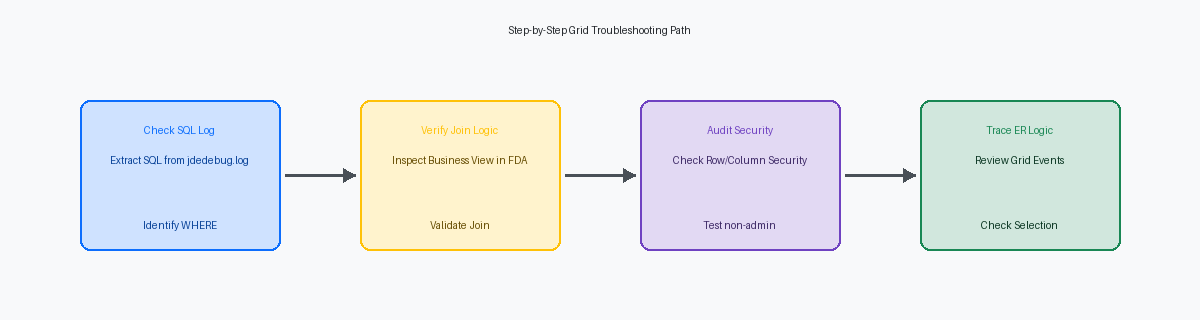
Analyzing the SQL Execution in JDEDEBUG Logs
When an interactive application displays an empty grid despite database records existing, the first move is extracting the raw SQL from the jdedebug.logA detailed log file used by developers to trace every step of a JD Edwards process, including the exact SQL statements sent to the database. file. The JDE engine constructs dynamic SQL queries based on business view joins and runtime filter fields, but what you see in the Event Rules does not always match the compiled execution plan. Tracing the exact SELECT statement generated by the runtime exposes the actual WHERE clause, which often contains unintended outer join restrictions or incorrect literal values that filter out the target records.
Data type mismatches in custom tables—specifically comparing a MATH_NUMERICA specific JD Edwards data type used to store and manipulate numeric values with high precision. to a character (CHAR) field—frequently break the database parser. SQL Server or Oracle Database will reject these invalid statements with a conversion error, forcing the JDE engine to return zero rows to the grid. This failure happens silently at the application level, leaving the user with a blank grid while the underlying platform logs a database driver exception.
To isolate these anomalies, extract the specific SELECT or Fetch Single statements executed inside the "Grid Record is Fetched" event. Running these isolated queries directly in Oracle SQL Developer or SSMS bypasses the JDE middleware entirely, allowing you to see if the database is returning data that the HTML server is dropping. If the query returns dozens of rows in SQL Developer but the grid remains empty, the issue lies in the runtime data mapping or validation logic.
When the SQL itself is valid but the grid still fails to render, check the HTML server's JAS log files. These logs capture runtime Java exceptions, such as NullPointerException or serialization failures, which occur when the JAS engine attempts to process null values returned from custom table columns that lack default values. Fixing this requires updating the table definition in Object Management Workbench (OMW)The central management tool in JD Edwards for developing, managing, and promoting software objects through different environments. to enforce default values or modifying the Event Rules to handle nulls before grid rendering.
Grid Properties and Page-at-a-Time Issues
Unchecking the "Page-at-a-Time" grid property on a Find/Browse form over a high-volume table like F0911 or F42119 is a common cause for a blank grid. Developers do this to let users export entire datasets to Excel, but if the query returns thousands of records, the JAS server transaction timeout (typically 60 seconds in jas.iniA configuration file that defines settings, timeouts, and environment parameters for the JD Edwards Java Application Server.) kills the thread. The user sees a spinning wheel followed by an empty grid, while e1root.log throws a timeout exception.
Another silent failure occurs when mixing declarative grid properties with imperative Event Rules. Setting a grid column to "Disable Input" or "Read Only" in Form Design Aid blocks custom ER lines—such as those in "Write Grid Line-Before"—from programmatically injecting values into the grid buffer. When the engine suppresses these updates, the grid displays blank cells or stale data, meaning developers should instead use Disable Grid Column system functions dynamically in ER.
Misconfiguring grid control properties also guarantees blank displays. Setting the grid's "Fetch on Form Business View" property to false while expecting the form's default business view to automatically populate the grid on Find yields zero rows. Unless you write explicit Fetch Single loops inside the "Find Button Clicked" event to manually populate the grid buffer and call Insert Grid Buffer Row, the runtime assumes a manual load and leaves the grid empty.
Finally, placing a Clear Grid system function inside the Post Dialog is Initialized event of a Find/Browse form conflicts with the "Automatically Find on Entry" property. If auto-find is checked, the runtime executes the initial database select and populates the grid, only for your custom Clear Grid ER to execute milliseconds later, wiping out the retrieved records. This results in a blank grid that only populates if the user manually clicks Find.
Fixing a blank grid or incorrect data set in a JDE 9.2 environment requires looking beyond the FDA layout and into the interaction between the JDB database middleware and the Security Workbench. By systematically isolating business view joins, event rule execution, security overrides, and SQL logs, developers can replace guesswork with structured diagnostics, ensuring reliable data delivery to enterprise users.
