




I still see senior developers make the mistake of relying solely on ER_ERROR or ER_SUCCESS return values in C business functions. In a high-volume sales order integration running through AISApplication Interface Services, a server component that enables external applications to communicate with JD Edwards using REST services., returning a simple failure code without properly managing the JDE engine's internal DDData Dictionary, the central repository in JD Edwards that defines data items and their associated error messages. error stack leads to silent failures or hung kernels. Implementing a clean JDE BSFNBusiness Function, a reusable piece of code used to perform specific logic or calculations within JD Edwards. error handling pattern to return warnings and hard errors ensures that your code communicates execution states explicitly to the runtime.
To build resilient integrations, you must decouple the function’s return status from the system error stack. For instance, using jdeErrorSet with a specific Data DictionaryThe central repository in JD Edwards that defines data items and their associated error messages. item like "0002" (Record Invalid) triggers a hard stop in an interactive APPLInteractive Application, a JD Edwards program with a graphical interface for real-time user interaction., while using the warning APIs allows a UBEUniversal Batch Engine, a tool used to run background reports and process large volumes of data without user interaction. to log a non-blocking exception and continue processing the remaining thousands of records in a batch run. This approach prevents custom BSFNs from corrupting transaction boundaries or trapping users in infinite validation loops.
BSFN Return Codes vs the EnterpriseOne Error Stack
I often see developers assume that returning ER_ERROR from a C business function automatically handles user notification. In reality, returning ER_SUCCESS or ER_ERROR only controls the immediate conditional branching of the calling Event RulesA JD Edwards-specific scripting language used to add logic to applications and reports. engine, such as an If SV Action_Active_Status block. This return value is merely a binary flag for execution flow; it has no inherent connection to what the user sees on their screen.
To communicate what went wrong, you must interact with the EnterpriseOne error stack, an independent runtime memory structure storing detailed error and warning messages mapped to Data Dictionary items. While your C BSFN passes ER_ERROR back to the calling runtime, the engine requires explicit loading of DD items, like 0001, into this memory structure. Without this registration, the system is functionally blind to the root cause of the failure.
An interactive APPL relies entirely on this memory structure to highlight form controls in red. If a business function returns ER_ERROR without setting the stack, the form will halt processing but will not visually guide the user to the offending control. This leads to users staring at a frozen screen with zero diagnostic feedback, a common issue in custom C code.
Failing to clear the error stack before executing business logic can also cause stale errors from previous form actions to block the current transaction. In complex power forms, an uncleared warning from an earlier validation routine can linger in memory, halting subsequent BSFNs even after the user has corrected the data. Managing this stack's lifecycle is as critical as managing the return value itself.
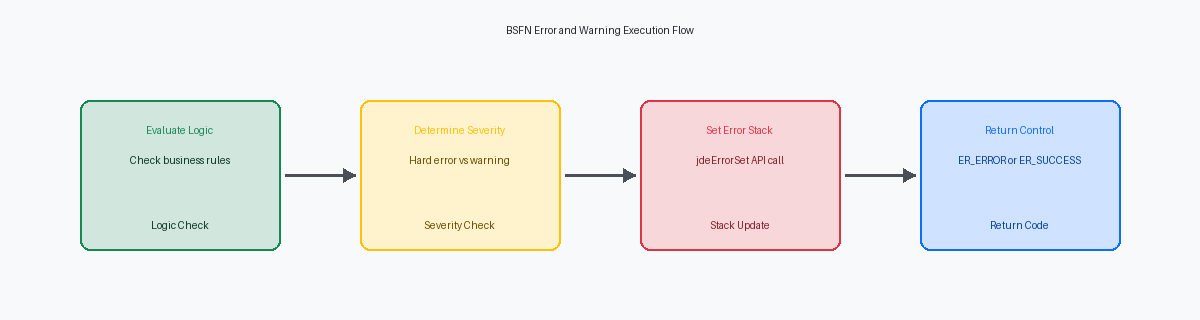
Implementing Hard Errors with the jdeErrorSet API
When a custom C business function encounters a critical validation failure—such as an invalid branch/plant lookup during standard sales order entry in P4210—you must immediately halt execution. Failing to return ER_ERROR to the calling Event Rules allows corrupt data to hit the database, bypassing the transaction boundary. The jdeErrorSet API is the engine mechanism that registers this failure, signaling to the EnterpriseOne runtime that a rollback is required if the BSFN is running within an active transaction boundary.
To trigger this behavior safely, developers must execute a highly precise parameter mapping within the API call. The jdeErrorSet signature demands the LPBHVRCOM lpBhvrCom structure and the LPVOID lpVoid pointer, which must map to the corresponding parameters of the BSFN's main entry point function. Additionally, you must pass the target Data Dictionary data item, such as standard error code 0002 (Record Invalid) or a custom glossary item like 55D9001, which maps directly to the specific validation failure.
Mapping the error to a precise Data Dictionary glossary item ensures that the HTML client renders clear, actionable debugging message text to the end-user. If the business function is executing within an interactive grid, failing to pass the correct grid row number to the API's line number parameter causes the error to float to the form header. Passing the specific index variable binds the red error highlight directly to the offending row, preventing user frustration on multi-line orders.
Setting Soft Warnings Without Halting Execution
In a standard JDE sales order entry scenario, throwing a hard error for a credit limit breach blocks the transaction entirely, whereas a soft warning lets the operator acknowledge the risk and proceed. To achieve this, your custom C business function must return ER_SUCCESS to the engine while concurrently calling jdeErrorSet with a warning severity level. This dual-state mechanism tells the interactive runtime to populate the error stack and change the control's visual state without aborting the execution flow. The user sees the yellow warning icon but can bypass it on a subsequent click of the OK button.
Managing this bypass behavior in interactive APPLs requires careful state tracking within the BSFN's data structure to avoid infinite loops during double-click validation cycles. When a user clicks OK, the form engine runs the validation events, triggers the BSFN, and displays the warning. On the second click, if the BSFN does not know that the warning was already presented, it will call jdeErrorSet again, trapping the user in an inescapable loop. You must implement a custom flag in the BSFN data structure—typically a single-character bypass parameter—that the calling application toggles to '1' after the first warning cycle to suppress subsequent warning generation.
This design pattern is modeled directly on standard JDE Master Business FunctionsSpecialized code modules that centralize the logic for processing major business transactions like sales or inventory. like F4211FSBeginDoc, which use dedicated warning suppression parameters to control this behavior dynamically. If you pass a value of '1' to the warning suppression flags in F4211FSBeginDoc, the MBFMaster Business Function, a specialized code module that centralizes the logic for processing major business transactions. bypasses the credit limit and margin check logic entirely, preventing the jdeErrorSet calls from polluting the stack during the final update phase. When building custom wrappers or integrations via the AISApplication Interface Services, a server component that enables external applications to communicate with JD Edwards using REST services. gateway, mapping these suppression flags correctly prevents automated RESTA standard architectural style for creating web services that allow different systems to communicate over the internet. calls from failing on non-blocking business anomalies.
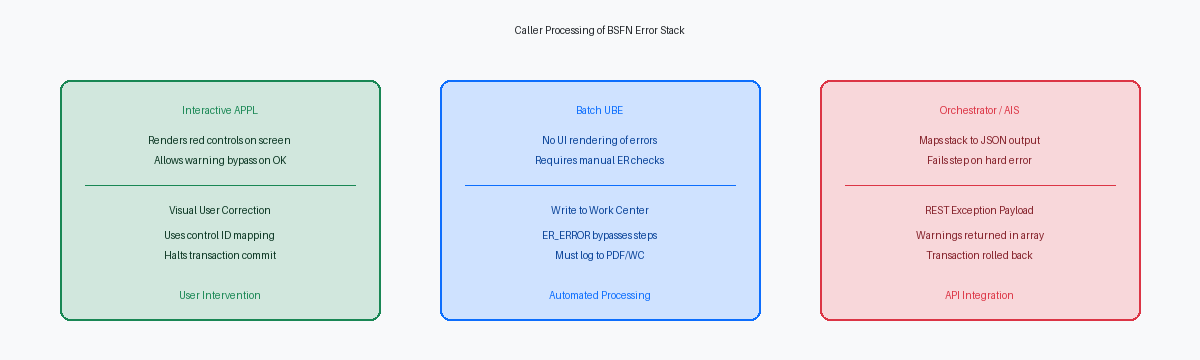
How Interactive APPLs and Batch UBEs Process Errors
Interactive applications (APPLs) map the EnterpriseOne error stack directly to the presentation layer. When a business function calls jdeErrorSet within an interactive form, the runtime engine automatically associates the Data Dictionary error item with the targeted control ID. The HTML client engine then renders these as visual cues—red indicators for hard errors and yellow for warnings—directly on the user's screen without requiring manual Event Rules (ER) intervention to display the message.
Batch UBEs behave entirely differently because they lack a presentation layer. If a BSFN encounters a fatal validation issue and calls jdeErrorSet, the UBE will not stop processing by default. A classic failure mode in custom EDIElectronic Data Interchange, a standardized format for exchanging business documents between different computer systems. inbound processing or shipment confirmation batch jobs—such as a modified R47011 or R42565—is a report that completes with an "Execution Detail" status of success despite underlying business functions throwing hard errors. This silent failure occurs because the developer neglected to explicitly evaluate the BSFN return value in the Event Rules.
To prevent these silent failures, batch processes must explicitly inspect the BSFN return pointer and write execution failures to the Employee Work CenterAn internal JD Edwards messaging system where users receive system notifications and error reports.. This requires integrating the jdeWriteWorkCenter API within your custom C business functions, or executing the system function counterpart in the UBE's ER. This API reads the active error stack and writes the detailed message references directly to the F01131M and F01131T tables. Without this explicit integration, the system discards the standard error messages in the enterprise server's batch context, leaving zero audit trail for the operations team.
A Standardized C Template for Dual-Mode Error Handling
A reliable C business function must control the state of the EnterpriseOne error stack from the first line of execution. The standard pattern begins by calling jdeErrorClear to ensure a clean slate for the current execution thread, preventing residual errors from previous business functions in the same call stack from polluting the current transaction. This is particularly critical in multi-threaded environments or complex execution loops where a prior, unrelated warning might otherwise halt a subsequent, valid process.
Inside the business logic, as validation rules run, any failures are caught, mapped to specific Data Dictionary items (such as 0002 for record not found), and registered using the jdeErrorSet API. Depending on the severity of the failure, the developer sets conditional return codes, returning ER_ERROR for terminal failures that require a rollback, or ER_WARNING when execution can safely proceed. This programmatic distinction prevents unnecessary transaction rollbacks while still capturing critical diagnostic data.
To make this dual-mode capability consumable by calling applications, the BSFN data structure must include a dedicated output parameter like cErrorClass to explicitly communicate the severity back to the caller. We see this design pattern in standard Oracle objects like the D3700010 data structure, where a single character flag ('1' for hard error, '2' for warning, '0' for success) tells the calling application exactly how to handle the result without forcing it to parse the entire system error stack.
This explicit parameter pattern ensures that both interactive forms running in the HTML client and automated OrchestratorA JD Edwards tool used to create automated workflows and integrate JDE with external cloud services and devices. REST calls interpret the response payload correctly. While an interactive APPL relies on the automatic screen-level rendering of the error stack, an AIS-based Orchestration requires this structured parameter to gracefully branch its JSONA lightweight data format used to exchange information between a server and a web application. response, mapping '2' to a warning payload and '1' to an HTTP 500 error step.
Debugging Message Text and Error Stack State
When a business function fails to trigger an expected error or silently passes invalid data, immediately isolate the runtime flow in your jdedebug.log. You are looking specifically for SetBehaviorError and ClearBehaviorError API calls within the trace. If a custom BSFN executes but fails to halt a transaction, these entries expose whether the error was actually pushed to the stack or cleared prematurely by a downstream standard master business function like B4200310.
A blank error popup or empty message string in your logs points to one of two configuration oversights: a missing Data Dictionary glossary item for the specific error code, or an invalid language preference in the User Profile (P0092). If the system attempts to resolve error code "0001" but the runtime environment cannot map the override text or default English glossary, it defaults to a null string, leaving users with a generic, unhelpful blank warning box.
To inspect this programmatically during local web development, attach the Visual Studio debugger to your ActiveConsole.exe or local HTML web client process. Step into your C code and inspect the LPBHVRCOM structure, which contains the pointer to the behavior common structure. By drilling down into this pointer, you can directly verify the error stack depth and confirm that the engine is registering your warnings and hard errors at the correct parent-child control level.
This stack hygiene is even more critical when your custom BSFNs are exposed to modern integrations. OrchestratorA JD Edwards tool used to create automated workflows and integrate JDE with external cloud services and devices. calls executing these business functions via the AISApplication Interface Services, a server component that enables external applications to communicate with JD Edwards using REST services. gateway automatically map any errors on the stack directly into the outbound JSONA lightweight data format used to exchange information between a server and a web application. response payload. If your C code fails to clear warnings or stacks multiple duplicate errors, the AIS engine will return a bloated, repetitive JSON response, causing API consumers to break or misinterpret the transaction status.
If you are refining your development standards to ensure 01 and 02 return codes propagate reliably, explore the other deep dives in the BSFN / NER Development category,
