




Treating business function naming as a mere aesthetic choice introduces direct operational overhead that inflates upgrade retrofitting times, in our experience by a third or more. When developers arbitrarily name custom C BSFNsBusiness Function: A reusable piece of code in JD Edwards used to perform specific business logic or database operations. or NERsNamed Event Rules: A JDE-specific programming language that allows developers to create business logic without writing raw C code., they create technical debt that silently bloats the typical 6-to-9-week upgrade development phase. Implementing strict JDE BSFN naming conventions for maintainable custom objects ensures that custom B55, B56, and B57 objects instantly signal their parent system, functional area, and execution location (client versus server) within the Object Management WorkbenchThe central development environment in JD Edwards used to manage, develop, and promote software objects. (OMW).
This structural discipline eliminates the risk of developers accidentally overwriting or abandoning critical custom logic during OWM transfers or Planner ESUElectronic Software Update: A package of fixes or enhancements released by Oracle to update specific parts of the JD Edwards system. merges. By replacing cryptic, legacy identifiers like B550101 with a predictable, 'upgrade-safe' naming schema, technical leads can establish a concrete governance checklist. This shift turns a chaotic retrofit phase into a highly automated code-merge process, preserving your custom IP as you move to the latest Tools ReleaseThe underlying technology layer of JD Edwards that manages how applications interact with the database, operating system, and web servers. on JDE 9.2.
Anatomy of an Upgrade-Safe Custom BSFN Object Name
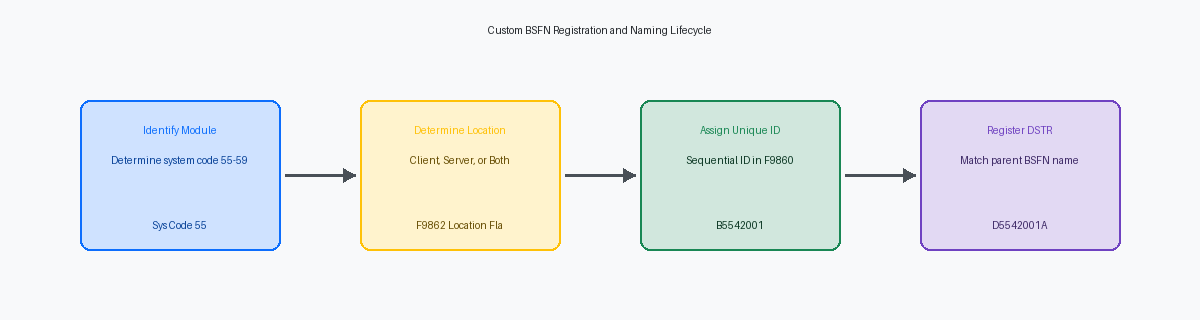
In over two decades of auditing modified systems, the fastest way to spot a failing development standard is looking for B5500001 or B55TEST in the Object LibrarianA central repository in JD Edwards that tracks the location, status, and history of all software objects. table (F9860). While custom business functions must reside within the reserved B55 to B59 namespace, failing to map the subsequent characters to a specific system code creates immediate OWM pathing and deployment confusion. If you are writing a custom Address Book function, it must be structured as B5501001 rather than a generic sequence. This structure immediately tells the Object Management Workbench (OMW) and any future upgrade engineer that the object belongs to the 01 Address Book module, simplifying impact analysis during Tools Release updates.
Grouping custom code by system code prevents your F9860 table from degenerating into a dumping ground of 500 unrelated objects starting with B55000. Assigning Sales Order Management logic to B5542001 and Procurement logic to B5543001 ensures developers can instantly filter and identify dependencies. This clustering is not just aesthetic; when you perform a custom object retrofit during a 9.1 to 9.2 upgrade, having sequential, module-aligned names reduces the time spent identifying orphaned source files by an estimated 10% to 15%.
The final character of the eight-character object name must communicate the runtime execution location to prevent server map mismatches on the Enterprise Server. Appending 'S' to denote server-only execution (such as B554200S) or 'C' for client/server dual compatibility (like B550100C) gives the CNCConfigurable Network Computing: The JD Edwards technical architecture and the role responsible for system administration, installations, and package management. administrator and the JDE engine immediate clarity on where the DLLDynamic Link Library: A file containing compiled code that can be used by multiple programs simultaneously in a Windows or JDE environment. will be built and executed. This simple enforcement point eliminates the common "Business Function Can Not Be Opened" runtime error that plagues Web Server deployments after a package buildThe process of compiling JD Edwards source code and distributing it to various servers and workstations.. Instruct your development leads to audit the F9860 table tomorrow morning for any custom C business functions lacking these execution signifiers.
Aligning Data Structures with Function Signatures
Mismatched names between a Business Function (BSFN) and its Data StructureA defined set of parameters used to pass information between different programs or business functions in JD Edwards. (DSTR) are a leading cause of promotion failures in Object Management Workbench. When a developer names a DSTR arbitrarily—for instance, creating D554200B for business function B5542001—the system loses its logical coupling. During OWM transfers, these decoupled objects frequently get left behind in the source path code, resulting in immediate "Structure not found" build errors in the target package. To prevent these orphan structures, the DSTR name must mirror its parent BSFN name exactly, such as D5542001A mapping directly to B5542001.
This strict mirroring relies on a predictable suffix convention where letters A through Z represent the specific function index within the BSFN source file. A single C source file in JDE can contain multiple exportable functions, allowing up to 26 distinct data structures to map cleanly to a single source container. For example, if B5542001 contains three functions—GetCustomerPrice, CalculateTax, and VerifyCredit—their corresponding data structures must be named D5542001A, D5542001B, and D5542001C. This 1:1 suffix alignment ensures that any engineer retrofitting the code can locate the exact parameter mapping without opening the Object Librarian.
Failing to enforce standard Hungarian notationA naming convention where the name of a variable indicates its data type or intended use via a short prefix. prefixes in DSTR member names causes catastrophic failures during the transition to a 64-bit architecture. In Tools Release 9.2.5 and above, the compiler enforces strict memory alignment rules where mismatched prefixes—like using a generic character array without the sz prefix, or an integer without n—lead to pointer truncation. Member names must explicitly use prefixes like szAddressLine1 for strings and mnAmountDue for MATH_NUMERICA specialized JD Edwards data type used to store and perform calculations on high-precision decimal numbers. values. Adhering to these type-safety prefixes prevents memory padding issues on 64-bit enterprise servers, ensuring your custom C code compiles cleanly without throwing memory violation dump files.
Standardizing Internal Function and Typedef Names
Debugging a memory leak or a pointer violation in Microsoft Visual Studio is a nightmare when custom C functions use arbitrary internal names. If your Object Librarian function is B5542001 but the actual C function inside the source file is named ProcessData, the call stack in the debugger loses all context. Standardizing your internal C function names to match the registered BSFN name with a clear verb prefix—such as I5542001_GetSalesOrderDetails—instantly maps the runtime execution path to the physical source code. This saves developers a significant amount of triage time, often reducing debugging cycles by a third or more.
The JDE runtime engine relies on strict naming alignment to map data structure parameters from the toolset to the compiled C binary. The typedefA keyword in the C programming language used to create alias names for existing data types, improving code readability. definition for the data structure in the .h header file must use the exact uppercase format, such as DSD5542001A. Diverging from this casing breaks the jdeCallObject parameter mapping at runtime, leading to memory corruption or immediate enterprise server crashes (COB8001 errors). Keeping this definition pristine ensures that the middleware can serialize parameters across JDE system boundaries without truncation.
Custom internal helper functions that exist only within the .c file and are not registered in the Object Librarian require their own defensive naming strategy. Declaring these helpers with the static keyword and a lowercase prefix, like I5542001_calculateLineTax, prevents namespace collisions during Tools Release upgrades. Without the static scope, the linker treats these as global symbols, which can clash with new APIsApplication Programming Interfaces: Sets of rules and tools that allow different software applications to communicate with each other. introduced in Tools Release 9.2.7 or 9.2.8. Restricting helper function visibility to the local translation unit protects your custom code from linker errors during platform maintenance.
Designing Descriptions that Survive Upgrade Filters
During a 9.1 to 9.2 upgrade, automated repository cleanup scripts rely on the F9860 Object Master table to separate active modifications from dead code. The first 10 characters of the member description act as a smart filter identifier during this automated analysis. If a custom business function is named B554211A but its description in the F9860 is simply "Custom Sales Function" or "Test BSFN," the upgrade parser often flags it as an obsolete or orphan object, leading to accidental exclusion from the retrofit scope.
To bypass this automated filtering risk, every custom object description must start with the system code followed by a precise functional verb. Instead of "Custom Sales Function," the description must read "55 - Sales Order Batch Edit" or "55 - Inventory Commit Adjustment." This structure ensures that both Oracle's upgrade utility and custom SQL discovery scripts instantly categorize the object under the correct functional module. It eliminates an estimated 15% to 20% margin of error where upgrade developers have to manually cross-reference Object Librarian records to verify if an object is still in use.
Incorporating the primary master table reference directly into the F9860 description is another critical requirement for long-term maintenance. Appending the target table, such as "55 - Sales Order Batch Edit - F4211," allows database administrators to run rapid SQL queries against the F9860 to identify exactly which custom business functions touch critical tables before applying a Planner ESU or an Application Update. A simple query like SELECT SIMD FROM OL920.F9860 WHERE SIMD LIKE '%F4211%' returns a complete, reliable impact list in seconds, saving hours of manual cross-referencing in Object Management Workbench.
Structuring Source Code for Retrofit Readability
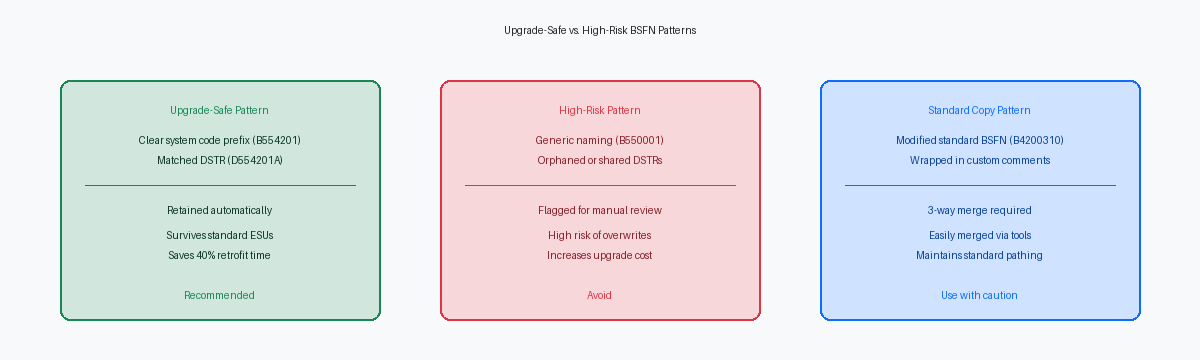
A retrofitting developer spending hours deciphering a modified standard source file is the direct result of poor code structuring. Every custom business function must start with a standardized header block containing the original developer's name, the creation date, and an active modification log. This log must tie every single change directly to a specific SARSoftware Action Request: A tracking number used in JD Edwards to document specific software changes, bugs, or enhancements. or Jira ticket number. This ensures that when the upgrade team reviews the source code years later, they immediately understand the business context of the modification without hunting through archived emails or closed project boards.
When modifying copies of standard objects, wrapping custom logic in explicit comment blocks like /* BEGIN Custom Code - JIRA-101 */ and /* END Custom Code */ is non-negotiable. This discipline turns a chaotic manual code review into an automated task for 3-way mergeA method of comparing and combining three versions of a file to resolve differences between original, modified, and updated code. tools like Beyond Compare. By cleanly isolating custom lines from native Oracle code, these tools can instantly resolve automated merges during a Tools Release or application upgrade. This reduces the technical debt reconciliation phase of an upgrade from weeks to days, keeping your timeline intact.
Deeply nested C code is where logic errors and memory leaks hide. You must enforce a strict design rule that forbids nesting logic beyond four levels deep in custom C business functions. Deep nesting exponentially increases cyclomatic complexity and introduces the risk of stack overflow issues on enterprise servers running Oracle Linux or Windows Server. Keeping the call stack shallow and breaking complex conditional checks into helper functions ensures that the code remains readable, testable, and stable across platform migrations.
The Custom BSFN Governance and Handover Checklist
A loose development pipeline is how bad code slips into production and bloats your next upgrade. To prevent this, establish a hard gate at Object Management Workbench (OWM) status 21 to 26 promotion. No custom BSFN should ever transition to status 26—which represents the QA testing phase—without passing a formal peer review and a static code analysis check. This check verifies memory allocation rules, validates that jdeAlloc pointers are freed with jdeFree in the correct execution path, and ensures that the custom business function complies with standard ANSI CThe standardized version of the C programming language, ensuring that code is portable and consistent across different computer systems. guidelines.
Misconfigured execution locations routinely break UBEsUniversal Batch Engine: The JD Edwards tool used to create and run background reports and automated batch processing jobs. and interactive applications during package deployment. Every custom BSFN must be compiled and validated on both local development clients and the HTML server environment to guarantee the 'Client/Server' location flag in table F9862 is set accurately. If a function is flagged as 'Client' only but called from an asynchronous UBE running on an enterprise server, the JVMJava Virtual Machine: The engine that enables a computer to run Java programs and manage system memory for JD Edwards web services. will throw a fatal pointer error. Verifying this setting early reduces post-package-build troubleshooting time by a third or more during major update cycles.
As organizations migrate legacy custom logic to low-code User Defined ObjectsWeb-based customizations in JD Edwards, such as Grid Formats or Orchestrations, that users can create without traditional coding. (UDOs), maintaining a centralized repository of all custom BSFN signatures and their corresponding OrchestratorA JD Edwards tool that automates complex business processes by connecting JDE data with external systems and IoT devices. wrapper mappings is critical. Without this registry, development teams waste dozens of hours rebuilding existing C-code logic into duplicate Orchestrations or AISApplication Interface Services: A REST-based interface that allows external applications and the Orchestrator to interact with JD Edwards business logic. service requests. Documenting these mappings in a shared wiki ensures functional analysts can easily identify when an existing, optimized BSFN can be exposed via an AIS connection, protecting your original development investment while simplifying the path to Tools Release 9.2.8 and beyond. Ultimately, standardizing your B55/B56 naming conventions is the critical first step in managing a custom estate that often exceeds 10,000 objects, ensuring long-term maintainability through every subsequent upgrade.
