




When applying a major baseline Electronic Software Update (ESU)—such as JN19112 for Financials—organizations frequently discover that roughly 10% to 15% of their modified standard C business functions (BSFNs) have been silently reset to the Oracle standard. The native Object Management Workbench (OMW) merge utility regularly fails to reconcile complex C pointer manipulations or custom data structure alterations, introducing memory leaks or immediate zombie processes on the Enterprise Server at runtime.
To prevent these critical runtime failures, technical leads require a systematic, repeatable execution plan. This JDE BSFN retrofit checklist after Oracle ESU changes bypasses high-level generalities to focus strictly on the low-level mechanics of the retrofit process. This guide outlines the precise steps for specification comparison, C source code merging, Named Event Rule (NER) regeneration, and package build verification to ensure custom modifications survive the update without compromising the stability of the JD Edwards 9.2 architecture.
Phase 1: ESU Impact Assessment and Object Filter
Applying an ESU containing hundreds of objects without a surgical filtering process is a primary driver of project budget overruns. The initial step requires running the R96701 and R96711 ESU impact analysis reports in the target environment. This analysis isolates standard objects that have been modified by both the internal development team and Oracle, preventing developers from wasting cycles analyzing hundreds of untouched pristine objects that the ESU simply overwrites.
Technical leads must isolate all custom BSFNs in the Y or 55-59 namespace, alongside standard C business functions—such as B4200310 or B3101260—that carry custom modifications. Cross-reference the R96701 output against the F9860 and F9861 Object Librarian tables to verify current project status. Within an enterprise footprint of several thousand custom objects, typically only 10 to 15 business functions actually require manual code merging after a cumulative update.
A common mistake that inflates project timelines is treating every flagged BSFN as an active retrofit task. Many flags are false positives triggered because the ESU modifies a parent dynamic link library (DLL) definition or an unrelated header file without changing the underlying logic of the specific business function. Filtering these out before assigning tasks to developers can save 30 to 40 hours of redundant code analysis per update.
To ensure developers can perform an accurate three-way comparison, establish a clean baseline in a dedicated path code like DV920 before applying the ESU. Back up the existing custom source code and specifications to a holding path code like PS920 or a secure local repository. Without this pre-ESU snapshot, developers cannot reliably determine whether a discrepancy in the C source was introduced by legacy customization or by the incoming Oracle update.
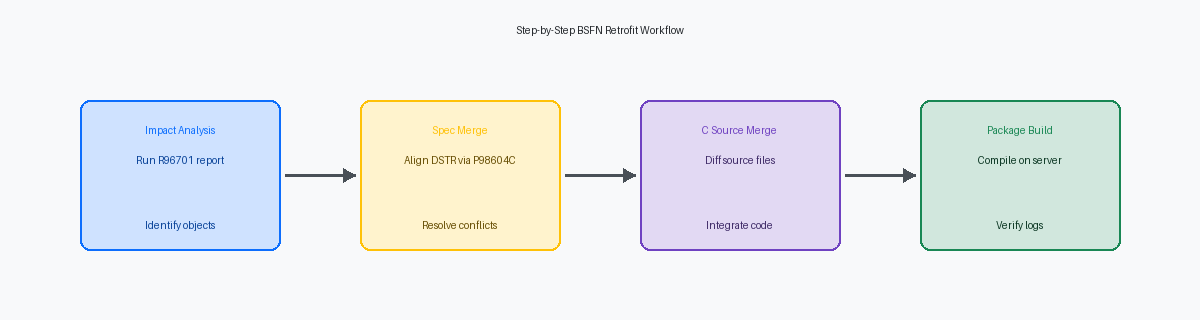
Phase 2: Spec Compare and Data Structure Alignment
When an ESU updates a core business function like B4200310, developers often jump straight to the C source code while ignoring the underlying data structures. Teams must run the Visual Compare for Business Functions (P98604C) application immediately after applying the ESU to the DEP920 environment to isolate specification-level modifications in the parent Data Structure (DSTR).
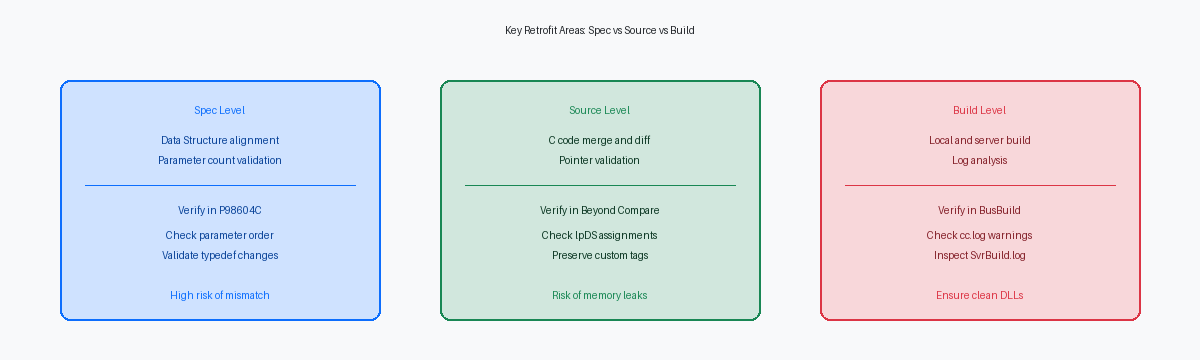
If the ESU modified the standard BSFN’s parameter count, data types, or parameter order, any custom C code passing pointers to this structure will trigger immediate pointer misalignment or memory violations during runtime. This is particularly dangerous when custom wrappers call standard Master Business Functions like F4211FSEditLine, where structure size changes frequently across Tools Releases, often causing sudden Access Violation errors in jdekrnl.dll.
Next, document any changes to standard Typedefs in the associated header files (.h) to prevent compiler warnings during local builds. A mismatch between the local specifications and the .h file on the developer's workstation will cause C compiler warnings or fatal compilation errors (such as C2065 in Microsoft Visual Studio) during the local build phase.
Finally, audit all custom wrapper functions calling the modified standard BSFN. Ensure custom wrapper functions are updated to map newly introduced standard parameters to safe default values, such as passing a blank space for newly added character flags or zero for new numeric pointers. Leaving these new parameters unmapped often results in uninitialized memory being passed into Oracle's standard business logic, causing unpredictable database writes or silent UBE failures in production environment call stacks.
Phase 3: C Source Code Merge and Pointer Validation
JD Edwards' internal merge utility frequently fails to resolve complex C source conflicts, making external diff tools like Beyond Compare or WinMerge mandatory for protecting custom logic. When an ESU updates a core source file like B4100210.c (Inventory Decisions), the standard merge tool can easily misalign or drop custom blocks. Exporting both the pristine ESU-delivered source and the current custom production source to a local directory allows a side-by-side visual comparison to pinpoint exact differences.
The primary task in the editor is isolating custom code blocks written within designated custom comment tags, such as /* Custom Begin */. If previous developers ignored these tagging standards, you must manually trace the logic to prevent the incoming Oracle ESU code from silently overwriting modifications. Misplacing a single closing bracket during this manual merge will corrupt the logical flow, leading to compile-time syntax errors or silent runtime bypasses of business rules.
Merging the code is only the first step; developers must rigorously validate pointer assignments involving the lpDS data structure. A common pitfall occurs when the ESU modifies the underlying data structure, but the custom C code still attempts to access members using outdated offsets or uninitialized pointers. This mismatch triggers memory leaks and immediate access violations, resulting in General Protection Faults (GPFs) that can crash the CallObject kernel on the enterprise server.
Finally, audit any standard APIs embedded within custom logic that may have changed signature or behavior under the new ESU. For example, if Oracle modified the parameters of a core API like JDB_Fetch or altered the expected behavior of a nested jdeCallObject execution, the custom code must be refactored to match. Never assume an API behaves identically post-ESU; verify the API prototypes in the updated header files before running local builds.
Phase 4: NER Code Generation and Spec Serialization
Merging Named Event Rules (NER) specifications during an ESU update is only the first step; forgetting to regenerate the underlying C code is a classic mistake that leads to silent runtime failures. In Object Management Workbench (OMW), developers must explicitly select the NER and trigger the NER generation process to rewrite the local C and header source files. If this step is skipped, the enterprise server will build the DLL using stale, pre-merge C code, completely bypassing the visual Event Rules changes verified in the toolset. This mismatch typically manifests as a 3675 or 3676 error in the jde.log during runtime execution.
Before triggering generation, inspect the variable declarations. Oracle ESUs frequently introduce new system or internal variables to standard data structures that can conflict with custom-defined variables in the NER. If a variable name collides, the generator will produce invalid C code that fails to compile, or worse, silently maps memory addresses incorrectly. Open the variables grid in the NER design aid and cross-reference custom variables against the newly merged standard variables to prevent variable shadowing.
Once generated, do not trust the OWM success dialog blindly. Navigate to the local path code directory—typically under E920\DV920\source and include—and open the generated .c and .h files in a text editor to verify the timestamps and inspect the generated C structures. Finally, run the local spec generation utility on the fat client to synchronize local specifications. This step guarantees that the local development environment is fully aligned with the newly generated C code before initiating a package build.
Phase 5: Local Compilation and DLL Build Verification
Skipping local compilation before checking in a retrofitted business function is a primary cause of broken central objects package builds. Run BusBuild directly on the fat client to compile the modified C code and catch syntax errors or missing #include header declarations immediately. This localized step isolates changes to the workstation, preventing a single missing semicolon from halting the nightly build for the entire development team.
Do not just look for a successful build status; inspect the cc.log and link.log files. Pay close attention to warnings regarding 'different levels of indirection' or 'unreferenced local variable'. A 'different levels of indirection' warning usually indicates a pointer mismatch in custom data structure mappings, which can lead to memory violations and zombie kernels when executed on the Enterprise Server.
Verify that the compiler successfully rebuilds and links the target DLL, whether it is a standard container like CALLBSFN.dll or a custom library such as CCUSTOM.dll. If the DLL fails to update on the local workstation, the runtime engine executes the cached, outdated object specification. This mismatch creates a false sense of security where code appears to compile but fails during execution.
Before promoting the object, attach the Visual Studio debugger to the active JD Edwards instance, run the calling application, and step through the custom C code line-by-line. This local debugging session allows developers to inspect the values within the data structure pointers and ensure that the ESU-modified variables do not cause memory leaks or unexpected pointer truncations before the code reaches a shared environment.
Phase 6: Package Build and Server Deployment
A retrofitted business function may compile perfectly on a fat client but still fail during a server package build. Once local validation is complete, teams must assemble and build a targeted update package—or a full package if retrofitting core modules like XT4311Z1 or B4200310—on the deployment server to compile the C code for the enterprise server's specific platform architecture. Skipping this step or relying on local DLLs is a primary cause of runtime pointer errors in HTML environments.
Open the SvrBuild.log on the Linux enterprise server—or the equivalent build logs on Windows or AS400—to verify that the compiler did not generate unresolved external references. On Linux, developers should verify the successful generation of shared libraries (.so files), whereas Windows expects .dll files and AS400 targets service programs (.SRVPGM). A clean compilation on the deployment server does not guarantee a clean link on the enterprise server if system-level include paths or compiler flags differ.
Active call object kernels will lock these binary files if a package deployment occurs while users are processing transactions. To prevent locking issues, schedule the update package push during a maintenance window or use the Server Manager console to manage kernel recycling. Once the binaries are safely in place under the target path code directory (such as /u01/jdedwards/e920/packages), clear the service cache or perform a rolling restart of the network services. This ensures the CallObject kernels drop old specifications and load the newly compiled business functions into memory, preventing memory leaks or pointer mismatches on the next execution.
Systematically executing this checklist mitigates the risks of memory corruption, pointer misalignment, and kernel instability following major ESU updates. By enforcing rigorous alignment between specifications, C source code, and server-side binaries, enterprise IT organizations can preserve complex legacy customizations while maintaining a highly stable and performant JD Edwards environment.
If your organization is planning a major JD Edwards upgrade or requires expert assistance with complex business function retrofits, contact our enterprise consulting team to schedule a technical architecture review.
