



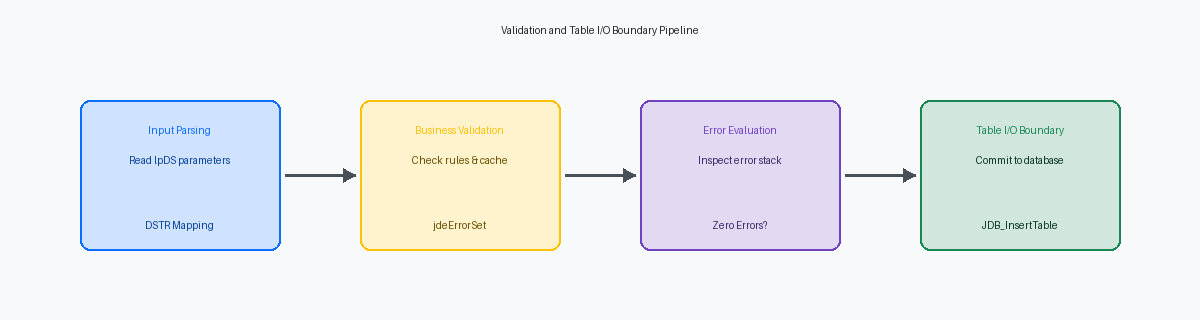
Hardcoding custom validation logic directly into the Form Event Rules of P4210The standard JD Edwards interactive application used by staff to enter and manage sales orders. or P42101 is a technical debt trap that guarantees data integrity issues the moment you introduce EDI (R47011)Electronic Data Interchange; R47011 is the standard JD Edwards batch program used to import sales orders from external systems. or BSSVBusiness Services; a JD Edwards architecture used to facilitate web service integrations using Java.-based integrations. When order entry bypasses the interactive forms, your validation rules are missed entirely. This JDE NERNamed Event Rule; a JD Edwards tool that allows developers to write business logic in a proprietary language which is then converted to C code. event rules example to validate sales order line data demonstrates how to encapsulate this logic in a reusable business function rather than scattering it across multiple application events.
By isolating your custom rules inside a Named Event Rule (NER) and calling it immediately before the standard F4211 Edit Line (B4200310) Master Business FunctionA centralized set of logic in JD Edwards designed to ensure data integrity by processing all validations and database updates for a specific record type., you maintain a single point of enforcement across all entry channels. This architectural pattern reduces custom object retrofitting by a significant margin, often 30% to 50% during a Tools ReleaseThe underlying technical layer of JD Edwards EnterpriseOne that provides the environment for applications to run. upgrade, as the validation remains completely decoupled from Oracle’s standard interactive code.
The Architecture of F4211 Validation Hooks
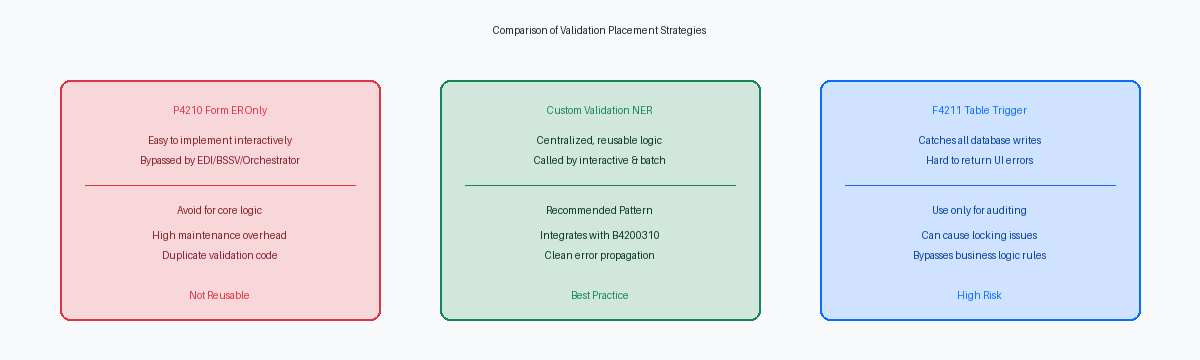
Hardcoding validation rules directly into the P4210 grid events is a common architectural mistake that inevitably surfaces during integration phases. While this approach works when a customer service representative manually keys an order, it completely bypasses inbound interfaces like the R47011 EDI document processor or modern REST integrations running through the AISApplication Interface Services; a REST-based server that allows external applications to interact with JD Edwards business logic and data. server. To ensure 100% data integrity across all channels, validation must reside where the data actually enters the database pipeline.
The standard EnterpriseOne sales order pipeline relies on the F4211 Edit Line (B4200310) master business function to process line-level validations, calculate taxes, and commit data to memory caches. This massive business function, containing thousands of lines of C code, serves as the gatekeeper for the F4211The primary database table in JD Edwards used to store Sales Order Detail information. table. Injecting custom validation rules directly into this pipeline ensures that whether an order originates from an interactive screen, a batch UBEUniversal Batch Engine; a JD Edwards tool used to create reports and background processing programs., or an XML call, the same business logic is enforced uniformly.
A custom validation Named Event Rule (NER) must execute immediately before the F4211 Edit Line function is invoked. Running the validation after Edit Line is too late; by that point, the master business function has already written dirty data to the JDE multi-line transaction cache. If an error is detected after cache insertion, clearing those memory tables cleanly requires complex rollback operations that frequently trigger memory leaks or orphaned cache records in the call stack.
Relying on database-level triggers on the F4211 table for interactive validation is a dangerous anti-pattern in EnterpriseOne development. While a database trigger can successfully block an invalid insert, it cannot gracefully bubble structured error messages back to the P4210 user interface. Instead, the user is met with a cryptic "Transaction Error" red banner, forcing the entire interactive session to crash and leaving the user with no actionable feedback on which specific field failed validation.

Designing the Custom NER Data Structure
A poorly designed Data Structure (DSTR)The set of input and output parameters used to pass information to and from a business function. is the primary reason custom validation Named Event Rules (NER) fail during upgrades or high-volume batch processing. If you do not pass the full context of the F4211 record, your validation engine will eventually require a rewrite. The custom DSTR must explicitly define key transaction context fields: Company (CO), Order Type (DCTO), Line Type (LNTY), and Item Number (LITM). This allows the NER to evaluate line-level rules without executing redundant database fetches against the F4211 table, which can drag down interactive performance in P4210 by 15% to 20% on multi-line orders.
Returning a simple boolean flag for failure is a rookie mistake that forces developers to hardcode error messages inside the calling application. Instead, design the DSTR with a dedicated output parameter mapping to the Data DictionaryA central repository in JD Edwards that defines all data fields, their properties, and associated error messages. item Error Code (DTAI). This allows the NER to return specific standard JDE glossary error messages, such as '3143' (Item/Branch Record NotFound), or custom '55' errors like '554201' (Line Price Below Minimum Margin). By returning the DTAI value directly, the calling application can dynamically pass the error ID to the system function Set Action Error, keeping the logic centralized.
Flexibility requires a control flag parameter like cSuppressError (EV01) to toggle the validation behavior between hard errors, warning-only, or a completely silent execution mode. For high-volume EDI processing via R47011 or OrchestratorA powerful JD Edwards tool used to automate business processes and integrate with external IoT devices and cloud services. integrations, you often want to log validation failures to a custom table rather than halting the UBE execution. Finally, always include the Job Number (JOBS) or Computer ID (CTID) in the DSTR. This enables the NER to query temporary work files or memory cache, such as the F4211UI11 master business function cache, ensuring the validation logic remains accurate even before the sales order transaction is committed to the physical database.
Writing the NER Event Rules for Line Validation
A common performance bottleneck in custom sales order validation is executing database lookups for lines that do not represent physical inventory. In our custom NER, the first executable line must evaluate the Line Type (LNTY). If the line type is 'N' (non-stock) or 'F' (freight), the code immediately exits with success. Bypassing these non-stock lines eliminates a substantial portion of unnecessary database roundtrips, often 30% to 50%, during high-volume EDI processing via the R47011 batch interface.
For stock lines, the NER performs standard table I/O fetches against the Item Master (F4101) and Item Branch (F4102) using the 2nd Item Number (LITM) and Business Unit (MCU) as keys. The fetch on F4101 retrieves the Item Flash Message (IFM) to check for corporate-level restrictions. The subsequent fetch on F4102 verifies the Stocking Type (STKT), ensuring the item is active in that warehouse before P4210's validation engine triggers.
Because the JDE call stack reuses memory structures when looping through multiple grid lines in P4210, you must explicitly initialize all local variables at the start of the NER. Failing to clear variables like szItemRestrictionFlag_EV01 between iterations leads to dirty variable values, causing line 2 to fail based on data from line 1. In C-generated Named Event Rules, uninitialized variables generate silent data corruption that is difficult to isolate in the JDEDEBUG log.
When a validation rule fails, the NER must communicate the failure using the Set User Error system function. This API binds the specific DD error item, such as 0037 (Item Number Invalid), directly to the grid column or form control associated with the input parameter. This precise binding ensures the interactive user sees the red highlight on the exact field that caused the validation failure, rather than receiving a generic form-level error.
Proper Error Handling and Set Error API in NER
Failing to properly register an error in the JDE call stack is the primary reason custom validations silently fail during high-volume P42101 interactive entry or EDI batch import runs. To prevent this, your validation logic must assign a non-blank Data Dictionary item error code to the DTAI output parameter of its data structure. This assignment signals the calling business function or application that a hard error has occurred, halting the transaction before database commit. The NER must explicitly execute the standard Set Error (B0900011) business function or utilize the system function Set LSFN Error to push the error code directly to the engine's runtime stack.
Hardcoding error messages inside your custom Event Rules is a shortcut that breaks multi-language deployments and complicates maintenance. Instead, define custom error messages in the Data Dictionary within the 55 system code range, such as 554201A for "Invalid Custom Line Logic." This approach ensures that the JDE runtime automatically translates the message based on the user's profile language preference, while also allowing the IT team to modify the text in a single place without rebuilding or deploying the business function.
When a critical validation rule fails, you must immediately halt execution of the parent sales order Master Business Function to prevent orphaned records in the F4211 or F42119 tables. Inside your custom NER logic, once B0900011 registers the error, map a return code of '1' to the calling application and immediately trigger a Set Action system function to terminate further processing of that line. This defensive coding pattern guarantees that the F4211 Edit Line (B4200310) routine does not execute subsequent steps, saving CPU cycles on the enterprise server and keeping dirty data out of your transaction tables.
Integrating the NER with P4210 and F4211 Edit Line
Placing custom validation rules into P4210 requires precise placement to prevent database-level rollbacks and performance degradation. The correct injection point is the Row Exit & Changed - Inline grid event, which executes immediately before the system invokes the standard B4200310 Sales Order Edit Line business function. Developers often make the mistake of placing validations in Row Exit & Changed - Asynch, which allows invalid data to pass into the master business function processing queues before the validation even runs.
Within this inline event, map the active grid column values (such as GC BusinessUnit, GC Litm, and GC Uorg) directly to the custom validation NER parameters. The NER must return a distinct error flag, typically a character variable like cErrorFlag or cErrorCode. If this flag returns '1' or any non-blank error status, you must immediately trigger Set Action Code Error and suppress the subsequent B4200310 Edit Line call. Failing to halt execution here allows dirty data to pollute the F4211UI11 work file, which often leads to orphaned records in the temporary transaction tables when a user abruptly cancels the order.
For batch integrations, such as EDI inbound processing via R47011 or custom UBEs, the P4210 grid events do not execute. To maintain identical validation rules without duplicating code, wrap this custom NER inside a custom wrapper business function. This wrapper must execute sequentially alongside the standard F4211FSBeginDoc and F4211FSEditLine master business functions within your custom inbound processing UBE. By calling the validation wrapper directly before F4211FSEditLine, you can programmatically bypass the heavy MBF processing when a line fails validation, saving significant execution overhead, typically 30% to 50%, on large batch runs.
Testing and Debugging the NER Execution
A common failure point in sales validation is assuming clean input. During unit testing, you must inject boundary anomalies: an empty LITM, an inactive business unit (MCU) in F0006, and a transaction quantity (UORG) of zero. If your custom NER does not handle these before calling F4211EditLine, the master business function may bypass your validation entirely or commit invalid data to the F4211.
With the transition of Tools Release 9.2 to 64-bit architectureA modern computing structure that allows the system to process more data and use more memory than older 32-bit systems., you must verify that your custom NER compiles cleanly into both 32-bit and 64-bit environments. On your local fat client, generating the C code from the NER spec should build successfully into CCUSTOM.dll or a dedicated CSALES.dll. A successful local build is only half the battle; you must immediately build a server package to ensure the C code compiles under the Enterprise Server’s compiler, whether that is MS Visual Studio or gcc.
Relying on local fat client execution hides spec mismatches that cause runtime failures in HTML sessions. Use OMWObject Management Workbench; the JD Edwards project management system used to control the development and distribution of software objects. to check in the NER, then run a server package build to generate the serialized specs on the Enterprise Server. If the server specs do not match, the JAS server will throw an "Asynchronous Business Function Error" the moment a user clicks OK on P4210.
To verify the exact flow of data, enable the call object kernel log and analyze the resulting JDEDEBUG.logA detailed technical log file used by developers to trace the execution of JD Edwards code and identify errors.. Search for your custom function name to inspect the parameter mappings before and after execution. This analysis is the only reliable way to confirm that the input pointers pass the correct runtime values—such as the line number (LNID)—and that the custom error code is returned to the business function call stack.
Centralizing validation logic within a Named Event Rule (NER) prevents business rules from fragmenting across P4210 and P42101 form events. By decoupling custom validation from standard Oracle source code, development teams can protect their integrations, streamline future Tools Release upgrades, and ensure absolute data integrity across all order-entry channels.
