



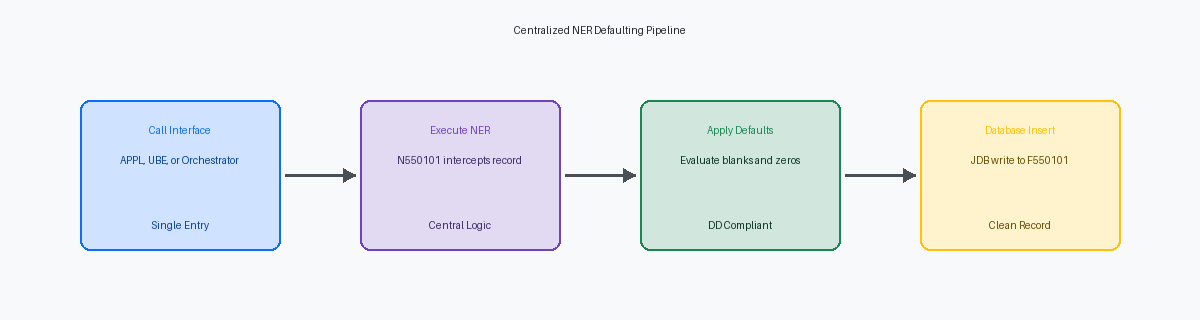
When auditing custom modifications across JDE 9.2JD Edwards EnterpriseOne version 9.2, a comprehensive suite of Enterprise Resource Planning (ERP) software. environments, I routinely find a common architectural flaw: default column values for custom tables (such as a custom F550101) hardcoded across multiple interactive applications (APPLAn interactive application in JD Edwards that users interact with via a web browser.). Relying on database-level default constraints fails because the JDB middlewareThe database abstraction layer that handles communication between JD Edwards applications and the physical database. layer explicitly inserts blanks or zeros, overriding database-level defaults. Implementing JDE NERNamed Event Rule, a type of business function created using JD Edwards scripting instead of C code. examples for custom table default values allows teams to centralize validation and assignment before calling the table I/OOperations that read from or write to database tables within JD Edwards. insert, ensuring data integrity across all entry points.
This guide provides concrete implementation patterns to centralize validation and assignment before calling the table I/O insert. Moving this logic out of FDAForm Design Aid, the development tool used to create and modify JD Edwards interactive applications. Event Rules and into a single, reusable business function reduces the custom code footprint by a significant portion of custom applications, in our experience around a third to half. This shift simplifies future Tools ReleaseThe underlying technology layer of JD Edwards that provides the runtime environment and development tools. upgrades and guarantees consistent data formatting whether records originate from an APPL, a UBEUniversal Batch Engine, the JD Edwards tool used for running reports and background processing., or an AIS-based orchestrationAutomated workflows using the Application Interface Services server to connect JD Edwards with external systems..
The Cost of Scattered APPL Defaulting Logic
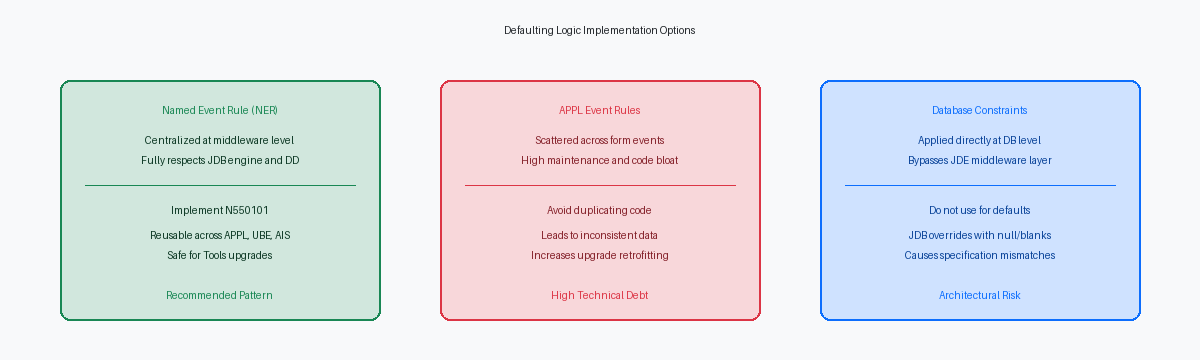
I recently audited a custom shipping system where developers scattered defaulting logic across the Write Grid Line-Before and OK-Post Button Clicked events of multiple APPLs. This design pattern creates immediate technical debt because interactive application Event RulesThe proprietary scripting language used to add logic to JD Edwards applications and reports. (ER) are notoriously difficult to unit test and maintain outside of their specific runtime context. When business requirements change—such as updating a default branch/plant or status code—you are forced to check out, modify, and build packages for multiple interactive applications instead of a single, reusable component.
Consider a custom master table like F550101, which requires default values for a dozen or more distinct fields, including standard audit columns, default search types, and currency codes. If this table is updated by multiple APPLs (a mobile entry screen, a desktop master manager, and a portal application) alongside several batch UBEs running nightly integrations, duplicating that multi-field defaulting logic across all entry points guarantees data corruption. A developer modifying the desktop APPL will inevitably miss a default value assignment in one of the background UBEs, resulting in orphan records or null values in critical columns like GL class or tax explanation code.
Encapsulating this defaulting logic within a dedicated Named Event Rule (NER) reduces the APPL code footprint by more than half on standard data-entry forms. Instead of maintaining dozens of lines of ER mapping default values in every form, the interactive application simply calls a single BSFNBusiness Function, a reusable piece of logic written in C or NER that performs specific tasks. passing the F550101 data structure prior to insert. This architectural shift ensures consistent data integrity across all entry channels and ensures that any future default value adjustments require a single modification in one centralized BSFN.

Why Database Default Constraints Fail in JDE
Database administrators often try to bypass JDE development by executing an ALTER TABLE statement to apply a DEFAULT 'Y' constraint on a custom table like F550101. This approach fails immediately due to the design of the JDB middleware engine. When an application or batch process triggers an insert, the JDB layer does not omit unmapped fields from the SQL statement. Instead, it explicitly constructs an INSERT statement containing every column defined in the Table Specifications. Because the JDB engine explicitly passes a blank, a zero, or a null pointer for uninitialized variables, the database engine treats this as an explicit value, completely overriding the database-level default constraint.
Relying on database-level constraints to force default values introduces silent failures and configuration drift across your environments. When you promote F550101 from DV920 to PY920 using OMWObject Management Workbench, the central tool for managing the development lifecycle of JD Edwards objects. and regenerate the table, the standard generation tool drops and recreates the physical table. This process wipes out any custom SQL Server or Oracle DB constraints. Developers are then left wondering why a process that worked in the development database fails to populate default values in testing or production.
The correct architectural pattern is to enforce default values at the application middleware level using a Named Event Rule. Because an NER executes within the standard EnterpriseOne call stack—either on the HTML server or mapped to an enterprise server via OCMObject Configuration Manager, a tool used to map where specific objects or data sources run in the system.—it respects JDE's native Data Dictionary rules and Table Specs. By intercepting the data before it reaches the JDB layer, the NER ensures that the runtime engine writes the correct default values consistently, whether the transaction originates from an interactive application, a batch UBE, or an AIS orchestration.
Designing the Centralized Table Insert NER
Moving defaulting logic out of interactive events like Grid Record is Fetched to a centralized Named Event Rule, such as N550101, is the only way to prevent data corruption when external integrations bypass the GUI. When you build N550101 as a dedicated pre-insert validation and defaulting engine, you ensure that every write path respects the same business rules. This shift eliminates the risk of missing header fields when integrations write directly to the interface tables.
The foundation of this pattern lies in the companion data structure, D550101, which must mirror the custom table's columns. By passing the entire table record as an IN/OUT structure, the NER can inspect the state of every field and modify empty values in place. If you only pass a subset of keys, you end up writing redundant fetch logic inside the BSFN, which degrades performance when processing batches of thousands of records.
Inside the NER, the logic executes a strict conditional evaluation: it applies default values like the system date (SL DateToday) or Next NumbersA JD Edwards feature that automatically assigns the next sequential number to a data field. only if the incoming parameter is blank or zero. For instance, if the caller passes an explicit transaction date, N550101 respects it; if empty, the NER populates it. This prevents overwriting intentional user inputs with hardcoded system defaults during bulk UBE imports.
This design pattern converts the NER into a centralized service accessible across the entire EnterpriseOne ecosystem. Whether a transaction originates from a P550101 interactive application, an R550101 batch UBE, or a REST call routed through the AIS Orchestrator, the exact same defaulting rules apply. This unified entry point reduces your retrofitting footprint by a significant margin during Tools Release upgrades, as you only have one object to validate.
Code Walkthrough of the Defaulting Logic
In the Event Rules of our custom NER, the first defensive line is validating the incoming data structure. If an alphanumeric field like Company (CO) is equal to <Blank> or a numeric field like Address Number (AN8) is equal to <Zero>, the NER must intercept and apply the default. We implement this using explicit If statements checking against CO and AN8 before any table I/O occurs, preventing the database from receiving incomplete records.
When the primary key of our custom table is left blank by the calling process, the NER dynamically retrieves a unique identifier. We call the F0002 Get Next Number business function inside the NER, passing the target system code and next number index to populate the key field. This ensures that even if a developer forgets to assign a key in an APPL or UBE, the NER guarantees database integrity by generating the next sequential ID automatically.
Consistently populating audit fields is where manual coding in APPLs often breaks down. Within this centralized NER, we explicitly map the JDE system values SL UserID to the USER field, SL DateToday to UPMJ, and the system time to TDAY. This design ensures that every insert, whether initiated from an interactive application, a batch UBE, or an external AIS orchestration, carries an identical, tamper-proof audit trail.
To prevent the calling application from proceeding with a corrupted transaction, the NER exposes a return flag, typically cErrorFlag (EV01). If a critical validation fails—such as an invalid company code or a failure within the next numbers routine—the NER sets this flag to '1' and bypasses the table insert. The calling APPL or business function evaluates this return code immediately after execution, allowing it to halt processing and roll back the transaction before invalid data hits the database.
APPL Simplification and Calling Patterns
In a typical P550101 interactive customer master extension application, developers often litter the "OK-Post Button Clicked" or "Grid Record is Fetched" events with dozens of lines of repetitive validation and hardcoded assignments. Replacing this scattered logic with a single call to the N550101 Named Event Rule (NER) significantly reduces the form's Event Rules footprint. For header-less detail forms, placing this call in the Write Grid Line-Before event ensures every row is processed cleanly before hitting the database. For fix-inspect forms, the "Add Record to DB - Before" event serves as the optimal gatekeeper to intercept the buffer and apply the defaults.
Decoupling this logic from the presentation layer directly accelerates future upgrade cycles. When you upgrade from 9.1 to 9.2, comparing and retrofitting a simplified APPL with minimal Event Rules modifications takes minutes instead of hours. The UI becomes a pure data-entry vehicle, while the core business rules live safely inside the centralized NER. This isolation prevents the common upgrade headache where custom form modifications get overwritten or require tedious manual merges during a Tools Release or application update.
This architectural pattern delivers immediate improvements when integrating batch processes like the R550101 customer upload UBE. Instead of duplicating the defaulting and validation rules inside the UBE's "Do Section" event, the batch report calls the exact same N550101 business function. Whether a record is created manually by an operator in P550101 or imported in bulk via R550101 from an external flat file, the exact same database defaults are applied consistently. This single point of maintenance eliminates data integrity discrepancies between interactive entries and batch interfaces.
Performance and Cache Considerations for NER Defaults
Running a custom NER on every single row insert can severely degrade batch performance if the underlying code performs un-cached database lookups. For a high-volume UBE processing tens of thousands of records, a poorly designed function will turn a brief run into a prolonged processing bottleneck. To prevent this, your design must target an execution overhead of under a few milliseconds per record insert during bulk processing. This tight performance envelope is entirely achievable if you restrict the NER's scope and handle data retrieval intelligently.
Minimizing database roundtrips within the NER is the single most effective way to protect system performance. Instead of executing direct select or fetch-single statements against control tables for every row, utilize the JDE Service CacheA mechanism to store data in memory for faster access, reducing the need for repeated database queries. or call standard business functions that employ internal caching. For instance, when validating or defaulting values based on the business unit, route the check through the standard F0006 Branch/Plant validation cache rather than querying the physical database table repeatedly. This keeps the lookups in the local enterprise server memory, reducing the overhead of each check to microseconds.
Keep the NER architecture simple by focusing strictly on data defaulting and basic validation, leaving complex business logic to downstream processing functions. Trying to execute multi-level inventory allocations or credit checks inside a table-level defaulting routine is a design pattern that invites database deadlocks and call-stack bloat. If a field requires complex conditional calculations, assign a safe fallback default in the NER and let the subsequent Master Business FunctionA complex business function designed to ensure data integrity by centralizing all logic for a specific entity like an Order or Address. handle the heavy lifting.
Centralizing default logic within an NER is a standard move for shrinking a custom code estate that often exceeds 5,000 to 15,000 objects. If your 9.2.x.x roadmap involves high-concurrency tables, the related articles on C BSFN memory management and custom cache patterns provide the necessary technical depth to prevent kernel failures. For those managing complex retrofits, my technical project portfolio contains specific examples of enterprise-scale customization cleanups and database optimization strategies that have successfully reduced upgrade durations from several months down to 6-9 weeks.
