



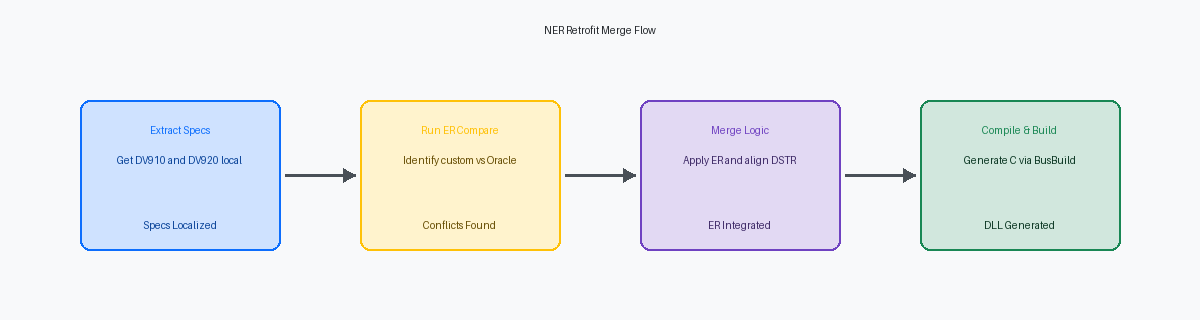
When upgrading to JD Edwards EnterpriseOne 9.2, developers routinely watch automated merge tools fail on heavy-duty Named Event Rules (NERs)A JD Edwards tool that allows developers to create business logic using a visual interface, which is then converted into C programming code. like standard Sales Order Master Business Function N4200310 or Item Master N4101060. A standard Electronic Software Update (ESU)A package of fixes or new features released by Oracle for JD Edwards software. can overwrite thousands of lines of custom ER code if you trust the default merge. This guide provides a step-by-step JDE NER retrofit example to merge custom event rules with Oracle changes, demonstrating how to manually dissect these high-risk conflicts within the JD Edwards ER Compare toolA utility used to identify and merge differences between two versions of Event Rules code..
Rather than blindly copying and pasting blocks of code—which frequently breaks variable scopeThe specific region of a program where a defined variable can be accessed or modified. and corrupts the generated C code in the path code'sA set of specifications and objects that define a specific JD Edwards environment, like Development or Production. source directory—we must analyze the underlying C-generation patterns. Isolating standard Oracle updates from custom insertions during a typical 6-to-9-week retrofit phase ensures that your business functions compile cleanly, eliminating the silent runtime memory leaksA failure in a program to release discarded memory, causing slowed performance or system crashes over time. and cache corruption that often bypass basic Unit Testing.
The Anatomy of an NER Upgrade Conflict
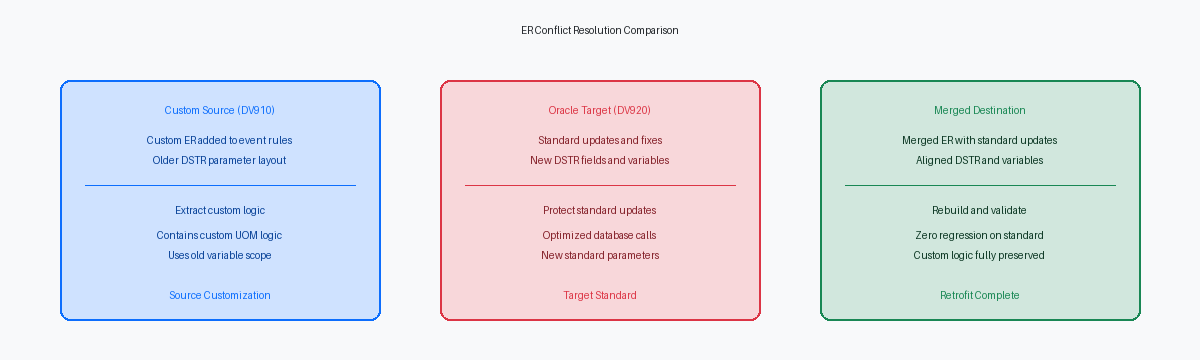
When you upgrade from 9.1 to 9.2, standard Named Event Rules (NER) like N4101060 (Process Item Master) do not sit static. Oracle regularly refactors these core functions, altering internal data structures, adding parameters to support new features, and optimizing database fetches. If your team has customized N4101060 to inject custom business logic—such as validating custom category codes during item creation—a simple overwrite of the new standard object with your old custom code will break the system.
Blindly replacing the 9.2 standard code with your 9.1 custom version wipes out crucial Oracle bug fixes, memory leak resolutions, and performance optimizations delivered in recent Application Updates. For instance, a direct overwrite might eliminate critical validation logic for new item master fields introduced in EnterpriseOne 9.2. This brute-force approach forces a regression that can take weeks of integration testing to uncover, often manifesting as silent database corruption or random memory violations in the CallObject KernelThe server process responsible for executing business functions on the JD Edwards Enterprise Server..
To execute a safe merge, you must respect how the JDE toolset processes an NER. Unlike standard Event Rules in an interactive application, an NER is not interpreted at runtime; the toolset translates the Event Rules into ANSI C code, generating corresponding .c and .h files in the path code's source and include directories. When you modify the ER, you are modifying a high-level abstraction that eventually compiles down to native C via the Business Function builder (BusBuildThe JD Edwards utility used to compile C business functions into executable libraries.).
A precise merge requires a three-way comparison using Object Management Workbench (OMW)The central management tool in JD Edwards for controlling object development, versions, and movement between environments.. You must isolate the pristine 9.1 source code (e.g., PS910), the custom-modified 9.1 code (e.g., DV910), and the pristine 9.2 target environment (e.g., PS920). Only by mapping the delta between these three states can you safely inject your custom validation logic into the updated 9.2 code structure without breaking the newly introduced Oracle parameters.
Setting Up the ER Compare Workspace
Setting up an ER Compare session starts in the OMW configuration tables, specifically F98230. If your activity rules do not map the legacy source (DV910) as a valid target against the upgrade environment (DV920), the tool fails to compare across releases. Ensure your OMW profile has rules allowing you to pull specs from both the legacy DV910 custom path code and the new DV920 pristine environment.
Before launching the utility, you must populate your local specifications. Perform an Advanced Get in OMW to pull the custom DV910 code into your local spec directory, while ensuring the target DV920 pristine object is checked out. This isolates the local database (such as the E1Local instance on Tools Release 9.2.7) from network latency, preventing the classic ER Compare crash that occurs when a WAN connection drops mid-merge.
Next, open the ER Compare options menu before loading the event rules. Disable the comparison of comments and line spacing; ignoring these trivial differences reduces visual noise in a highly customized NER like N4100040 by 30% to 50%. Failing to do this means wading through hundreds of false positives where Oracle simply adjusted indentations or updated copyright headers.
With a clean workspace, the visual indicators dictate your merge strategy. Red lines highlight code blocks present only in your custom DV910 specs, blue lines indicate Oracle modifications in the 9.2 pristine base, and green lines represent deleted blocks. Trusting these color-coded deltas allows you to copy custom blocks into the target code without overwriting critical 9.2 structural changes.

Step-by-Step NER Merge Execution
Blindly clicking the "merge all" arrow in ER Compare when retrofitting N4101060 is a fast track to a memory violation or silent data corruption. In a 9.1 to 9.2 upgrade, you must first isolate the exact event—such as the 'Before Record is Written' event within the item master or unit-of-measure validation flow—where your legacy custom logic was injected. In our experience, in the vast majority of custom UOM overrides, the original developer appended code to the very end of the event, ignoring how Oracle’s base logic might have evolved in the newer tools release.
Before moving a single line of code, you must manually align any custom parameters added to the NER’s companion Data Structure (DSTR)A defined set of parameters used to pass data into or out of a business function or application. in the target environment. If your custom UOM conversion logic relies on a custom parameter that is missing in the target 9.2 DSTR, ER Compare will silently drop those variable mappings during the merge. Once the DSTR is synchronized, analyze the new Oracle standard variables in N4101060 to ensure no naming overlaps exist, particularly with standard math numeric or flag variables that Oracle may have introduced to support localized tax or packaging features.
When executing the merge, use the ER Compare directional arrows only for isolated, clean blocks of code. For complex conditional blocks, manually re-type or surgically insert the logic to guarantee that variable scope and initialization routines—such as resetting standard EV01 error flags—remain intact. If Oracle has redesigned the surrounding control structures in the target release, placing your custom UOM conversion code inside the wrong nesting level will bypass standard validations, leading to orphaned records in the F41002 table during transaction processing.
Resolving Variable Scope and Data Structure Clashes
When upgrading to 9.2, the most volatile friction point in custom NER merges is the silent alteration of underlying data structures. For example, when retrofitting custom logic around N4101060 (Item Master/Branch Plant Info), any mismatch between the source and target Data Structure (DSTR) definitions will break the compilation of the generated C code. If your old custom NER relies on parameters that Oracle altered in 9.2, the Event Rules engine cannot map those pointers. You must align the target DSTR first, adding any custom parameters to the 9.2 version before merging the ER.
Before copying custom ER, you must manually recreate all custom local variables in the target NER using identical Data DictionaryA central repository in JD Edwards that defines the attributes, validation, and formatting of all data fields. items. If you paste ER containing variables that do not exist in the target NER's local pool, the ER editor will silently drop the lines. This preventative step ensures the compiler does not throw undeclared identifier errors.
You must also audit and re-link child business function calls nested within the merged NER. In 9.2, standard Oracle BSFNsReusable pieces of business logic written in C or NER that perform specific tasks like calculations or database updates. frequently feature expanded data structures. If a child BSFN's DSTR has changed, the existing parameter mappings from your 9.1 ER will misalign, requiring you to manually re-map and save the updated call.
Finally, verify variable scope, specifically distinguishing between Subroutine and Event-level variables. Neglecting this validation leads to silent runtime memory corruption or null pointer exceptions in the C engine. If a variable is initialized inside a subroutine but accessed globally, the underlying pointer arithmetic in the generated C code will fail, crashing the CallObject kernel on the enterprise server.
Compiling and Regenerating the C Code
Many developers forget that a Named Event Rule is not an interpreted script; the toolset translates your visual ER into ANSI C code (.c and .h files) before compiling it into a dynamic link libraryA file containing code and data that can be used by more than one program at the same time to perform specific tasks.. If you skip the generation step after a merge, the runtime will execute the old compiled code, completely ignoring your newly merged event rules. Running a local build of the retrofitted NER via BusBuild immediately validates that the newly generated C code contains no syntax errors, missing semicolons, or uninitialized variables before you attempt to promote the project.
Do not rely solely on a "Build Successful" popup. You must open the build.log or the specific DLL log, such as CCUSTOM.log, located in your client workstation's local path (typically E920\DV920\spec\log). Scan this file for warning messages, specifically compiler warnings like C4018 (signed/unsigned mismatch) or C4244 (conversion with possible loss of data). These warnings often point to mismatched data types or hidden casting issues introduced during the merge, particularly when custom math numeric variables are mapped to standard business function parameters.
Generating the header files correctly ensures that other calling objects, such as APPLs, UBEsA JD Edwards tool used to create reports and batch processes that run on the server., or other BSFNs, can bind to the updated NER interface without memory violations at runtime. If you modified the Data Structure (DSTR) of the NER to accommodate the upgrade, you must regenerate the header file to align the typedef struct with the new JDE data dictionary definitions. Failing to do this causes a misalignment in the call stack, which typically manifests as a fatal memory violation—such as a COB0000012 error—the moment the enterprise server attempts to execute the calling object.
Defining the Testing and Validation Path
Triggering a retrofitted NER inside a complex transaction flow like Sales Order Entry (P4210) during initial testing is a recipe for wasted hours. You cannot easily isolate your custom logic changes when wrapped in thousands of lines of standard master business function code. Instead, build a simple, dedicated test harness APPL or a lightweight custom UBE designed specifically to call the target NER with controlled input parameters. This isolation ensures that any memory violations or unexpected null pointers are immediately attributable to the retrofitted code rather than upstream data preparation.
Once the test harness is in place, set Output=FILE in your local jde.ini and execute the test run to capture a clean jdedebug.log trace. Analyzing this trace is the only reliable way to verify that the parameter mappings inside your merged Event Rules are passing values correctly across the data structure boundary. You must inspect the call stack trace line by line to confirm that your custom logic executes in the exact sequence intended relative to the standard Oracle events, verifying that values are not overwritten by late-running standard code.
Compare the execution time and SQL statement count in the debug log of the retrofitted NER against a baseline run of the pristine version. A merged NER that introduces redundant database fetches or recursive table I/O can degrade performance by a factor of two or more under production loads. After validating the logic and performance locally, promote the object through Object Management Workbench to the integration environment. This promotion must trigger a full package buildThe process of compiling and linking JD Edwards objects into a deployable format for clients and servers. rather than an update package, ensuring that the newly generated C binaries are cleanly compiled and distributed to all enterprise servers.
Applying these ER Compare patterns across a typical portfolio of 200 to 500 objects ensures that custom logic survives the move to the latest Tools Release without compromising Master Business Function integrity. For those managing complex custom code estates, further technical deep-dives on JDE cache optimization and C BSFN memory management are available on this site. You can also browse my project portfolio to see how these methodologies were applied to stabilize 9.1 to 9.2 migrations for enterprise-scale manufacturing and retail environments.
