




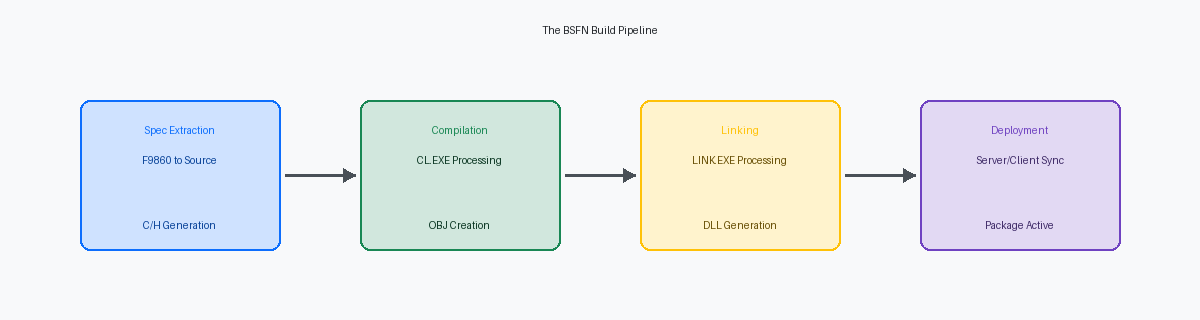
A failed full package buildA complete compilation and linking of all JD Edwards objects into a deployable software package for deployment to servers. on a Sunday night is rarely a CNC infrastructureThe technical foundation and administration of the JD Edwards EnterpriseOne system, including servers, databases, and network. failure; in the vast majority of cases, it is a developer-driven specShort for "specifications," these are metadata definitions of JD Edwards objects (like applications, reports, business functions) stored in the database. or dependency oversight. Relying on the generic "Build Failure" status in P9608The JD Edwards application for monitoring and managing package build status. It provides a high-level overview of the build process. is a mistake that adds hours of unnecessary downtime to a deployment window. To understand how to troubleshoot JDE BSFN build errorsErrors encountered during the compilation and linking of JD Edwards Business Functions, which are reusable pieces of business logic. after a package build, you must bypass the application layerThe software layer that provides user interface and business logic, abstracting underlying system details. and interrogate the raw .err and .log filesText files containing error messages and detailed execution records, crucial for troubleshooting software build processes. located in the server’s work folderA directory on the server where temporary files, logs, and build outputs are stored during processing, including package builds.. Whether it’s a missing #includeA preprocessor directive in C/C++ that tells the compiler to insert the content of another file (like a header) into the current file. in a custom header or a data structure mismatchAn inconsistency where the definition of a data structure used in one part of the code doesn't match its definition elsewhere, causing compilation errors., the compilerA program that translates source code written in a high-level language (like C) into machine code that a computer can execute. provides the only objective truth when the JDE repositoryThe central database where all JD Edwards object specifications and metadata are stored and managed. is out of sync.
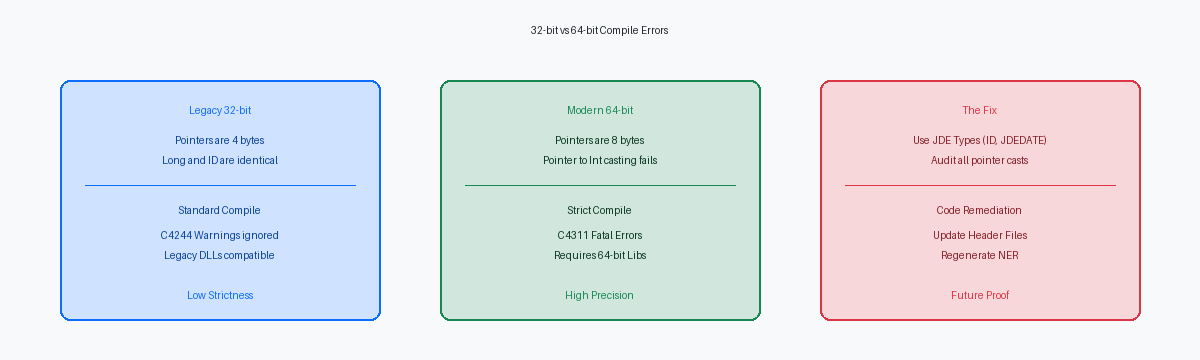
The shift from 32-bit to 64-bit architectureA change in how computer systems process data, moving from 32-bit (4-byte) memory addresses to 64-bit (8-byte) addresses, impacting code compatibility. in Tools Release 9.2.xA specific version or range of versions of the JD Edwards EnterpriseOne development tools and runtime environment. has fundamentally changed the error landscape, exposing legacy C codeOlder C programming code that may have been written for previous system architectures or standards, potentially causing issues in new environments. that remained stable for over a decade but now triggers fatal casting and pointer-size violationsCritical errors occurring when data types are incorrectly converted or when memory addresses are handled improperly in a 64-bit environment, often leading to crashes.. We are seeing a notable increase in build failures during 9.2 upgradesThe process of updating a JD Edwards EnterpriseOne system to Tools Release 9.2 or a later version, often requiring code adjustments., often between 15% and 25%, because developers ignore mathNumericToIntA specific JD Edwards function or compiler warning indicating potential issues when converting JD Edwards' precise numeric type (MATH_NUMERIC) to an integer. warnings or use incompatible pointer typesErrors where different types of memory addresses are used in a way that the compiler cannot reconcile, leading to build failures. that the older 32-bit compilersCompilers designed to generate code for 32-bit computer architectures, which may overlook issues that 64-bit compilers flag. overlooked. Resolving these requires a surgical approach to the includeA folder containing header files (.h) that define functions, variables, and data structures used in C/C++ programs. directory and a strict verification of NER generationThe process of converting JD Edwards Named Event Rules (business logic) into C source code for compilation. before the package engineThe component of JD Edwards that orchestrates the compilation, linking, and deployment of software packages. starts its first DLL linkThe process of combining compiled code modules (object files) with shared libraries (Dynamic Link Libraries) to create an executable program..
Locating the Source of Truth in Build Logs
Watching a package build fail in P9608The JD Edwards application for monitoring and managing package build status. It provides a high-level overview of the build process. is a rite of passage, but the red status icon is functionally useless for a developer. It shows that a single object out of several thousand failed, yet provides no context on whether you have a missing comma in a C statementA single instruction or expression in the C programming language, forming a complete thought or action. or a failure of the compiler's environment variablesSystem settings that provide information to the compiler, such as paths to libraries and include files, essential for a successful build.. The Work with Package Build Status applicationThe JD Edwards application (P9608) used to monitor package build progress, showing high-level status but lacking detailed error context. is merely a high-level dashboard; the real forensic evidenceDetailed technical data and logs used to investigate and diagnose system issues, providing the true source of build problems. lives exclusively on the file system of the build machineThe server or workstation dedicated to compiling and linking JD Edwards software packages..
To move beyond the binary failure, map a drive to the \\buildserver\E920\packages\PACKAGENAME\compile directoryA network path to the specific folder on the build server where compiled package components, including logs and object files, are stored.. This is where the EnterpriseOne build engineThe core JD Edwards component responsible for managing the package compilation and linking process. dumps the raw output from the Microsoft Visual C++ compilerA specific C++ compiler developed by Microsoft, commonly used for JD Edwards builds on Windows operating systems. or the relevant Linux compiler suiteA collection of compilers (e.g., GCC) used for building software on Linux operating systems, essential for cross-platform JD Edwards deployments.. Within this folder, the stderr.logA log file that captures standard error messages, typically containing critical error details from a program's execution, crucial for troubleshooting. file is your primary target, as it captures the specific line numbers and error codes—such as C2065 for undeclared identifiersSpecific alphanumeric codes indicating different types of compilation errors, like using a variable without declaring it, providing precise diagnostic information.—that JDE runtime logsLog files generated by the JD Edwards system during its operation, recording events and errors, but often obscuring build details. usually obscure. If that file is empty, the stdout.logA log file that captures standard output messages, often showing the normal progress of a program or build process. reveals if the build process failed during the pre-processor stageThe initial phase of compilation where directives like #include are handled before the main compilation of source code. or if the system simply could not locate the cl.exe executableThe command-line executable for the Microsoft Visual C++ compiler, essential for compiling C/C++ source code..
Effective triage starts by distinguishing a compile-time syntax errorAn error detected by the compiler because the source code violates the grammatical rules of the programming language. from a link-time symbol resolution failureAn error occurring when the linker cannot find the definition for a function or variable that was declared but not defined, preventing final program assembly.. A compile error typically points to a specific .c or .h file`.c` files contain C source code, and `.h` files contain header definitions (declarations) for functions and data structures. where a developer missed a typedefA C keyword used to create an alias or a new name for an existing data type, improving code readability. or fat-fingered a data structure memberA colloquial term for making a typing error when defining or using a member of a data structure, leading to syntax errors. during a 9.2 retrofitThe process of adapting existing JD Edwards code or customizations to work with Tools Release 9.2, often involving significant code changes.. Conversely, a link errorAn error that occurs during the linking phase of software compilation, typically when the linker cannot find required code or libraries. surfaces at the end of the log as an "unresolved external symbolA specific link error indicating that the linker cannot find the definition for a function or variable referenced in the code.," signaling that while the code is syntactically correct, the linker cannot find the object codeThe machine-readable output of a compiler, before it is linked into an executable program or library. for a BSFN called from another DLLA Business Function (BSFN) that is invoked by code residing in a different Dynamic Link Library, requiring proper linking.. In a typical upgrade involving 300 impacted objectsSoftware components (like Business Functions or applications) that are affected by a change, upgrade, or modification., the majority of build failures—often upwards of three-quarters—stem from these header mismatchesInconsistencies between the definitions in header files, leading to compilation or linking errors due to conflicting declarations. rather than actual logic flawsErrors in the underlying design or reasoning of the program's functionality, causing incorrect behavior..
Look for exit code 2A specific numerical value returned by a program to indicate a particular type of termination, often signifying a fatal error during compilation. in the logs, which indicates a fatal error that stopped the compilation of a specific C file. If you see failures across multiple BSFNs, check the includeA folder containing header files (.h) that define functions, variables, and data structures used in C/C++ programs. subdirectory within the package folder to ensure the .h files were correctly pulled from the F98711 and F98712 specsJD Edwards database tables that store specifications for Business Functions and their associated source code and headers.. I have seen multi-hour debugging sessions shortened to minutes simply by verifying that the JDE.H fileA core JD Edwards header file containing global definitions and declarations essential for compiling JD Edwards C code. in the compile folder actually matches the version in the development environmentThe software and tools used by developers to write, test, and debug code, including compilers and IDEs.. If file sizes differ by even a few kilobytes, your local specsSpecifications stored on a developer's local workstation, potentially differing from the central repository and causing build issues. and the build serverThe server or workstation dedicated to compiling and linking JD Edwards software packages. are out of sync, necessitating a full spec generationThe process of regenerating all object specifications from the JD Edwards database, ensuring consistency across environments. before the next package attempt.
Resolving Header and Include File Dependencies
A successful local build on a FAT clientA compilation process performed on a developer's workstation (FAT client), which may not perfectly replicate server build conditions. frequently creates a false sense of security. When the server build fails with fatal error C1083: Cannot open include file: 'b550001.h': No such file or directoryA critical compiler error indicating that a required header file, like 'b550001.h', cannot be found during compilation., the issue is rarely the code itself but the accessibility of the source. If the #include "b550001.h" dependency chainThe sequence of files that rely on 'b550001.h' for their definitions, where a broken link causes build failures. is broken because the .h file exists only in the developer’s local \include\ folder and was never checked into the central objects repositoryThe main database where all JD Edwards object specifications and source code are stored and managed., the server-side compilerThe compiler running on the build server, as opposed to a local workstation, which has different access to files. will fail every time. You must confirm that the header is physically present on the deployment serverThe server where JD Edwards packages are deployed and from which clients access applications. and correctly mapped in the F98611A JD Edwards database table that stores information about object locations and dependencies, crucial for package builds. before kicking off the next build.
Circular dependenciesA situation where two or more components (e.g., header files) directly or indirectly rely on each other, potentially causing build issues. represent a more complex failure mode that often evades detection during isolated BSFN builds in OWMThe process of compiling individual Business Functions within Object Workbench (OWM), a JD Edwards development tool.. On a local workstationA developer's personal computer used for coding and testing, which may have different file access than a server., a developer might build B550001 which references B550002, and since both headers exist locally from previous work, the linker resolves them without complaint. On the Enterprise ServerThe main server component of JD Edwards EnterpriseOne that runs business logic and processes., the multi-threaded build sequenceA build process that uses multiple concurrent threads to compile different parts of the code simultaneously, which can expose timing issues. may attempt to compile B550002 before B550001’s header is fully staged. This race conditionA situation where the outcome of a process depends on the unpredictable timing of multiple independent operations, leading to intermittent failures. leads to intermittent failures that appear as spec corruptionDamage or inconsistency in the metadata definitions (specifications) of JD Edwards objects, leading to build errors. but are actually architectural flaws in the header nesting logicProblems in how header files are organized and included, leading to incorrect dependencies and build issues..
To resolve these issues, bypass the top-level logs and inspect the IncludeA folder containing header files (.h) that define functions, variables, and data structures used in C/C++ programs. folder within the package staging directoryA temporary directory on the build server where package components are assembled before final deployment. on the build server. If a custom header is missing from this directory, the global build scriptThe main script that orchestrates the entire package build process, managing compilation, linking, and deployment steps. failed to extract it from the F9860 specsJD Edwards database tables that store object specifications, including information about header files and their dependencies., typically due to a status mismatchAn inconsistency in the status of an object (e.g., checked in, checked out) between different environments or tables, causing build issues. or an incomplete check-in. In a mature environment with 10,000+ custom objectsA large and established JD Edwards system with a significant number of custom-developed components., these dependency gaps account for approximately one-fifth of all package build failures. Verifying that every custom .h file is explicitly defined in the Object LibrarianA JD Edwards tool or component that manages and tracks all objects in the system, including custom header files. and visible to the server-side build processThe compilation and linking process that occurs on the build server, distinct from local workstation builds. is a mandatory step for any stable 9.2 environmentA JD Edwards EnterpriseOne system running Tools Release 9.2 that is reliable and free from frequent errors..
Data Structure Mismatches and Spec Corruption
When a build fails with "member of struct has no nameA compiler error indicating that a field within a data structure (struct) is missing a name, making it invalid." or "conflicting typesA compiler error indicating that a variable or function is declared with different data types in different places, causing inconsistency.," the first check is the F98606 tableA JD Edwards database table that stores definitions for data structures, including member counts and data item sequences.. This table tracks the member count and data item sequence for every data structureA custom data type composed of multiple members, used in JD Edwards to organize related data. in the system. A common failure occurs when a developer adds a parameter to a DSTRShort for Data Structure, a custom data type composed of multiple members, used in JD Edwards. but fails to synchronize the C-style typedefA custom data type definition using the `typedef` keyword in C, often used for data structures.. If the F98606 count shows 14 members but your .h file only defines 13, the compiler will throw a C2027 or C2079 errorSpecific compiler error codes related to undeclared identifiers or conflicting types, often due to data structure mismatches. during the link phase of the server buildThe stage during a server build where compiled object files are combined into executable libraries (DLLs)..
The Generate Header tool in OWMA specific utility within JD Edwards Object Workbench (OWM) used to create or update header files based on object specifications. is the only way to ensure the .h file matches the specs in the F9860 objectA JD Edwards database table containing object specifications, including details for header file generation.. Despite being a fundamental requirement, it remains the most frequently skipped step in the development lifecycleThe entire process of creating, testing, deploying, and maintaining software, from conception to retirement.. Developers often manually edit the .h fileDirectly modifying a header file using a text editor, rather than through JD Edwards tools, which can introduce errors. to save time, missing the specific padding or alignment commentsSpecial comments or directives added by JD Edwards tools to ensure correct memory layout for data structures, crucial for cross-platform compatibility. that the JDE toolsetThe collection of development tools and utilities provided by JD Edwards for creating and managing objects. expects. This manual interventionDirect human modification of files or settings, bypassing automated tools, which can lead to inconsistencies and errors. leads to alignment shiftsChanges in how data is arranged in memory, which can cause issues, especially between different architectures or operating systems. that might not crash a local fat client buildA compilation process performed on a developer's workstation (FAT client), which may not perfectly replicate server build conditions. but will cause a memory violationAn error where a program attempts to access a memory location it is not authorized to use, often leading to a crash. on a Linux or AIX enterprise serverSpecific operating systems (Linux, IBM AIX) commonly used for JD Edwards Enterprise Servers, known for strict memory alignment requirements. where memory alignment is strictly enforced.
Discrepancies where a BSFN compiles perfectly on a local workstationA Business Function successfully compiles on a developer's computer, but this doesn't guarantee success on the server. but fails during a full or update package buildA complete or partial compilation and deployment of JD Edwards objects to a server, which has stricter build rules. point directly to stale specs in Central ObjectsOutdated or incorrect object specifications stored in the central JD Edwards database, causing discrepancies during server builds.. When the package build engineThe component of JD Edwards that orchestrates the compilation, linking, and deployment of software packages. pulls specs to the build server, it relies on the version checked into the deployment server's databaseThe database associated with the deployment server, containing object specifications for deployment.. If a developer tested locally but forgot to check in the DSTR along with the BSFNEnsuring that both the Data Structure and the Business Function are checked into the central repository together to maintain consistency., the server build uses the old structure. This results in a parameter mismatch errorAn error occurring when the number or types of arguments passed to a function do not match its definition. in the build logA file containing detailed output from the compilation and linking process, crucial for diagnosing errors. that is impossible to debug by looking at the local code alone.
Watch for 0KB filesFiles with zero bytes, indicating they are empty or corrupted, often signaling a failure in a preceding build step. in the source or include directories of the package folderSpecific subfolders within the package directory on the enterprise server containing source code and header files. on the enterprise server. A truncated source file indicates the BusBuild processThe JD Edwards process responsible for building packages, including spec-to-source conversion and compilation. failed during the spec-to-source conversion phaseThe stage where JD Edwards object specifications are translated into C source code, a critical step before compilation.. This usually happens when the repository contains orphaned recordsDatabase entries that no longer have a valid parent or reference, leading to inconsistencies and build failures. or a corrupted blob in the F98743 tableDamaged binary large object (BLOB) data within the F98743 table, often storing source code, leading to conversion failures.. If the conversion fails, the compiler finds an empty file and terminates the build for that entire DLLDynamic Link Library, a shared library file containing code and data that can be used by multiple programs., often taking down dozens of unrelated functionsOther Business Functions that are not directly involved in the error but are affected due to shared dependencies within a DLL. in the process.
Navigating 32-bit to 64-bit Compilation Pitfalls
Tools Release 9.2.5A specific version of the JD Edwards EnterpriseOne development tools and runtime environment, which introduced 64-bit architecture. and subsequent versions moved the JDE runtimeThe software environment that executes JD Edwards applications and business logic. to a 64-bit architectureA change in how computer systems process data, moving from 32-bit (4-byte) memory addresses to 64-bit (8-byte) addresses, impacting code compatibility., rendering thousands of lines of legacy C codeOlder C programming code that may have been written for previous system architectures or standards, potentially causing issues in new environments. potentially unstable. The most common failure point is the assumption that a pointer and an integer share the same bit-widthAn assumption, common in 32-bit systems, that memory addresses (pointers) and whole numbers (integers) occupy the same amount of memory.. In 32-bit releasesVersions of JD Edwards or operating systems designed for 32-bit architectures, where pointers and integers often had the same size., both were 4 bytes. In the current 64-bit environmentA computing environment where memory addresses occupy 8 bytes, requiring careful handling of pointers and integers., memory addresses occupy 8 bytes. When developers attempt to cast an LPVOID pointerA generic pointer type in C/C++ that can point to any data type, often used for memory addresses. into a 32-bit long or intData types in C/C++ that typically occupy 4 bytes of memory, which can lead to truncation errors in 64-bit systems., the compiler throws a C4311 warning for pointer truncationA compiler warning indicating that a memory address (pointer) is being converted to a smaller data type, potentially losing information and causing memory corruption.. Ignoring this warning leads to memory corruptionErrors where the contents of memory are unintentionally altered, leading to unpredictable program behavior and crashes. because the high-order bits of the address are discardedThe most significant bits of a memory address are lost during an incorrect conversion, making the address invalid., causing the BSFN to reference invalid memory locationsA Business Function attempting to access parts of memory that are not allocated to it or do not contain valid data, leading to crashes..
Refactoring these BSFNsThe process of restructuring existing Business Function code without changing its external behavior, typically to improve its design or adapt to new requirements. requires replacing legacy long declarationsOlder uses of the `long` data type in C/C++ code, which might be problematic in a 64-bit environment due to size differences. with ID or intStandard integer data types in C/C++, used for general-purpose numeric variables. for standard variables, and using INT_PTRA data type specifically designed to hold a pointer value, ensuring it has the correct size (32-bit or 64-bit) for the current architecture. for any variable intended to hold a memory address. This is a requirement for the 64-bit memory modelThe way memory is addressed and managed in a 64-bit computing environment, requiring specific data types for pointers.. We frequently see this issue in custom cache handlingCode designed to manage temporary storage (cache) for specific application data, often involving pointers. where a pointer to a cache bucketA segment or entry within a data cache, used for temporary storage of frequently accessed data. is stored in a data structure member. If that member was defined as a 4-byte integer in the Data DictionaryA central repository in JD Edwards that defines all data items, their types, and properties., the 8-byte pointer will be truncated, and the jdeCacheFetch callA JD Edwards API function used to retrieve data from a cache, which can fail if pointers are truncated. will fail with a memory violationAn error where a program attempts to access a memory location it is not authorized to use, often leading to a crash..
Precision management within MATH_NUMERIC structuresThe careful handling of JD Edwards' specific numeric type (MATH_NUMERIC) to maintain accuracy, especially in a 64-bit context. also changes in a 64-bit context. While the structure itself remains 36 bytes, the way the compiler aligns the internal members on 8-byte boundariesHow the compiler arranges data structure members in memory to optimize access, often requiring them to start at addresses divisible by 8. can lead to unexpected results if you use direct memory manipulationAccessing and modifying memory contents directly using pointers, rather than through higher-level language constructs or APIs. instead of standard JDE APIsApplication Programming Interfaces provided by JD Edwards for interacting with its system components, recommended for data handling.. You must use MathCopyA JD Edwards API function for copying values between MATH_NUMERIC structures, ensuring proper precision handling. and ParseNumericStringA JD Edwards API function for converting a string representation into a MATH_NUMERIC value, ensuring proper precision. exclusively. Attempting to use standard C math functionsMathematical functions provided by the C standard library, which may not handle JD Edwards' MATH_NUMERIC type correctly. by casting MATH_NUMERIC members to doublesConverting parts of a MATH_NUMERIC structure to a `double` floating-point type, which can lead to precision loss or rounding errors. will often result in precision loss or rounding errorsInaccuracies introduced when numeric values are converted or processed, especially with floating-point numbers, impacting financial calculations. that were not present in the 32-bit runtimeThe JD Edwards execution environment designed for 32-bit architectures, which had different numeric handling characteristics..
Finally, check your external dependenciesOther software components or libraries that a program relies on to function, often from third-party vendors.. If your BSFN links to a third-party DLLA Dynamic Link Library developed by a vendor other than JD Edwards, used for specific functionalities.—common in scale-interface or freight-tagging customizationsExamples of custom JD Edwards functionalities that might integrate with external hardware or software, requiring third-party libraries.—that library must be 64-bit compliantDesigned and compiled to work correctly within a 64-bit computing environment, essential for compatibility.. A 32-bit .lib fileA static library file compiled for a 32-bit architecture, which is incompatible with 64-bit builds. will cause the linker to throw a LNK2001 or LNK1112 errorSpecific linker error codes indicating that a symbol cannot be found or that there's an incompatibility between object files, often due to architecture mismatch. during the package build. You cannot bridge these architectures within the same processAttempting to mix 32-bit and 64-bit code within a single running program, which is generally not supported and causes errors.. If a 64-bit version of the third-party library is unavailable, you must move that logic to an external serviceA separate software application or component that provides functionality, often accessed over a network, to avoid architecture conflicts. and call it via an AIS orchestrationApplication Interface Services (AIS) orchestration, a JD Edwards tool for integrating with external systems and automating processes. or a business serviceA JD Edwards component that encapsulates business logic and can be exposed as a web service for integration. to avoid crashing the call object kernelA core JD Edwards component responsible for executing Business Functions and other objects..
Diagnosing Unresolved External Symbols and Linker Errors
When the package build log throws error LNK2019A specific linker error indicating an "unresolved external symbol," meaning the linker cannot find the definition for a referenced function or variable., the compiler has finished its task, but the linker is strandedThe source code compiled successfully, but the final program could not be assembled because the linker could not find definitions for all referenced symbols.. You have a valid header file declaring the functionA header file that correctly defines the signature of a function, but without its actual implementation., yet the linker cannot find the compiled machine codeThe low-level instructions generated by the compiler that the computer can execute, forming the actual implementation of functions. in the specified libraryThe Dynamic Link Library (DLL) or static library where the linker expects to find the compiled code for a function.. In a typical 9.2 environmentA JD Edwards EnterpriseOne system running Tools Release 9.2, which has specific build and linking characteristics., this occurs most frequently after a developer reassigns a Business Function from a custom DLL like CCUSTOM to a standard one like CALLBSFNReassigning a Business Function from a user-defined library (CCUSTOM) to a standard JD Edwards library (CALLBSFN), which requires updating references.. If the parent object’s specifications in the F9860The metadata for the object that calls the Business Function, stored in the F9860 table, which must correctly point to the DLL. still point to the old DLL, the linker searches the wrong library and fails, even though the source code itself is syntactically perfectCode that adheres to the grammatical rules of the programming language, even if it has logical or linking issues..
Integrating third-party C++ librariesLibraries written in C++ by external vendors, used to extend JD Edwards functionality. for specialized logic—such as advanced encryption or proprietary shipping APIsExamples of specialized functionalities that might require external libraries, like secure data handling or integration with shipping carriers.—introduces a secondary layer of linker risk. These external .lib filesStatic library files provided by third-party vendors, containing compiled code that needs to be linked with the main program. must be explicitly defined in the linker flagsCommand-line options passed to the linker to control its behavior, such as specifying library paths. or the [JDE_CPP_FLAGS] section of the build machine’s JDE.INIA specific section within the JD Edwards initialization file on the build server, used to configure C++ compiler and linker settings.. If you are missing a reference to a library like libcurl.libA common third-party library used for transferring data with URLs, often required for external integrations. or a custom wrapperA piece of code that provides an interface to another library or system, often simplifying its use., the build will terminate during the final link phase of the DLLThe last stage of the linking process where all compiled object files and libraries are combined to create a Dynamic Link Library.. I have seen delays of two days or more in go-livesThe point in time when a new system or major update is deployed and becomes operational. because a build server was replaced and the manual linker path configurationsSettings for the linker that are manually entered or configured, rather than being automatically managed, which can be missed during migrations. in the JDE.INI were not migrated from the old deployment serverA previous server used for deploying JD Edwards packages, whose configurations might not be automatically transferred..
The most dangerous scenario is a silent link failureA linking error that does not cause the build process to explicitly fail, but results in an incomplete or incorrect output. where the UBE reportA report generated by a JD Edwards Universal Batch Engine (UBE) job, which might show warnings instead of fatal errors. shows a "Warning" but the package completes. You must verify the 'bin' folder of the package on the deployment serverThe directory on the deployment server where the compiled executable files (DLLs) of a package are stored. to confirm the .dll timestampThe date and time recorded when a Dynamic Link Library file was last modified, indicating if it was successfully updated. matches the build start time. If the .dll is missing or shows an old date, the link step failed. For a 10,000-object enterprise repositoryA large JD Edwards system with many custom and standard objects, making dependency management complex., a single unresolved symbol in a core DLLA missing definition for a function or variable within a fundamental Dynamic Link Library, which can prevent many dependent functions from loading. can prevent dozens of downstream BSFNsBusiness Functions that depend on or are called by other Business Functions, and thus can be affected by upstream failures. from loading at runtime, leading to the dreaded "Business Function Load Failed" error in the jdedebug.logA specific error message in the JD Edwards debug log indicating that a Business Function could not be loaded into memory during execution.. Verify the F9862 tableA JD Edwards database table that maps objects to their associated Dynamic Link Libraries (DLLs), crucial for correct loading. to ensure the object is mapped to the correct parent DLL before re-running the build.
NER Generation Failures and Source Code Sync
A package build failure for a Named Event Rule (NER)A type of JD Edwards object that encapsulates business logic, often triggered by specific events, and requires C code generation. often stems from a breakdown in the pre-compilation phaseThe stage before actual compilation where source code is prepared, e.g., by a preprocessor or generator. where Event Rules are translated into C source codeThe process where JD Edwards' proprietary Event Rule logic is converted into standard C programming language for compilation.. If you inspect the source and include directories of your package build folder and find N550001.cA placeholder for a custom Named Event Rule's C source file, generated from the NER logic. or its corresponding header fileThe `.h` file associated with a `.c` source file, containing declarations for functions and data structures. missing, the build process never reached the compiler. The generation stepThe process of creating source code or other files from a higher-level definition, like Event Rules. is a prerequisite; the build agentA software component that executes build tasks on a server, including the generation of C source code from Event Rules. must successfully run the generatorA program that creates source code or other files from a higher-level definition, like Event Rules. to transform the ER logicThe business logic defined using JD Edwards Event Rules, which needs to be translated into C code for compilation. into a format the C compilerA program that translates source code written in C into machine code that a computer can execute. can digest.
Discrepancies between the local workstation validatorA tool on a developer's computer that checks the validity of Event Rules, which may differ from the server-side generator. and the server-side generatorThe program on the server that translates Event Rules into C code, which might have different configurations or access. account for a significant majority of these failures. You might see a "Success" status when saving the NER in the Event Rules Design toolThe JD Edwards application used to create and modify Named Event Rules., yet the server-side build fails because of an orphaned record in the F9861 tableA database entry in the F9861 table (object master) that is no longer correctly linked or referenced, causing build issues. or a mismatch in the OMW project statusThe status of a project within JD Edwards Object Workbench (OWM), indicating its stage in the development cycle. that prevents the generator from accessing the latest specs. To mitigate this, always perform a "Get" on the NER and its associated Data StructureRetrieving the latest versions of a Named Event Rule and its Data Structure from the central repository to ensure consistency. in a clean environmentA development or build setup that is free from old or conflicting files and settings, ensuring a fresh start. before promotionThe process of moving JD Edwards objects through different development environments (e.g., from development to testing). to ensure the central objects repositoryThe main database where all JD Edwards object specifications and source code are stored and managed. is fully populatedEnsuring that all necessary data and definitions are present in the database, preventing missing object errors..
This guide addressed the primary technical hurdles in resolving BSFN build errors during package deployment. For deeper architectural challenges or persistent performance bottlenecks in your custom C code, see our subsequent technical deep-dives on JDE Cache managementThe process of optimizing how JD Edwards stores and retrieves frequently accessed data in temporary memory to improve performance. and BSFN optimizationThe process of improving the performance and efficiency of JD Edwards Business Functions through code review and best practices..
