



Custom development in JD Edwards — BSFN, NER, APPL, and ERP automation — is where most implementations determine either their long-term success or their technical debt for the next ten years. The platform offers four main tools for extending standard behavior, and every wrong choice about which tool to use for which use case creates consequences that only become visible when it is already too expensive to change direction: during an upgrade, during a retrofit, or during a Tools Release that changes the underlying behavior in undocumented ways.
This article lines up the four tools — Business Functions in C, Named Event Rules, FDA applications, and Orchestrator — describes what each one is actually suited for, and explains the decision patterns that work in production with real customers. None of the four tools is universally better than the others; each covers a specific problem space, and the discipline lies in recognizing that space before writing the first line of code.
BSFN in C: the bottom of the stack, where truly heavy logic lives
A BSFNBusiness Function in JDE — a compiled business logic function, written in C or generated from NER. It runs on the logic server and can be called from any point in the platform. in C is the most powerful and least maintainable form of custom code in JDE. It is real C code, compiled against the JDE runtime libraries, linked into the DLLs of the logic server, and callable from any point in the platform — applications, UBE, other BSFN, Orchestrator, AIS REST. Performance is native C performance, access to external libraries is possible through standard linking mechanisms, and the level of control over behavior is maximal.
The cost of all this power is maintainability. Another person opening a BSFN in C written three years earlier by a senior developer who has since left the company needs forty to fifty minutes to understand what it does, assuming they know the JDE macros (jdeStrcpy, jdeERRORInsert, jdeReadKeyed, and the other hundred runtime utilities). A functionally equivalent NER can be read in fifteen minutes.
The cases where a BSFN in C is the right choice are specific and clearly bounded: complex string parsing beyond the capabilities of Event Rules, date arithmetic that goes beyond built-in operators, calls to external C libraries linked into the runtime, or code shared with legacy modules through common headers. Out of fifteen custom BSFN written for customers over the last two years, only one truly needed to be in C — the other fourteen were NER, because every time the technical assessment was done honestly, NER won.
The other non-negotiable discipline for BSFN in C is reentrancy. The JDE runtime calls BSFN from multiple threads in parallel under load, and any module-level state — a static variable, a global pointer, an unprotected cache — creates intermittent bugs that can take weeks to diagnose. State belongs in the data structure passed as input, never in static variables.
NER: the de facto standard for new logic
NERNamed Event Rules — a visual scripting language used to write business functions without writing C code. Under the hood, they are compiled into C by the Tools Release. are the default choice for every new BSFN that does not fall into the specialist cases described above. The visual editor exposes the constructs needed for 95% of business logic — reads on indexed tables, conditional validations, F0005 lookups for UDC, Next Numbers allocation from F0002, writing error rows with typed codes — and the compiler translates them into equivalent C that runs exactly like a hand-written BSFN.
The operational advantage that NER provide, and that is often underestimated, is the readable diff during code reviews. A change to a BSFN in C produces a C-code diff that the reviewer must interpret line by line; a change to a NER produces a visual diff in the Event Rules panel that immediately highlights changed conditions and added BSFN calls. Code review time is cut in half, and more bugs are caught during review.
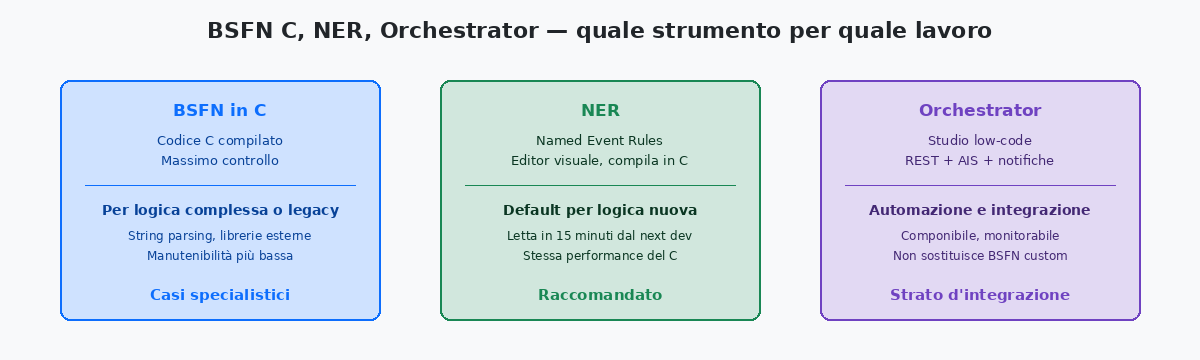
The limits of NER are real, but narrower than Oracle presentations often suggest. String manipulation beyond elementary operations is awkward; fixed-precision arithmetic on amounts requires care with MATH_NUMERIC types; calls to external libraries are simply not available. When one of these constraints appears, the right choice is not to force the NER until it becomes unreadable. It is to move that specific operation into a small BSFN in C called by the broader NER, isolating C code to the portion that truly requires it.
APPL: the layer where custom development meets the user
Custom applications — APPL in OMW terminology — are the forms that users see and run. They are built in FDAForm Design Aid — the visual JDE designer used to create forms, attach business views, define grids, and write event rules. It is launched from OMW by double-clicking a checked-out APPL., bound to a business view that determines the available columns, receive event rules attached to controls (buttons, grid rows, form post-load), and become part of the menu or Fast Path like any standard application.
The standard pattern is the Find/Browse plus Fix/Inspect pair. Find/Browse is the entry form — a grid with a QBE filter row at the top and buttons to navigate to the detail. Fix/Inspect is the detail form — record header plus, where needed, a grid of related rows, with Save and Cancel buttons. Almost every inquiry and maintenance application I have built for customers follows this pattern, because it is the one JDE users immediately recognize and the one that integrates smoothly with the rest of the product.
The trap new APPL developers regularly fall into is putting too much logic into form event rules instead of callable BSFN. A complex validation written in the “Row Save” event rule of a Fix/Inspect form works perfectly as long as that form is the only way to write to the table. The moment an orchestration, a Z-file UBE, an AIS service, or a second custom form starts writing to the same table, the validation is completely bypassed. The operational rule that works is simple: business logic belongs in BSFN; form event rules call BSFN and handle only the user experience — highlighting the invalid row, showing the confirmation dialog, navigating to the next form.
Orchestrator and ERP automation: the modern layer above the stack
OrchestratorJDE low-code studio that composes REST calls, AIS services, BSFN invocations, and notification logic into named flows. The strategic tool for integrations and automation on EnterpriseOne. is the strategic integration tool Oracle introduced in recent Tools Releases, and it is the one that most changes the shape of modern JDE development compared with ten years ago. It does not replace BSFN, NER, or APPL — it completes the stack as a composition and automation layer, where flows that previously required a custom UBE or an externally scheduled script become declarative configurations.
The most common usage pattern with customers is exposing JDE logic to external systems through REST. A B2B partner that needs to create sales orders no longer calls a BSFN through proprietary mechanisms; it calls a REST endpoint exposed by an orchestration that internally invokes the Form Service Request chain or a sequence of custom BSFN with validations and order creation. The partner sees REST; JDE remains JDE; the orchestration is the contract between the two worlds.
The other use case that produces immediate ROI is the automation of previously manual batch flows. A typical sequence — the user opens a report, saves the output, emails it to three internal recipients, copies a subset into an Excel sheet — becomes a five-step orchestration scheduled to run every morning at 06:00 and deliver the same result without human intervention. The build effort is one or two days; the user saves thirty minutes per day, indefinitely. It is the type of automation that, by itself, justifies adopting Orchestrator for customers who still keep people on repetitive manual flows.
The limit of Orchestrator is volume. For volumes below tens of thousands of calls per day, it is perfect. For orchestrations that must process millions of rows per cycle — a mass load from a legacy system, a period recalculation across the whole F0911 — the right tool remains a custom UBE, possibly triggered by Orchestrator, not an orchestration that performs the processing directly.
Putting the four tools together in a real case
A real case clarifies how the four tools coexist within the same project. Manufacturing customer, requirement: advanced validation during sales order creation, accessible from the standard P4210 form, from a B2B REST channel, and from a daily EDI import, with rules that change according to customer and item group.
The solution designed and implemented for customers over the last few years follows this pattern. A custom BSFN in NER, B5542VAL, receives the order line as a data structure and applies all rules — reads on F0301 for credit, on F4101 for item holds, and on a small custom table F5542001 for customer-specific rules. The BSFN returns severity and error code. NER, not a BSFN in C, because all the logic is made of table reads and conditional branching that NER handles natively.
The standard P4210 form is extended with a small change to the “Row Save” event rule that calls B5542VAL before commit; this is the only touchpoint with standard JDE code, and it is managed as a retrofit item in the upgrade roadmap. An orchestration called “ValidateAndCreateSalesOrder” exposes a REST endpoint called by the B2B system; internally, the orchestration invokes B5542VAL and, if validation passes, calls the standard order-creation chain. The custom UBE R5542EDI that processes the daily EDI import also calls B5542VAL for every row of the Z-file, marking rejected rows in the status column of the staging table.
One implementation of the rules, three entry channels, identical behavior across all three. When the business asks for a rule change six months later — “add the block for overdue revenue beyond 90 days” — the change goes to one place only, B5542VAL, and takes effect on all channels simultaneously at the next promotion. This is the true value of disciplined JDE custom development: not writing less code, but writing code that allows future changes without touching ten different places.
For a deeper look at the individual aspects covered in this article, the related articles on order entry validation with BSFN, DV/PY/PD object promotion, and Orchestrator design patterns cover the subject in detail. The project portfolio documents two real implementations built on the patterns described here.
