




When a custom batch job runs for hours instead of minutes, developers typically blame database indexes or database server memory. In reality, the underlying cause is frequently how the primary Business View (BSVW)A JD Edwards object that defines relationships between database tables, acting as the data source for applications and reports. was designed. Developers often build complex multi-table joins in a custom BSVW to avoid writing Table I/OOperations used within JD Edwards Event Rules to manually read, write, update, or delete records from database tables. Event Rules (ER)The proprietary scripting language used in JD Edwards to define business logic for applications and reports., unaware that this shortcut directly compromises data integrity. This makes JDE UBEUniversal Batch Engine; the JD Edwards tool used to create and run batch reports and background processes. business view selection for performance and correctness one of the most critical, yet frequently misunderstood, architectural decisions in EnterpriseOne development.
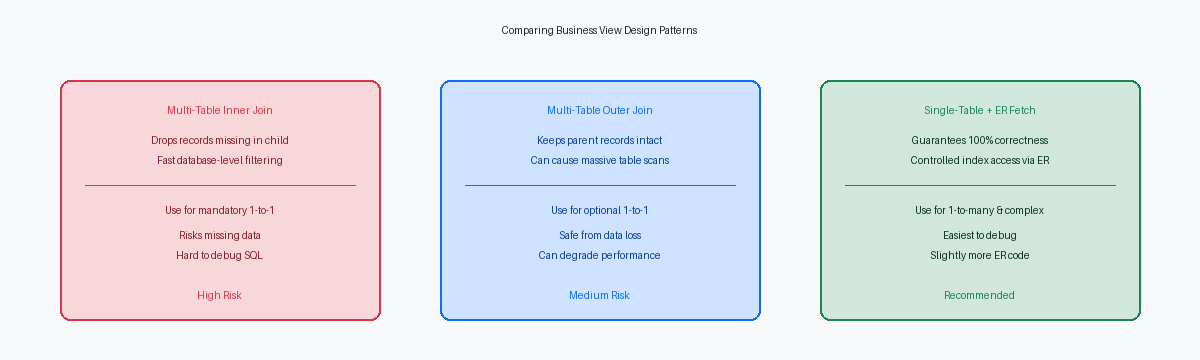
For instance, an inner joinA database operation that returns only the rows where there is a match in both joined tables. between F4211 and F4101 will silently omit sales lines if an item master record is missing or archived, causing critical data to vanish from reports. Conversely, joining header tables like F4301 to detail tables like F4311 in a primary view duplicates header-level calculations, producing mathematically incorrect financial totals. To guarantee both performance and correctness, developers must replace complex multi-table primary views with single-table views, handling secondary table lookups via manual ER fetches.
The Hidden Cost of Multi-Table Joins in JDE BSVWs
JDE developers often build multi-table business views to simplify UBE design, unaware of how the JDB database middlewareThe software layer in JD Edwards that translates application requests into database-specific SQL commands. layer translates these structures at runtime. When you join the Address Book Master (F0101) and the Address by Date table (F0116), the JDB engine generates a standard ANSI SQL join. If this is configured as an inner join, any F0101 record lacking a corresponding F0116 record is silently excluded from the UBE processing loop. In a database of hundreds of thousands of address book records, even a small fraction of missing address records means hundreds of critical entities—like tax authorities or foreign suppliers—are bypassed without throwing a single error in the jde.log.
Switching the relationship to a Left Outer JoinA database operation that returns all records from the left table and matched records from the right table, filling with nulls if no match exists. in the design stage prevents this data loss, but it introduces a different operational risk. If the join conditions are poorly structured or do not align with the primary index keys, the database optimizerSoftware within a database engine that determines the most efficient way to execute a SQL query. (whether on Oracle Database 19c or MS SQL Server) may abandon index scans entirely. The optimizer defaults to a full table scanA database operation where the engine reads every single row in a table to find the requested data, often causing performance issues. on F0116, turning a UBE that should run in seconds into a run of nearly an hour that locks tempdb or undo tablespaces.
Developers must explicitly verify the join properties inside the Business View Design Aid (BVDA) before deploying any custom UBE. Do not rely on JDE's default join assignments, which frequently default to a Simple Join (Inner Join). Open the BVDA, double-click the join line between F0101 and F0116, and verify that the join type matches your business logic. If you require all master records regardless of their address status, enforce a Left Outer Join and immediately validate the execution plan in Oracle Enterprise Manager to guarantee the primary index F0101_1 is utilized.
How Bad Joins Cause Duplicate Processing and ER Corruption
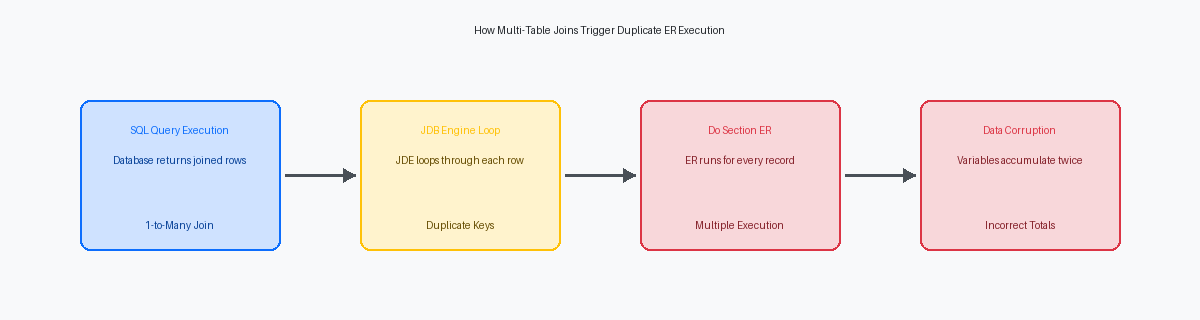
Binding a 1-to-many relationship like F4201 and F4211 directly into a primary UBE section's business view is a structural error that corrupts the execution loop. Because the JDE database engine processes the join as a flat SQL cursor, the Do Section event fires once for every detail line, not once per header. If an order has a dozen or more detail lines, the engine executes the header-level logic a dozen or more times. This forces developers to write defensive ER code to prevent downstream actions, like calling an external BSFNBusiness Function; a reusable C or Named Event Rule (NER) program that performs specific business logic in JD Edwards., from executing on every duplicate loop iteration.
This duplicate execution model destroys the integrity of mathematical accumulations. When a report relies on section-level Event Rules to aggregate financial metrics, such as order totals, the underlying SQL join can easily double or triple the reported values. Attempting to mitigate this by nesting complex conditional logic inside "On Section Break" events to manage level breaks introduces high risk. Developers must track the change of the DOCO key manually using custom variables, a pattern that frequently fails when null values or unexpected data structures bypass boundary checks.
Beyond calculation errors, firing transactional BSFNs like B4200310 within a duplicated loop can trigger data locks or redundant inventory allocations. Instead of relying on a multi-table join, split the processing. Define the primary section on a single-table view of F4201, and retrieve the F4211 detail records in a subordinate section or via F4211.FetchNext table I/O loops. This architectural separation guarantees that header-level Event Rules execute exactly once per order, keeping your financial summaries accurate.
Index Access and the Mechanics of UBE Data Selection
The Universal Batch Engine (UBE) translates the business view (BSVW) structure directly into database queries. When a UBE executes, the JDE runtime uses the index selected within the BSVW to construct the SQL WHERE and ORDER BY clauses. If your custom data selection targets columns omitted from this selected index, the database engine bypasses rapid index seeks. Instead of a fast lookup, it defaults to a costly full table scan on the host database, which locks resources and drags down the entire enterprise server.
On massive transaction tables like the F0911 (General Ledger) containing tens of millions of rows, a single mismatched index can degrade query performance more than tenfold. I recently resolved an issue where a custom financial reconciliation UBE took several hours to execute because the data selection queried the F0911 GLALT1 (Alternate Ledger) field, which lacked index representation in the active BSVW. Adding a targeted index on the F0911 and updating the business view allowed the Oracle Database optimizer to perform an index range scan, slashing the batch run time to under fifteen minutes.
Developers must always align the UBE's section sorting properties with the index defined in the underlying business view to prevent database-level sorting overhead. When the UBE sequence matches the BSVW index, the database retrieves pre-sorted rows directly, eliminating the need for expensive tempdb or PGA sort allocations. Always verify your SQL execution plans in Oracle SQL Developer or SSMS before promoting any custom UBE to the PD920 environment to guarantee index-driven data access.
The Performance Penalty of Unused Columns in Large Views
The JDB middleware behaves with absolute literalism: if a column exists in the business view, the engine fetches it. It does not matter if a UBE uses only three fields in its Event Rules and prints nothing on the PDF layout. When a developer bases a high-volume batch process on a standard business view containing more than a hundred columns of the F4211 table, the database driver retrieves every single attribute for every single row.
This indiscriminate fetching translates directly into massive network overhead and application server memory consumption. In modern hybrid architectures where the Enterprise Server sits on Oracle Cloud Infrastructure (OCI)Oracle's cloud computing platform providing servers, storage, and networking services. or AWS while the database resides on a co-located physical machine, transporting these unused megabytes of data across the network degrades throughput. The penalty compounds drastically when the view includes large character columns or BLOBBinary Large Object; a database data type used to store large amounts of unstructured data like images or documents. fields, which require multiple round-trips and drive up latency.
A concrete optimization strategy is to replace these bloated views with a tailored, custom business view containing only the 5 to 10 columns strictly required for processing. Stripping out the remaining ninety-plus columns reduces the SQL payload size and minimizes the memory footprint of the JDB_Fetch API on the Enterprise Server. In our performance audits of high-volume sales order processing UBEs, replacing the default F4211 view with a lean alternative has consistently cut execution times by 35% to 40%.
This simple design adjustment also reduces temporary tablespace usage on Oracle or SQL Server databases, as the engine does not need to build wide worktables for sorting and grouping. For a batch job processing hundreds of thousands of sales order lines nightly, this optimization prevents gigabytes of unnecessary data transfer, freeing up critical threads on the Enterprise Server during tight batch windows.
Design Pattern: Single-Table BSVW with Manual ER Fetching
Forcing the database engine to resolve complex joins at the UBE level is a common root cause of performance degradation. The most resilient design pattern for inventory reporting is using a single-table business view on the F4101 as the primary driving section, followed by manual fetches for the F4102 in the Event Rules. This decoupled architecture ensures the primary driver only selects valid parent records before resolving branch-level data.
Executing a Fetch Single on the F4102 or calling targeted business functions inside the Do Section event guarantees precise control over join logic and index usage. By explicitly passing the Item Number (ITM) and Branch/Plant (MCU) keys, you force the database to use the primary index (F4102_1), bypassing unpredictable execution plans. This manual approach reduces database CPU overhead by utilizing index-only scans on secondary tables.
This pattern eliminates the risk of missing records caused by mismatched inner joins, where an item exists in the F4101 but lacks a corresponding record in a specific branch. It also prevents duplicate record processing in the UBE, which occurs when a 1-to-many SQL join returns multiple child rows for a single parent entity. Controlling the loop iteration strictly through the single-table driver ensures your UBE processes exactly one record per item.
While this pattern requires roughly 15% to 20% more lines of ER code, it drastically simplifies debugging in the JD Edwards debugger or when analyzing jdedebug.log call stacks. Database query optimizers cache these isolated, single-table SQL statements far more efficiently than complex nested join statements. The result is a predictable batch process that maintains a flat performance curve even as your transactional data grows.
Auditing and Fixing Existing UBE Business View Bottlenecks
A multi-hour batch run of a custom sales analysis UBE (such as a R554210A) almost always traces back to a single, bloated SQL statement. To diagnose this specific bottleneck, developers must run the UBE locally on a development fat client with jdedebug.log enabled in the local jde.ini settings. This captures the exact database query generated by the Universal Batch Engine, exposing how the middleware translates JDE event rules and business view joins into SQL.
Copying this captured SQL directly into Oracle SQL Developer or SQL Server Management Studio (SSMS) reveals the underlying database execution plan. In a recent audit of a distribution client's inventory reconciliation report, this analysis showed a massive F4111 joined to F4101 and F4102, resulting in a full table scan over ten million ledger rows because of an implicit type conversion in the join logic. The execution plan immediately highlights these costly table scans and points to missing indexes that database optimizers struggle to compensate for under heavy production loads.
Fixing this issue does not require a weeks-long redesign. Retrofitting the offending UBE to run on a single-table driving business view (such as F4111) and fetching supplemental data via table I/O or business functions within the Do Section event takes only a few days of development and unit testing. Before deploying this modified UBE to Pathcodes like PY or PD, always verify that any custom indexes created in Object Management Workbench (OMW)The central development environment in JD Edwards for managing objects and project lifecycles. are explicitly generated on the target database using the OMW table utility, rather than just defined in the JDE specifications.
While precise business view selection is a foundational step, comprehensive optimization requires aligning these views with targeted database indexing strategies and JDE runtime tuning. For teams managing high-volume batch estates, our technical resources on database indexing and UBE tuning provide a deeper dive into JDE runtime behavior and real-world SQL optimizations applied to global supply chain systems.
