




A standard UBEUniversal Batch Engine; the reporting and batch processing tool in JD Edwards. designed for 5,000 records will fail catastrophically when nightly volumes scale past 100,000 transactions. Most custom batch runs fail not because of flawed business logic, but due to database timeouts, index contention, and memory leaks in custom C business functions (BSFNsBusiness Functions; reusable pieces of C or Named Event Rule code that perform specific logic in JD Edwards.). When executing high-volume runs in EnterpriseOne 9.2, relying on standard linear report designs is an operational liability. Achieving a resilient JDE UBE custom batch job design for nightly processing requires moving away from basic EREvent Rules; the proprietary scripting language used within JD Edwards to define logic. loops and adopting database-driven architectures.
Implementing database checkpoint patterns, SQL index optimizationImproving database query speed by ensuring the database uses the most efficient data structures., and autonomous transaction boundariesIndependent database transactions that can commit or roll back separately from the main process. can reduce nightly batch windows by 30% to 50%. This shift eliminates the manual database patching and table cleanup that typically follows an unexpected UBE failure at 2:00 AM. Instead of using raw table I/O inside the "Do Section" event of a standard UBE, developers must structure processing blocks that can resume from the exact point of failure without reprocessing completed records.
Designing for Restartability: The Checkpoint Pattern
A standard linear UBE execution running without intermediate commitsThe command that permanently saves all changes made during the current database transaction. represents a significant operational risk during nightly processing. If a database timeout or a transient network glitch occurs at record 90,000 of a 100,000-record run, the entire transaction rolls backReverting a database to its previous state before a transaction began, usually after an error., forcing a complete rerun that derails the nightly batch window. Instead of letting a four-hour job fail at 90% and starting from scratch, developers must design UBEs to resume exactly where they faltered.
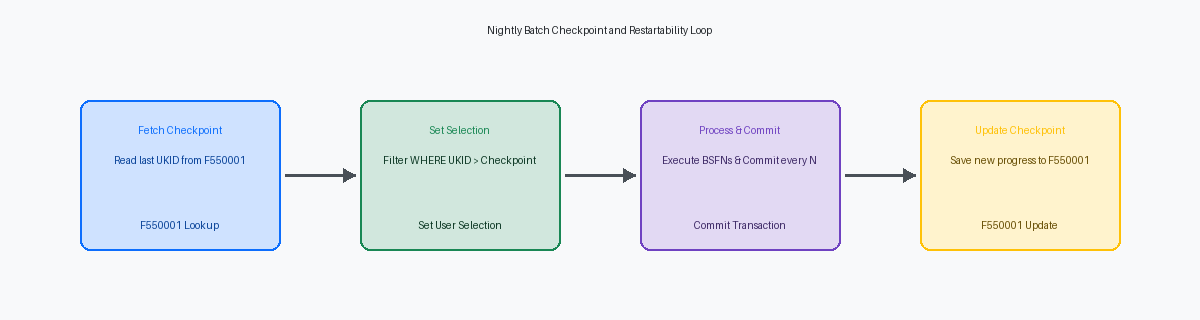
To achieve this resilience, implement a custom control table like F550001 to track the last successfully processed unique key, such as the Unique Key ID (UKIDUnique Key ID; a unique identifier used in JD Edwards tables to distinguish records.) or Document Number. Writing a record to F550001 and executing intermediate database commits every 1,000 records bounds the risk of reprocessing to a predictable, minimal block. If the UBE crashes, the next execution reads this table to determine the precise recovery point.
Activating this pattern requires enabling transaction processing on both the UBE properties and the specific table views involved in the run. Developers must use a dedicated custom C business function or the native 'Commit Transaction' system function to force the database to write the accumulated changes to disk at the designated interval. This prevents database tempdbA system database used by SQL Server to store temporary data like work tables or intermediate results. or undo tablespacesStorage areas in Oracle databases used to keep track of changes so they can be reversed if needed. from swelling during massive nightly updates.
In the Initialize Section of the primary driver, write the ER logic to fetch the last checkpoint from F550001. If a checkpoint exists, use the Set User SelectionA JD Edwards system function used to dynamically filter the data being processed by a report. system function to dynamically alter the processing start point, appending a clause that selects only records with a UKID greater than the retrieved checkpoint. This simple shift turns a catastrophic nightly failure into a minor, self-healing pause.
Dynamic Data Selection and Index Optimization
Trusting operators to update processing options daily or relying on static scheduler dates causes skipped records or duplicate processing. When running a nightly batch over a 100,000-row F4211 dataset, a single missed delta delays downstream invoicing. Developers must eliminate manual inputs and programmatically control the query boundaries.
Inside the Initialize Section event of the driver UBE, programmatically override any default selection. Use the Set User Selection system function to force selection on index-backed fields like UPMJ (Date Updated) and TDAY (Time of Day) against the F4211 table. Calculating the run window dynamically—such as looking back exactly 24 hours from the current system time—eliminates human error. This ensures the database optimizerSoftware within a database that determines the most efficient way to execute a query. utilizes the corresponding index rather than falling back to a full table scanA database operation where every row in a table is read to find matching data, often causing slow performance..
Avoid using '<>' (Not Equal To) operators in data selection, such as filtering out closed lines with SDLTTR <> '980'. This operator bypasses database indexes entirely, forcing a full table scan on massive tables like F4211 or F0911. Instead, structure selection using positive, inclusive criteria like SDLTTR BETWEEN '520' AND '560'. This change can drop UBE execution times for 200,000 records from nearly an hour down to under five minutes.
For high-volume runs, implement a virtual data selection pattern where a lightweight custom worktable (such as F554211W) acts as the driver. A preliminary UBE or database view populates this worktable with only the exact primary keysUnique identifiers for each record in a database table, ensuring no two rows are the same. (SDKCOO, DOCO, DCTO, LNID) needing processing. The main driver section then loops through this narrow, indexed worktable, performing single-record fetches on F4211 inside the Do Section. This keeps the execution thread targeted and prevents database lock contentionA situation where multiple processes try to access the same database record simultaneously, causing delays..
Constructing a Resilient Custom Audit Log
Relying on standard UBE PDF output as your primary operational audit trail is an anti-patternA common response to a recurring problem that is usually ineffective and risks being highly counterproductive. that costs support teams hours of manual effort during critical nightly run failures. When a high-volume batch job processing 80,000 sales order lines fails at 2:00 AM, parsing a 1,500-page PDF to find a single database lock or validation error is a costly operational bottleneck. Operations teams need structured, queryable data, not formatted text documents designed for printing.
To solve this, design a dedicated custom audit table, which we typically designate as F550911L (Log). This table must capture execution metadata including the job status, start and end timestamps, execution duration, total records processed, count of failed records, and the exact error message string from the data dictionary. Populate this table by mapping JDE system values directly from the UBE runtime, specifically sv rpt_ProgramId, sv rpt_VersionId, and sv JobNumber to uniquely identify the execution instance across your batch queues.
The critical failure point in most custom audit designs is transaction boundary integration. If your UBE encounters a fatal database error and rolls back the transaction, any standard insert to your audit table within that same boundary is wiped out. You must write to F550911L using an autonomous transaction by invoking a custom Business Function (BSFN) that opens a secondary database connection with Transaction Processing (TP) explicitly disabled. This design pattern ensures that even if a rollback wipes out 10,000 inventory updates, the audit log entry detailing exactly why and where the job failed remains safely committed in the database for immediate troubleshooting. This maintains referential integrityA database concept ensuring that relationships between tables remain consistent and valid. across your reporting systems.
Memory Management and Cache Cleanliness in Nightly Loops
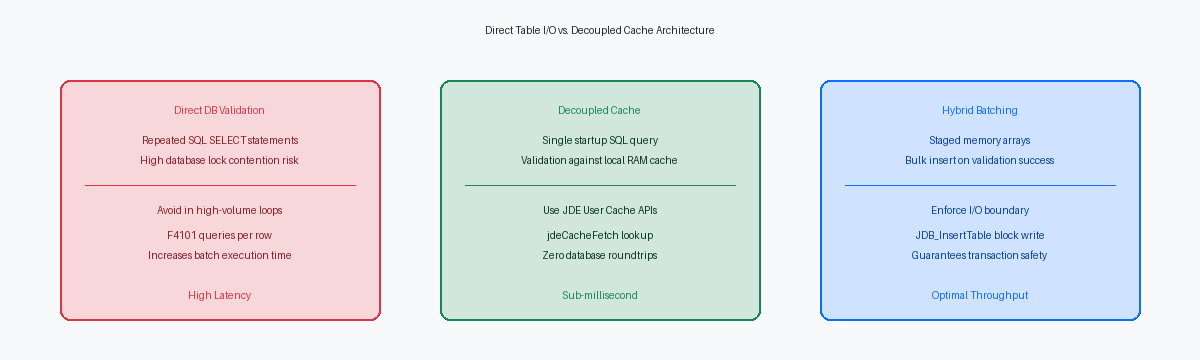
A nightly batch job processing 50,000 inventory lines will reliably crash the enterprise server if your custom C business functions fail to manage memory. High-volume processing routinely triggers 'Out of Memory' errors because developers forget that JDE CacheA temporary storage area in memory used by JD Edwards to hold data during processing for faster access. persists for the duration of the UBE run. When processing loops through tens of thousands of records, even a minor leak per iteration compounds into a gigabyte-scale memory exhaustion event that kills the JDE kernelA background process on the Enterprise Server that manages specific tasks like logic execution or security..
To prevent this, every custom BSFN that initializes a cache using jdeCacheInit must have a guaranteed execution path to jdeCacheTerminateAll. You must place these termination calls explicitly within the error handling blocks and the End Section of the UBE. The jdeCache API requires manual, explicit destruction of the cache cursor and the cache itself to release the allocated memory back to the operating system.
Deep nesting of UBE conditional sections also inflates the call stack size and memory footprint. Limit the scope of your event rules variables by clearing them at the end of each iteration instead of letting them accumulate state. Keep your driver section flat and pass minimal keys to processing options rather than nesting five levels of conditional sections that hold database cursors open.
Validate your memory footprint during high-volume test runs by monitoring the enterprise server log files, specifically JDEDEBUG.log and stderr. Scan these logs for 'Memory allocation failed' or 'Leaked cache' alerts. If you see a leaked cache warning, map the thread ID back to the specific BSFN execution to find the exact jdeCacheInit that lacked a corresponding termination.
Transaction Processing Boundaries and Error Handling
Enabling Transaction Processing in a UBE's report properties without defining explicit boundaries is the primary cause of database deadlocksA situation where two or more processes are unable to proceed because each is waiting for the other to release a resource. on high-concurrency tables like F41021. When a nightly batch job processes 10,000 inventory-touching records under a single global transaction, the database holds row locks on the Item Location table for the entire run. This halts parallel processes, blocks interactive users in P4210, and forces SQL timeouts.
To prevent database lock escalation, isolate each logical unit of work—such as sales order creation via the Master Business FunctionA specialized set of logic designed to ensure data integrity when updating major JD Edwards tables. (MBF)—within explicit boundaries. Call the system function Begin Transaction immediately before executing the MBF's first step, B4201100 (Begin Document). Pass the transaction ID to B4200310, and invoke Commit Transaction or Rollback Transaction immediately after B4201500 (End Document) completes, depending on the success flag.
Do not mix standard MBFs with automatic transaction processing while assuming custom staging tables roll back cleanly. Standard JDE business functions do not automatically register custom table inserts into the active transaction boundary unless those tables are opened with the transaction flag enabled. If the MBF fails and triggers a rollback, your custom table records remain orphaned, breaking referential integrity.
Implement a soft-fail mechanism within the driver section's Do Section event to keep the nightly run moving. When B4200310 returns an error, execute a rollback for that specific order transaction, write the failure details to an audit table like F5509LOG, and fetch the next record. This ensures a single malformed record among 5,000 transactions only skips that specific record, rather than aborting the entire UBE.
Performance Tuning: Parallel Processing and Queue Management
A single-threaded nightly UBE processing 500,000 sales ledger rows will eventually blow past your batch window as transaction volumes grow. Designing custom batch jobs to scale horizontally through Multi-threadingA technique where a computer task is split into several smaller parts that run at the same time to improve speed. is the only viable way to keep runtime under two hours. Instead of running a single monolithic process that serializes database I/O, you must architect the UBE to split the workload across multiple concurrent threads.
Implementing a modulus partitioningA method of dividing data into distinct groups using mathematical remainders to ensure even distribution. strategy allows you to slice the dataset deterministically without risking record locks or overlapping data selection. For example, by using the Unique Key ID (UKID) from the custom workfile, you can run four concurrent instances of the processing UBE where each thread processes a specific slice: UKID % 4 = 0, UKID % 4 = 1, UKID % 4 = 2, and UKID % 4 = 3. This mathematical division guarantees that no two threads attempt to update the same record, eliminating database deadlocks during high-throughput updates to tables like F4111 or F0911.
To automate this execution, build a controller UBE that queries the target record count and dynamically spawns the child threads using the 'Launch Batch Application' system function or the B9800240 business function. In Server ManagerA web-based tool used to manage and monitor JD Edwards EnterpriseOne server components., isolate this activity by routing these jobs to a dedicated multi-threaded queue, or a set of four distinct single-threaded queues, rather than dumping them into the default QBATCH queue. This prevents a heavy nightly run from starving other critical batch processes, ensuring your scheduled 3:00 AM inventory reconciliations still execute on time.
If your nightly batch window is creeping past six hours, implementing these architectural shifts is no longer optional. Transitioning to checkpoint-based, multi-threaded processing ensures your EnterpriseOne environment scales alongside transaction volume without destabilizing nightly operations.
