




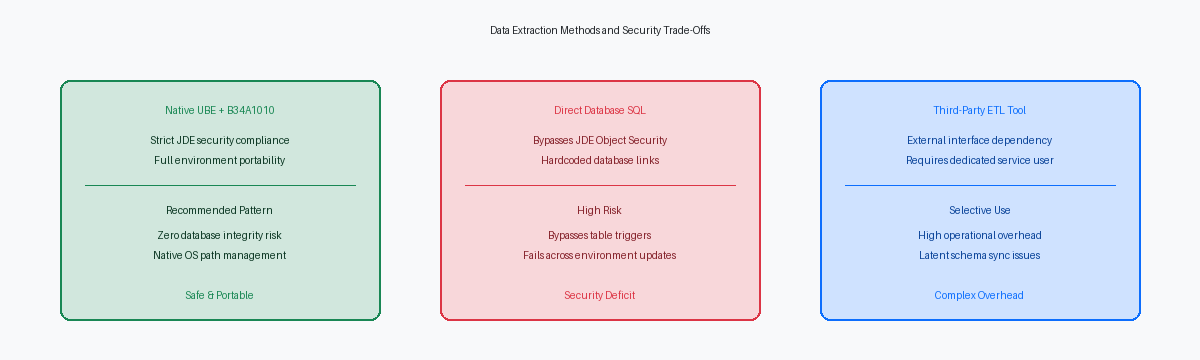
When finance or supply chain teams demand daily automated reconciliation between standard ledger tables like the F0911The standard JD Edwards General Ledger table that stores detailed financial transaction records. and third-party systems, database administrators often reflexively write external SQL scripts or database triggers. That approach regularly backfires: it bypasses JDE Object Management Workbench (OMWObject Management Workbench, the JD Edwards toolset used to manage the development lifecycle and transfer of software objects.) lifecycle controls, ignores security rules, and risks table-locking active transaction tables during peak batch windows.
Building a native Event RulesThe proprietary scripting language used in JD Edwards to define business logic for applications and reports. batch engine report over standard tables and custom staging tables (using an F55The standard prefix reserved in JD Edwards for custom tables and objects to prevent them from being overwritten during system upgrades. prefix) maintains full environment integrity while generating formatted extract files for external consumption. Evaluating a practical JDE UBEUniversal Batch Engine, a JD Edwards background process or report used to process data in batches. custom table extraction example for reconciliation shows how native Event Rules and Table I/ODatabase operations performed directly within JD Edwards Event Rules to read, write, update, or delete records. handle record-level variance checks cleanly without executing dangerous dynamic SQL writes directly against production schemas.
Designing Reconciliation UBEs Across Standard and Custom Tables
High-volume financial reconciliation routinely requires cross-referencing core ledgers against custom staging structures. In a typical production environment, the F0911 General Ledger table holds 10 to 50 million records, while custom operational tables like F554109 hold unposted staging transactions from external subledgers. Joining these datasets directly at the database layer using external SQL scripts or custom database views breaks JDE environment isolation and bypasses Object Management Workbench (OMW) lifecycle controls.
Executing direct SQL writes or using external ETL tools to insert records into custom JDE schemas bypasses JDE Security (F00950) entirely. External processes operate outside the JDE transaction manager, meaning they ignore Object Configuration Manager (OCM)The JD Edwards system that maps where database tables reside and where business logic executes. mappings, bypass system Next NumbersA JD Edwards system that automatically generates sequential document numbers for transactions to ensure unique identifiers., and risk index fragmentation or row-locking conflicts on active tables. If an external process fails midway through a 100,000-record batch, you lose transactional atomicity, leaving partial updates that require manual database cleanup.
Developing a dedicated Universal Batch Engine utilizing native Table I/O operations provides the cleanest, most maintainable architecture for cross-table reconciliation. Native Event Rules (ER) handle F0911 reads and F554109 lookups through standard JDB middleware, ensuring proper environment portability across DV920, PY920, and PD920 without changing code. This pattern guarantees full auditability, respects data dictionary field overrides, and keeps database operations fully compliant with enterprise security models.
Primary Business View Selection and Data Selection Strategy
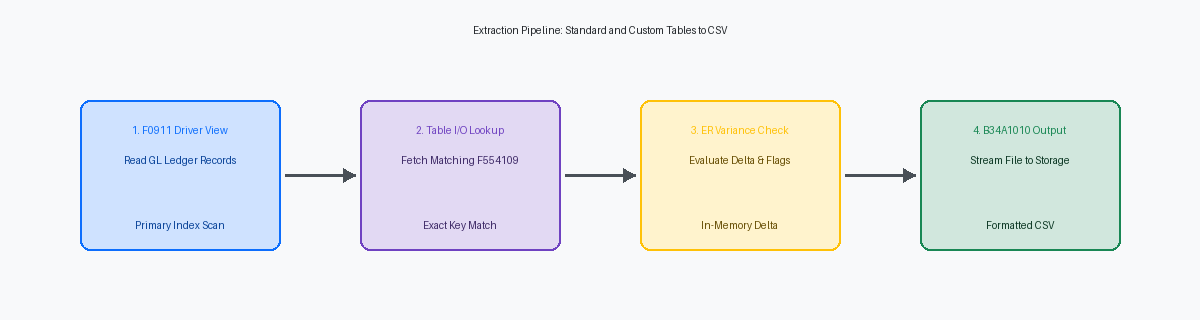
Driving a reconciliation UBE from a custom staging table or a high-level header table like F0010 is a structural mistake commonly found during 9.2 code remediation audits. Your primary section's business view must attach directly to the highest-cardinality table in the comparison set—typically F0911 for general ledger integrity runs. This design lets the database engine manage row fetching through a single, optimized cursor rather than forcing the UBE runtime to execute thousands of iterative Fetch Single calls inside Event Rules loops.
Index selection on this driver section dictates whether a month-end extraction job finishes under fifteen minutes or hangs EnterpriseOne batch queues for several hours. When scanning millions of ledger transactions, explicitly overriding the section's index to Index 1 on F0911 (comprising GLAIDA, GLCTRY, GLFY, and GLPN) ensures the underlying SQL query performs an index range scan directly against Account ID, Century, Fiscal Year, and Period Number. Omitting this explicit assignment in Report Design AidThe JD Edwards development tool used to design, layout, and configure batch reports (UBEs). forces the database query planner to evaluate secondary indexes or perform full table scans, destroying batch throughput on the enterprise server.
User-defined data selection must be strictly anchored programmatically using the Set Data Selection system function within the Initialize Section event. Allowing financial users unconstrained selection across period ranges or document types inevitably produces unbounded queries that exhaust temporary tablespace on Oracle Database or SQL Server instances. Appending mandatory criteria programmatically—such as forcing GLLEDG = 'AA' and restricting ledger types before runtime selection is appended—guarantees the generated WHERE clause preserves index alignment regardless of how broad the user's report prompt selection is.
Performing Safe Lookups with Table I/O and BSFNs
In a UBE processing large volumes of records, executing a Table I/O Fetch SingleA Table I/O operation in JD Edwards that retrieves a single record matching specific key criteria. against custom tables like F554109 inside the Do Section without fully mapping primary keys leads to silent logic errors and false reconciliation variances. When querying F554109 for a matching document number (DOCO), document type (DCTO), document company (KCOO), and line type (LNTY), omitting even a single key field causes JDE to execute a partial key fetch. The database returns the first index match it encounters, instantly corrupting balance comparison across multi-line order extractions. Every key defined on the target index must explicitly map to a UBE data item, Event Rule variable, or explicit constant.
Structuring these secondary lookups as strict read-only Table I/O constructs guarantees zero transactional impact on live custom tables during multi-hour batch extraction windows. By utilizing single-fetch constructs without open table handles in the section loop, you prevent the runtime engine from maintaining open SQL cursors across database commits. This explicitly avoids shared-lock escalation on F554109 at the database level, ensuring that concurrent warehouse operations executing inventory adjustments via P4114 or order processing via P42101 experience zero SQL blocking or deadlocks while the batch job evaluates historical audit lines.
Concatenating strings directly in Event Rules to build flat-file output buffers over a high-volume batch run causes continuous micro-memory leaks and degrades overall UBE performance significantly. Event Rule string assignments allocate dynamic heap space that JDE EnterpriseOne cannot instantly garbage-collect within rapid Do Section loops. Passing extracted F554109 field values into a custom C business functionA reusable code module written in C to perform complex processing or calculations in JD Edwards. using core JDE APIs like jdeStrcat or jdeSprintf keeps the call stack memory footprint fixed under 20 MB for the duration of the execution.
Event Rules Architecture for Record-Level Variance Checks
Evaluating variance math must happen strictly inside the Do Section of the driver detail section, immediately after table I/O lookups populate local data structures. A clean Event Rules architecture sets a local math variable, VA rpt_mnVarianceAmount, to compute the absolute difference between F0911.GLAA and F554109.CLAMNT. If this calculated delta falls within an acceptable tolerance boundary—such as a standard one-cent currency rounding floor—the ER branch skips memory buffer allocation entirely. Staging unvarianced strings into memory before testing variance wastes heap space and degrades performance when scanning hundreds of thousands of GL records.
Construct two distinct classes of report variables: line-by-line delta comparison variables and aggregate tracking totals. Scoped ER variables like VA rpt_mnRunningGLTotal and VA rpt_mnRunningCustomTotal must be reset deliberately in section header events to maintain accurate rollups across batch controls. Line-level ER evaluates F0911.GLAA against F554109.CLAMNT for every row, updating VA rpt_mnRecordVariance instantly. When VA rpt_mnRecordVariance evaluates outside zero, the ER increments an exception counter variable and formats the target extraction array for output processing.
Calling the Suppress Section Write system function on matched records is where you reclaim massive job execution performance. Standard detail sections force the UBE engine to construct layout specifications, format page buffers, and track line counts even when hidden on PDF output. Suppressing section output for matched records reduces UBE processing overhead by up to 70 percent during large extractions. This shift forces the engine to bypass layout rendering entirely, directing system resources strictly to database fetch cycles and conditional staging logic.
Writing the Extraction File Without Direct SQL Writes
Direct SQL INSERT statements or custom database drivers within report objects introduce security risks and hardcoded credentials. Passing file output through standard C business functions like B34A1010A standard JD Edwards C business function used to perform flat file operations like opening, writing, and closing text files on the server. (Flat File Operations) provides an OS-independent, secure interface that abstracts whether the Enterprise Server runs on Oracle Linux, Windows Server, or IBM i. By managing file handles natively in the C runtime layer, B34A1010 avoids permission escalation while maintaining cross-platform path compatibility without exposing database connection strings.
Structure the file lifecycle strictly across three execution events to avoid leaking file handles or corrupting output. Call Open Flat File within the Initialize Section of the primary driver, passing the target server directory path and access mode (w for write, a for append) while capturing the generic pointer ID. Execute Write Line to Flat File inside the Do Section for every record that passes variance checks. Finally, invoke Close Flat File inside the End Section. Skipping the explicit close API leaves OS-level locks on the output directory and truncates the I/O buffer, dropping the final records in the buffer.
Formatting the extract payload requires explicit string manipulation prior to the write call. CSV targets demand strict text delimiters—wrap string fields like GLANI or MCU in double quotes using character variable assignments to prevent embedded commas in descriptions from breaking column alignment. For financial amounts, convert MATH_NUMERIC data types using format BSFNsBusiness Functions, which are reusable code modules written in C or Event Rules to perform complex processing in JD Edwards., explicitly retaining fixed two-digit decimal precision and stripping trailing spaces. Passing raw numeric variables directly into text lines often truncates trailing zeros (rendering 1250.50 as 1250.5), causing downstream automated reconciliation tools to reject the file layout during ingestion.
Exception Handling, Batch Auditing, and Performance Optimization
Once an extraction payload crosses tens of thousands of records on an enterprise server queue, standard batch memory allocations become a primary bottleneck. Executing continuous custom Table I/O lookups without optimizing the [UBE] section parameters in the enterprise server jde.ini causes excessive page swapping and thread allocation failures. Configure batch commit boundaries at 1,000 to 5,000 records to flush enterprise server memory buffers, release read locks on custom tables, and prevent execution kernel time-outs during extended processing runs.
High-volume reconciliation processes inevitably encounter orphaned cross-references or missing secondary keys in custom tables. Halting the execution pipeline on a failed table lookup breaks automated night-deck job streams and leaves downstream systems partially updated. Program Event Rules to test CO SUCCESS return flags on every Fetch Single, write an explicit warning flag such as 'E_KEY_MISSING' into the extraction record, increment an exception counter, and let the execution engine advance to the next record seamlessly.
Every batch extraction must report operational execution metrics upon completion. Track total records processed, successfully matched lines, and total non-fatal exceptions in global report variables, outputting these figures directly to the UBE cover page or final summary section. Enterprise operations teams can immediately validate these summary statistics against execution metadata in the F986110The JD Edwards Job Control Status Master table, which tracks the status and execution details of all submitted batch jobs. Job Master table to verify batch completion integrity without running manual SQL validation scripts against the underlying database tables. When optimizing UBEs that process tens of millions of ledger rows, this extraction pattern provides a robust baseline that preserves database performance while guaranteeing strict data lineage across environments.
