




In enterprise JDEJD Edwards, an enterprise resource planning (ERP) software suite from Oracle. environments where core ledger tables like F0911The JD Edwards General Ledger Detail table that stores all financial transaction records. or transaction ledgers like F4111The JD Edwards Item Ledger table that tracks inventory transactions and history. scale past 20 million rows, a single poorly structured RDAReport Design Aid, the JD Edwards tool used to design and modify reports and batch processes. clause can degrade a sub-minute batch run into a multi-hour queue bottleneck. When overnight batch windows blow out, infrastructure teams usually blame CNCConfigurable Network Computing, the technical architecture and system administration methodology of JD Edwards. queue allocations or demand database memory upgrades. In reality, a substantial majority of long-running custom UBEsUniversal Batch Engine, a JD Edwards background process or report that runs batch jobs.—often three-quarters or more—stem directly from inefficient SQLStructured Query Language, the standard programming language used to manage and query relational databases. generated by flawed selection criteria.
Identifying and correcting JDE UBEUniversal Batch Engine, a JD Edwards background process or report that runs batch jobs. data selection mistakes that hurt performance requires looking past the surface query and analyzing how the database engine evaluates index keys, data types, and implicit function wrapping. Fixing these clauses in Report Design Aid stops unnecessary full table scans and buffer thrashing at the source, keeping your batch pipeline clear without touching infrastructure.
Unbounded Date Ranges and Open-Ended Operator Pitfalls
Setting up a custom financial UBE with a data selection like DGJ >= 01/01/2020 without an explicit upper limit is a guaranteed way to degrade batch windows over time. On an F0911 General Ledger table sitting at 25 million records, the database optimizer evaluates that open-ended predicate by walking index leaf nodes from 2020 through every subsequent year. As historical data accumulates, execution time degrades linearly, transforming a nightly report that took two to three minutes a few years ago into a 30- to 45-minute batch queue bottleneck today.
The underlying mechanics of generated SQL worsen this issue when object specifications mix literal strings, system variables, and JDE Julian dateA date format representing the year and the day of the year, commonly used in JD Edwards databases. conversions. EnterpriseOne translates human-readable calendar dates into six-digit Julian integers (CYYDDD) before handing the statement off to the database tier. Mixing a JDE System Variable like SL DateToday with open-ended relational operators often prevents the SQL optimizer from accurately calculating index cardinality. The optimizer assumes high selectivity costs and defaults to scanning millions of unnecessary index blocks.
Eliminating this latency requires explicitly capping the temporal range and providing the optimizer with discrete access keys. Hardcoding or prompting for an end date removes the unbounded scan, but pairing DGJ with fiscal year (FY) and period (PN) filters yields the highest impact. In production environments running multi-million-row financial tables, combining FY and PN with a bounded date range cuts scanned database buffer getsThe number of times the database engine requests a data block from the memory buffer cache. by 80 to 90 percent, reducing UBE execution times from over half an hour down to a few seconds.
Omitting Company or Business Unit Scope Filters
Stripping SDKCOO (Order Company) or CO from batch data selection invalidates database index efficiency before the query execution plan is even finalized. The primary index on F4211The JD Edwards Sales Order Detail table that stores line-level sales transaction data. leads with SDKCOO, followed by SDDOCO, SDDCTO, and SDLNID. When a UBE report queries order details but omits SDKCOO, the database engine cannot perform a standard index range scan. Instead of executing a sub-second index seek, the query degrades to an index prefix invalidation, triggering full table scans across tens of millions of rows and exhausting buffer pool resources.
Business Unit (MCUBusiness Unit, a 12-character field in JD Edwards used to identify a specific branch, plant, or department.) filtering introduces a secondary failure mode tied to JDE string architecture. Because MCU is a 12-character right-aligned text column, passing an unpadded branch value like 100 instead of the space-padded string (' 100') breaks text comparisons. When developers apply dynamic string functions in Event Rules to resolve this at runtime, the engine wraps SDMCU in SQL functions like LTRIM(). This function wrapping neutralizes index usage entirely, forcing row-by-row table evaluations across corporate entities.
In an environment with 15 million records in F4211, omitting KCOO or misformatting MCU expands query execution from sub-second speeds to over a minute. Every UBE processing operational ledgers must enforce CO or MCU as primary data selection criteria before evaluating date spans or status codes like LTTR and NXTR. If multi-company aggregation is required, iterate through explicit driver queries sourced from the F0010 Company Master rather than issuing unbounded queries against transactional tables.
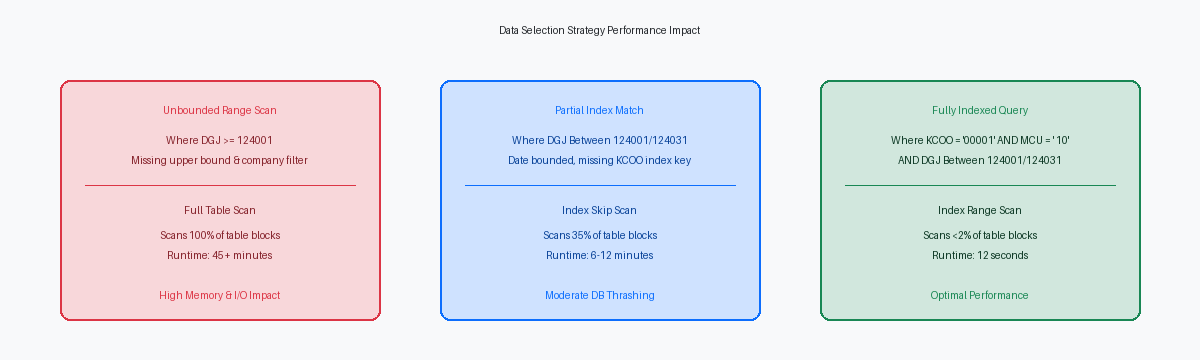
Index Mismatch: Selection Order vs Table Key Hierarchy
In the Sales Order Detail table (F4211), the standard primary index F4211_1 orders keys by Order Company (SDKCOO), Document Number (SDDOCO), Document Type (SDDCTO), and Line Number (SDLNID). When an application developer builds RDA Data Selection starting with SDDCTO followed by SDDOCO while omitting SDKCOO, the SQL generator emits an unaligned WHERE clause. The database query optimizer is stripped of its primary key path, forcing the database engine to allocate tempdb or PGA work areas for high-cost sorting operations to return the dataset.
Overriding the default index in Report Design Aid properties to force F4211_3—which leads with Business Unit (SDMCU) and Ship-To (SDAN8)—while supplying Data Selection filters exclusively for SDDOCO and SDDCTO creates a severe execution mismatch. On databases like Oracle 19c or Microsoft SQL Server 2019, this structural disconnect forces the optimizer into index skip scans or table spools with excessive row-id lookups. In production environments where F4211 exceeds 15 million rows, this misconfiguration routinely inflates UBE execution times from a few seconds to over half an hour for simple night-end processing.
Aligning UBE Data Selection hierarchy directly with the physical table keys allows the optimizer to perform direct index range lookups with minimal page reads. If operational requirements mandate filtering on SDMCU and SDAN8 first, switch the RDA explicit index setting to F4211_3 rather than relying on automatic optimizer selection. Verifying this structural key alignment in Object Management WorkbenchThe primary change management and development tool used in JD Edwards to manage software objects. before promoting UBE specifications eliminates standard batch queue bottlenecks without altering a single line of Event Rules code.
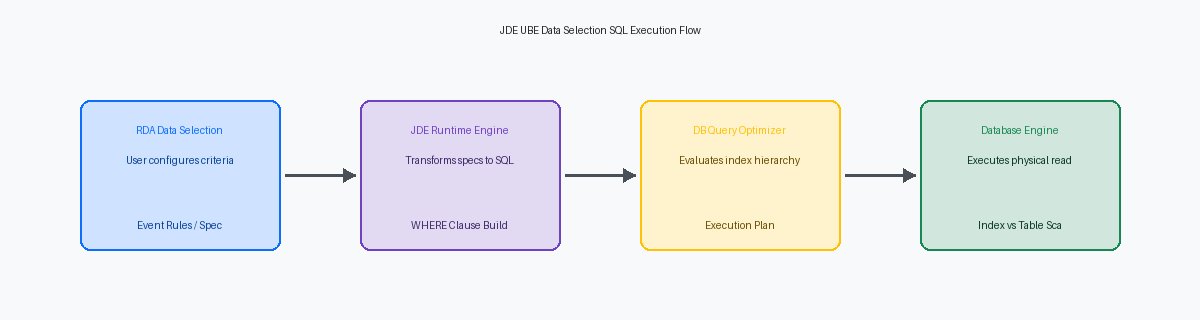
Implicit Conversions and Function Wrapping on Columns
Passing a raw string parameter into a numeric Data Dictionary field like AN8 or DOCO instantly breaks database optimization on core tables like F0101 or F4211. When the JDE runtime engine encounters mismatched data types between Event Rules variables and physical table columns, the database query planner injects an implicit CAST or TO_CHAR wrapper around the database column. This implicit conversion transforms a high-performance index lookup into a non-sargableA query condition that prevents the database engine from using an index to speed up the search. predicate, forcing the query optimizer to bypass primary key indexes and perform a full table scan across 500,000+ Address Book records.
Wrapping selection columns in database functions or attempting to handle data filtering inside Event Rules logic directly prevents predicate pushdown to the database layer. Instead of allowing Oracle DB or SQL Server to execute an optimized set-based query, the JDE UBE engine pulls huge unfiltered result sets—frequently exceeding 100,000 unneeded rows—over the network to evaluate conditions row-by-row in application server memory. This architecture mistake consistently elevates enterprise server CPU utilization and turns a sub-10-second batch run into a multi-minute thread bottleneck.
Resolving these performance drops requires enforcing strict Data Dictionary type matching in custom data selection objects. Audit custom UBE data selection logic for variables mapped across disparate DD types, such as comparing a string variable against F0101.ABAN8. Replacing dynamic string manipulations with typed intermediate variables native to the target table column restores index usage immediately. Correcting one non-sargable predicate on an F0101 Address Number lookup reduced nightly batch processing runtime from nearly an hour down to under five minutes for a manufacturing enterprise on Tools Release 9.2.7.
Literal List Anti-Patterns and Massive IN Clauses
Building interactive UBE data selection using the LIST operator for hundreds of individual literal values is a guaranteed recipe for database performance degradation. When a user pastes hundreds of branch/plants or item numbers into a selection screen, EnterpriseOne constructs an SQL IN clause containing every single literal string. This explodes the raw SQL text size well beyond standard shared pool cursor thresholds, forcing the Oracle Database or SQL Server optimizer to treat every execution as a brand-new, unique query.
Instead of retrieving a soft-parsed, execution-ready plan from the library cache, the database engine executes a CPU-intensive hard parseThe process where the database engine compiles a SQL query from scratch, consuming significant CPU resources. every time the report runs. In an enterprise system running concurrent batch jobs, a single UBE generating a large IN list can spike database CPU utilization by 30 to 50 percent while holding shared pool latches. The query optimizer cannot bind variables across varying array lengths, so execution plan stability dissolves, frequently triggering full table scans on multi-million row tables like F4111 or F0911.
To resolve this anti-pattern, replace static selection lists exceeding 50 items with a custom work table (such as an F55 custom table) or a two-stage driver UBE architecture. Populating a lightweight staging table via OrchestratorA JD Edwards tool that enables integrations, automations, and data exchanges with external systems. or an interactive app, then joining the primary processing UBE directly to that table using an inner join or subquery, eliminates literal parsing entirely. Transitioning a high-volume transaction report from a massive literal selection list to a work-table driver architecture routinely reduces execution times from over two hours down to under five minutes.
Diagnosing Runtime Impact with JDE Debug Logs and Execution Plans
Visual layouts in Report Design Aid obscure how the C engine actually builds SQL queries at runtime. Setting SHOWSQL=1 inside jdedebug.log or activating logging via P98616 exposes the exact dynamic WHERE clause generated by jdekrnl.dll. Developers often assume RDA data selection appends linearly, but the engine merges section-level selection, global report selection, and programmatic Set User Selection system functions into a single statement. Examining the raw log reveals structural issues immediately, such as implicit JULIAN date conversions or missing parenthetical groupings that force the database to evaluate predicates inefficiently.
When a batch process stalls, pull runtime history directly from the Job Control Status Master table (F986110). Comparing JCEXESTARTTIME and JCEXEENDTIME across thousands of historical executions establishes an exact duration trend line. Taking the dynamic SQL captured from SHOWSQL=1 and generating a database execution plan via DBMS_XPLAN or SQL Server Management Studio isolates the exact column causing row-fetch latency. If an execution plan shows a full table scan on a 20-million-row F0911 or F4211 table instead of an index range scan, the culprit is almost always an unindexed selection predicate or a leading wildcard.
Prevent these failures by instituting mandatory baseline execution checks in PY prior to promotion through Object Management Workbench. Standardize a threshold rule: any custom or modified UBE fetching over 100,000 records must execute at under 50 milliseconds per 1,000 fetched rows in PY. Catching index mismatches and non-sargable selection clauses in non-production environments takes under 30 minutes of execution plan analysis, saving dozens of critical production support hours during month-end processing.
