



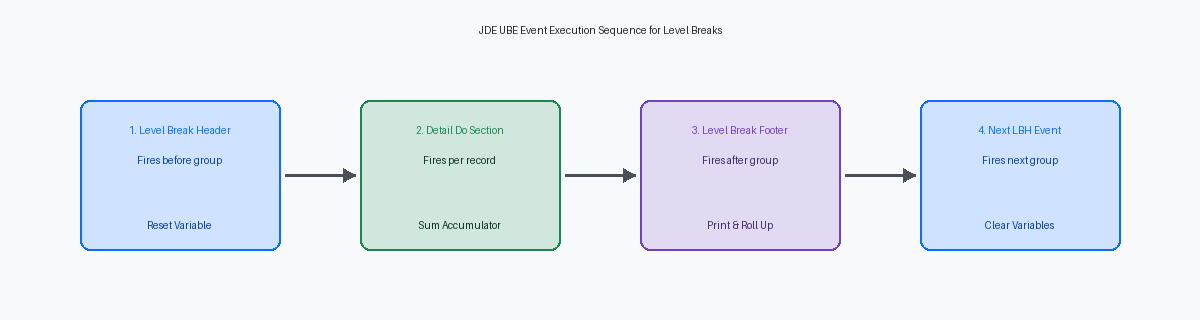
A clean Event Rules (ER)The proprietary scripting language used in JD Edwards to define business logic and event-driven processing. compile in Report Design AssistantThe JD Edwards tool used to design, configure, and modify batch reports and processes. guarantees syntax validity, but it tells you nothing about mathematical integrity. On mature 9.2 buildsSoftware releases running on JD Edwards EnterpriseOne version 9.2. running batch processes over 100,000 ledger or inventory rows, misplaced variable reset timing never triggers a runtime error or a C-BSFNA C-language Business Function in JD Edwards used to perform complex calculations or database operations. memory violation. Instead, the UBEUniversal Batch Engine, the JD Edwards background processing engine used to run reports and batch jobs. completes with a Status 60A JD Edwards job status indicating that a batch process has completed successfully. while quietly generating off-by-one sub-totals or double-counted grand totals across section boundaries.
Resolving these silent calculation errors requires stepping through the exact runtime sequence of Do Section, Level Break Header, and Level Break Footer events. In this JDE UBEUniversal Batch Engine, the JD Edwards background processing engine used to run reports and batch jobs. debug example, wrong totals caused by level break logic are isolated by analyzing EREvent Rules, the proprietary scripting language used in JD Edwards to define business logic. line execution inside the jdedebug.logThe runtime trace log file in JD Edwards that records detailed execution steps and SQL statements for debugging.. By mapping variable initialization directly against event execution order, you can permanently eliminate accumulator drift across custom report sections.
Anatomy of JDE Level Break Processing
When the Report Design Aid (RDA)The JD Edwards tool used to design, configure, and modify batch reports and processes. engine processes a detail section over the F0911The General Ledger Detail table in JD Edwards, storing all financial transaction details. General Ledger table, it relies on an event-driven execution sequence dictated by field value transitions. If you configure level breaks on Business Unit (MCU)A JD Edwards database field representing a specific cost center, branch, or department., Object Account (OBJ)A JD Edwards database field representing the primary account number in the chart of accounts., and Subledger (SUB)A JD Edwards database field used to track detailed transactions within a general ledger account., the engine inspects the data buffer between fetches. Before rendering the first record of a new account grouping, the runtime triggers the Level Break Header (LBH)A report section that executes and prints before a new group of sorted records begins. event. The Level Break Footer (LBF)A report section that executes and prints after a group of sorted records ends, typically used for subtotals. event executes only after the engine detects a value change on the subsequent record, processing retroactively for the group just evaluated.
The primary trap here is assuming that defining a level break section in RDAReport Design Aid, the JD Edwards tool used to design, configure, and modify batch reports and processes. automatically sorts the record stream. It does not. The data sequencing specified in report properties or user overrides strictly dictates when the engine recognizes a field change. If your sequence sorts by OBJ and SUB but leaves MCU out of order, the runtime engine will fire LBFLevel Break Footer, a report section that executes and prints after a group of sorted records ends, typically used for subtotals. events every time the trailing fields change, breaking logical groupings across cost centers. A 50,000-row F0911The General Ledger Detail table in JD Edwards, storing all financial transaction details. extract will generate hundreds of premature footers if the sort order and level break hierarchy do not mirror each other field-for-field.
This structural mismatch corrupts the event lifecycle inside the UBEUniversal Batch Engine, the JD Edwards background processing engine used to run reports and batch jobs. C runtime. When level break fields misalign with data sequencing, an LBFLevel Break Footer, a report section that executes and prints after a group of sorted records ends, typically used for subtotals. for a higher-level break like MCU can execute mid-group, running Event RulesThe proprietary scripting language used in JD Edwards to define business logic and event-driven processing. and flushing section totals before all child records for OBJ and SUB have processed. Because accumulation variables depend on LBFLevel Break Footer, a report section that executes and prints after a group of sorted records ends, typically used for subtotals. execution to write and clear memory, out-of-sequence execution leaves dirty state values for the next fetch cycle. Aligning level break fields to the exact order of the SQL ORDER BY clause is the only way to ensure LBHLevel Break Header, a report section that executes and prints before a new group of sorted records begins. and LBFLevel Break Footer, a report section that executes and prints after a group of sorted records ends, typically used for subtotals. events fire cleanly at true record boundaries.

How Variable Reset Timing Causes Off-By-One Totals
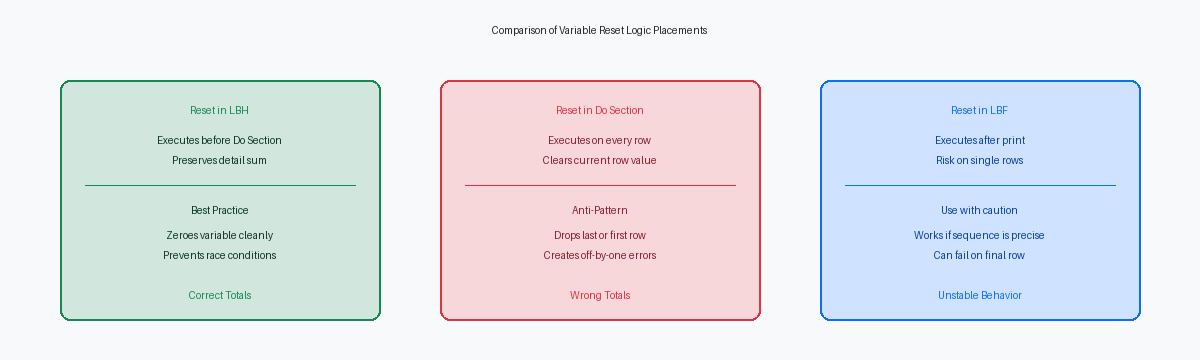
The Event RulesThe proprietary scripting language used in JD Edwards to define business logic and event-driven processing. execution sequence in Report Design AidThe JD Edwards tool used to design, configure, and modify batch reports and processes. catches developers off guard when managing transitions between detail lines and section footers. When a level break occurs on a field like Address Number (AN8)A unique identifier in JD Edwards used for entities like customers, suppliers, and employees., the runtime engine pauses the primary driver section, processes the Level Break FooterA report section that executes and prints after a group of sorted records ends, typically used for subtotals. section, and then resumes driver processing. Developers who place VA rpt_SubTotal = 0 at the bottom of the driver section's Do Section assume it executes after the break, but it runs on every single record before the engine evaluates whether a break condition exists on the current record.
Placing a zeroing assignment inside the primary Do Section causes the last record of a break group to be dropped from the subtotal accumulator. The JDE runtime evaluates data boundary shifts after executing the detail Do Section logic, meaning your reset runs on record 50 of a 50-record group before the LBFLevel Break Footer, a report section that executes and prints after a group of sorted records ends, typically used for subtotals. event triggers. By the time the Level Break FooterA report section that executes and prints after a group of sorted records ends, typically used for subtotals. processes its output, the accumulator variable has already been cleared, yielding an off-by-one subtotal that accurately sums records 1 through 49 while completely omitting record 50 from the subtotal calculation.
Resetting accumulators inside the LBFLevel Break Footer, a report section that executes and prints after a group of sorted records ends, typically used for subtotals. section EREvent Rules, the proprietary scripting language used in JD Edwards to define business logic. can work because code placed after section layout rendering fires post-output, but it introduces subtle bugs if section rendering is conditionally suppressed.
Reading JDE Debug Logs for ER Level Break Events
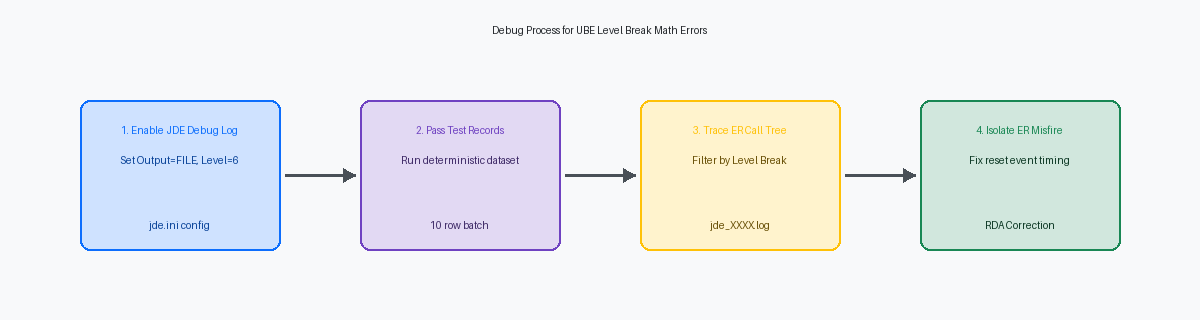
Isolating level break bugs in Event RulesThe proprietary scripting language used in JD Edwards to define business logic and event-driven processing. requires inspecting the exact execution order in the runtime trace. Setting Output=FILE and DebugLevel=6 under the [DEBUG] section of your local jde.iniThe primary configuration file on JD Edwards clients and servers that controls runtime environment settings. forces the engine to write step-by-step EREvent Rules, the proprietary scripting language used in JD Edwards to define business logic. execution into a jde_XXXX.log trace file. On a local web client, this log captures every section trigger, EREvent Rules, the proprietary scripting language used in JD Edwards to define business logic. line execution, and BSFNBusiness Function, a reusable code module in JD Edwards written in C or Event Rules to perform specific tasks. API call sequentially. Without level 6 logging, you miss the micro-sequencing of section execution during data set boundary switches.
Searching the trace log for Entering Event: Level Break Footer reveals the precise sequence relative to Entering Event: Do Section. A common root cause for off-by-one subtotals is seeing the level break footer fire after the detail section has fetched the first record of the next break group and executed its Do Section EREvent Rules, the proprietary scripting language used in JD Edwards to define business logic.. When the trace demonstrates that the Do Section for record N+1 processes before the Level Break Footer for group N renders, your report variables have already accumulated the new row's math numeric values, proving the sequence grid order is broken.
Focusing on log line traces for specific report variable assignments immediately before section render calls isolates the exact line number of a premature reset. The log outputs evaluation statements such as Evaluating ER: VA rpt_Amount = [VA rpt_Amount] + [BC Amount]. Comparing the line numbers of these evaluation steps with the call to render the footer section reveals where VA rpt_Amount is wiped. In a majority of miscalculated UBEsUniversal Batch Engines, the JD Edwards background processing engines used to run reports and batch jobs., the trace shows that the developer placed the variable reset in the Do Section or Level Break HeaderA report section that executes and prints before a new group of sorted records begins. instead of the footer.
Designing Isolated Test Records for Math Verification
Relying on existing transactional data in F4311 or F4211 during level break debugging is an inefficient way to isolate defects. You need absolute mathematical determinism. Insert exactly 10 custom test records into F4211The Sales Order Detail table in JD Edwards, storing individual line items for sales transactions. assigned to a dedicated order type like ZZ or an isolated MCUA JD Edwards database field representing a specific cost center, branch, or department.. Structure these into two distinct level break groups of five records each, assigning a static extended amount (AEXP) of 10.00 and a transaction quantity (UORG) of 1.00 per row. When your expected level break footer result is exactly 50.00 and your expected grand total is 100.00, any deviation in the UBEUniversal Batch Engine, the JD Edwards background processing engine used to run reports and batch jobs. output immediately flags the exact event where calculation logic diverges.
Once static baseline math validates, introduce intentional edge cases into a second 10-record set. Place a single-record group ahead of a multi-record group, insert a row with a 0.00 AEXP value in the middle of a sequence, and force a final break with trailing null values in the sort key fields like AN8Address Number, a unique identifier in JD Edwards used for entities like customers, suppliers, and employees. or ITM. These specific boundary conditions reveal whether your Event RulesThe proprietary scripting language used in JD Edwards to define business logic and event-driven processing. rely on implicit sequential execution or if a level break footer section fails to trigger because runtime suppression logic evaluates empty fields unexpectedly. A zero-amount detail line often exposes logic where conditional accumulation code bypasses variable assignment entirely, leaving stale values in memory from the previous record.
Run this isolated 10-record dataset through the Local Web Development Client with debug logging enabled. Operating on the local client allows you to monitor how the runtime environment maintains variable state across event boundaries. The generated log file explicitly captures every Do Section and Do Level Break execution pass alongside internal buffer states. Comparing log timestamps against your EREvent Rules, the proprietary scripting language used in JD Edwards to define business logic. variable evaluation sequence on a tight 10-record set makes off-by-one errors and double-accumulation bugs instantly visible, bypassing the noise of thousands of database fetch lines.
Fixing Accumulation Errors in LBF and Grand Totals
Double-counted grand totals almost always stem from mixing RDAReport Design Aid, the JD Edwards tool used to design, configure, and modify batch reports and processes. system aggregates with manual Event RulesThe proprietary scripting language used in JD Edwards to define business logic and event-driven processing. on the same section. Attaching a system-calculated aggregate to an LBFLevel Break Footer, a report section that executes and prints after a group of sorted records ends, typically used for subtotals. section while simultaneously executing manual EREvent Rules, the proprietary scripting language used in JD Edwards to define business logic. math inside the Do Section causes RDAReport Design Aid, the JD Edwards tool used to design, configure, and modify batch reports and processes. to process both during the section execution cycle. The total inflates by 100% for every record processed. Grand total variables must accumulate exclusively from either LBFLevel Break Footer, a report section that executes and prints after a group of sorted records ends, typically used for subtotals. section variables or detail lines, never mixed across both tiers. Pick one source: sum detail rows directly into a report variable, or aggregate LBFLevel Break Footer, a report section that executes and prints after a group of sorted records ends, typically used for subtotals. section totals inside the Report Footer.
Legacy custom UBEsUniversal Batch Engines, the JD Edwards background processing engines used to run reports and batch jobs. frequently rely on C business functions like MathAdd (B76A0003)A standard JD Edwards C business function used to perform mathematical addition on currency and numeric fields. to increment currency variables across break events. Developers assumed BSFNsBusiness Functions, reusable code modules in JD Edwards written in C or Event Rules to perform specific tasks. handled MATH_NUMERIC structures better than native EREvent Rules, the proprietary scripting language used in JD Edwards to define business logic., but running B76A0003 across 100,000 detail rows adds 12 to 15 seconds of execution overhead while hiding scale truncations. If the BSFNBusiness Function, a reusable code module in JD Edwards written in C or Event Rules to perform specific tasks. target variable uses 2 display decimals while the input uses 4, implicit truncation occurs inside the C structure without triggering a log warning. Replacing BSFNBusiness Function, a reusable code module in JD Edwards written in C or Event Rules to perform specific tasks. calls with standard RDAReport Design Aid, the JD Edwards tool used to design, configure, and modify batch reports and processes. EREvent Rules, the proprietary scripting language used in JD Edwards to define business logic. assignments allows the JDE runtime to manage scale alignment natively, eliminating penny rounding discrepancies.
To fix accumulation errors across multi-level breaks, enforce a strict upward cascading model. The detail Do Section populates only the lowest LBFLevel Break Footer, a report section that executes and prints after a group of sorted records ends, typically used for subtotals. variable. Upon execution, that lowest LBFLevel Break Footer, a report section that executes and prints after a group of sorted records ends, typically used for subtotals. adds its total to the next higher level variable before resetting. The Report Footer reads strictly from the highest LBFLevel Break Footer, a report section that executes and prints after a group of sorted records ends, typically used for subtotals. total. Enforcing this single-tier hierarchy eliminates variable bleed and reduces reconciliation effort during financial audits.
Standardizing Level Break Reset Patterns in RDA
In custom UBEUniversal Batch Engine, the JD Edwards background processing engine used to run reports and batch jobs. development, most level break math bugs stem directly from inconsistent variable scope and timing. You eliminate this class of defect by enforcing a strict 3-tier accumulation hierarchy across your Report Design Aid (RDA)The JD Edwards tool used to design, configure, and modify batch reports and processes. sections. Detail lines drive subtotal aggregates, subtotals feed grand totals, and level break variables reset deterministically. Developers must accumulate detail values in the Detail Do Section, display and pass that subtotal up to the grand total variable within the Level Break FooterA report section that executes and prints after a group of sorted records ends, typically used for subtotals., and clear the subtotal variable inside the Level Break HeaderA report section that executes and prints before a new group of sorted records begins..
Never rely on Section Visibility rules or the Hide Section system function to suppress background calculations. RDAReport Design Aid, the JD Edwards tool used to design, configure, and modify batch reports and processes. continues executing Event RulesThe proprietary scripting language used in JD Edwards to define business logic and event-driven processing. in the Do Section of a hidden section regardless of whether output renders on the PDF. A hidden detail section attached to a driver table like F4211The Sales Order Detail table in JD Edwards, storing individual line items for sales transactions. continuously fires accumulation EREvent Rules, the proprietary scripting language used in JD Edwards to define business logic., quietly corrupting subtotal and grand total fields. If a record must not contribute to a calculation, filter it out using Set User Selection or explicitly wrap the accumulation code in conditional evaluation logic.
Protect custom level break sequences during code retrofits and ESUElectronic Software Update, a software patch delivered by Oracle to fix bugs or deliver new features in JD Edwards. applications by recording key field dependencies upfront. When applying an ESUElectronic Software Update, a software patch delivered by Oracle to fix bugs or deliver new features in JD Edwards. to heavy batch objects like R42565 or R094121, baseline updates often displace custom event logic. Documenting the exact break-level hierarchy—such as Company (CO) down to Business Unit (MCU)A JD Edwards database field representing a specific cost center, branch, or department.—in OWMObject Management Workbench, the change management and development control tool in JD Edwards. Object Text and RDAReport Design Aid, the JD Edwards tool used to design, configure, and modify batch reports and processes. section comment headers provides retrofit engineers an explicit roadmap, reducing debug and regression testing time substantially during release upgrades.
