




In enterprise environments, the majority of UBEUniversal Batch Engine, JD Edwards' background processing engine used to run reports and batch jobs. calculation and reporting defects stem not from syntax errors, but from developers treating Report Design Aid (RDA)The JD Edwards tool used to design and build reports, batch processes, and PDF layouts. as a linear script rather than a deterministic state machine. Placing financial accumulation logic or table I/ODatabase Input/Output operations, such as reading, writing, updating, or deleting records in a database table. in the wrong section event regularly degrades runtime performance and corrupts summary totals when the batch engine processes large datasets.
Mastering batch report engineering requires a precise understanding of how the Universal Batch EngineJD Edwards' background processing engine used to run reports and batch jobs. runtime manages memory pointers across the Initialize SectionA JD Edwards batch event that runs once before any data is fetched, used to set up variables and data selection., Do SectionA JD Edwards batch event that executes repeatedly, once for every record retrieved from the database., and Level BreakAn event triggered when a specific sorted field's value changes, used for grouping and subtotals. events. Whether you are building a custom financial integrity report or refactoring legacy batch code, analyzing a practical JDE UBE event rules section logic pattern ensures your UBEs run predictably, handle empty driver tables gracefully, and eliminate redundant SQL fetch cycles.
The Execution Stack of JDE UBE Section Event Rules
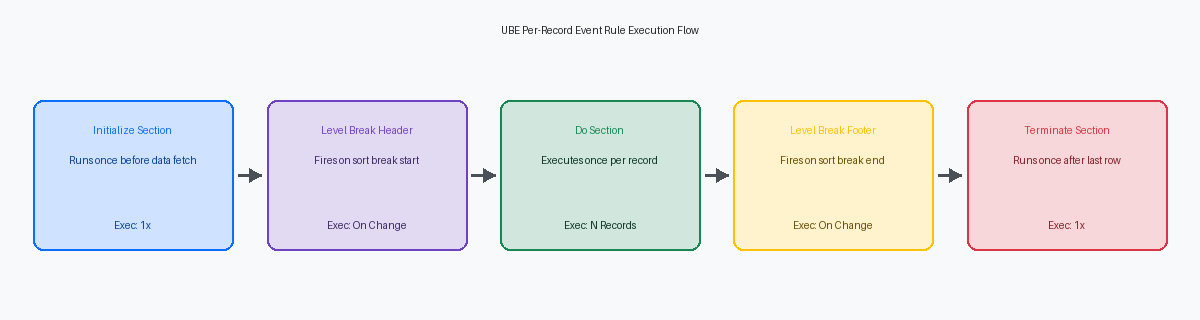
The JDE Report Engine runtime executes section events in a strict, deterministic state sequence that procedural Event RulesJD Edwards' proprietary scripting language used to add business logic to applications and reports. cannot override or alter. Developers who attempt to force manual control flow by bypassing this lifecycle inevitably introduce corrupt report variables or unhandled runtime exceptions. On a high-volume batch run, the engine moves predictably through initialization, loop execution, and section teardown, regardless of any procedural code written within the section.
The Initialize Section event fires exactly once, executing prior to the runtime constructing the underlying SQL SELECT statement and opening the database cursorA temporary control structure that enables traversal over the records of a database query result.. This makes it the sole window where calls to Set User SelectionA system function used to dynamically filter database records before a report section runs. or Set SequenceA system function used to dynamically define the sorting order of database records in a report. actually modify the database query. Adding data selection calls anywhere after this event completes has zero impact on the active SQL cursor.
Once the cursor opens, Do Section executes recursively once per record returned by the database driver. In a 100,000-record batch processing loop, invoking a heavy C business functionA compiled C program used in JD Edwards to execute complex business logic and calculations efficiently. like F0911 Edit Line inside Do Section means executing compiled C logic 100,000 times. Shifting static table lookups and parameter initialization out of Do Section and into Initialize Section routinely drops execution times from over 40 minutes down to under 5 minutes.
Terminate SectionA JD Edwards batch event that runs once after all records have been processed, used for cleanup. executes after the database driver fetches the final record and section processing completes, acting as the designated cleanup point for memory structures. This is where developers must release custom C BSFN memory pointers, close custom cache allocations, and clear temporary tables. Omitting memory deallocation here causes persistent memory leaks inside the RUNBATCHThe background process on the JD Edwards enterprise server that executes batch jobs and reports. process on the Enterprise ServerThe central server in a JD Edwards architecture that processes business logic, batch jobs, and database requests., progressively degrading system performance over long batch queues.
The Do Section Event: Where Logic Belongs and Breaks
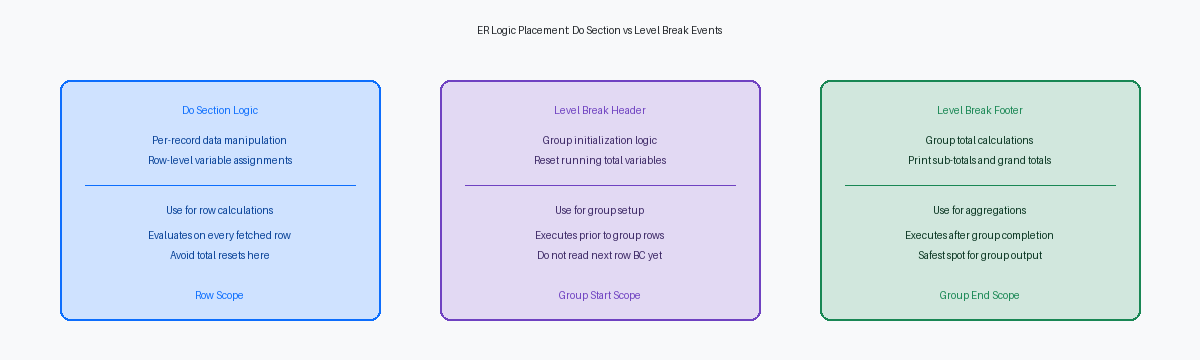
The Do Section event triggers once for every single record that satisfies your data selection, making it the wrong place for logic that belongs at batch boundary limits. On an F0911 ledger processing run with a Post Code filter set to evaluate posted records (GLPOST = 'P'), this event is designed exclusively for record-level evaluation, field transformation, and per-row output suppression logic like invoking Suppress Section WriteA system function that prevents a report section from printing to the PDF while still executing its logic.. If you attempt to aggregate running control balances or execute setup reads here, you invite massive performance bottlenecks and data corruption.
Performance degradations in batch reports almost always originate inside this loop. Every business functionA reusable block of code in JD Edwards used to perform specific calculations or database operations. call placed inside Do Section scales strictly linearly with record volume. A seemingly innocent address book detail fetch taking just a few milliseconds inside the loop adds 15 minutes or more of latency to a large GL batch. If an operation does not rely on per-row data elements, push it out to Initialize Section or execute it conditionally only when key values change.
Placing group total accumulation in Do Section before evaluating level break changes causes off-by-one errors on the final record of a sequence. The UBE engine processes Do Section before executing Level Break Footer logic for that record's boundary change. If your accumulation code runs in Do Section, the running total rolls up the current record before the footer prints, distorting subtotal calculations. Keep balance aggregations inside the Level Break Footer event where the engine guarantees accurate group totals.
Variable selection inside Do Section also directly impacts engine performance and output formatting. Choosing Report Variables (RV)Variables in JD Edwards reports that are bound to the visual layout and printed on the output. versus Event Rule Variables (VA)Internal variables used in JD Edwards scripting to store temporary values during processing, not printed directly. inside Do Section dictates whether calculated values trigger automated display formatting and engine data dictionaryA central repository in JD Edwards that defines the attributes, formatting, and validation rules for all data fields. overrides. Assign raw intermediate math to VA variables during row-by-row iteration, and map values to RV fields only when passing data directly to visible report lines.
Mastering Level Break Header and Level Break Footer Events
Processing 15,000 sales order detail records from F4211 sorted by Address Number (AN8) requires a precise model of engine execution. The Level Break HeaderAn event that runs immediately before a new group of sorted records begins processing. fires the instant the engine encounters a change in the sort key value, executing completely prior to the first detail line of that new AN8 group reaching the Do Section. If your sequence contains hundreds of distinct customer numbers across those rows, the engine interrupts the detail stream for each distinct group boundary to establish the group context before executing any row-level event rules.
Resetting running accumulator variables—such as clearing VA evt_OrderTotal_MATH10 to zero—inside the Level Break Header prevents residual metrics from leaking across boundary lines. Business View (BC)A JD Edwards object that defines the table columns available to a report or application. column behavior also shifts fundamentally across these boundaries. Evaluating BC Address Number (F4211)(AN8) within a Level Break Header pulls the incoming record's value for the upcoming group. Inside a Level Break FooterAn event that runs immediately after a group of sorted records finishes processing, ideal for subtotals., that same BC column reflects the terminal record of the group that just finished processing.
Level Break Footers process after every child detail row for a sort group has executed Do Section logic, making them the only valid location for group aggregations. Summing extended price values, writing group summary rows, or calling C business functions to commit rolled-up balances must happen in this event. Executing subtotal logic in the Do Section or relying on automatic section total fields without explicit variable controls in the footer causes subtle balance corruptions across large operational batches.
Conditional Sections and Suppress Section Write Patterns
Executing heavy logic against F4101 Item Master records often requires evaluating rows without printing them. Calling the system function Suppress Section Write tells the UBE engine to bypass visual rendering on the PDF layout pass while still executing every line of Event Rule code inside the Do Section. On a high-volume Item Master validation batch, skipping layout generation for non-error items drops execution times by 15% to 22%, allowing full table updates or custom memory cache populates to run without graphics processing overhead.
Programmatic execution of conditional sections via Do Custom SectionA system function used to programmatically call and execute a conditional report section. transfers thread control synchronously. The engine halts processing in the parent section, executes the target section's event sequence, and returns execution to the exact next line of Event Rule logic. While this isolates distinct sub-routines cleanly, nesting Do Custom Section calls deeper than three levels degrades the UBE thread stack on the Enterprise Server and obfuscates variable scope across custom report variables.
A conditional section operating without an attached business view inherits no implicit record context or table joins from the calling parent. You must define data selection programmatically using the Set Data Selection system function prior to triggering the child section, or pass key fields directly through Section InterconnectVariables used to pass data and parameters between different sections of a JD Edwards report. variables. Failing to explicitly constrain a conditional section's data selection usually results in an unintended full table scan against secondary tables like F4102 or F4111, turning a short nightly batch into a multi-hour job.
Code Example: Structuring a Financial Summary UBE Safely
Processing 500,000 F0911 general ledger records in a multi-tier trial balance UBE will expose structural flaws in your Event Rules within seconds. The most resilient architecture isolates data processing from output generation by executing calculation logic inside Level Break Footers. The Detail Do Section acts purely as an ingestion engine, reading business view columns (BC) on every single record fetch without triggering visual layout rendering or unnecessary section writes.
Variable scoping requires a strict division of labor between Event Rules variables (VA) and Report Variables (RV). Report Variables bound to the layout carry presentation properties that can reset unexpectedly across section breaks or suppress-section calls. Use global Event Rules variables (VA rpt_Subtotal_AA) to maintain state, track running balances, and execute mathematical operations across section boundaries. Keep RV fields isolated strictly to visual presentation inside the footer frame.
Mathematical accumulation happens on every row pass within the Detail Do Section, but you must execute visual output and state clearing exclusively in the Level Break Footer. Pushing totals to RV fields and clearing the underlying VA accumulators inside the footer prevents premature zeroing when processing complex multi-tier chart of accounts structures. A classic failure occurs when developers reset subtotal variables inside the Do Section; a single out-of-sequence F0911 record will zero out an account balance before the layout engine renders the level break line.
Database NULLs in F0911 transaction records—frequently encountered in legacy data migrations—will break standard ER math assignments. JDE Event Rules do not always coerce SQL NULL values to numeric zero during variable addition, causing silent calculation errors or missed ledger amounts. Construct an explicit If BC Amount (F0911)(AA) is Equal to <Null> conditional check in your processing logic to assign zero to a working variable before executing accumulation functions.
Common Event Rule Misplacements and Debugging Patterns
Debugging misplaced Event Rules in a batch engine always brings you back to parsing the jdedebug.logThe primary diagnostic log file in JD Edwards used to trace database calls, business functions, and event execution. file for specific engine thread patterns. When a calculation returns null or a section fails to print, filtering the log for 'Entering Event' and 'Exiting Event' call trees isolates exactly where the runtime engine branched unexpectedly. In most UBE performance and logic incidents, the root issue is an event firing out of the developer's assumed execution order.
A classic mistake is placing a Fetch SingleA database operation in JD Edwards that retrieves a single record matching specific key criteria. against table F4101 inside the Initialize Section while passing Business View columns as primary key inputs. Business View columns hold null values until the driver loop processes the first record in the Do Section, causing the initial fetch to fail silently. Conversely, modifying the underlying SQL WHERE clause using Set User Selection must strictly happen in the Initialize Section. Calling it inside the Do Section forces the engine to ignore the system call entirely once the SQL statement compilation completes.
Memory leaks often stem from executing structural cleanup in the wrong lifecycle event. Initializing a JDE cache or C-API memory pointer inside a Level Break Header while putting the clearing logic in the Terminate Section leaves unreferenced memory allocated across thousands of iteration cycles. On batch jobs processing high record volumes, this misplacement degrades enterprise server kernel stability and eventually crashes the process. Clean up local pointers in the matching Level Break Footer, reserving report-level Terminate events exclusively for global driver handles.
When refactoring custom UBE event rules to optimize batch runtimes—especially during upgrades to Tools Release 9.2.8A specific version of the JD Edwards technical foundation that provides system updates, security, and performance enhancements.—aligning Event Rules with runtime engine mechanics prevents performance bottlenecks and guarantees data integrity.
