




If you fire Set System Error or Set Action Code inside UBEUniversal Batch Engine, the JD Edwards background engine used for running batch jobs, reports, and automated processes. Event RulesJD Edwards' proprietary scripting language used to define business logic and behavior in applications and reports., the batch engine silently ignores the interactive UI calls. Developers coming from APPLInteractive Application, the user-facing screens and forms in JD Edwards used for real-time data entry and inquiry. design frequently fall into this trap, leaving failed batch jobs to either complete with invisible data corruption or dump ambiguous generic errors into the F01131The JD Edwards database table that stores Work Center message control information and system alerts. Work CenterJD Edwards' internal messaging system used to deliver system alerts, workflow notifications, and batch error logs to users. table. When a custom batch validation fails on a missing credit limit in F03012 or an invalid account in F0901, standard UBE execution gives the end user zero actionable context on the output PDF.
Solving this requires a standardized JDE UBE error message pattern for failed validation that bypasses interactive error logic entirely. By pairing explicit Work Center messaging BSFNsBusiness Functions, reusable code modules (written in C or NER) that execute specific business logic in JD Edwards.—such as B0100011—with ER flag arrays and conditional Error Detail report sections, you can push exact record keys, data structure errors, and JDE system log pointers directly to the spool file. This structure turns hours of CNCConfigurable Network Computing, the system architecture and administration methodology used to manage JD Edwards environments. log digging into immediate business-user resolution.
Why Standard Interactive Error Calls Fail in UBE Runtime
System functions like Set Error and Set System Error were engineered specifically for interactive application controls, where the runtime engine holds the form in memory and blocks user input until the error clears. In a UBE event rules context, calling these system functions accomplishes virtually nothing. The UBE engine registers the error code in the thread context, but because there is no user interface to lock or render visual cues, processing continues uninterrupted into the next record in the loop.
The technical break gets worse when C business functions enter the mix. Standard modules like B0900049 (G/L Account Validation) or custom C BSFNs frequently call jdeSetUserError internally to flag bad data. If the calling UBE Event Rules do not explicitly intercept the cErrorCode parameter returned in the data structure, the UBE engine completely ignores the populated error state. It proceeds directly to the table I/O or F0911The Account Ledger table, which stores all detailed financial transactions and journal entries in JD Edwards. / F4111The Item Ledger table, also known as the Cardex, which tracks all inventory transactions and history in JD Edwards. commit steps, silently writing invalid or unverified transactions to the production database.
This silent failure model converts routine validation issues into major diagnostic sinkholes. Instead of a clear alert on the report output, a failed run leaves zero visual trace, forcing developers and CNC engineers to hunt through 2GB to 5GB enterprise server jde.log files. Finding the root cause requires isolating specific call object kernel thread IDs and scanning thousands of lines for buried COB0000011 APIApplication Programming Interface, a set of protocols that allows different software components or systems to communicate with each other. error assignments that the batch engine discarded during execution.
Routing Validation Failures to the Work Center and Report Output
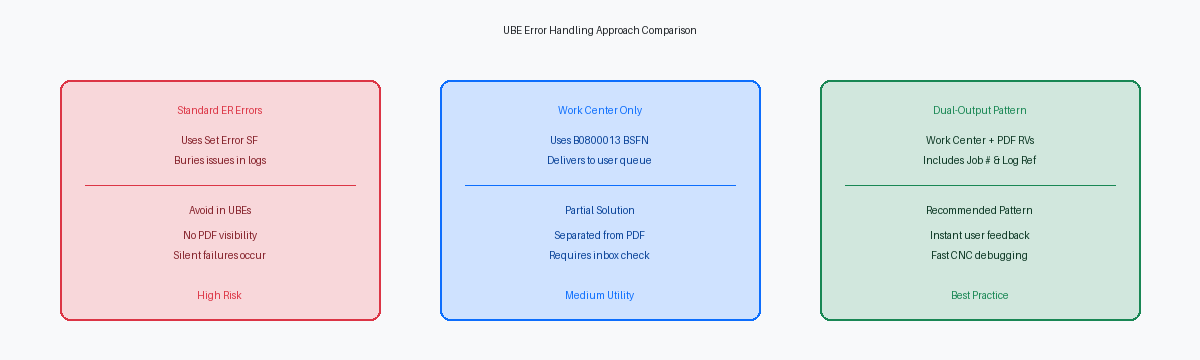
Interactive forms display visual error badges immediately, but batch processors push messages deep into the Work Center tables (F01131 and F01132). Relying solely on Work Center delivery isolates business users who process high-volume batch runs like a 5,000-record sales order upload. Requiring a warehouse supervisor to log into the Work Center, expand nested sub-folders, and decipher generic system text just to find one credit-hold failure adds 15 to 20 minutes of friction per exception report.
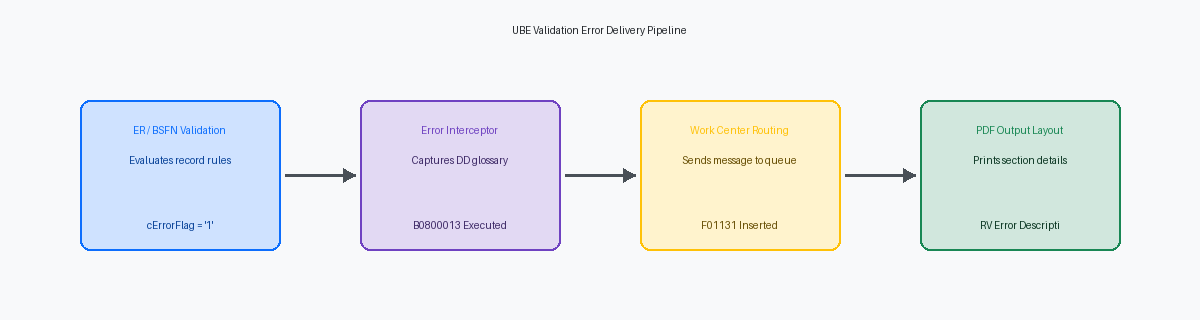
The standard approach for batch messaging relies on B0800013 (Send Message Extended). Executing this C business function inside your UBE Event Rules populates the user's Work Center inbox using Data Structure D0800013A. It attaches specific runtime context—such as the order number, line number, and error message glossary ID—ensuring that systemic exceptions remain tracked within native JDE queue architecture for compliance and automated workflow escalations.
To eliminate operational blind spots, implement a dual-logging pattern directly within your ER validation loop. When a record fails a business rule, assemble a unified error string into a report-level variable. Flush this variable immediately to a dedicated, conditional UBE detail section that prints directly below the failed record on the PDF layout, then pass that exact variable into B0800013 on the same cycle.
This split approach gives business analysts instant, line-level feedback on the printed PDF output while preserving the underlying Work Center history for system administrators. On a typical upgrade or code retrofit project, replacing single-channel messaging with this dual-pattern across your top 20 custom processing UBEs reduces tier-one functional support tickets by an estimated 30% to 40%.
Structuring the ER Validation Loop with a Flag Array
Standard Master Data validation functions like B4101410 (Item Master Validation) populate the system error list via jdeSetDataDictionaryError, but they fail to halt processing in a batch engine automatically. To handle thousands of records in a single execution without writing corrupt transactions, you must maintain a dedicated process status flag (cErrorFlag) and an error counter (mnErrorCount) inside the report data structure or report variables. Evaluating cErrorFlag immediately after the validation call lets the event rules bypass downstream processing logic, such as F4111 cardex updates or F0911 ledger inserts, for that specific row.
Because B4101410 pushes errors directly to the data dictionary error stack rather than returning structured error codes in its data structure, wrapping it in a custom C or NERNamed Event Rules, a JD Edwards tool allowing developers to write business functions using Event Rules scripting instead of C. business function is mandatory for consistent batch handling. The custom wrapper executes the standard validation call, inspects the API return code or queries the error stack using jdeGetErrorCount, and extracts the message IDs into a temporary memory array or JDE cache structure. This pattern isolates standard JDE validation logic from report processing while exposing precise, multi-error details back to Event Rules without bloating global memory.
Variable scope management inside the Event Rules determines whether your batch job runs reliably or breaks silently across 50,000 records. At the top of the Do Section event—prior to firing validation calls—explicitly reset cErrorFlag to '0' and clear the error counter array. If you skip this initialization step, a single invalid item on row 12 sets the failure flag permanently, causing the report logic to skip valid transaction processing for every subsequent record across the remaining engine thread.
Printing Error Detail Sections Directly on Report Output
Relying solely on the Work Center forces business users to match job numbers between PDF outputs and PPAT queues, driving up Tier-1 support tickets during peak batch runs. In Report Design AidThe design tool in JD Edwards used to create and modify batch reports and UBE layouts., set up a dedicated Error Detail Section configured for conditional execution using Do Custom Section. Leave this section invisible during normal row processing, calling it programmatically from the Do Section event only when your validation logic flags a row-level exception. This keeps clean records on the primary report driver while writing exact line-item failures directly beneath the bad record or onto a dedicated exception layout.
Map your Event Rules variables directly to Report Variables based on Data DictionaryThe central repository in JD Edwards that defines data item attributes, validation rules, and default glossary text. items DTAI (Data Item) and DSER (Error Description) within this custom section. Instead of hardcoding literal strings that break multi-language deployments, pass DTAI into the section to populate DSER dynamically at runtime. This surfaces the exact error message text—such as 0002 for Record Invalid or 058L for Account Not Mastered—alongside the specific transaction key that triggered the failure.
Append a Report Footer section configured as a summary cover block that executes at job termination. Maintain two scope-level counter variables across the primary driver section: mnRecordsProcessed and mnValidationExceptions. Displaying a final tally—such as 14 validation exceptions out of 10,000 records processed—provides operational teams with an immediate visual metric on the final page. Operators can determine in seconds whether the batch requires upstream data maintenance or re-submission without opening Work Center messages or checking CNC log files.
Injecting Log References for Rapid CNC Triage
When a batch job fails in a production queue processing 10,000 records an hour, a CNC engineer shouldn't spend 20 minutes parsing a 500MB jde.log file with vague wildcard searches. You fix this directly in Event Rules by constructing a standardized log reference string inside the error payload passed to the Work Center. Concatenate SL ServerName, the section ID, and System Value JOBS (Job Number) using B9800100 (Get Audit Information) or native ER string functions. A payload formatted as [REP: R42565 | VER: XJDE0001 | JOB: 849204 | SEC: S12] gives the operations team the exact anchor required to grep enterprise server logs in under 5 seconds.
Unrecoverable database errors occurring inside custom C Business Functions—such as ORA-00001An Oracle database error indicating a unique constraint violation, meaning an attempt was made to insert a duplicate record. unique constraint violations or JDB3100011 insert failures—frequently write generic "Transaction Aborted" messages to the PDF report output while hiding the underlying cause deep inside the call stack. Modify your C BSFN error handling logic to extract the return code from the HUSER or HREQUEST handle via JDB_GetLastSQLDiagnostic and pass that exact numeric code back through the BSFN data structure. Printing SQL-00001: Unique Constraint Violation on F4211 directly in the UBE error detail section eliminates the need to execute a manual database trace to discover why an insert call failed.
Implementing this telemetry standard across your top 20 transactional UBEs reduces Level 3 CNC triage duration from up to 45 minutes down to under 5 minutes per incident. Package this logic into a core NER function, N55ERR01 (Format UBE Telemetry Payload), and call it immediately before issuing GlossaryTextError or calling B0800011 for Work Center messaging. This structural change keeps your batch error pipelines actionable, audit-compliant, and directly mapped to server infrastructure logs.
Production Audit Checklist for Custom UBE Error Handling
A pre-go-live code audit across a custom UBE estate usually exposes the same core flaw: event rules set cErrorFlag to '1', yet subsequent Table I/O or business function calls still execute against the database. Before granting production promotion, verify that every Do Section or record processing loop explicitly guards every Insert, Update, or business function call behind an error flag evaluation. Allowing uncommitted or partially updated records to hit master tables like F0911 or F4111 during a validation failure corrupts operational data and forces manual SQLStructured Query Language, the standard programming language used to manage and manipulate relational databases. remediation in production.
Data Dictionary configuration requires equal scrutiny during this code review phase. Generic error items such as "0001 - Value Not Found" force support analysts to guess which field failed across a 50,000-record batch processing run. Audit all ER validation blocks to ensure all validation error DD items rely on explicit Glossary Text overrides when generic error messages are insufficient. Passing dynamic variables into text substitution parameters gives the end user the exact record ID, table alias, and invalid value directly in the error message.
Standardizing error reporting across custom UBEs reduces L2/L3 support ticket resolution times by up to 40%. When a night-shift batch engine fails during a 2:00 AM scheduled execution, an operations analyst must be able to identify the bad data row, understand the failed business logic, and execute the fix without escalating to a developer for a C-code debug trace or e1root.log inspection.
