




In almost every mature EnterpriseOne 9.2 environment I audit, I find dozens of custom UBEs running validation code copy-pasted straight from interactive screens. When business rules shift—whether adjusting item branch safety stock checks, customer credit limits, or GL cross-validation—developers inevitably update the interactive Form Event Rules while neglecting the overnight report drivers. Configuring JDE UBE event rules to call an NER for reusable validation bridges this maintenance gap and prevents silent data corruption in core tables.
The Cost of Duplicate Validation in Batch Processing
Walk into any JDE environment running for over five years, and you will find the exact same pattern: a dozen custom UBEs each executing independent F4101 Item Master table I/O inside their Do Section events to check stocking types, search types, and GL class codes. When the business updates its product lifecycle rules—such as restricting Stocking Type 'U' from batch order generation—the change gets coded into the P4101 interactive application. The batch reports processing inbound orders, replenishment, and work order creation remain untouched, silently processing invalid items for months until finance spots the integrity error.
Hardcoding record-level validation directly inside Universal Batch Engine Event Rules degrades database performance and destabilizes system integrity. Running repeated Fetch Single operations on the F4101 across hundreds of thousands of transaction rows adds non-trivial database overhead, multiplying round-trips that could be cached in memory. More critically, when UBE processing rules diverge from interactive forms like P4210, the batch engine writes database records that interactive applications immediately reject during subsequent user edits, creating orphaned records in F4211 and transactional deadlocks in F4111.
Encapsulating item validation logic inside a Named Event Rule creates a single maintainable source of truth across your entire software architecture. When a single NER executes the business checks, both interactive applications and background UBE processing engines run identical validation code against the same memory structures. Updating a single validation rule inside the NER business function automatically updates every calling report and form, eliminating logic drift without forcing developers to audit, edit, and re-test dozens of separate batch objects.
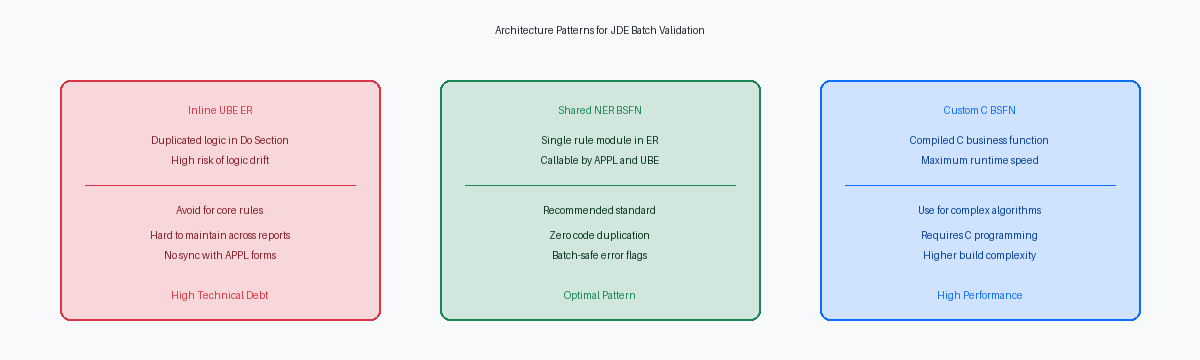
Designing the Shared NER Parameter Data Structure
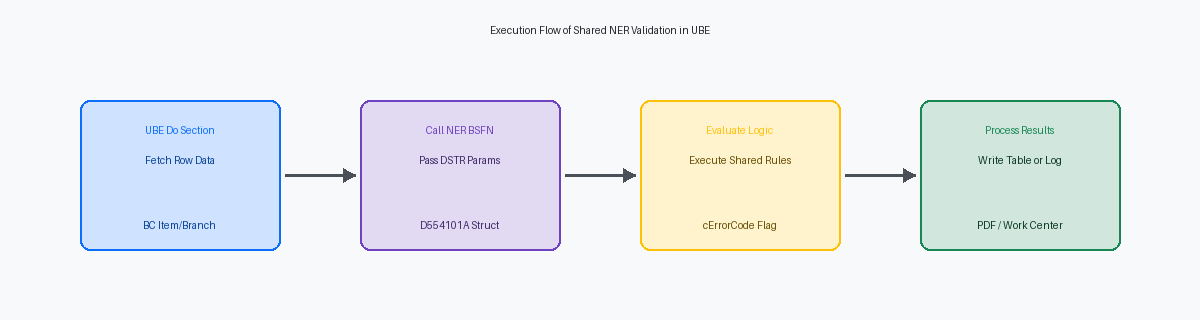
Building a shared NER that operates cleanly across both interactive applications and UBE section events requires strict parameter discipline in Data Structure D554101A. You must explicitly segregate input keys—such as szItemNumber (LITM), szBranchPlant (MCU), and mnQuantity (QTY)—from output response fields. Defining parameters as bi-directional or generic IN/OUT in the Object Design Agent introduces variable contamination when batch engines execute event loops across tens of thousands of sales order detail lines.
The parameter structure must include standard return flags like cErrorCode (EV01) and szErrorMessageID (DTAI). Setting cErrorCode to '0' for success and '1' for hard errors allows the calling event rule to evaluate execution status programmatically without relying on UI popups. In interactive APPL forms, the calling event rule consumes szErrorMessageID to highlight form controls via Set Control Error. In a background UBE, the report engine inspects cErrorCode, writes the error context to custom work tables or the F01131 work center, and suppresses UI interactions completely.
Excluding interactive system functions from the NER logic guarantees total runtime compatibility across web application servers and enterprise batch kernels. Invoking UI-dependent system functions or form-level error assignments inside a business function causes silent execution halts or core dumps when processed by a Call Object Kernel under runube. The NER must restrict its operations to pure table lookups against F4101 and F4102, evaluate condition trees, assign the exact return values in D554101A, and immediately yield control back to the calling process.
Executing NER Calls Within UBE Section Events
Executing custom validation logic in batch processing demands precise event placement to guarantee data integrity without sacrificing execution runtime. Positioning the NER call directly inside the Do Section event of the primary driver section ensures row-level evaluation for every record fetched from the database. On a high-volume batch job processing hundreds of thousands of F4101 Item Master records, this placement guarantees that no row skips validation, regardless of data selection parameters or level-break sequencing.
Data mapping between the UBE event rules and the underlying C-compiled NER must remain strictly isolated. Mapping Business View (BC) fields directly to the input parameters of the Business Function data structure—such as passing BC ITM and BC MCU—establishes a clean execution scope. Developers frequently make the mistake of using global Report Variables (RVT) to pass state into an ER call; this invites subtle state-bleed bugs when processing multi-plant or multi-currency runs across thousands of iterations.
Evaluating the returned error status immediately after the Business Function call prevents corrupt data from reaching downstream processing. If the NER sets a return parameter flag (such as cErrorCode equal to '1'), the ER logic must immediately halt further section processing for that record. Calling the Skip Detail Line system function or suppressing custom Table I/O statements prevents partial or invalid writes to target tables like F4102 or F4211.
Standard EnterpriseOne UBE processing does not automatically enforce transaction rollback on custom table writes unless explicitly grouped inside a transaction boundary. Trapping this error flag on the line immediately following the call is the only way to safeguard database integrity. A compiled NER adds less than a millisecond of overhead per call on modern OCI or on-prem enterprise servers, meaning performance bottlenecks stem entirely from unindexed database fetches inside the NER rather than the event call stack itself.
Batch Error Handling Without Interactive UI Popups
Firing interactive error routines like Set Action Code Error inside a batch thread is a fast way to corrupt job behavior. In interactive forms, these system functions halt user input and render red visual warnings. Place that same call inside a UBE execution thread processing tens of thousands of sales order lines, and the engine will either abort the job mid-stream or silently bypass the validation, committing partial, invalid writes to F4211.
Clean batch error handling requires explicit error suppression built directly into the underlying NER. By passing an execution control parameter such as cSuppressErrorMessage = '1' from the UBE, you instruct the NER to bypass runtime UI popups. Instead of calling Set Data Item Error, the function formats the validation failure and routes it to the Work Center API via B0800011 (Store Data Structure in Work Center). This writes structured message instances into F01131 tables without interrupting the engine thread.
Accumulating validation failures in memory rather than forcing immediate termination keeps your batch pipeline running. When B0800011 logs a validation failure, the NER returns an error flag like cErrorCode = '2' to the UBE section event. The report driver logs the failed transaction key, skips table I/O for that single record, and immediately evaluates the next row in the queue. Processing a 10,000-record run yields clean commits for valid rows while routing flagged records to Work Center messages, eliminating the operational nightmare of a batch process halting mid-run.
Managing Memory and Context Across Event Boundaries
Running a UBE through a large batch run exposes every flaw in scope management. When logic runs inside the Do Section event of a batch report, variables defined in the NER's local data structure exist strictly for the lifespan of that single execution call. Once the C runtime wrapper generated by the Event Rules compiler completes the function execution, those local variables drop out of scope and release their allocated memory back to the enterprise server process. This automatic cleanup guarantees that calculation counters, temporary buffer flags, and intermediate mathematical results from early records never bleed into subsequent rows, maintaining absolute state isolation across massive batch volumes.
Local NER memory protection does not automatically clean the calling scope's parameter values. In the UBE Do Section, developers frequently pass report-level or section-level variables directly into the parameter structure without resetting them between iterations. If record 49,999 sets an error flag cErrorCode to '1', and record 50,000 encounters clean data, the parameter data structure retains that '1' unless explicitly reset. Executing a target clear system function or manually zeroing out every IN/OUT parameter immediately prior to the function call on every iteration eliminates ghost errors that halt execution prematurely.
Executing a compiled NER millions of times in sequential batch jobs can still degrade Enterprise Server performance if the underlying code accumulates memory allocations across calls. EnterpriseOne compiles NER logic into standard C dynamic link libraries, executing within the batch job's active kernel thread. Isolating server execution contexts by avoiding persistent module-level caching and closing open table handles inside the NER prevents heap fragmentation from consuming kernel memory over a multi-hour processing window. This architectural discipline keeps memory usage flat across large batch runs and prevents kernel crashes mid-run.
Verifying Dual Execution in APPL and UBE Contexts
Running a newly minted Named Event Rule directly through the Business Function Test Bench (P986250) is the fastest way to validate execution logic before attaching it to an APPL control event or a UBE section. P986250 allows you to map input parameters manually, evaluate pointer assignments, and verify return flags like cErrorCode (Value '1') in complete isolation. Skipping this step leads to painful debugging sessions where you are left guessing whether a validation failure stems from the batch event flow or the underlying generated C code of the NER itself.
Local web development clients frequently hide C-compilation oversights, uninitialized memory pointers, and missing header files that crash on the Enterprise Server. When an interactive application executes an NER locally, it runs under a local C compiler environment that is forgiving of unmapped data structure parameters or string truncation. Deploying the business function to a server package and executing it directly on the Enterprise Server kernel—whether running Linux, AIX, or Windows—is mandatory to uncover server-only kernel execution failures before rolling the logic out to batch queues handling tens of thousands of transactions nightly.
Final verification requires a side-by-side audit comparing interactive screen responses against batch log traces. Process a test run of 100 to 500 records through the UBE with Level 6 debug logging enabled, then cross-reference the jdeCallObject call stack against the interactive application's error stack for identical invalid records. If an invalid business unit triggers error code 0002 on P42101, that exact same error must surface in the UBE's work center or execution log. Modularizing ER validation into reusable NERs ensures both batch processing and interactive forms operate against identical business rules across Tools Release 9.2.8 and beyond.
