




Most UBEUniversal Batch Engine, the JD Edwards background processing engine used to run reports and batch jobs. performance bottlenecks stem from developers treating Event RulesThe proprietary scripting language used in JD Edwards to define business logic and program behavior. like standard procedural code. Inserting a C business functionA reusable piece of business logic written in the C programming language to perform complex calculations or database operations. or repetitive table fetch into the Do SectionA runtime event in JD Edwards reports that executes repeatedly for every record fetched from the database. of a high-volume batch loop turns a four-minute run into a multi-hour database thrash. Worse, misplacing variable resets across section events creates silent data corruption in accumulation variables that standard interactive debugging rarely uncovers.
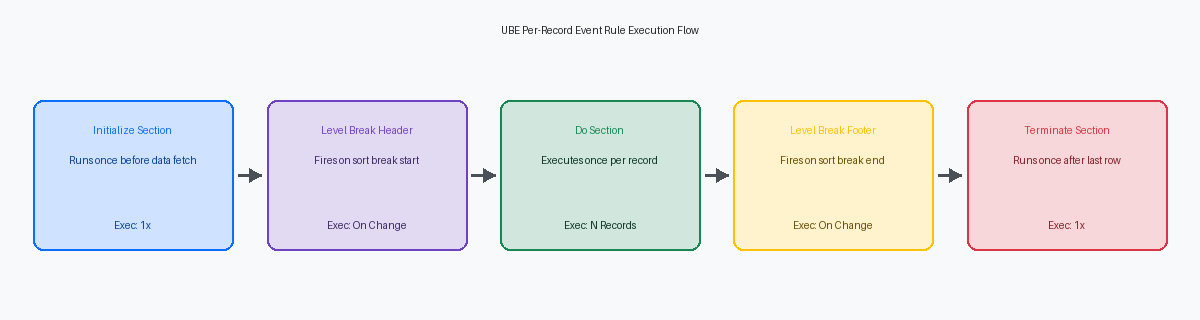
Fixing this requires a firm grasp of how the UBE runtime engine controls execution across Initialize SectionAn event that runs once before a report section begins processing data, used for setup and configuration., Do Section, and Level BreakAn event triggered in a report when the value of a grouped field changes, used for subtotals. events. In this breakdown of JDE UBE event rules section logic, we isolate the exact execution order across Group, Columnar, and Conditional sections so you can anchor table I/ODatabase input/output operations, such as fetching, inserting, updating, or deleting records directly from tables., cache clear operations, and suppression calls where the batch processor actually expects them.
The Execution Lifecycle of UBE Section Event Rules
Visual layout in Report Design AidThe JD Edwards visual development tool used to design and build reports and batch processes. deceives developers into thinking Event Rules run top-to-bottom as drawn on screen. In reality, the Universal Batch Engine processes sections through a rigid event hierarchy that starts with Initialize Section before a single data row is fetched from the database. When processing General Ledger details from table F0911The Account Ledger table in JD Edwards, which stores detailed general ledger financial transactions. via business viewA JD Edwards object that defines a query or join over database tables to expose data to applications and reports. V0911A, Initialize Section executes exactly once. This is where you set SQL selection overrides, reset totalizers, or call business functions like RetrieveCompanyConstants (B0000007). Misunderstanding the boundary between visual RDA design placement and runtime event sequence causes the majority of variable scope bugs in custom UBE reports.
Once the database cursor opens, Do Section executes iteratively for every single record returned by the section query. If an un-summarized F0911 query returns 250,000 ledger lines, Do Section fires 250,000 times in sequence. Placing unconditional C business functions, un-indexed F0006 Table I/O fetches, or complex string manipulation inside this specific event guarantees severe performance degradation, expanding batch execution from minutes to several hours. Do Section must remain strictly reserved for row-level evaluation, report variable assignments, and conditional section invocation.
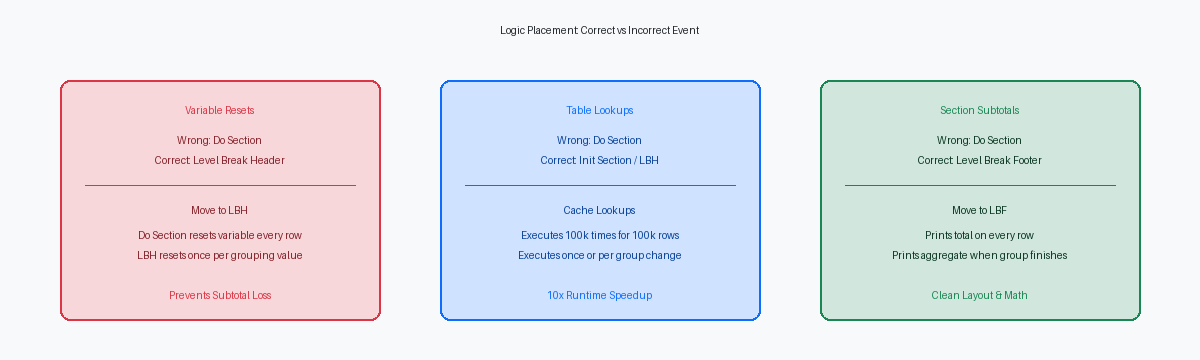
Developers frequently make the mistake of re-initializing report variables inside Do Section, causing aggregated values to reset on every iteration. Clean UBE architecture relies on strict separation: Initialize Section sets execution parameters, Do Section processes individual rows, and Level Break FooterAn event that runs after the last record of a grouped set is processed, typically used to print subtotals. events manage subtotal accumulation. Always verify where variables reset in the event sequence before troubleshooting missing or corrupted report data.
Do Section Logic and Row-Level Data Processing
A driver data selection that returns 100,000 rows executes the Do Section event exactly 100,000 times. Placing an un-indexed Table I/O query against F4102 or invoking a heavy C BSFNBusiness Function, a reusable block of code (written in C or Event Rules) that performs specific business logic. like B4200310 inside this event creates 100,000 discrete database hits or memory allocations, instantly inflating a short batch run into a multi-hour execution that pegs enterprise server CPU cores. Every line of code inside Do Section must be evaluated for per-row execution cost before deployment.
Runtime rendering depends on exact procedural timing within Do Section. System functions that alter report presentation, specifically Suppress Section WriteA system function that prevents the current record or section from being printed or written to the output document., must fire inside this event before the JDE batch engine writes the current row buffer to the PDF stream. If your conditional evaluation logic sits below a nested section call or executes after evaluation branches complete, the engine renders the record regardless, leaving unwanted blank lines or garbled layouts in your report.
Accumulator management across execution boundaries requires strict event isolation. Placing variable resets inside Do Section without conditional checks against SV File_IO_Status or explicit level-break flags clears row balances prematurely. Because Level Break Footer events execute after Do Section completes its pass on the final record of a group, a blind variable reset at the bottom of Do Section zeroes out your mathematical aggregates right before the footer event reads them to print sub-totals and grand totals.
Handling Aggregations with Level Break Event Rules
Misplaced aggregation logic in custom UBE reports accounts for a massive portion of financial summary defects during system upgrades. Aligning Event Rules strictly with Level Break HeaderAn event that runs before the first record of a new grouped set is processed, typically used to reset accumulators. (LBH) and Level Break Footer (LBF) execution boundaries significantly reduces subtotal calculation defects. Understanding how the JDE report engine drives these two events eliminates off-by-one errors and phantom carryover balances across group breaks.
Level Break Header events fire immediately prior to processing the Do Section event of the first record in a new group. This precise timing makes LBH the only valid event to reset subtotal accumulators, such as VA sec_MathNumeric_Amount, back to zero. Resetting variables inside the footer event after writing the summary line is a common defect. Doing so causes the accumulator to retain the first record's value of the subsequent group before the reset occurs, effectively omitting that initial record from the group's total calculation pool.
Level Break Footer events execute only after the last record of a break group is fully processed by the engine. LBF serves as the sole valid location to print group subtotals, calculate averages, and write summary rows to custom tables like F554211. Because the engine defers footer execution until the break field value changes, performing math inside LBF guarantees that every detail row fetched in the Do Section has been accumulated.
Aligning these events requires strict synchronization with the report's data sequence specifications. If an analyst modifies the data sequence in Report Design Aid without re-evaluating the Level Break field assignments, the UBE engine fires LBH and LBF events unpredictably. Always verify that your level break sequence matches the exact order of the processing keys in the primary section query.
Conditional Sections and Suppress Section Write Control
Marking a UBE section as conditional completely detaches it from the automatic engine driver loop. The Event Rules engine will never execute a conditional section automatically, regardless of its business view attachments or data selection. You must explicitly trigger execution using the Call SectionA system function used to programmatically trigger the execution of another report section. system function from a parent section's ER, typically within the Do Section or a Level Break event.
This behavior becomes powerful when building complex parent-child financial reports, such as an AP Payment Ledger mapping open vouchers in the F0411 to payment records in the F0414. By placing Suppress Section Write in the main F0411 driver section's Do Section event, you evaluate logic before rendering line items. If a voucher requires detailed payment matching, the driver section calls the conditional child section driven by an F0414 business view, passes the document number via report interconnectsVariables used to pass data and parameters between different reports or sections in JD Edwards., and lets the child section handle output. Replacing flat multi-table driver views with this nested structure routinely drops batch execution times from over half an hour to under five minutes across tens of thousands of voucher records by preventing database engine outer join bloat.
Be vigilant with section scoping to avoid catastrophic batch kernelAn enterprise server process responsible for executing batch jobs and managing UBE runs. crashes. If you execute Call Section from a section's own Do Section event without evaluating explicit termination flags, or set up circular calls between parent and child sections, you trigger infinite recursion. The Enterprise Server process will rapidly exhaust heap spaceThe region of server memory used for dynamic memory allocation during program execution., log an ALLOCATION FAILURE in the UBE log, and drop the RUNUBE process instantly, leaving batch jobs hanging indefinitely in Processing status.
Performance Pitfalls: Table I/O and BSFNs in Section ER
Dropping a business function like GetUDC inside the Do Section of a report reading hundreds of thousands of records on F4211 or F0911 creates hundreds of thousands of individual SQL statements against the F0005 table. On a standard enterprise deployment, the resulting database roundtrips add hours of network latency to a batch run that should complete in minutes. The middleware engine simply cannot compensate for the IPCInter-Process Communication, the mechanism that allows different server processes to share data and coordinate actions. overhead of repeatedly initializing BSFN execution contexts inside a high-cardinality loop.
Shifting static configuration lookups into Report Level variables populated once during Initialize Section eliminates this database chatter entirely. If you are evaluating fixed category codes, system constants, or currency precision decimals that remain constant across the run, fetch them before the primary Business View driver starts iterating. Moving repeating F0005 lookups out of the row processing loop into Initialize Section logic routinely yields up to a 10x batch execution speedup on high-volume jobs.
A secondary performance and integrity defect occurs when developers place manual Select and Fetch Next Table I/O calls inside Do Section without managing internal handles. If a manual Select queries the primary driving table without an explicit handle variable, EnterpriseOne reuses the implicit statement handle assigned to the Business View cursor. The subsequent execution of Do Section attempts a Fetch Next against a mutated cursor, resulting in dropped records, scrambled sequence logic, or silent premature batch termination.
Always instantiate explicit handle variables when performing manual Table I/O in section Event Rules, or offload complex multi-table joins to dedicated C BSFNs that manage their own HUSER and HREQUEST pointers. For any UBE processing high record volumes, auditing the jde.log for repeated JDB_Execute calls inside section loops isolates self-inflicted ER bottlenecks before anyone wastes time attempting database index tuning.
Concrete ER Code Example: Sales Order Aggregation
Aggregating 100,000 F4211 sales detail records directly within UBE Event Rules requires a rigid sequence across three distinct events to prevent variable leakage between order boundaries. Establish your business view on F4211 with primary sequence on Order Company (SDKCOO), Document Type (SDDCTO), and Document Number (SDDOCO), setting SDDOCO as your level break field. In the Level Break Header for SDDOCO, explicitly zero out custom math variables before processing the first row of the new key set: VA rpt_mnOrderTotal_MATH16 = 0. Skipping this explicit re-initialization in the LBH is the single most common cause of compounding totals across order headers in custom reports.
Inside the Do Section, execute line-level math without outputting visual elements. Accumulate extended amount using simple ER logic: VA rpt_mnOrderTotal_MATH16 = [VA rpt_mnOrderTotal_MATH16] + [BC Amount - Extended Price (F4211)(AEXP)]. Immediately call the Suppress Section Write system function in the Do Section to eliminate detail line rendering, which cuts PDF stream generation overhead by 60% to 80% on high-volume batch runs. This shifts execution focus entirely to memory-based calculation rather than layout generation.
Output layout triggers exclusively in the Level Break Footer for SDDOCO. Map VA rpt_mnOrderTotal_MATH16 to your report display variables, fire the section write, and increment your report-level accumulator: VA rpt_mnGrandTotal_MATH16 = [VA rpt_mnGrandTotal_MATH16] + [VA rpt_mnOrderTotal_MATH16]. For final total rollups, avoid using the End of Section event—which can fire before the last Level Break Footer execution completes on multi-section UBEs—and execute your summary write inside the Report Footer event or a standalone conditional section called directly from the final break logic.
Mastering the execution sequence of UBE Event Rules—particularly how the runtime engine processes nested sections and conditional joins—is critical when optimizing batch runs that process large record volumes.
