




Standard General Ledger integrity reports like R09701 or R09702 fall short the moment an enterprise runs custom ledger types, multi-currency revaluations, or non-standard subledger rules. Finance teams frequently ask DBAsDatabase Administrators: IT professionals responsible for managing, securing, and maintaining database systems. for raw SQLStructured Query Language: A standard programming language used to manage and manipulate relational databases. queries to spot unposted batches or GL imbalances during period-end close, but direct database scripts bypass EnterpriseOne Row Security, fail SOXSarbanes-Oxley Act: A US federal law that mandates strict financial reporting and auditing regulations for public companies. audit requirements, and cannot be scheduled reliably through batch engine queues.
Building a native batch report solves this by maintaining full platform compliance while automating exception detection. Studying JDE UBEUniversal Batch Engine: JD Edwards' proprietary tool used to run background processes, batch jobs, and generate reports. examples for F0911The Account Ledger table in JD Edwards that stores detailed transactional journal entries for the General Ledger. reconciliation report development highlights a proven architecture: a driving section aligned with F0911 Index 1 (GLA, GLDGJ, GLBLK, GLDOC, GLDCT, GLKCO), Level Break headers to aggregate control totals, and targeted Business Functions (BSFNsBusiness Functions: Reusable blocks of C or Event Rules code in JD Edwards used to perform specific business logic or calculations.) to calculate precision variances before flagging unbalanced batches.
F0911 Data Model and Selection Criteria
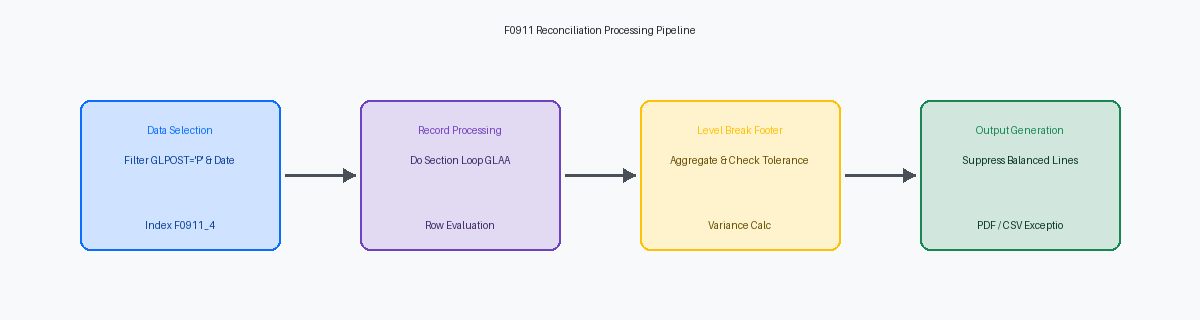
Querying the F0911The Account Ledger table in JD Edwards that stores detailed transactional journal entries for the General Ledger. Account Ledger directly means scanning tables that frequently scale to tens of millions of records in mature 9.2 production instances. If your UBE execution bypasses index 0911_2 (GLCO, GLAID, GLDGJ), SQL execution plans fall back to full table scans, extending batch runtimes from under a minute to several hours. The first non-negotiable filter in your data selection is GLPOST equal to 'P' (Posted). Including unposted batches (status 'W' or ' ') or approved-but-unposted entries introduces unposted GL balances into your reconciliation outputs, instantly invalidating integrity checks against the F0902The Account Balances table in JD Edwards that stores summarized financial balances by account, period, and fiscal year. Account Balances table.
Hardcoding date ranges or company boundaries inside Event RulesJD Edwards' proprietary scripting language used to program business logic within applications and reports. using Set User Selection creates rigid report objects that require OWMObject Management Workbench: The change management and version control system used by JD Edwards developers to manage software objects. promotions every time accounting periods shift. Mandate GLCO and GLDGJ ranges within the Processing OptionA user-defined parameter template in JD Edwards that allows users to customize how a report or application runs without changing code. template, driving the logic dynamically during the Initialize Section event. Evaluating processing option values against null or blank entries before report execution ensures the engine never fires an unbounded query against a large table space. If an analyst leaves the GLDGJ start date blank, abort processing in ER immediately using Stop Processing before the SQL statement hits the database tier.
To preserve developer-defined selection criteria while allowing end users to filter by specific Business Units (MCU) or Object Accounts (OBJ) in the Web Client, execute the system function Set Selection Append Flag set to <YES>. Calling this in the Initialize Section guarantees that user-entered data selection via the prompt screen appends with an AND operator rather than overwriting your core programmatic logic for posted status and company scope. Without this flag, user-defined prompt criteria overwrite any Set User Selection calls executed prior, accidentally pulling unposted transactions or cross-company records into your total calculations.
Designing Section Layout and Processing Options
Standardizing on a Group Section over a Tabular Section gives developers precise control over conditional row suppression and custom total calculations when processing F0911 data sets. Pairing this section layout with a custom Processing Option (PO) template based on template T0911 ensures the UBE captures comparative account ranges, fiscal years (GLFY), periods (GLPN), and comparative ledger types dynamically. Capturing ledger parameters like 'AA', 'CA', or 'AZ' via data item GLLT in the PO structure eliminates hardcoded IF statements in Event Rules, allowing seamless multi-currency reconciliation across secondary ledgers without code modification.
Incorporating a numeric tolerance threshold field into the PO template shifts exception reporting criteria directly to the financial analyst. Defining an amount threshold—such as $100—enables Event Rules in the Do Section to evaluate foreign or domestic amount variances against the user-defined value before outputting exception rows. This design choice filters out penny-rounding noise across hundreds of thousands of transaction rows and eliminates developer work tickets whenever corporate internal audit shifts materiality guidelines.
Aggregation boundaries require strict alignment between UBE data sequencing and section layout in Report Design AidThe design tool within JD Edwards used by developers to create and modify batch reports and UBE layouts.. Establishing Level Break Header and Level Break Footer sections on GLAID (Account ID) or GLOBJ (Object Account) creates clean operational boundaries for custom ER tracking variables. Enforcing strict primary data sequencing on Company (GLCO), Object Account (GLOBJ), and Account ID (GLAID) guarantees that the engine fires level-break events predictably, clearing subtotal variables on boundary crossings and eliminating accumulator bleed across account groups.
Event Rules Logic for Accumulating Control Totals
Relying on standard layout aggregate properties for critical financial reconciliation breaks down when processing high-volume F0911 record sets in a single run. Explicitly handle accumulation within the Do Section event of your detail section. As the engine evaluates each record, map the actual amount (GLAA) directly into a dedicated Event Rules math numeric variable. Manual ER accumulation gives you complete control over conditionally processed records, which automatic layout totals silently mishandle when sections or zero-balance lines are suppressed.
General Ledger balance direction requires evaluating the account master (F0901) record before adding amounts to running variables. Asset and expense accounts carry natural debit balances, whereas revenue and liability accounts store credits as negative amounts. Fetching F0901 category codes during record processing allows ER logic to determine whether multiplying GLAA by -1 is necessary prior to aggregation. Skipping this check produces false variance figures when totaling across mixed-account general ledger ranges.
Using local report variables backed by data dictionary items like MATH10 or AA prevents rounding errors caused by Math Numeric precision mismatches across large batch sets. Standard layout fields risk float precision drift over hundreds of thousands of iterations. Direct local ER variable accumulation eliminates the single-cent rounding artifacts that routinely plague financial reconciliation reports.
State isolation across level breaks demands strict variable lifecycle management. Clear and zero out running accumulation variables in the Do Section of the Level Break Header for company (CO) or account (ANI), never in the Level Break Footer. Initializing variables in the header guarantees clean boundaries when crossing company limits, preventing balance bleed-over during multi-entity batch runs.
Implementing Business Function Calculations for Variance
Directly coding IF Math_Amount_A != Math_Amount_B in Event Rules routinely generates false-positive variances. Floating-point conversions and C-structure scale discrepancies in standard ER math will evaluate a zero-dollar difference as non-zero if internal trailing decimals differ deep in the calculation structure. Calling standard JDE Math NumericA specialized JD Edwards data type designed to handle high-precision financial calculations and prevent rounding errors. BSFNs like B0900049 encapsulates C-level double-precision evaluation, ensuring variance calculation down to exact currency precision without custom code defects.
Calculating the variance between accumulated F0911 detail sums and actual F0902 account balance fields (GBAP01 through GBAP14) isolates structural database anomalies. A non-zero balance variance flags unposted GL transactions, timing differences from active batch entries, corrupt index pointers on F0911.GLAID, or manual SQL updates that bypassed the R09801 post process. In environments processing hundreds of thousands of ledger rows daily, surfacing these calculated variances directly at the account level catches integrity breaks before financial statement generation.
Executing these variance calculations exclusively inside the Level Break Footer section on AID significantly improves batch processing performance. Moving C BSFN executions out of the primary Do Section driver loop and into the level break execution layer reduces total function call overhead from tens of thousands of evaluations down to a single call per account, cutting UBE execution duration by roughly a third to half on large general ledger datasets.
Blank ledger types or null records returned from outer joins to F0902 must be trapped before passing parameters to the business function. Explicitly checking for blank GLLT values and pre-initializing Math Numeric ER variables to zero prevents system error triggers, null pointer faults, and bloated Enterprise Server log files during large-scale overnight batch runs.
Validating Output Totals and Exception Level Formatting
Setting up a Level Break Header and Footer on Object Account (GLOBJ) establishes the boundary between detailed transaction rows in the F0911 and summary ledger records in the F0902. Inside the Level Break Footer section Event Rules, evaluate the cumulative AA ledger total against the corresponding F0902 period balance. Before the engine renders the section, execute a tolerance check against an Event Rule math variable initialized to 0.01. If the absolute variance falls within this 1-cent threshold, fire the Suppress Section WriteA JD Edwards system function that prevents a specific section of a report from being printed or written to the output. system function. This logic filters out harmless multi-currency rounding noise across tens of thousands of journal entries and prevents the report from printing zero-variance output.
Suppressing sections for balanced accounts transforms a multi-hundred-page bulk output into a concise exception document for financial controllers. Controllers handling month-end close do not need visibility into thousands of reconciled accounts; they need immediate exposure to the handful of accounts holding genuine material imbalances. Calling Suppress Section Write inside both the Detail and Level Break Footer sections guarantees that fully reconciled GL accounts consume neither processing overhead nor spool space.
Configuring the UBE design to emit CSV output concurrently with the standard PDF report equips accounting teams for direct root-cause investigation. While the PDF version displays visually aligned Level Break Footer totals matched against F0902 summary balances for audit sign-off, the raw CSV export strips out line wraps and page headers. Financial analysts can immediately run VLOOKUPs or pivot tables against thousands of unformatted F0911 batch numbers and document types in Excel, cutting discrepancy resolution time from hours to minutes.
Performance Optimization for Large F0911 Data Sets
A multi-million-row F0911 table will exhaust enterprise server resources if your report relies on dynamic SQL sorting at runtime. Matching UBE data sequencing precisely to primary or secondary F0911 indices—such as F0911_4 (GLPOST, GLAID, GLDG, GLDICJ) or F0911_1 (GLDCT, GLDOC, GLKCO, GLDG, GLJTN)—eliminates costly full table scans by allowing the database engine to execute a direct index range scan. Custom GL reports frequently run for several hours simply because a developer added a sort field outside the index, forcing the database engine to construct an explicit sort in temporary table space.
When fetching hundreds of thousands of transaction records, standard single-row database calls create excessive network latency. Setting the buffer size parameter in the UBE report properties reduces database round-trips by fetching records in optimized array blocks between the enterprise server and the database host. Disabling unnecessary section execution events, turning off unneeded child section joins, and purging unreferenced report variables conserves enterprise server memory during overnight processing windows, keeping individual thread footprints light.
Deploying a heavy financial reconciliation report to a generic batch queue causes database lock escalation and job contention. Running the reconciliation batch on dedicated batch queues prevents operational locks on active financial transaction tables during peak hours. Isolating these jobs guarantees your overnight reconciliation finishes cleanly without stalling real-time order processing or delaying scheduled morning GL posting jobs when batch queues clear.
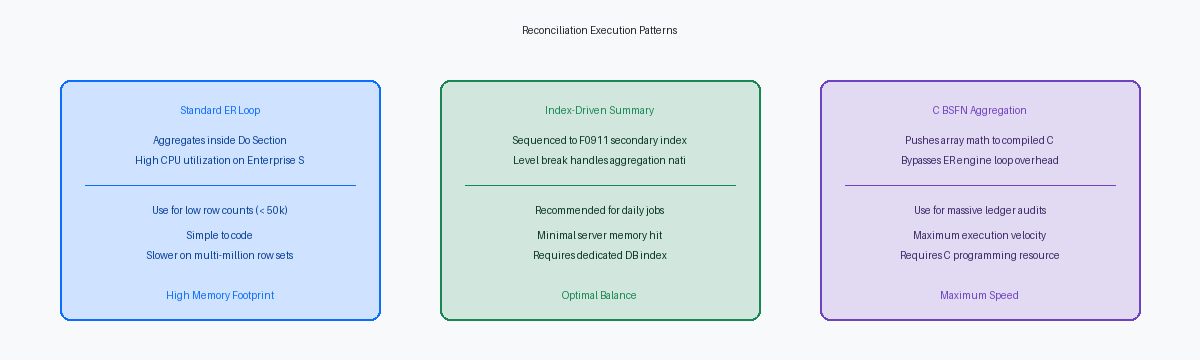
Building high-performing UBEs against the F0911—where ledger tables routinely scale into tens of millions of rows—requires strict event rule efficiency to prevent overnight batch processing from spilling into peak operational hours.
