




In health check audits, most corrupted batch reports stem from a single structural mistake: developers treating Report Design Aid (RDA)The design tool within JD Edwards used to create and modify reports and batch processes. events like imperative procedural loops. When you place aggregate mathematical logic or variable resets inside the wrong section event—such as writing accumulation logic in the Level Break HeaderReport sections that execute and print immediately before a new group of sorted data begins processing. or resetting totals inside the Detail Do Section—the JDEJD Edwards, an enterprise resource planning (ERP) software suite by Oracle. runtime engine's event sequencing silently corrupts output, producing off-by-one errors and phantom subtotals that escape standard QA.
Correcting these mathematical distortions requires precise boundary management and disciplined variable scoping. Below, we examine JDEJD Edwards, an enterprise resource planning (ERP) software suite by Oracle. UBEUniversal Batch Engine, the JD Edwards background engine that processes reports and batch jobs. level break subtotal and control logic execution, mapping how the runtime engine processes Level Break Headers (LBH)Report sections that execute and print immediately before a new group of sorted data begins processing., Detail Do Sections, and Level Break Footers (LBF)Report sections that execute and print immediately after a group of sorted data finishes processing, often used for subtotals.. We will analyze aggregate versus ERThe proprietary scripting language used in JD Edwards to add custom business logic to applications and reports. global variable assignments and define reset placement patterns that maintain financial accuracy across multi-level breaks.
RDA Level Break Event Sequence Mechanics
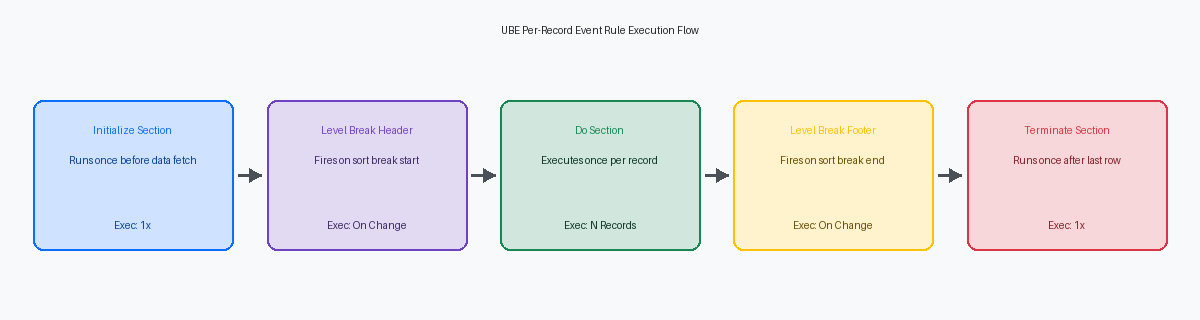
In RDAThe design tool within JD Edwards used to create and modify reports and batch processes., event sequencing during a level break follows an immutable runtime order driven by row fetching over tables like F0911The primary Account Ledger table in JD Edwards, storing detailed general ledger transactions.. When you establish a level break on MCUBusiness Unit, a database field in JD Edwards representing a specific department, branch, or location. (Business Unit) followed by OBJObject Account, a database field in JD Edwards representing the main account number in the chart of accounts. (Object Account), the Level Break Header fires immediately before the driving section’s Do Section event processes the first row of a new group. Conversely, the Level Break Footer executes after the driving section completes the Do Section event for the final row belonging to that specific MCU/OBJ combination. Understanding this exact event sequence prevents off-by-one subtotal errors in general ledger reporting.
Data Sequence field ordering in RDA must mirror your level break definitions field for field, left to right. If you set a level break on MCU and OBJ but omit OBJ from the report's Data Sequence—or sequence OBJ ahead of MCU—the JDE runtime engine loses track of boundary state transitions. On a large-scale F0911 GL detail extract, misaligned data sequencing causes level break footers to fire on nearly every single record fetch or bypass execution entirely, tripling runtime processing and corrupting subtotal blocks.
The primary driver section’s Do Section event executes on every single record fetched from the database, making it the correct location for incrementing row-level math variables like aggregated transaction amounts. Placing subtotal variable reset logic inside Do Section using manual flag evaluation consistently introduces dirty data into your output. Resetting group totals belongs strictly inside the Level Break Header before the first row of the block processes, or within the Level Break Footer immediately after writing the summary line.
Section Variables vs ER Global Variables for Totals
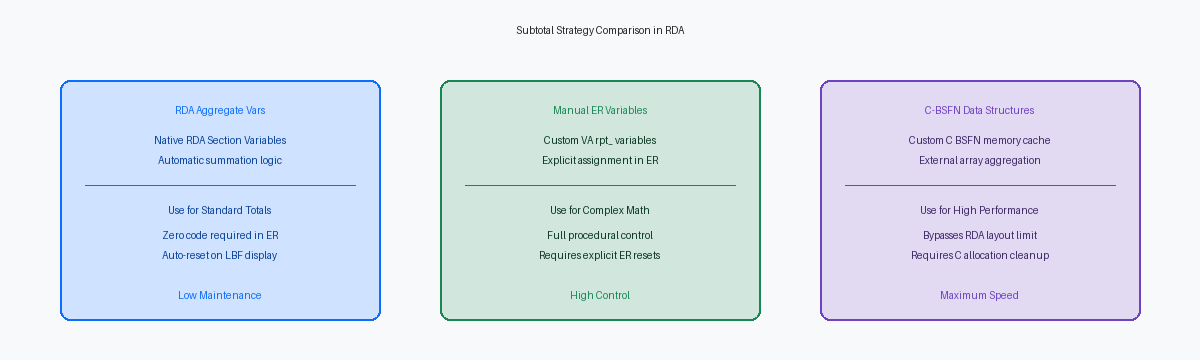
RDA aggregate functions attached to native Section Variables offload totalization directly to the report engine runtime. When you assign a Sum aggregate to an RVReport Variable, a field placed on a report layout to display data or calculated values. field in a Level Break Footer (LBF) linked to MCU, the engine maintains an internal accumulator for each row read from the F03B11The Customer Ledger table in JD Edwards, storing accounts receivable invoice details. table and automatically clears it immediately after the LBF prints. This native behavior eliminates procedural math in Event RulesThe proprietary scripting language used in JD Edwards to add custom business logic to applications and reports. entirely for simple summations.
Custom Event RulesThe proprietary scripting language used in JD Edwards to add custom business logic to applications and reports. variables operate on a different scope model. When you declare VAEvent Rules Variable, a user-defined variable used to store temporary values during report execution. rpt_MCU_SubTotal_MATH to accumulate amounts across a large F03B11 invoice dataset, the JDE runtime preserves that variable’s memory state across every section execution in the report thread. The engine will not reset this value on a level break; failing to explicitly clear VA rpt_MCU_SubTotal_MATH = 0 inside the LBF Do Section results in uncontrolled accumulation drift, where the subtotal for the second Business Unit includes the grand total of the first.
The execution order between the driving detail section and the LBF determines whether your calculations yield discrete group totals or rolling running totals. Incrementing VA rpt_MCU_SubTotal_MATH in the main detail section's Do Section fires for all fetched rows prior to the LBF trigger. If you evaluate conditionality or cross-section business logic inside the LBF Do Section before resetting the variable, the ER code sees the final accumulated boundary value for that specific MCU group. Placing the reset logic at the bottom of the LBF Do Section after custom output logic completes guarantees mathematical isolation between business units.
Step-by-Step Code Example for Subtotal Logic
In a dual-level break report querying F03B11 sorted by Business Unit (MCU) and Customer (AN8Address Number, the unique identifier in JD Edwards for customers, suppliers, employees, and entities.), relying on automatic RDA aggregate fields fails when you need conditional subtotal hiding or multi-currency conversions. The proper pattern attaches a Level Break Footer section directly to the AN8 level break item while maintaining manual Math Numeric accumulator variables in Event Rules. Inside the primary detail section's Do Section event, execute explicit math assignment logic to accumulate row values: VA rpt_mnCustomerSubtotal = [VA rpt_mnCustomerSubtotal] + [BCBefore Change, a buffer containing the database column values for the current record being processed in a report. Gross Amount (F03B11)(AG)]. This guarantees every valid record contributes to the mathematical total regardless of layout visibility flags.
To display the aggregated result, output VA rpt_mnCustomerSubtotal inside the Level Break Footer's Do Section event, then immediately clear the accumulator: VA rpt_mnCustomerSubtotal = 0.
Reset Logic Pitfalls in Multi-Level Breaks
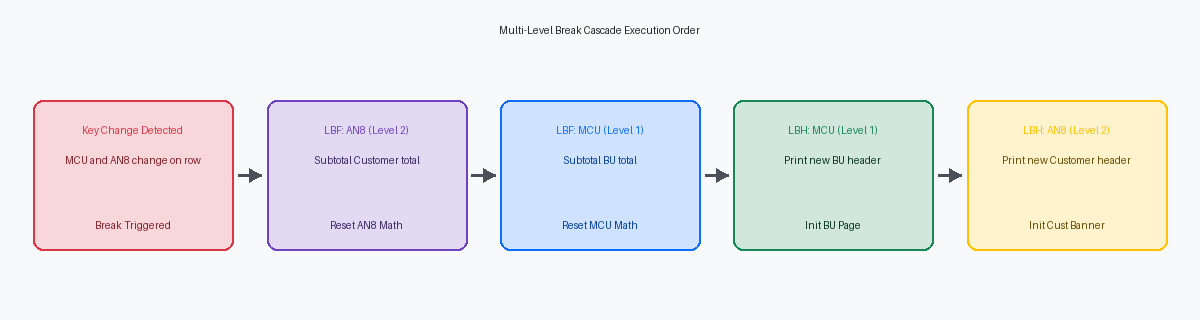
When reporting on F0911 sorted by a three-tier sequence of CO (Level 1), MCU (Level 2), and AN8 (Level 3), Event Rules execution follows a strict bidirectional order: Level Break Headers fire top-down (CO to AN8), while Level Break Footers fire bottom-up (AN8 to CO). Level Break Footer AN8 executes entirely before Level Break Footer MCU starts its event logic, making the placement of variable resets the most common cause of zeroed subtotals.
Placing a zero-assignment statement on your MCU or CO total variable inside the AN8 footer event resets the aggregate before the higher-level MCU section ever renders. On a large-scale F0911 ledger extract, this produces valid customer subtotals, but outputs zero for every business unit aggregate and completely zeroes out the company grand total. Accumulators for parent tiers must be reset exclusively inside their own Level Break Footer events after printing.
Level Break Headers must be reserved for visual group formatting, section hiding, and flag initializations. Adding aggregate math inside a Level Break Header skips first-record processing because the header event fires before the Detail section Do Section event evaluates that row. Keep all row-level math inside the Detail section Do Section event, and reset total variables strictly in the corresponding footer event.
On financial reports with three or more sequencing levels, maintain distinct global ER variables for each break level rather than reusing a single variable. Attempting to reuse a single subtotal variable across AN8, MCU, and CO corrupts state preservation during nested level break triggers.
Conditional Printing and Hide Section Interactions
Calling Hide Section on a detail driving section is a frequently misunderstood mechanic in Report Design Aid. It suppresses visual rendering on the PDF page layout, but the UBE runtime executes 100% of the Event Rules logic behind the scenes. If a GL trial balance report processes tens of thousands of F0911 records across hundreds of account groups, calling Hide Section on the detail line saves layout rendering overhead, but every single Level Break Header and Footer still fires its criteria, processes internal aggregate math, and executes ER code.
Handling zero-balance GL account groups inside a Level Break Footer requires precision to avoid generating orphan subtotal bands or blank lines on financial reports. The standard technique relies on evaluating the group total inside the footer's Do Section event before the runtime attempts to render subtotal controls to the PDF output engine. If you rely on conditional visibility settings on individual controls rather than suppressing the section, the engine still reserves physical page height, creating unnatural 10- to 15-point whitespace gaps across multi-page reports.
The Suppress Section WriteA JD Edwards system function that prevents the current report section from rendering or printing on the output document. system function inside the Level Break Footer solves this by stopping section layout rendering entirely for that iteration. Placement of this call relative to variable reset logic dictates whether cumulative totals survive into the next group without corruption. Place Suppress Section Write inside an IF mnAccountGroupTotal == 0 block, but ensure section variable reset logic—such as resetting mnAccountGroupTotal to zero—executes regardless of whether the write was suppressed. Bypassing the write suppresses the blank subtotal band without skipping variable clearing for subsequent account groups.
Debugging UBE Level Break Execution in Debugger
Standard jde.log and JDEDEBUG.log traces capture SQL SELECT statements and API calls, but obscure section boundary transitions inside the UBE engine. Catching off-by-one errors or premature variable resets requires attaching the Event Rules Debugger to a local client execution. Stepping through object execution at the ER level reveals precisely when the runtime engine intercepts a data change on the driving table.
Place side-by-side breakpoints on Event ID 13 (Do Section) of the detail section and Event ID 18 (Level Break Footer). When processing high-volume record sets, execution order dictates that Event ID 13 reads record $N+1$ into the BC (Before Change) buffer first. Before running the detail ER, the engine compares BC to the previous key, detects the break, and diverts control to Event ID 18. Inspecting variable values in the debugger at Event ID 18 confirms whether subtotals are reading current row data or cached section variables from record $N$.
Dynamic data manipulation introduces severe runtime blind spots. Calling SetDataSequenceA system function used to dynamically alter the sorting and sequencing of records in a report at runtime. (such as B9800007) to alter sort orders dynamically rewrites the underlying SQL ORDER BY clause, but fails to update the engine's internal RDA level break specifications. This misaligns the database fetch sequence with Event ID 18 triggers, silently bypassing level breaks altogether. If dynamic re-sequencing is required, manage control breaks manually using ER global variables and custom comparison logic rather than relying on native RDA level break sections.
If you are troubleshooting performance bottlenecks on high-volume UBEsUniversal Batch Engines, the JD Edwards background engines that process reports and batch jobs.—such as an R42565 or R110912 processing high record volumes—isolate event timing by logging memory footprint and database fetch execution times in the JDE trace file before making structural layout changes.
