




In Report Design AidThe JD Edwards design tool used to create batch report layouts and logic., target output format is an architectural constraint, not a runtime toggle. Designing a UBEUniversal Batch Engine, the core batch processing framework in JD Edwards. strictly for PDF presentation and expecting clean tabular extraction by simply ticking the CSVComma-Separated Values, a simple plain-text format for tabular data. export flag is why downstream pipelines frequently break on shifted column coordinates. Section hierarchy, horizontal pixel alignment, and level-break sequencing must be engineered around the intended delivery format from the first line of development.
Mastering JDE UBE output management across PDF, CSV, and burst report examples eliminates reliance on fragile external PowerShell wrappers and OS-level cron jobs. From preventing multi-gigabyte PrintQueueThe server folder where JD Edwards stores generated report output files. bloat across enterprise batch servers to executing native Report Definition bursting for large invoice runs, proper control over batch output belongs inside EnterpriseOne design parameters, not in post-processing band-aids.
Native UBE Output Engine and Format Selection
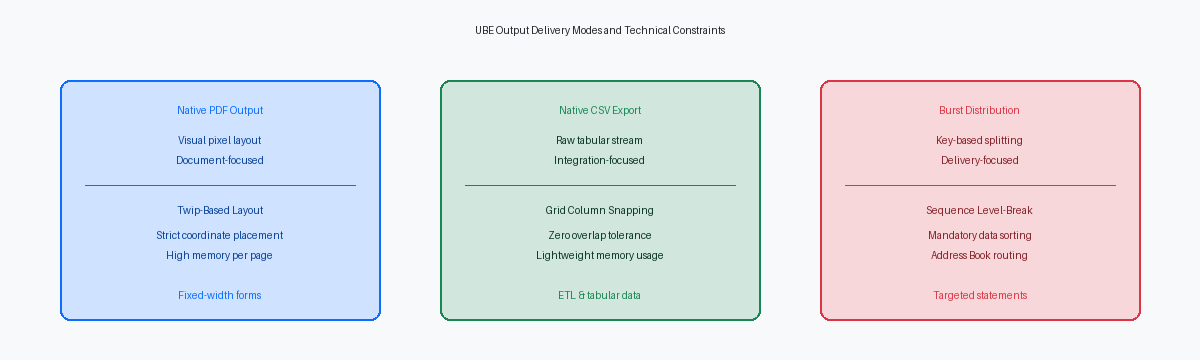
The UBE engine builds printable output by translating Report Design AidThe JD Edwards tool for building batch report layouts. (RDA) elements into absolute page coordinate buffers measured in twips—where 1 inch equals exactly 1,440 twips. When rendering a PDF, the engine evaluates every field's top, left, width, and height coordinates down to this exact twip granularity to place visual elements precisely on a fixed canvas. When generating CSV output, the engine bypasses this graphical renderer entirely. It reads the logical coordinates within the RDA design grid to determine column order and row sequencing, converting spatial relationships into comma-delimited tabular rows.
Ticking the "Export to CSV" checkbox at the version or runtime prompt does not alter event ruleEvent Rule (ER) logic is JD Edwards scripting code attached to events in report objects. execution or the underlying section logic flow. What changes is the engine's tolerance for spatial overlap. In a PDF, two overlapping fields simply print on top of one another or clip based on section bounds. In CSV extraction, an overlap of a single twip in horizontal or vertical positioning causes the parser to either spawn an unintended extra column or push data into an unexpected row, corrupting flat-file structures intended for automated downstream ingestion.
Version-level report properties—such as landscape versus portrait orientation, paper size definitions like Letter or A4, and exact margin cutoffs—dictate the hard bounding boxes of the PDF canvas. Pure CSV extraction ignores these properties completely. Page headers, footers, and physical margin boundaries that make a 132-column PDF readable become unwanted delimiters and repeating clutter when parsed as raw tabular data.
Attempting to maintain a single UBE version that produces an aesthetically balanced PDF and a clean, machine-consumable CSV almost always forces an unacceptable compromise. If business operations require human-readable documents alongside data extracts, build two dedicated versions of the UBE. Reserve one version for formatted visual distribution and strip the second down to pure columnar sections aligned strictly along a zero-margin grid.
Designing RDA Layouts for Deterministic CSV Output
The UBE engine constructs CSV output by projecting every RDA control onto a virtual two-dimensional grid based on its X-axis coordinate and horizontal width. If two fields overlap by even a single twip (one-twentieth of a point) or a single pixel, the runtime CSV formatter merges those variables into a single column, shifts every subsequent field to the right, or injects phantom blank cells. Standard ETLExtract, Transform, Load, automated processes for moving data between systems. pipelines frequently fail simply because a developer nudged a detail variable without snapping it to the layout grid.
Deterministic CSV output requires exact mathematical symmetry between column headings and detail fields. In Report Design Aid, set the grid properties to snap controls precisely, and manually verify that the X-axis starting position and horizontal width of every detail field match its corresponding header control down to the integer. Columnar sections handle this alignment automatically if untouched, but custom Group sections require developers to enforce this discipline manually across all section layout properties.
Never position floating Text Constants to serve as labels above data fields in batch definitions intended for flat-file consumption. The UBE parser treats free-floating text boxes as independent data cells, scattering arbitrary text rows across output whenever a Tools Release introduces subtle coordinate rounding differences. Defining labels directly within the native Column Headings property of each data dictionaryA central repository in JDE defining attributes and default labels for fields. item forces the runtime engine to anchor headers directly to the associated data column.
Build dedicated batch versions for downstream data feeds rather than forcing one visual layout to serve both print distribution and automated ingestion. Suppress Page Headers, Page Footers, and decorative line constants entirely in the CSV version properties. Stripping these non-data rows eliminates page numbering artifacts, run dates, and blank buffer lines that break automated ETL pipelines, producing an uninterrupted tabular data stream.
Dynamic Output Naming and PrintQueue File Management
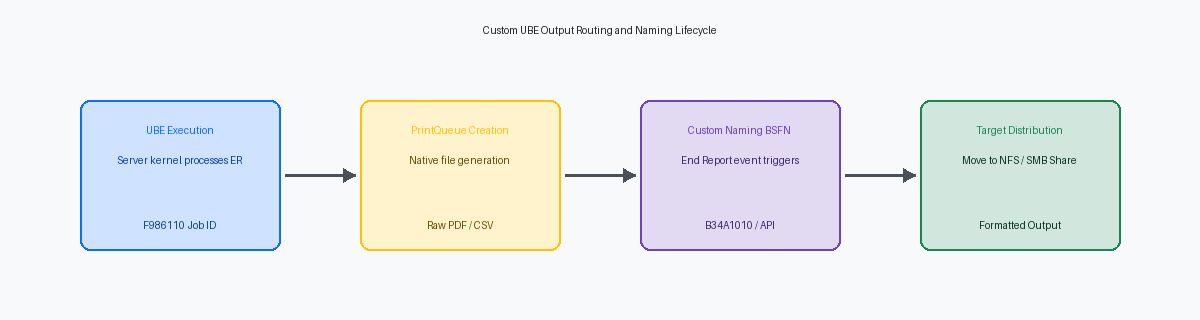
Every batch run generates a predictable, rigid filename in the enterprise server's PrintQueue directory—typically structured as R554210_ZJDE0001_123456_PDF. While this structure keeps the runtime engine organized, third-party SFTPSecure File Transfer Protocol, a secure method for transferring files over networks. endpoints and downstream integrations cannot parse arbitrary six-digit JDE job numbers to identify specific business documents. Overcoming this default behavior requires deliberate post-processing logic executed strictly in the End ReportA JDE event triggered after report rendering finishes and the file is closed. event of your UBE, after the engine flushes the output stream and releases the OS file lock.
To programmatically target the output, first resolve the active job attributes. Querying the F986110The JDE database table tracking all submitted job executions and statuses. (Server Job Control) table or calling core system APIsApplication Programming Interfaces that allow different programs to interact. retrieves the runtime Job ID (JCJOBNBR) and execution host. With the job number in hand, the business function constructs the fully qualified source path within the server's PrintQueue directory. Attempting to touch this file in any event prior to End Report will result in an OS sharing violation or produce a corrupted, zero-byte file.
Once the source path resolves, execute the move or rename operation. Developers frequently deploy custom C business functionsCompiled C programming routines integrated into JDE for complex tasks. wrapping the jdeRenameFile API for local renames, or call standard functions like B34A1010 (Execute External Program) to trigger OS scripts that push files to external network shares. Regardless of the execution mechanism, hardcoded target directories must never enter event rules. Store environment-specific target paths in report processing options or a dedicated mapping table like UDCUser Defined Codes, customizable reference tables within JD Edwards. 55/PT so code promotes cleanly between DEV, PY, and PD without manual intervention.
Implementing Report Bursting and Dynamic Distribution
Bursting splits a single UBE execution into separate target documents by evaluating level breaksLogic triggers in JDE reports when field values change during data processing. against a defined key, typically Customer Number (AN8) or Company (CO) pulled from transactional tables like F03B11. The underlying engine relies entirely on sequential evaluation. If a UBE version lacks an explicit, strict data sequence on the burst field—such as querying F03B11 without placing RPAN8 at the top of the sort hierarchy—the engine spawns a new document instance every single time the value shifts in the result set. An unsorted query of 5,000 open invoices across 300 customers will not produce 300 customer statements; it will generate hundreds of fragmented, single-page duplicate files across the print queue.
Delivery mechanics diverge sharply between native engine capabilities and Embedded BI PublisherOracle document formatting tool integrated with JDE to transform XML into formatted output.. Native UBE distribution lists evaluate Address Book electronic address records (F01151) directly through report version interconnects, routing standard PDF chunks to recipient mailboxes. In contrast, BI Publisher bursting decouples rendering from data extraction, reading the raw XMLExtensible Markup Language, a structured text file format for structured data. stream, mapping target recipient tags to dynamic delivery rules defined in bursting definitions (stored across system tables including F956311), and routing output via SMTPSimple Mail Transfer Protocol used for sending email messages across networks. or print servers without holding the base UBE thread open for delivery confirmation.
High-volume bursting runs—such as month-end generation of AR statements for tens of thousands of accounts—introduce enterprise server memory constraints. When the XML output engine builds massive hierarchical structures in memory before parsing burst splits, Java heapMemory allocated to the Java environment processing XML document trees. exhaustion on the enterprise server can terminate the jdequeue kernel mid-stream. Set explicit transaction processing commit boundaries within the driver section's Do Section event, and configure the XML publisher threshold properties in jdelog.properties to spill oversized DOM trees directly to temporary disk storage rather than pinning them in JVM memory.
Handling Output Errors, Zero-Byte Files, and Purging
A batch job that crashes with an 'E' status in Work With Submitted Jobs does not just leave an audit trail in the F986110; it drops orphan zero-byte files directly into your enterprise server PrintQueue directory. On Linux and AIX enterprise servers, high-volume batch environments running tens of thousands of jobs daily can exhaust available file system inodesData structures on Unix/Linux file systems storing file metadata. within weeks, even while raw disk capacity shows ample free space. The OS runs out of file descriptorsHandles used by operating systems to manage open files. because terminated batch kernels abandoned their file handles mid-stream.
These zero-byte artifacts typically trace back to two root causes: an unhandled memory leakA bug where allocated memory is not freed, consuming server resources. in a custom C business function that crashes the underlying process, or an unhandled conditional section logic error that aborts the runtime before the PDF or CSV stream flush completes. When the batch process terminates abruptly, the engine never executes its normal cleanup routines, leaving partially allocated temporary pointers and empty shell files behind on the operating system.
Developers can prevent empty output clutter by placing deterministic pre-flight validation in the Report Header or Initialize Section events. Checking selection parameters before triggering heavy SQL cursorsDatabase query pointers used to fetch and process rows one at a time. allows you to call the Stop Event Processing system function early. Skipping section execution when no qualifying transaction records exist prevents the engine from generating empty output containers and tying up enterprise batch threads.
Production stability requires automating output maintenance across both the database and file system layers. Schedule the standard R9861101Standard JDE system batch report for purging old submitted job records. (Purge Submitted Jobs) UBE to run nightly with strict data selection, pruning F986110 records and matching PrintQueue payloads older than your retention threshold (typically 7 to 30 days). Pair this with an OS-level shell script executing targeted find-and-delete commands against orphan .tmp and zero-byte files to prevent physical disk saturation from threatening host availability.
Performance Considerations for Heavy Batch Output Runs
A 10,000-page financial report rendered as PDF can push a 64-bit enterprise server UBE kernel process past 1.5 GB of RAM, while the equivalent raw CSV export streams line-by-line using under 50 MB. Generating massive PDF files creates severe memory pressure because the engine builds complex internal page layout tables in memory before writing the binary stream to disk. When a scheduled batch job regularly exceeds 5,000 pages, force native CSV output or partition the data selection into smaller logical runs.
Inside Report Design Aid, unoptimized child sections degrade memory efficiency. Triggering conditional child sections with blank records still allocates structural layout memory, bloating PDF page tables and generating unnecessary blank lines. Placing explicit Hide Section calls or wrapping section executions in conditional logic before calling Do Custom Section cuts memory overhead by roughly 30% to 40% on large driver runs.
Single-threaded queues like QBATCHThe default JDE job queue used for sequential batch job processing. frequently stall when a heavy output job locks the process for several hours. Routing bulk generation tasks to dedicated multi-threaded queues combined with asynchronous output delivery decoupled from the primary job engine prevents downstream operational reports from queuing behind large runs. This keeps transactional processing moving while heavy rendering executes independently in background threads.
Server stability during peak batch windows relies directly on proper JDE.INIThe main initialization file configuring runtime settings for JD Edwards servers. tuning within the [UBE] stanza. Leaving UBEDebugLevel=6 enabled in production degrades batch throughput significantly due to continuous disk I/O lockup on debug logs. Setting UBEDebugLevel=0 and tuning the UBECacheSize parameter ensures the engine keeps heavy report structures in allocated RAM buffers rather than writing intermediate cache directly to local disk.
Review your existing batch catalog to identify high-volume UBEs that attempt to serve dual PDF and CSV roles, and separate them into dedicated presentation and data extraction versions to stabilize batch runtimes across your enterprise server architecture.
