




In a majority of custom UBEUniversal Batch Engine, the JD Edwards processing engine for batch jobs and reports. financial integrity report audits, developers treat processing options merely as passive SQL WHERE clause mappers rather than active execution controllers. When a developer hooks a Processing Option Data Structure (T554210) directly into event rules without strict input bounds, an omitted option code defaults to zero or space, silently skipping critical batch updates or posting unbalanced GL entries to F0911The General Ledger Account Ledger table in JD Edwards..
To build resilient batch engines, studying a clear JDE UBE processing options example to control report logic must focus on defensive design: enforcing fail-fast validation in Initialize ReportA JDE batch event that executes before data selection or section processing begins., defining explicit runtime defaults, and isolating data selection variables from execution flags. Retrofitting these architectural guards into your Event RulesThe low-code scripting language used to define logic in JD Edwards. requires minimal development time per object, but eliminates the silent data corruption that routinely stalls month-end processing.
Designing Processing Option Data Structures with Intent
Every disciplined batch architecture begins in OWMObject Management Workbench, the software life-cycle development environment in JD Edwards. with a dedicated PO DSTRProcessing Option Data Structure, defining user inputs for batch versions. (Type 5 object). Grouping parameters across structured tabs—specifically "Execution Modes", "Defaults", and "Date Ranges"—is not cosmetic; it prevents operator error when configuring version prompts. Dumping dozens of unsegmented parameters onto a single tab guarantees that runtime operators will miss critical operational toggles during scheduled batch runs.
Relying on generic Data DictionaryThe central JDE repository defining field attributes, validation rules, and default text. items like EV01 for boolean triggers is standard practice, but it introduces operational ambiguity unless you strictly maintain text overrides and edit rules within the data structure. Binding an unedited EV01 to a transactional flag leaves the operator guessing what a blank value represents. When capturing specific business units like MCU or freeform criteria like D200, map the exact DD type rather than generic alphanumeric strings so engine-level formatting and dictionary validation occur before the UBE initializes.
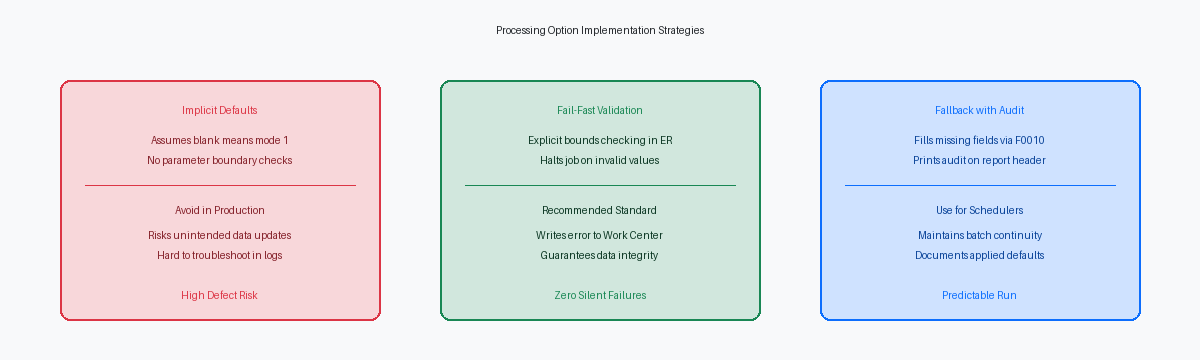
Never construct logic where a blank PO value defaults to a production update. If a version runs with an unconfigured execution mode parameter, the report logic must safely fall back to proof mode or terminate immediately. Assuming an empty field implies active processing has caused unauthorized table updates across countless enterprise environments.
Ensure strict data item length alignment between your PO data structure and internal Event Rule variables. If a PO parameter defines a 30-character string but ER logic passes it into a 20-character runtime variable, the Enterprise Server batch kernel will silently truncate memory allocations. In high-volume server kernels, these buffer mismatches corrupt adjacent memory stacks, triggering access violations that kill the batch process without writing actionable diagnostics to the jde.logThe diagnostic log file generated by the JD Edwards EnterpriseOne runtime engine..
Validating Parameters in Initialize Report Events
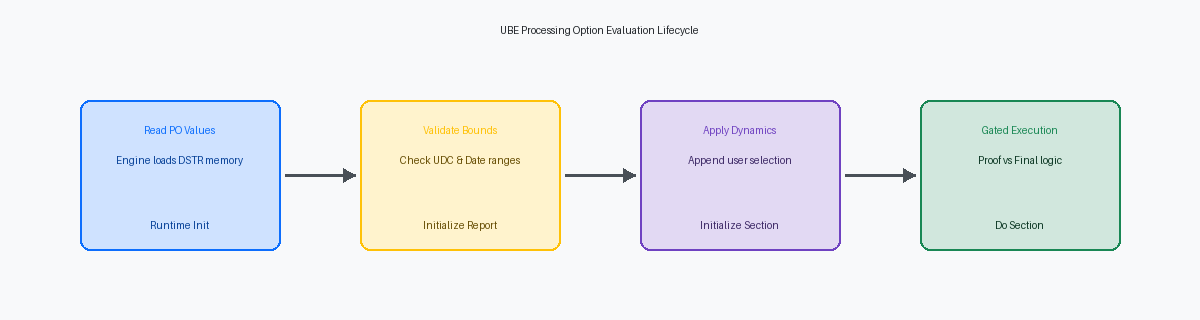
Every processing option value must be fully validated in the Initialize Report event before the Universal Batch Engine opens a single business view table. Placing parameter validation or reference lookups inside the Do SectionA JDE report event executed once for every row retrieved from the database. event is a frequent and costly design flaw. In a high-volume batch job scanning hundreds of thousands of records, validating a user-defined code against F0005 or verifying a company number in F0010 inside Do Section repeats those lookups for every fetched row, increasing batch runtime by 30% to 50% on identical workloads.
Date parameters require explicit boundary checks during initialization because the runtime engine will never flag missing inputs automatically. When a user leaves a date processing option blank, the JDE runtime evaluates the null Julian dateThe internal CYYDDD numeric date format used by JD Edwards. as 0, which translates directly to January 1, 1900 in standard EnterpriseOne date logic. If your Event Rules rely on an unverified through-date parameter to drive General Ledger balances or dynamic data selections, the UBE will silently execute against century-old data boundaries rather than current operational records.
When a parameter fails validation, trap the error immediately and terminate execution cleanly before processing begins. Call standard validation business functions to verify your UDCUser Defined Codes, custom lookup tables used throughout JD Edwards. values and master table keys. If the return code indicates a missing or invalid value, write a descriptive fatal error to the Work CenterThe internal messaging system for JDE batch errors and notifications. using B0500725 or directly to the JDE.LOG, and immediately invoke the Stop Processing system function. Executing this call inside Initialize Report halts the engine before any section initializes, ensuring that no orphaned staging records, lock escalations, or misleading blank PDF outputs reach your operations team.
Driving Dynamic Data Selection from Processing Options
Direct manipulation of data selection in Event Rules requires strict control over execution order. Placing selection logic in the Initialize Section event guarantees runtime execution before the initial database fetch against driver tables like F4211. Calling Set Selection Append Flag with a parameter of <YES> prior to executing Set User Selection ensures dynamic Processing Option criteria merge with existing version selection instead of wiping it out entirely. Omitting the append flag is a classic defect that silently destroys ad-hoc selection criteria applied by enterprise batch schedulers or users running reports interactively.
Passing blank processing options directly into Set User Selection system functions triggers immediate query errors during batch runs. When an operator leaves a Processing Option blank expecting to bypass a filter, executing the API call forces an unintended WHERE SDKCOO = ' ' clause onto the SQL statement generated by the JDE middleware. Wrapping every Set User Selection call in an Event Rules conditional block that evaluates whether the target Processing Option contains a valid value prevents this issue. Omitting the API call when the option is blank allows the engine to skip appending an empty string evaluation to the database query.
Dynamically generated criteria exert unpredictable pressure on the database query optimizer when executed against large ledger or order tables. Adding multiple conditional clause combinations through Event Rules against an F4211 table holding 10 to 15 million rows can easily bypass composite indexes, turning a sub-minute batch report into a multi-hour queue blocker. DBA trace analysis must verify generated SQL statements from JDE logs whenever dynamic selection logic modifies queries on high-volume tables like F4211 or F0911. Benchmark these dynamic queries with fully populated processing options alongside sparse configurations to ensure index stability across all execution paths.
Controlling Proof vs Final Execution Flow in ER
A proof-versus-final pattern fails when Event Rules evaluate the processing option directly inside detail section loops, creating inconsistent states if memory structures shift mid-stream. In Initialize Report, evaluate your mode processing option once and populate an explicit report-level variable like cExecutionMode_EV01 ('1' for Proof, '0' for Final). Assign this variable once at initialization, and never re-read processing option values inside Do Section code across the 10 to 15 event points typical of a custom batch application.
Proof mode must replicate every business logic calculation, pricing BSFN call, and G/L flex sales accounting evaluation that final mode executes, logging potential failures to the work center or report output without updating data. Pass parameters into standard C business functions or custom pricing routines normally, but prevent execution of write logic. Skipping calculations in proof mode produces false positives where draft runs pass cleanly, only for final runs to abort later on division-by-zero errors or missing ledger accounts in table F0901.
Gate every Table I/ODatabase operations (Insert, Update, Delete, Fetch) executed within JDE Event Rules. operation—Insert, Update, and Delete—behind an explicit If rpt_cExecutionMode_EV01 IS_EQUAL_TO "0" block across all primary and conditional sections. When final mode requires integrity across multiple tables like F0911 and F03B11, wrap those writes inside explicit transaction boundaries using JDEBEGINTRAN and JDECOMMTRAN ER calls or section-level transaction properties. In proof mode, bypass these transaction calls entirely, eliminating uncommitted cache allocations and unnecessary locks on database rows.
Finance teams routinely archive proof outputs as finalized records when visual markers are subtle. Alter section headers dynamically during execution, printing an unmissable *** PROOF MODE - NO DATABASE UPDATES *** banner in the page header whenever rpt_cExecutionMode_EV01 equals '1'. Enforcing this dynamic presentation across an estate of custom reports prevents support tickets and audit findings tied to accidental duplicate postings.
Handling Blank and Zero Values Without Hidden Assumptions
In the C-based batch runtime, unpopulated numeric processing option items initialize to integer 0, not a database NULL. When an ER developer assumes an unentered Fiscal Period (PN) or Century/Year (FY) signifies "all periods," the runtime treats 0 as an active query filter, quietly corrupting data selection or steering general ledger postings into period 00. Blank alphanumeric fields carry identical operational risks. A blank parameter must never trigger destructive or updating logic without explicit fallback code that traps the missing value and logs the system-assigned default.
When a company-specific parameter is omitted by the user, resolve the entity context immediately using the Company Constants table (F0010). Querying F0010 for Company '00000' or invoking Get Company Constants (B0010014) establishes a verified baseline for current fiscal periods and reporting currencies. If the retrieval returns a non-zero error code or cannot resolve the financial structure, execute Stop Processing immediately in the Initialize Report event. Halting before processing records prevents partial ledger updates and orphaned batch headers.
Document every resolved variable by building a mandatory audit block within the report cover page or runtime execution header. Listing both raw user-entered processing option inputs and the derived fallback values provides absolute traceability for internal control auditors. When an overnight job processes tens of thousands of journal entries, operations teams should never have to guess whether Company '00001' or '00000' provided the underlying date pattern.
Building a Test Matrix for Processing Option Permutations
A developer who tests a UBE solely with their own pre-populated version values is shipping unverified code. Every production-bound batch report requires a structured 4-quadrant test matrix that evaluates Proof versus Final execution against Detail versus Summary layouts, crossed against full and partial date ranges. If a custom UBE updates transaction tables like F0911 or inventory balances in F4111, running a Final-mode summary execution over an entire fiscal period must be proven mathematically identical to running consecutive daily detail runs.
The test matrix must explicitly include a blank version with completely unpopulated processing option values—the exact state encountered when a business analyst adds a new version via P98305W. If a user submits that unconfigured version directly to a server queue, the report must halt immediately via event rules or fall back to safe read-only behavior, never running an open-ended database purge or generating corrupted records due to uninitialized variable flags.
Rather than submitting dozens of parameter variations by hand, configure an OrchestratorAn enterprise automation tool in JDE for executing workflows and integrations. test runner to automate the validation suite. An orchestration calling the AISApplication Interface Services, the REST API service layer for JD Edwards. batch launch service can execute every PO permutation against mock dataset records across your batch queues in a few minutes, parsing the resulting execution status codes automatically. Once validation passes, confirm your EnterpriseOne 9.2 package build explicitly packages both the processing option template data structure and the UBE runtime specifications. Promoting modified report logic without its companion PO template creates memory offset mismatches at the enterprise server level, causing the runtime engine to silently pass corrupted data into report variables.
Controlling report logic through PO data structures establishes the baseline for predictable batch execution. Standardizing these parameter bounds and execution gates across custom reports eliminates runtime failures and preserves transactional integrity during lifecycle upgrades.
