




When an ESUElectronic Software Update: a patch package delivered by Oracle to update JD Edwards software objects. drops code into heavily modified enterprise reports like R42565 or R09801, the automated Spec MergeAn automated JDE utility that combines new vendor code fixes with existing local modifications. utility becomes your greatest operational risk. The merge engine routinely blends Oracle’s delta fixes with your custom logic in ways that compile cleanly without errors, yet silently wreck conditional section sequencing, overwrite custom Report Variables (RV)Custom variables used within JDE Report Design Aid to store section-level calculations or temporary data., or sever section interconnects at runtime.
A disciplined JDE UBEUniversal Batch Engine: the executable batch report and processing framework in JD Edwards. retrofit after an ESU—comparing specs and event rules methodically—requires stepping away from automated trust. By executing a side-by-side spec inspection between your pristine baseline, the incoming ESU specs, and your modified development pathcodeA specific database repository and file structure representing a JDE environment like DV920 or PY920. using ER CompareEvent Rules Compare: a visual tool for comparing and merging differences between JDE code versions. and RDA Visual Compare, you isolate exact Oracle structural shifts before touching a line of code, preventing regressions before your package ever hits QA.
Pre-ESU Snapshot and Spec Preservation
Executing a Planner ESU without isolated spec backups guarantees lost engineering hours when the automated spec merge collides with legacy modifications. Before launching the ESU installer against your DV920The standard Development pathcode and environment in JD Edwards EnterpriseOne 9.2. pathcode, aggregate all modified UBEs targeted by the update into a clean OWMObject Management Workbench: JD Edwards' change management and version control system. project and export complete PAR filesCompressed archive files used to export, back up, and transfer JDE object specifications. to a secure network share. These archives serve as your final, uncorrupted restore point outside the EnterpriseOne pathcode directories if central objects tables suffer pointer misalignment during the merge.
Verify token ownership across the team before touching a single spec. Direct SQL queries against the Object LibrarianCentral JD Edwards repository tables tracking object definitions, locations, and checkout status. tables (F9860 for object master records and F9861 for location and status) reveal token reservations that OWM UI screens occasionally obscure in multi-project environments. Assigning explicit single-developer token ownership across all targeted UBEs prevents concurrent check-ins from overwriting active Event Rule retrofits during multi-developer execution.
Isolate your Pristine pathcode (PS920)An un-customized stock Oracle JDE environment used as a clean baseline for code comparisons. completely from the ESU application pipeline. Keeping PS920 untouched provides the required baseline for ER Compare during three-way spec reconciliations. When a complex UBE like R42565 or R43500 carries dozens or hundreds of custom modifications, having an unpatched Pristine environment is the only reliable way to distinguish native Oracle bug fixes from legacy site-specific code changes.
Document custom user variables, custom report sections, and Table I/ODatabase operations (Fetch, Insert, Update, Delete) written directly within JDE Event Rules. handles before launching the automated merge wizard. Spec merge algorithms handle standard Event Rule logic reasonably well, but frequently drop custom data structure parameters or break scope on local variables bound to custom sections. Manually logging custom section IDs and Table I/O index keys upfront eliminates hours of debugging silent runtime failures after package build.
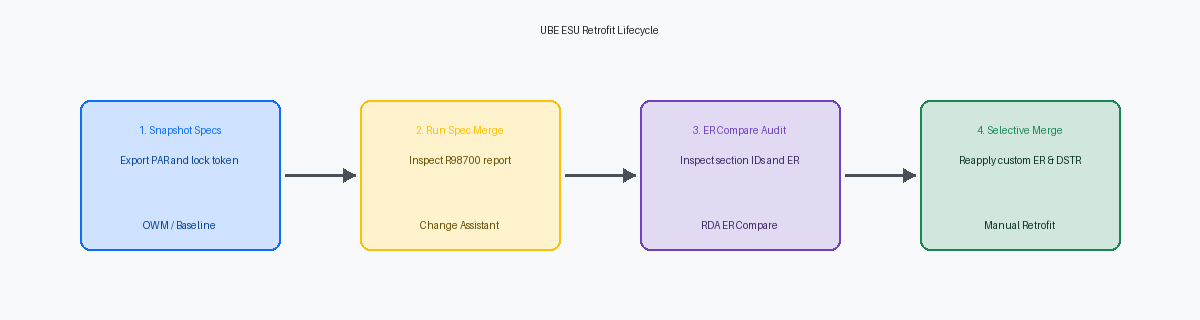
Validating Spec Merge Flags and ESU Scope
The R98700The automated Spec Merge report generated during ESU installation detailing object merge statuses. Spec Merge report generated during the ESU installation run is your primary diagnostic tool before touching any developer tools. Check the merge flags immediately: a 'Replaced' flag on a customized UBE indicates the engine overwrote your local specifications entirely, meaning you must restore the pre-ESU specs from your backup pathcode before proceeding. A 'Merged' flag means Oracle's engine attempted to combine standard fixes with your local modifications, which is where subtle logic overwrites occur in a majority of merge conflicts.
Open Change AssistantOracle application used to search, download, and manage JD Edwards patches and updates. and pull the specific Software Action Request (SAR)Oracle's tracking identifier for specific bug fixes and feature updates in JD Edwards software. details tied to the object before inspecting code. Knowing that a SAR modified three lines of tax calculation logic in the Do Section of R42565 narrows your review window from 3,000 lines of Event Rules down to a single event. Skipping this step turns a targeted 20-minute code review into a multi-hour line-by-line inspection of unaffected code.
Verify structural changes in the object dependencies next. Scan the report data structure and report interconnectA JDE mechanism to pass data parameters and invoke one report program from another. definitions for added, deleted, or reordered parameters. If an ESU alters the underlying data structure template of a called UBE, any custom report passing parameters through a Report Interconnect event will fail silently at runtime or pass truncated values across the data structure buffer.
Isolate standard sections that Oracle restructured from custom sections attached below standard execution hooks. If Oracle shifted driver table fetch calls from the Initialize Section to a conditional On Fetch event in a standard section, your custom child section relying on those fetch variables will return null values. Map these execution sequence changes prior to checking in the retrofitted object.
ER Compare Inspection and Section Alignment
Launching RDA ER Compare between your post-merge DV920 spec and the pre-ESU archive specs is where most execution-time retrofit errors are caught. Visual diffs easily highlight deleted lines, but they frequently obscure internal section re-indexing. When an ESU inserts a standard section into a foundational UBE like R42565 or R43500, the report's internal Section IDs shift. If your custom code relies on hardcoded processing logic or explicit conditional calls, a section previously assigned ID 14 might silently drop to ID 15 in the merged spec, leaving your logic pointing at the wrong section structure.
Validate every Do Custom Section line in your custom event rules directly against the merged section layout. If Oracle re-indexed the section stack, your ER will trigger the wrong conditional section without throwing a single compile error during build time. Next, execute a targeted audit of three critical event triggers: Initialize Section, Do Section, and After Last Object Printed. ESUs regularly overwrite these event frames back to base code, silently blowing away custom cache initializations, variable assignments set at startup, or financial summaries calculated when printing finishes.
Pay strict attention to standard C business functions embedded within those primary event triggers. When an ESU updates a core BSFN like B4200310 for sales order processing, Oracle frequently alters the data structure or modifies underlying C API signaturesThe parameter definitions and function signatures required to interface with C-language programs.. ER Compare flags these lines as structural changes, but it cannot automatically map old parameters to altered data structure fields. You must manually open each flagged BSFN call in RDA, inspect the updated data structure mapping, and explicitly re-bind your custom ER variables before saving and building local specs.
Handling Data Structure and Interconnect Shifts
When an ESU alters a Report Interconnect data structure, JDE runtime memory corruption is usually one click away. If an interactive application passes a 5-element data structure to a modified UBE expecting 6 elements—or passing fields in a shifted sequence—the enterprise server writes into unallocated memory, throwing memory violation errors in the jde.logThe main runtime log file in JD Edwards capturing engine errors and memory violations.. Open the DSTR in Object Management Workbench, verify whether Oracle added or reordered parameters, and immediately regenerate the serialised objects on your development client. Every APPL or wrapper UBE passing parameters to this object must be re-saved to bind the updated structure.
Processing option template shifts present an equally severe operational risk when version-level overrides exist. If an ESU inserts a new processing option parameter into an existing index position rather than appending it, existing version specs will shift offset bytes across the entire processing option data structureThe underlying data layout storing user inputs passed to a JDE program at runtime.. This misaligns runtime values, causing the UBE to pull a ledger type or date format into an account balance filter. Inspect the PO template via Data Structure Design, check the delta against the pre-ESU snapshot, and recreate corrupt version specs rather than attempting to manually toggle misaligned values in the version prompt.
Scope collisions frequently slip past developers who only look at event rules line-by-line. When Oracle introduces new report-level or section-level variables that shadow custom naming conventions, runtime scope can produce silent data overwrites during execution. Realign custom variable names to maintain unambiguous local scope. Finally, trace every child batch call invoked through B9800240 (Launch Batch Application) or asynchronous interconnects. Because B9800240 relies on generic pointers and data structure ID references rather than strictly typed signatures, a shifted DSTR definition will corrupt the parameter string silently, executing the child batch job with truncated data selection values or null parameters.
Systematic Event Rule Retrofit and Merging
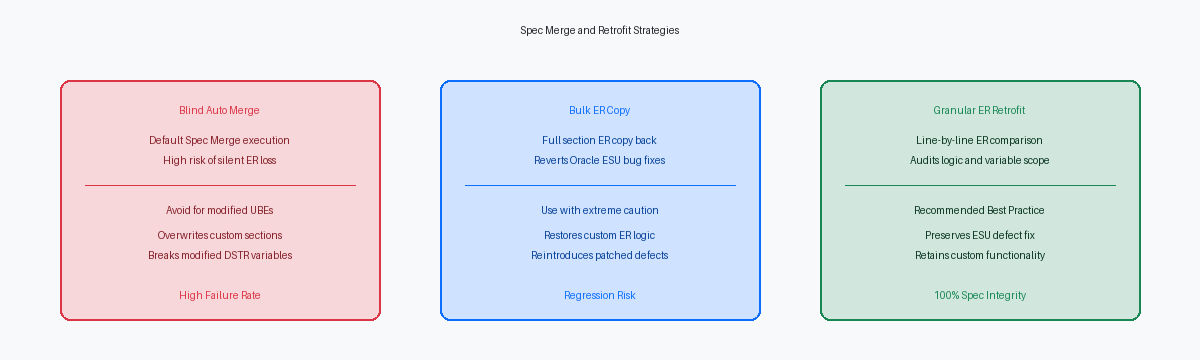
Blanket section merges in ER Compare guarantee broken pointer logic and overwritten variable scopes. When an ESU touches an engine-heavy report like R42565 or R09801, Oracle frequently refactors in-line procedural logic into dedicated NERsNamed Event Rules: JDE logic functions written in Event Rules and compiled into C functions. or consolidated C BSFNs. Blindly accepting target sections wipes out custom modifications, while forcing entire source sections destroys the vendor patch. Step through the event rules line by line, copying discrete custom blocks into the updated baseline rather than executing bulk merges across the event.
Reconciling custom conditional branching requires verifying how Oracle's refactored base code manages transactional state. If standard processing moved an open table handle or altered parameter mappings into master business functions like F4211FSEditLine or F0911FSEditLine, your custom IF and WHILE conditions must adapt to the new call sequence. Inserting custom evaluation logic before an ESU-modified wrapper completes can trigger dirty reads, corrupt transaction boundaries, or bypass newly mandated cache initializations introduced in the Tools layer.
Custom Table I/O operations across high-volume transactional tables like F4211 and F0911 require manual re-insertion with explicit SV File_IO_StatusA JDE system variable evaluating whether a database read or write operation succeeded. evaluations immediately following each operation. ESU spec overlays often drop custom index selections, silently reverting a targeted Fetch Single to the table's primary key and triggering costly full-table scans. Verify that custom index pointers and dynamic SQL aggregations built on F4211 or F0911 persist in the target specs. Enforcing a check for CO SUCCESSA system constant indicating a database I/O operation completed without error. before invoking downstream math prevents unhandled database errors and corrupt summary buckets during batch processing.
Verification, Token Promotion, and Execution Audit
A clean ER Compare screen does not guarantee a functioning runtime engine. Rebuild the local specifications on your development client immediately to force a complete syntax check, flushing out any dangling variable pointers or orphaned event references caused by dropped data structure members. If the runtime engine encounters an unmapped section interconnect or an unassigned report variable pointer during initialization, the batch engine will throw a memory spec violation before processing a single record.
Execute the retrofitted report locally with the jdedebug.logA detailed execution trace log showing raw SQL statements, API calls, and logic flow line-by-line. active to trace raw section sequencing, conditional hides, and internal event triggers. Step through the execution log to verify that custom section calls inside Do Section fire in their exact historical sequence, then confirm that SQL SELECT and FETCH counts against transaction tables like F0911 or F4211 match your pre-retrofit baseline. Any delta in total fetch counts typically signals an altered primary index, a missing table join, or an inadvertently wiped data selection block.
Export both the baseline pre-ESU run and post-retrofit execution outputs to CSV and text-formatted PDF dumps, strip non-deterministic timestamp headers, and run them through a side-by-side file diff utility. Once calculated totals, column layouts, and row counts align down to the cent, check the object into Object Management Workbench (OWM) and release your development token. Promote the project to PY920, assemble a targeted update package, and deploy to the Enterprise Server for full-volume regression sign-off against representative transactional datasets. When managing 30 to 50 impacted UBEs across an update cycle, systematic spec reconciliation remains the only defense against silent logic degradation.
