




When a custom batch processing 50,000 records hits an unhandled memory exception or database lock at record 38,000, naive audit logging turns a clean recovery into an operational disaster. Tacking raw Insert or Update statements into the Do Section event without explicit transaction boundaries guarantees duplicate key errors (JDBJD Edwards Database API layer used to communicate between application logic and the underlying database. error 0002) or orphaned audit rows in custom tables like F550911A the moment operations restarts the job.
Implementing a reliable JDE UBEUniversal Batch Engine, the report and batch processing engine in JD Edwards EnterpriseOne. table IO example to update a custom audit table safely requires strictly idempotentLogic designed so that executing it multiple times produces the same result as running it once. Event Rules logic, defensive key lookups, and deliberate alignment with EnterpriseOne commitment controlA database mechanism ensuring multiple related table changes are committed together or rolled back if an error occurs. boundaries. If an aborted batch run requires a developer to execute manual SQL cleanup before the UBE can be re-executed, the Table I/O architecture is fundamentally flawed.
Designing Custom Audit Tables for UBE Re-execution
Most batch audit failures trace back to a flawed primary key design rather than faulty Event Rules. If you build custom audit table F550911A using a surrogate Unique Key ID (UKID)A system-generated unique sequence number used as an identifier in JD Edwards. retrieved via X00022A standard JD Edwards business function used to retrieve system-generated unique sequence numbers., operations will generate duplicate audit rows every time a nightly job dies midway through a 500,000-record run and gets restarted. The database assigns fresh sequence numbers on the second pass, fragmenting historical tracking and distorting reconciliation reports.
Enforcing a composite natural keyA primary key formed by combining multiple existing business fields to uniquely identify a record. comprising Document Number (DOCO), Document Type (DCTO), Document Company (KCO), Line Number (LNID), and Date Updated (UPMJ) delivers structural idempotency directly at the database layer. When a rerun processes an already-handled transaction, the UBE encounters an existing key collision rather than writing phantom ledger lines. This architecture allows batch logic to cleanly redirect execution to an update branch or log a benign bypass without external state tracking.
Unlike interactive applications in Form Design Aid (FDA)The JD Edwards tool used for developing interactive user interface applications. where the runtime engine populates audit columns automatically, Event Rules Table I/O requires explicit mapping for every write operation. You must manually map SL UserId (USER), SL ProgramId (PID), SL MachineKey (JOBN), SL DateToday (UPMJ), and SL TimeOfDay (TDAY) into the Table I/O buffer. Leaving these unmapped writes blank or zero-filled metadata to the enterprise database, immediately invalidating compliance audits.
Your index selection directly dictates lock granularityThe extent of data locked by the database engine, ranging from individual rows to whole tables. and throughput when iterating across high-volume datasets. If the primary index sequence does not match the exact key criteria in your Table I/O update calls, the database manager escalates from fine-grained row locks to broad page or table locks. Aligning your Table I/O index definition precisely to the natural composite key eliminates lock contention and prevents deadlocksA state where concurrent database tasks block each other indefinitely while waiting for locked resources. against concurrent batch jobs.
Table IO Placement: Do Section vs End Section Logic
Executing an explicit Table I/O Fetch Single, Insert, or Update directly inside the Do Section event executes a distinct database cursorA database pointer that allows application code to process query results row by row. cycle for every single iteration of the driver business view. On a 100,000-row batch run—typical for night-end sales order processing or inventory reconciliations—that translates to 100,000 individual database round-trips over the wire. Unless compliance requirements strictly mandate record-by-record transactional audit logging, this design choice degrades batch throughput, easily stretching a 4-minute UBE run past 45 minutes.
You can reduce database round-trips by more than half by driving Table I/O conditionally rather than executing on every record cycle. Evaluate status flags—such as order status LTTR or EDIElectronic Data Interchange, a standard electronic format for exchanging business documents between systems. process flag EDSP—and issue audit writes only when state changes occur. Crucially, keep Table I/O completely out of the After Record is Fetched event. JDE processes this event before evaluating section-level filter criteria or engine-level Suppress Section Write logic. Writing audit records in After Record is Fetched guarantees your audit table will record rows that the report engine ultimately drops.
Flushing aggregate metrics and final execution states belongs strictly in the End Section event. This event fires once after the main processing loop finishes across the entire dataset without unhandled errors. Use End Section to write batch summary counts, total financial values, and final execution timestamps to your custom audit table. Restricting summary writes to End Section keeps mid-process database locks out of the main loop while ensuring your final audit record accurately reflects the completed execution cycle.
Structuring Write Conditions to Prevent Duplicate Records
Executing a blind Table I/O Insert against a custom audit table guarantees an unhandled failure the moment a batch job runs over existing data. The JDE runtime traps the underlying database unique constraint violationA database error triggered when inserting a record with a primary key that already exists. during JDB_InsertTable, writes an error to the jde.log, and faults the batch execution. In high-volume jobs processing 50,000 records, a single duplicate key on record 49,999 turns a 40-minute run into an aborted job that leaves target tables out of sync with your audit log.
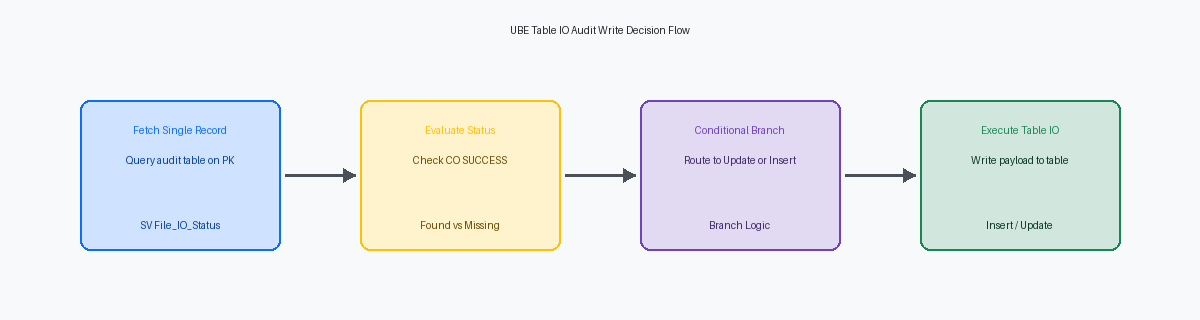
Eliminating this failure mode requires an explicit defensive fetch pattern before issuing write calls. In your Event Rules, pass the complete primary key—typically fields like DOCO, DCTO, KCOO, and a line or sequence number—into a Table I/O Fetch Single targeted directly at the primary index. This operation queries table state without locking the row and immediately populates the SV File_IO_Status system variable to drive execution logic.
Evaluate SV File_IO_Status immediately following the fetch. When the status evaluates to CO SUCCESS, the audit row exists from a previous step or aborted run. Direct your ER logic to execute a Table I/O Update mapped strictly across the exact primary key fields, refreshing audit timestamps, attempt counters, or payload values.
When SV File_IO_Status evaluates to CO RECORD_NOT_FOUND, route execution to a Table I/O Insert. Populate the insert buffer with pristine, explicitly initialized Event Rule variables rather than unassigned report variables carrying residual memory from previous section iterations. Structuring write conditions through this deterministic sequence keeps Table I/O reliable, protects database index integrity, and ensures the UBE can rerun without throwing SQL duplicate key errors.
Managing Transaction Safety and Commitment Control
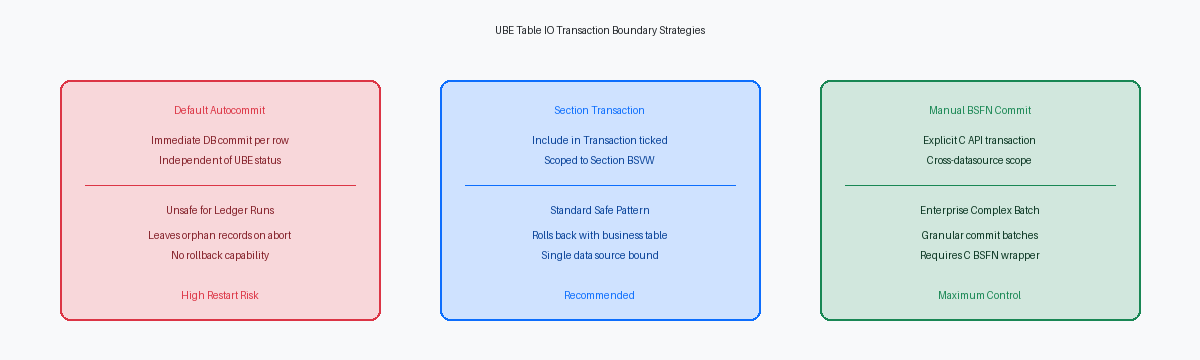
Standard Event Rules Table I/O executes in auto-commitA database setting where each SQL command is automatically and immediately saved as a permanent transaction. mode by default, completely independent of the UBE section's underlying transaction boundary. If you issue an Insert or Update to a custom F554111A audit table inside the Do Section event while generating standard ledger records in F0911, those operations run on separate connection handles. A database deadlock, batch cancellation, or runtime host error at record 450 will trigger an engine rollback on the main F0911 business view, yet your custom F554111A table retains dirty, orphaned audit records for rows 1 through 449.
To synchronize these operations without writing C code, enable the Include in Transaction property on the UBE Section Properties dialog. This setting forces all native Event Rules Table I/O statements executed within that section into the transaction scope managed by the primary business view driver. When a processing error or host-level termination triggers a batch rollback, the JDB engine rolls back your custom audit rows alongside standard JDE table modifications, preserving absolute state consistency across all involved tables.
Declarative section-level transaction processing breaks down when the custom audit table resides in a separate database data source—such as a distinct enterprise analytics database or a dedicated security schema defined in Object Configuration Manager (OCM)The JD Edwards component that routes application calls and table locations to specific database servers.. JDB middleware cannot automatically enlist multi-data-source database handles into a single section-level transaction scope. Resolving this requires bypassing native ER Table I/O and calling C business functions that use JDB_BeginTransaction, JDB_CommitUser, and JDB_RollbackUser to explicitly coordinate commits across disparate database connection boundaries. Passing explicit transaction handles (HUSER and HREQUEST) ensures that even cross-datasource audit writes roll back cleanly during high-volume batch processing failures.
Handling Batch Aborts and Idempotent Restart Boundaries
When a batch job crashes midway through processing 50,000 records, manual SQL cleanup is an operational risk that development should eliminate by design. You must handle resubmission directly in Event Rules using the restart pattern native to core JDE UBEs like R09801. Design your Processing Options to give operators an explicit rerun mode—allowing them to choose between reprocessing uncommitted records, handling errors only, or forcing an execution-level overwrite. Without a clear processing mode defined in the processing option template, operators will inevitably create duplicate entries or skip failed records during recovery.
Idempotency requires a dedicated status column in your F55 audit table, such as EDSP (Processed Code) or an EV01 flag updated to 'P' upon successful commit. In the Initialize Section event, the driver code must inspect the audit table to establish the high-water markA recorded point showing the highest record or state successfully processed so far. of committed records before the main loop starts. Validating this status against source ledger lines in F0911 or F4711 ensures that re-executing an aborted UBE skips already-processed transactions without raising primary key violations.
Clearing partial or corrupted records from an aborted run requires precise Table I/O constraints. Never issue an unconstrained Delete statement against the F55 table. Scope your Table I/O Delete strictly using a composite key matching Job Number (SV JobNumber), Execution Date (SV DateUpdated), and User ID (SV UserId). This isolates and removes only the orphan records written during the failed job execution while keeping historical audit data completely untouched.
In enterprise environments, the vast majority of batch aborts stem from transient network timeouts or memory allocation failures on the Enterprise Server. Building your F55 audit logic around high-water mark detection and job-scoped Table I/O guarantees that resubmitting the UBE yields the exact same state, whether it takes one attempt or three.
Event Rules Implementation: Safe Table IO Step by Step
Relying on JDE's implicit engine connections for custom audit writes is a latent production risk. In the Initialize Section event, issue an explicit Table I/O Open statement assigning your custom audit table (e.g., F55411A) to a dedicated table handle (hUserTableHandle). Opening the handle explicitly during section initialization ensures the database connection overhead occurs exactly once per UBE execution, rather than opening and closing implicitly for every single row across a 100,000-record batch.
Inside the Do Section event, clear all report variables and data structure values mapped to the audit table before executing read or write operations. Failing to clear variables like RV szErrorMessage or RV mnAuditAmount causes classic memory buffer bleed, where value state from record 499 silently persists into record 500 if the 500th row returns a null database field. Execute a Table I/O Fetch Single using your open table handle, passing the primary key components (such as BC szOrderKey and BC idDocumentType).
Immediately evaluate the System Value SV File_IO_Status following the fetch call. If SV File_IO_Status equals CO SUCCESS, route logic to Table I/O Update mapped to the primary key; if it returns CO ERROR (indicating record missing), branch directly to Table I/O Insert. Wrap both branches with a conditional check on SV File_IO_Status after the write operation, writing any failure flag to a report variable for diagnostic output so the batch run finishes with full operational visibility instead of failing silently.
Finally, transition to the End Section event to execute an explicit Table I/O Close using hUserTableHandle. Leaving table handles unclosed forces the enterprise server engine to maintain open database cursors until the UBE process terminates. On large batch jobs processing 50,000 records across multiple sub-sections, unclosed handles routinely exhaust database cursor limits (such as Oracle OPEN_CURSORS = 300), throwing ORA-01000An Oracle database error indicating that a process has opened more database cursors than permitted. errors mid-run and terminating the job.
Structuring your Event Rules around explicit table handles, defensive key checks, and synchronized transaction boundaries ensures your batch jobs execute reliably and recover cleanly from mid-process aborts without manual intervention.
