



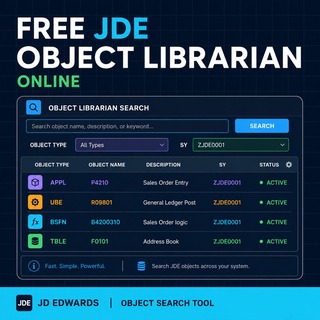
Looking for a JD Edwards object should not feel like digging through an old technical basement with the lights off. This Free JDE Object Librarian Online lets you search a large JD Edwards EnterpriseOne Object Librarian extract by the two fields that actually matter first: Object Name and Description.
Start with an object name like P4210, R09801, B4200310, or type a functional keyword such as sales order, invoice, ledger, address book or business unit. Then use Object Type and System Code only to narrow the result set.
Search the JDE Object Librarian
Search by Object Name or Description. Use Object Type and System Code as optional filters. System Reporting Code is shown in the results.
What this JDE Object Librarian search tool does
This tool searches a JD Edwards EnterpriseOne Object Librarian extract containing 68,908 objects. The search is intentionally focused on Object Name and Description, because that is where most useful lookups start.
The other columns — Object Type, System Code and System Reporting Code — are used to classify and understand the object you found. Object Type and System Code can also be used as filters, but they are not meant to replace a real object-name or description search.
How to use it
- Search by Object Name if you already know the JDE object, for example P4210, R09801 or B4200310.
- Search by Description if you only know the functional area, for example sales order, invoice, ledger or address book.
- Use Object Type as a filter when you want to narrow the result set to applications, UBEs, BSFNs, tables or other object families.
- Use System Code as a filter when you want to restrict the search to a specific JDE application area.
- Read System Reporting Code in the result table to understand the reporting classification stored in the Object Librarian data.
Further reading
What is the JDE Object Librarian?
The JD Edwards Object Librarian is the catalogue of EnterpriseOne development objects. It contains objects such as applications, reports, tables, business functions, business views, data structures and other technical components used by the system.
Why does the search focus on Object Name and Description?
Because Object Name and Description are the fields people usually search when they are trying to identify a JDE object. Searching primarily by System Code would produce too many broad matches and would hide useful results inside a small arbitrary subset.
What does BL mean in JD Edwards?
BL represents a Business Function Library: a specific type of container or library used to group and organize related Business Functions. Business Functions are pre-written blocks of logic, either written in C or implemented as Named Event Rules, used by JD Edwards EnterpriseOne to execute reusable business logic.
What are BSFN objects?
BSFN objects are Business Functions. In JD Edwards EnterpriseOne, they contain reusable business logic that can be called by applications, reports and other objects.
What are UBE objects?
UBE stands for Universal Batch Engine. These are batch reports or batch processes used in JD Edwards EnterpriseOne for reporting, processing, posting, updates, extracts and other background operations.
Is this an official Oracle JD Edwards tool?
No. This is an independently prepared searchable reference based on an Object Librarian extract. It is intended as a practical lookup tool for JD Edwards consultants, developers and upgrade teams.
By Vincenzo Caserta — JD Edwards Technical Consultant, builder of small tools that exist because searching technical information should not require unnecessary suffering.
