




At 02:00, when a corrupted pointer in a custom inventory allocation BSFNBusiness Function: an encapsulated C or Event Rules program in JD Edwards executing specific business logic. halts pick confirmation across three distribution centers, the standard reaction is panic. Technical leads face immense pressure to bypass Object Management WorkbenchThe primary JD Edwards change management system used to develop, track, and promote software objects., edit event rules directly in PDProduction environment in JD Edwards where live business operations run., or drop a manually compiled .dll straight onto an enterprise server. It feels like a ten-minute rescue. In reality, speculative overrides poison Central ObjectsThe central database repository storing code, event rules, and design specifications for JD Edwards objects., inject rogue specifications that linger unseen, and guarantee that your next scheduled full package deployment detonates production all over again.
Emergency containment does not require technical anarchy. Executing a disciplined JDE OMW emergency fix workflow without losing control allows a CNCConfigurable Network Computing: the architecture and technical administration role managing JD Edwards environments, kernels, and packages. and developer pairing to branch the impacted object, build a targeted update package, and deploy a verified fix typically within 60 to 90 minutes. This protocol protects active development tokens held by teams mid-sprint in DV920The standard Development environment/pathcode for JD Edwards EnterpriseOne 9.2., maintains an auditable electronic trail for compliance, and ensures the hotfix survives subsequent package builds intact.
The Architectural Risk of Production Hotfixes
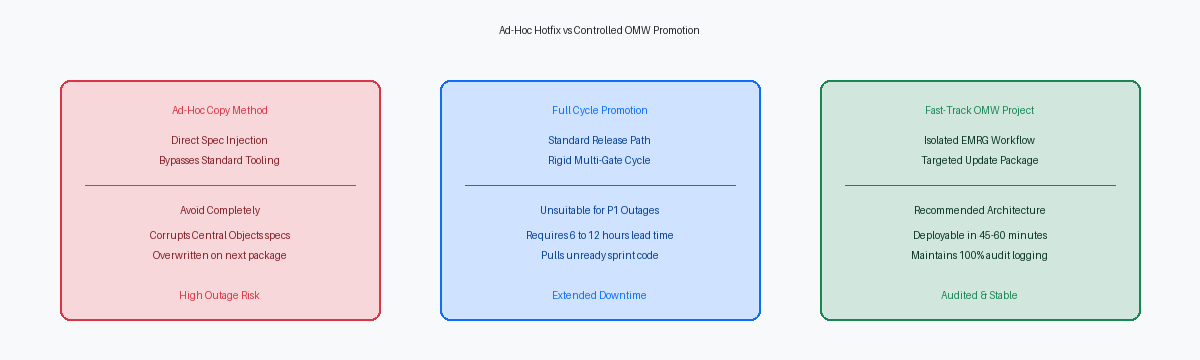
Under Sev-1 pressure, the fastest shortcut is often the most catastrophic: updating Central Objects directly through SQL or manually injecting spec records. Bypassing Object Management Workbench immediately breaks object master (F9860The Object Librarian master table in JD Edwards defining object names, descriptions, and types.) and object librarian status (F9861The Object Librarian status table tracking which pathcode holds the definition of an object.) records. The moment an F9861 row falls out of lockstep with the Central Objects relational tables, pathcodeA specific set of Central Objects specifications and business function code representing an environment level. parity dissolves. EnterpriseOne loses the referential integrity that defines which environment owns the approved version of that component.
The immediate failure mode lands squarely on your enterprise servers. Modifying BSFN logic without coordinated spec delivery creates a mismatch between compiled runtime DLLs—or shared objects on Linux—and the serialized specs cached by kernel processes. This structural offset triggers memory misalignment, crashing the Call Object Kernel and generating cascading zombie processes that drop interactive user sessions. An unmanaged C modification to patch order processing will quickly take out an entire enterprise server instance.
Even if the server stays upright, out-of-band modifications guarantee a deferred disaster. The next scheduled full package build compiles clean specs strictly from the Central Objects repository mapped in your deployment environment. Any binary manually swapped on an enterprise server or table definition altered outside OMW gets silently overwritten. The hotfix vanishes without an audit trail, resurrecting the production defect during a routine maintenance window.
Operational pressure cannot exempt an organization from system physics. A controlled emergency path requires unwavering single-path repository discipline, where every byte moving to production traverses standard token validation, logged status advances, and auditable update packages.
Configuring an Isolated Controlled Project Branch
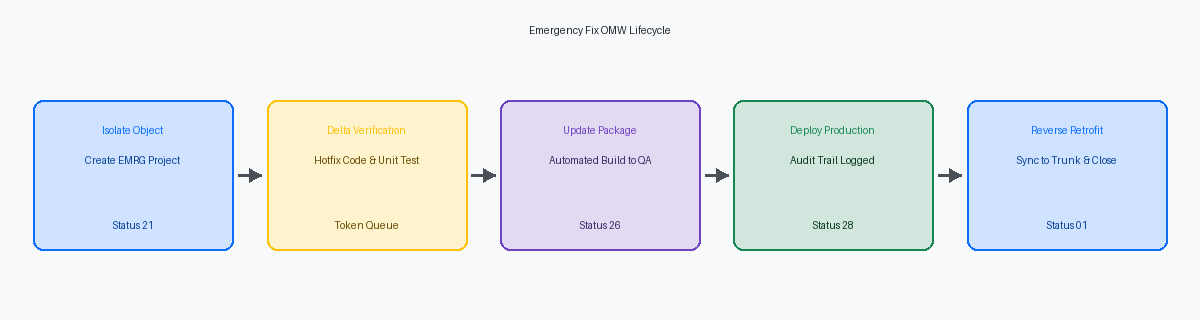
When a severity-one production outage hits, developers reflexively check out the offending object into whatever active development project they already have open. That single habit routinely contaminates hotfixes with unreleased sprint code. Enforce a clean break by establishing an isolated project container with a strict naming convention, such as EMRG_[Issue#]. This segregation guarantees that the urgent payload remains completely detached from scheduled release cycles, eliminating the risk of unvetted functional changes slipping into production.
Scope discipline within this container must be absolute. The project should hold exclusively the one or two artifacts directly responsible for the fix—typically an isolated C business function, table trigger, or batch application. If an engineer needs to inspect calling data structures or related application forms, those definitions must remain untouched in the pathcode. Dragging peripheral dependencies into the active project tempts accidental check-ins, ballooning a targeted single-object patch into an uncontrolled deployment.
Managing velocity requires tailored OMW activity rules mapped specifically for urgent scenarios, bypassing standard multi-week development gates. Rather than forcing the project through the full progression from Status 21 through Status 26, establish an explicit transition path that advances from Status 21 straight to an expedited testing phase at Status 25, then directly to Status 28 for transfer to Central Objects - PD. The project owner must enforce mandatory project roles within this path. The developer fixing the code cannot hold the approval or deployment role; system-enforced segregation of duties between programmer and CNC must survive even a midnight incident bridge.
Token Management While Preserving Work in Progress
Production halts rarely wait for a sprint to wrap. When a critical order entry BSFN breaks at month-end, that object is almost certainly checked out in DV920 under an ongoing feature enhancement. Abruptly releasing that token to clear an urgent path invalidates in-flight code changes sitting uncompiled in the development pathcode. EnterpriseOne tracks checkout ownership and queue sequence within the F98611The Object Librarian project and token management table tracking checkouts, reservations, and queues. table; blowing past those locks manually corrupts work-in-progress specs and breaks developer synchronization.
Stable emergency workflows rely on the native tokenA lock in JD Edwards OMW that grants exclusive editing rights for an object to a single project. queue maintained inside F98611. The urgent fix team places their project in the queue or triggers an inheritance check, allowing developers to execute a checkout without holding the primary token. This permits targeted triage against production-matching specs without severing the relationship between the active feature branch and the shared central repository.
When code surgery demands an absolute token transfer, the CNC lead must intervene with disciplined safeguards. Before releasing the token to the emergency project, the active developer must execute an explicit delta export of their current work in progress into a local .parJD Edwards compressed archive file containing object specifications and source code for transfer or backup. specification archive. Skipping this step means uncommitted Event Rules or modified data structures stored only in the local spec database vanish the moment Central Objects are refreshed.
Once the emergency update package lands in PD920The production environment pathcode in JD Edwards EnterpriseOne 9.2. and project promotion completes, automated token recovery protocols return the primary token to the original project queue. The feature developer restores the .par archive back into DV920, merges the incoming production delta, and continues development without losing work.
Update Package Builds and Audit Trail Preservation
The temptation during a production outage is to bypass package assembly and force specifications directly between pathcodes. That shortcut is where memory corruption begins. Emergency promotions must strictly deploy via targeted Update Packages rather than ad-hoc spec transfers to guarantee that compiled C business functions generate consistent shared libraries. Direct spec copies leave the enterprise server's runtime memory executing mismatched binaries against newly updated specifications.
Building an Update Package containing exclusively the impacted objects typically takes 15 to 30 minutes on modern infrastructure. That compilation cycle reliably builds the C source, packs the spec records, and updates the system deployment history tables in the Planner database. Skipping this step creates a ghost build state on the enterprise server, virtually guaranteeing that your next scheduled full package deployment will fail or overwrite the emergency change unexpectedly.
Maintaining this packaging discipline keeps regulatory controls intact when operational pressure is highest. Every promotion event executed across OMW automatically commits an immutable logging record into the F9863The OMW project activity log table tracking project transitions, actions, and user stamps. and F9864The OMW object history logging table tracking actions performed on specific objects. tables, capturing user IDs, timestamps, source pathcodes, and target environments. When external SOXSarbanes-Oxley Act: regulations mandating internal controls, audit trails, and segregation of duties for IT systems. and IT audit teams review off-cycle production releases, these system-generated entries prove authorized segregation of duties without relying on retrospectively typed change tickets.
Once the package deploys, finish the release cleanly on the runtime tier. Server Manager must be used to execute targeted kernel recycles or soft bounces rather than uncoordinated server terminations, preserving user sessions across non-impacted environments. Flushing only the relevant Call Object kernels loads the fresh business function libraries instantly, clearing the production issue without dropping active warehouse scanners or shop floor interactive sessions.
Engineering an Executable Rollback Mechanism
Native JDE OMW does not offer a single-click undo operation. Once an update package deploys into PD920, central objects and runtime specifications overwrite the production pathcode irreversibly unless you engineered an egress route before pulling the trigger. Counting on a developer to reverse-engineer an uncommitted BSFN or manually rebuild an APPLInteractive Application in JD Edwards representing the user interface screens and forms. definition after a midnight emergency fix fails is how brief incidents morph into multi-hour outages. An executable rollback mechanism must be fully staged before the payload moves.
Before promoting the emergency project out of your testing pathcode, your CNC must capture the pristine baseline. Pull the current production object state directly out of PD920 into a rollback par file, or build a pre-deployment snapshot package via standard package management. Place this intact code into a mirrored rollback project sitting at an inactive OMW status, such as status 26. If post-deployment smoke tests fail within the first fifteen minutes, the CNC can advance that mirrored project directly to status 38, deploying the previous good state immediately without scrambling through checkout-checkin conflicts.
Deploying replacement spec packages to Enterprise servers solves only half the problem. Modern HTML engines cache metadata aggressively, writing into the F989999Database table storing serialized metadata specifications used by web runtime servers. and F989998 serialized spec tables. Any emergency plan that omits runtime spec synchronization guarantees that end users will hit corrupted forms or stale business logic in the Java tier. Your rollback playbook must mandate an explicit Server Manager cache flush across all production web servers, or a scheduled rolling restart, forcing the JASJava Application Server: the web runtime engine hosting JD Edwards HTML client sessions. instances to dump old spec records and re-serialize from the restored baseline.
Post-Deployment Retrofitting and Project Closure
Most production regressions linked to emergency fixes do not happen during the incident itself; they happen several weeks later during a routine maintenance release. If your team stops the workflow the moment the update package hits PD920, you leave an unpatched code delta sitting in DV920 and PY920The Prototype/testing environment pathcode in JD Edwards EnterpriseOne 9.2.. The second the next scheduled project advances up the pipeline, those older, un-retrofitted specs will overwrite the hotfix in Production, silently resurrecting the defect you resolved during the incident.
An emergency fix is technically incomplete until the backward merge finishes across your pathcodes. Open the active feature project currently holding the primary token and launch the Visual Compare tool against the emergency project specs for any modified APPL, UBEUniversal Batch Engine: background batch reporting and data processing jobs in JD Edwards., or NERNamed Event Rule: a business function written in JD Edwards event rule script rather than raw C. objects. For custom C-language BSFNs, run a split-screen diff on the .c and .h source files directly inside your DV920 development directory. Merging the emergency logic into the active feature branch guarantees that the next baseline build incorporates the hotfix rather than wiping it out.
The final operational step is formal container retirement. Advance the emergency OMW project to Status 01 (Complete). This status advancement executes three mandatory controls: it permanently releases any secondary or queued tokens, strips checkout privileges, and locks the OMW activity logs in F98210Table logging high-level project-level activities and status advances in OMW. and F98211 against retroactive modification. Until that project reaches Status 01, your audit trail remains open to compliance scrutiny, and your pathcodes remain dangerously out of sync.
Hardening this promotion pipeline requires treating urgent fixes not as ad-hoc exceptions, but as scripted, repeatable branches within your core change management framework. Audit your OMW activity rules and automated package deployment scripts before the next Sev-1 event forces an unscripted decision.
