




Most development teams treat Object Management WorkbenchThe primary JD Edwards toolset used by developers to manage, develop, check out, and promote software objects. project statuses as arbitrary workflow gates to appease a project manager. That assumption is how environments get corrupted. Every numeric status change fires low-level Transfer Activity RulesRules configured in JDE that automate copying specifications, source files, and database records across environments during status changes. (TARs) that push specifications across Central Objects data sources, update Object LibrarianA central repository and set of tables (like F9860) tracking object definitions, locations, and system-wide ownership in JD Edwards. records in F9860 and F9861, and reassign checkout authorities. Ignoring the mechanics behind the JDE OMW object status meanings developers should know leads directly to overwritten specs, orphaned tokens trapped in F98611, and failed package builds that derail release schedules.
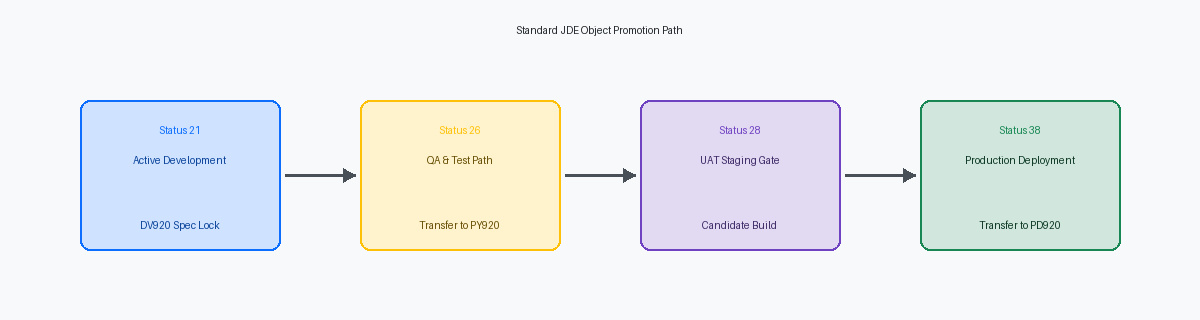
OMW is not an administrative tracker; it is an active database state machine. Moving a project across 21 (Programming), 26 (QA Transfer), 28 (Staging), and 38 (Production) dictates where code physically resides, which path codeA specific set of specifications and directory structures defining an environment (like DV920 for Development or PY920 for Prototype). governs execution, and whether your changes are isolated or live. Mastering the underlying transfer logic is the only way to ensure safe checkouts, clean builds, and repeatable promotions without leaving ghost specs across your path codes.
Under the Hood of OMW Status Transitions
Every project status change executed in P98220 operates as an engine, not a cosmetic database update. When an engineer clicks the advance arrow, the system executes background business functionsEncapsulated reusable code modules (written in C or Event Rules) executing specific logic, calculations, or system actions in JD Edwards. like B9800007 to validate user roles, project memberships, and transition permissions before modifying the record status in F98210. If someone updates F98210 via SQL to force a status move, none of the downstream event logic fires. What appears to be an instantaneous shift from status 21 to 25 triggers a strict sequence of relational checks across OMW control tables before EnterpriseOne commits any physical changes.
The structural transfer begins when P98220 queries the Object Transfer Activity Rules table (F9848). This table orchestrates data-source-to-data-source spec transfers, mapping specs from a source schema like Central Objects - DV920 directly into target schemas such as Central Objects - PY920. A developer modifying objects without checking the underlying Activity Rules risks checking in code to an unintended Central Objects schema. In a dual-maintenance or multi-path environment, a misconfigured activity rule can quietly overwrite validated UBEUniversal Batch Engine; the report writing and background batch processing engine in JD Edwards. versions or BSFNAbbreviation for Business Function, executable business logic modules written in C or Event Rules. specs in a pristine testing environment.
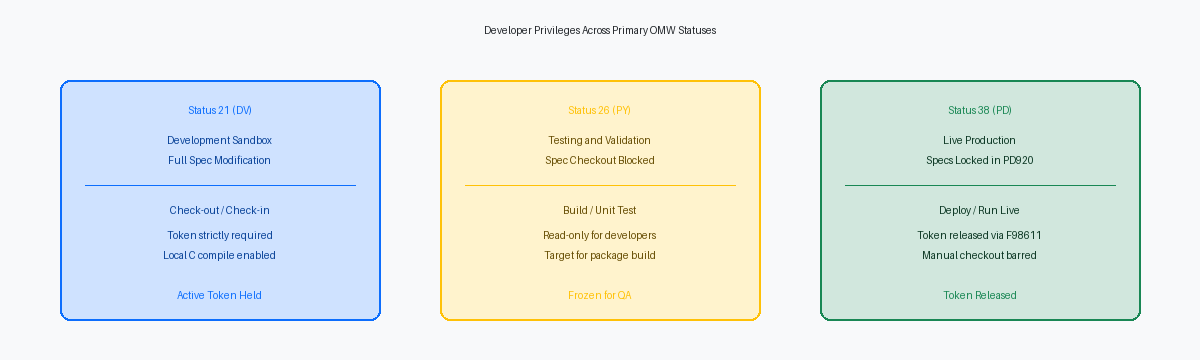
Spec concurrency across these transitions relies on token tracking governed through the F98611 table. EnterpriseOne enforces strict isolation by granting checkout privileges exclusively to the project holding the token at an active development status. If your project sits in the token queue, OMW forces a read-only state on your development machine, preventing rogue saves from contaminating shared specs. As the project advances toward promotion, F98611 dictates whether the token is transferred, retained, or released, preventing two teams from compiling conflicting C-code deltas into the same Central Objects schema.
Status 21: Programming and Safe Development
Status 21 is where active development lives and dies in EnterpriseOne. Transitioning an OMW project to 21 secures exclusive write access by granting an object token, which permits checkout directly to local spec repositories. Without that token in hand, OMW blocks checkout attempts flat, preventing rogue edits unless your CNCConfigurable Network Computing; the underlying architecture and system administration discipline managing JD Edwards environments, packages, and servers. team has explicitly configured token queuing and collaborative development workflows.
If a developer attempts a check-in while another user holds the token, OMW rejects the action immediately. That enforcement guarantees repository integrity, but it creates operational gridlock when teams treat status 21 as a storage bin. Unreleased tokens on central sales or financial objects like B4200310 or P4210 will block urgent production defect fixes from proceeding through parallel paths. If an engineer is out on leave while holding an unreleased token in status 21, your emergency P1 hotfix cannot even check out.
For custom and retrofitted business functions, status 21 demands technical discipline before the check-in button is touched. Developers must compile C business functions locally using the certified 64-bit compiler to validate DLL linking and build integrity before committing changes. Executing that check-in updates the Central Objects data source for the DV920 pathcode, serializing Event RulesThe proprietary, high-level business scripting language used within JD Edwards applications and batch processes. specifications into F98740 and F98741 while syncing the source and header files to the deployment server.
Rule of thumb for your team: never let a project sit at status 21 past the completion of initial DV testing. The moment local verification passes, transition the project to status 25 to hand over transfer management, or deliberately release the token so parallel workstreams do not stall.
Status 25 and 26: QA Verification and Transfer Rules
Advancing a project from status 21 to 26 triggers an OMW Transfer Activity Rule that extracts relational spec records from Central Objects - DV920 and commits them directly to Central Objects - PY920. In an active release cycle managing hundreds of modified APPLInteractive Application in JD Edwards, representing GUI screens, forms, and client event logic., BSFN, and UBE objects, this transition is the definitive technical boundary where isolated developer work converts into an enterprise release candidate. If a table definition, event rule spec, or business function data structure fails to transfer cleanly during this TAR execution, PY920 central specs become fractured before the CNC team even submits the package build.
Status 25 serves as a dedicated transit verification state in structured, multi-tiered enterprise architectures. Rather than promoting changes directly into test, teams configure status 25 to hold code while integration testing, security reviews, or technical lead sign-offs run against the staging repository. This operational buffer prevents half-finished multi-object enhancements from breaking the shared test environment when several developers concurrently modify dependent tables or shared data structures within a single project.
Once a project reaches status 26, OMW activity rules technically lock its objects against local checkout unless the project is deliberately demoted back to status 21 or handled via an override emergency rule. A frequent trap occurs when an engineer spots a bug during QA, modifies the object directly in DV under an ad-hoc project, but fails to execute a clean check-in and re-promotion through the transfer pipeline. When CNC builds the next PY920 update package, the build compiler pulls the un-promoted status 26 snapshot, deploying stale logic while the development team wastes hours troubleshooting phantom code.
Status 28 and 38: Staging and Production Path
Status 28 functions as the final quarantine gate before any artifact touches live code paths. In a disciplined promotion model, moving a project to status 28 indicates that development is frozen, UAT sign-offs are formally logged, and the CNC team can assemble a clean candidate package from staging. It isolates approved modifications from the active churn of status 21 or 26, ensuring that the specification footprint built into the staging package remains pristine.
Advancing the project to status 38 triggers the underlying Object Transfer Activity Rules that execute a spec copy directly from your source path code—typically PY920—into Central Objects - PD920. This transition commits code directly into production metadata schemas. The OMW transfer engine migrates the object records across database schemas, updating the F9860 and F9861 tables while committing compiled specifications into the production repository.
The defining mechanical event during the status 38 transition is the automatic token release executed against the F98611 Object Librarian table. Once specs commit to Central Objects - PD920, OMW strips the project's exclusive hold, immediately handing the token down to the next project waiting in queue. If a second release was blocked awaiting your modifications to a core BSFN or APPL, this transfer clears the obstruction without manual intervention.
Developers should never possess the OMW security permissions to execute a transition to 38; that action belongs exclusively to CNC. Pushing to 38 manually bypasses formal package buildThe process of compiling specifications, C business functions, and DLLs into deployable binaries across enterprise client and server machines. and deployment verification, dumping uncompiled specs into the production repository without corresponding shared libraries on the enterprise servers. If an object reaches PD920 specs without an accompanying package deployment, the runtime engine will trigger immediate spec mismatches the moment a user calls the object.
Status 01, 11, and 99: Project Life Cycle States
Status 01 serves as the baseline staging container in OMW, representing a blank administrative slate. At this stage, the project holds no tokens, enforces no check-out privileges, and cannot trigger spec transfers between pathcodes like DV920 and PY920. Developers often make the mistake of adding objects here expecting token acquisition, but the project must advance to Status 21 before OMW grants development locks in F9861.
Moving an OMW project to Status 11 applies an administrative freeze, functioning as a technical review gate or supervisor hold. CNC teams typically configure transfer activity rules to block any pathcode promotion out of Status 11, creating a deterministic pause point for peer reviews, SARSoftware Action Request; an Oracle tracking unit documenting bug fixes, functional enhancements, or code modifications. validations, or retrofitting audits. If a developer attempts to modify a BSFN or check in an APPL while the parent project sits at 11, OMW rejects the action, preventing incomplete code from slipping into an automated package build.
Status 99 marks complete project retirement, archiving the delivery and releasing every lingering token or reservation. The project container becomes strictly read-only, preserving an immutable audit trail of what reached production. A frequent operational blunder occurs when teams attempt to clean up legacy customisations by deleting objects directly from an OMW project at Status 99. That action only removes the object pointer from the F9822 project manifest; it does not touch the F9860 Object Librarian master table. True object deletion requires an explicit delete action configured through status transition rules, or the orphaned specs will continue to linger in your central repository indefinitely.
Developer Recovery: Broken Transfers and Token Traps
A failed promotion rarely rolls back cleanly. A network blip or lock contention during an environment transfer routinely strands an OMW project in an inconsistent status, creating corrupted spec pointers across your F9861 path code records where Object Librarian reports an object in DV920 while Central Objects has already committed parts to PY920. The most dangerous developer reaction is hitting "Check Out" to force a local reset. Performing an unprompted checkout over local specs after a failed transfer immediately overwrites the development workstation, destroying uncommitted business function code in your source and include directories.
When OMW halts with generic transfer error 119G, the user interface provides no actionable diagnostics. You need to bypass the OMW log viewer and audit the database directly. Execute a SQL query against the F98611 object librarian status table and F9848 transfer log in your System schema. Sorting by the transaction timestamp exposes the exact failure point, revealing whether the transfer broke on bloated event rule specs in F98741, data structure parameters in F98743, or a foreign key collision during the Central Objects table copy.
The other common operational trap is the trapped token resulting from abandoned projects or departed contractors. If an object is tied up at status 21 by an inactive project, developers should first use the native Request Token feature in OMW, which alerts the token holder during their next status transition. When an inactive user profile blocks that path, avoid the temptation to clear records manually via database scripts. Have a CNC log into P98220, locate the project in the token queue, and execute an administrative release to free the object cleanly without compromising the base revision history.
Disciplined execution across OMW status transitions—from 21 through 38—eliminates the broken spec deployments and package build failures that stall mid-cycle releases. Review your team's Transfer Activity Rules and token release policies to ensure your promotion pipeline enforces strict repository integrity across every path code.
