




Most IT teams treat the Object Management WorkbenchThe primary change management and software lifecycle tool in JD Edwards EnterpriseOne. as nothing more than an interactive promotion screen—a utility where developers advance project statuses and push specsSpecifications; compiled metadata defining how JD Edwards applications, tables, and reports function. between path codesPointers defining specific sets of Central Objects and code directory environments (e.g., DV920, PY920).. That misconception is expensive. Across enterprise environments, poorly configured rules account for the majority of cross-environment spec corruption—often three-quarters or more in troubled estates—alongside orphaned records across Central ObjectsThe database repository storing application specifications, business functions, and event rules. databases and unverified code leaking directly into production.
OMW is not an administrative convenience; it is your core architectural control boundary. Having JDE OMW object transfer activity rules explained at the systemic level—grounded in concrete action codes, status transitions, and repository targets—transforms how you govern software change. Configured with precision, these rules strip human error from promotions, eliminate package build failures, and turn OMW into an automated, audit-defensible delivery pipeline.
The Core Mechanics of Activity Rules and F98211
When an engineer advances an OMW project from status 21 to 26, EnterpriseOne does not perform an arbitrary file copy; it queries a deterministic relational engine. That engine is anchored directly in the F98211The JD Edwards control table defining OMW transfer activity rules between project statuses. control table, which evaluates three critical coordinates: From Status, To Status, and Object Type. Whether explicitly scoping a defined object category like APPL or utilizing the *ALL wildcard to sweep mixed project payloads, this lookup structure governs every state change. Before initiating any data movement, OMW cross-references these parameters against the object master records in F9860The Object Librarian Master table tracking object names, descriptions, and system codes. to verify that the registered object type has an authorized, active transfer action.
F98211 dictates the exact physical payload movement between Path Codes, Central Objects, and relational runtime tables. For serialized specifications, it manages the transactional extract from the source Central Objects database (such as DV920) and the write into the target (such as PY920). For interactive versions, batch versions, or processing option text, it directs the targeted row inserts across the respective runtime tables. F9860 tracks the object's overarching identity and system code ownership, but F98211 controls whether the underlying C code, event rules, and data structures actually bridge the gap between environments.
A missing or misconfigured row inside F98211 will break a deployment fast. When an activity rule is absent for a specific object type during a transition, OMW often fails silently at status advance or drops a cryptic 'Transfer Failed' error into the jde.logThe primary diagnostic text log generated by JD Edwards client and server engines.. Because EnterpriseOne does not execute project promotions under an atomic transaction boundary, partial changes do not roll back. You end up with several objects successfully written to target Central Objects while others remain stranded in development, silently creating out-of-sync environments and broken subsequent package builds.
Deconstructing Status Transitions and Allowed Actions
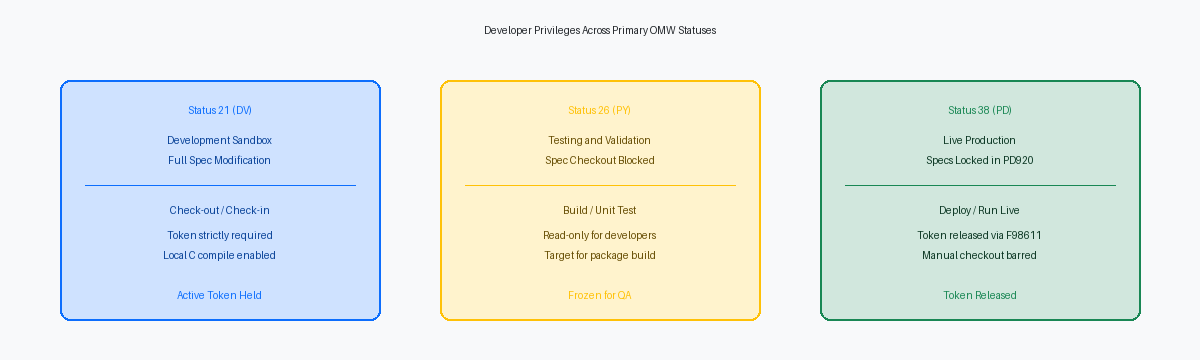
Project statuses like 21 (Development), 26 (QA/Test), 28 (Staging), and 38 (Production) are operational firewalls, not human-readable project tags. In the OMW engine, these numeric states evaluate user roles against the project to grant or deny exact operational privileges through Allowed Actions. When a developer holds an active tokenA lock mechanism in OMW ensuring only one developer can modify an object at once. on a custom UBEUniversal Batch Engine; the report writing and background batch processing engine in JD Edwards. or BSFNBusiness Function; compiled C code or Named Event Rule executing business logic., that token confers authority only if the project's current status maps directly to an active action rule. Everything from spec merges and table generation to object deletion depends entirely on this handshake.
Consider action code 01 (Check Out) and action code 02 (Check In). Under a standard architecture, action 01 belongs exclusively to status 21 for developer and owner roles, operating strictly against the DV920 path code and local specs. Status 38 exists to represent locked, live code in PD920; it should permit zero checkouts and restrict checkin capabilities entirely. If a team enables action 02 at status 38, they open the door for unverified local client specs to overwrite central production objects without traversing testing path codes or undergoing full package build verification.
In many audited client environments, a well-meaning CNCConfigurable Network Computing; JD Edwards architecture and system administration discipline. granted action 01 at status 26 or 38 to let developers apply emergency fixes directly. That single shortcut destroys audit segregation of duties instantly and leads directly to spec contamination. It allows a developer to pull PY or PD specs down to a local workstation, bypass the DV promotion path, and commit untracked code back upward. The moment that happens, your central repositories drift out of sync, your automated package builds begin failing on missing delta headers, and reconciling the F9860 and F9861The Object Librarian Status table tracking object checkouts and path code locations. manifests becomes an avoidable manual nightmare.
Anatomy of the Object Transfer Matrix
A transfer rule in OMW is not a raw file copy; it is a relational and serialized data synchronization orchestrated by JDE base APIs. When an APPL or UBE advances from status 21 to 26, the OMW engine queries the Object Configuration ManagerJD Edwards routing engine mapping users, environments, and objects to specific database locations. to resolve data source mappings and moves BLOBBinary Large Object; a database field format storing binary application specs and images. payloads alongside relational metadata across Central Objects schemas—such as moving records from CODV920 to COPY920 or COPD920. If your environment mappings for Central Objects point to an incorrect data source, OMW will execute what looks like a successful transfer directly into the wrong database schema, silently stranding code updates during the next server package build.
Control table transfers operate under an entirely different architecture and bypass the spec repository altogether. For Data DictionaryCentral repository defining field attributes, error messages, and glossary text across JDE. items, task views, and User Defined CodesCustomizable reference lookup tables (UDCs) used throughout JD Edwards applications., the transfer matrix directs inserts, updates, or merges against relational runtime tables—specifically targets like the F9210, F9000, and F0005 across environment boundaries. A frequent diagnostic error occurs when an administrator searches for spec corruption in the F98740 or F98741 tables after a promotion, unaware that the transfer matrix simply omitted the runtime table rules for the target Control Tables data source.
Table objects (TBLE) represent the highest-risk blind spot in custom transfer matrices. When an activity rule omits object-specific transfer instructions for TBLE, OMW updates the F9861 spec pointer records in the Object Librarian without synchronizing the actual column layouts between Central Objects schemas. A CNC will subsequently generate or alter the physical table in production using local workstation specifications that conflict with Central Objects. That misalignment leaves the runtime database catalog completely out of step with enterprise server middleware, triggering immediate memory access violations on subsequent UBE runs.
Configuring Secure Promotion Paths for Enterprise Scale
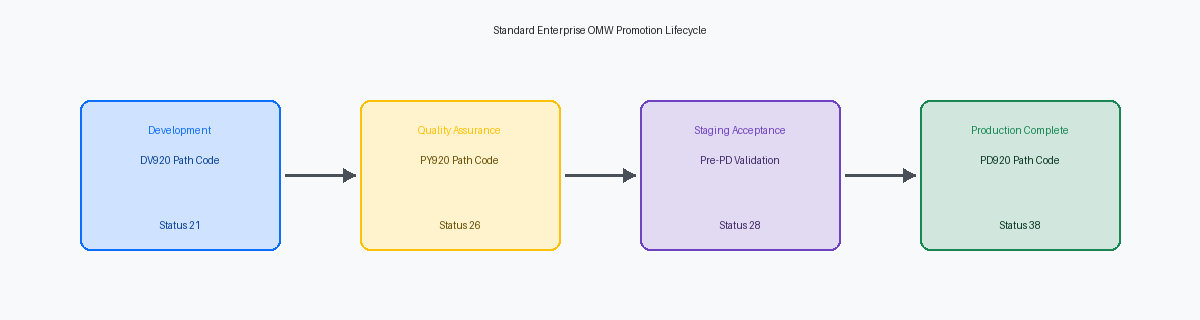
In clean enterprise setups, the object pipeline moves across environments in one immutable direction: 21 (Programming) in DV920, 26 (QA Test) in PY920, 28 (Staging/Production Prep), and finally 38 (Production) in PD920. Every object type must follow these rules without environmental detours. Skipping the 28 status—frequently utilized by CNC teams to freeze the package build and run full client/server builds before final deployment—breaks release validation. If an object fails testing in PY920, you do not alter the pipeline to pull specifications backwards; you fix the code in DV920 and cycle through the sequence again.
Architecturally prohibiting back-promotions is where most configurations fail basic governance. Your promotion rules must never allow a project at status 38 to transition directly back to status 21, nor permit checkouts directly from PD920. Once a project reaches status 38, its token history and object transfer logs must freeze permanently. Any subsequent fix or enhancement requires an entirely new project initiated at status 11 or 21, which pulls the current baseline from the central objects data source and forces re-entry into the full validation lifecycle.
Production outages inevitably tempt teams to bypass standard controls by granting developer checkouts against PD920. The correct design handles priority incidents through an isolated emergency sub-path, typically status 25. This dedicated rule branches directly to an expedited build cycle while enforcing mandatory audit triggers that log developer credentials, the incident ticket number, and specific SARSoftware Action Request; JD Edwards tracking record used for code fixes and enhancements. references to the F98210The OMW Project History table logging all project transitions, user IDs, and timestamps. tracking table. You isolate the risk to a monitored exception path without dismantling the security boundaries that protect production code.
Save Locations and Version Management Safeguards
Most failed production cutovers do not collapse because incoming code is fundamentally flawed; they collapse because teams cannot revert to the previous baseline when an edge-case regression strikes. When configured correctly within transfer activity rules, EnterpriseOne automatically snapshots pre-existing target specifications into the Object Save table (F98700) before a single byte in the target Central Objects data source is overwritten. This spec serialization executes at the database layer during the transition, preserving an isolated, point-in-time spec image with zero manual developer intervention.
Omitting a designated Save Location on your status 26 to status 38 transition rule is an unforced operational risk that routinely catches teams off guard. Without an explicit save data source mapped in P98230 for the transfer action, promoting an object into Production permanently overwrites the working spec state. When a compiled BSFN or malformed UBE layout causes a production halt during Monday morning cutover, that missing configuration strips CNC administrators of a rapid emergency rollback mechanism via the standard OMW Restore button.
The performance argument against automated spec backups does not hold up under scrutiny. Writing the spec payload into the F98700 repository adds roughly 15 to 40 milliseconds per object transfer—a negligible overhead adding merely seconds across a dense 80-object project package. In exchange, you eliminate the catastrophic scenario of initiating a multi-hour RMANRecovery Manager; Oracle utility used for enterprise database backup and recovery. or tape restoration of Central Objects schemas just to recover a handful of broken forms. Query your status 38 rows in F98211 tomorrow morning; if the Save Location field is blank, populate it before your next promotion cycle.
Auditing and Hardening OMW Rules Against Tampering
External auditors examining change management invariably scrutinize the same vulnerability: a developer who modified a custom C BSFN or NERNamed Event Rule; business logic written in JDE event rule script and compiled into C. promoting their own code into production. They demand demonstrable proof that developers cannot advance an OMW project from status 26 (QA/Testing) to status 38 (Production). Activity rules alone will not stop a developer who holds elevated OMW role privileges in DV or PY from executing that transition if the project team roles assign them Manager or Originator permissions.
True segregation of duties requires pairing transfer configurations with application security managed through Security Workbench (P00950). Access to P98230—where the transfer matrix, status transitions, and allowed actions are maintained—must be restricted exclusively to the CNC lead, barring all developers and functional leads. Within P98220 itself, you must implement action security so that only a dedicated release coordinator or automated deployment role has the authority to trigger project status movements targeting staging and production path codes.
When auditors demand verification, running direct SQL against the project history log table (F98210) provides immutable evidence of who moved what and when. Querying columns like LGOST (Old Status), LGNST (New Status), LGUSER (User ID), and LGUPMT (Time) instantly flags unauthorized bypass attempts or unexpected status hops across path codes. Cross-referencing F98210 records where LGNST = '38' against the object-level check-in logs in F9861 proves definitively whether the engineer who modified the object was cleanly barred from deploying it. If you are hardening your release pipeline, the companion articles on CNC package build automation and server-side deployment manifests on this site walk through the downstream mechanics of automated delivery.
