




Every veteran CNCConfigurable Network Computing; the technical systems architecture and system administration discipline within Oracle JD Edwards EnterpriseOne. or development lead has inherited this exact mess: an external contractor rolls off after a scrapped four-week proof of concept, leaving a dozen core objects checked out with primary tokensAn exclusive lock in JD Edwards OMW granting sole permission to modify and promote a specific object. stranded in DV920The standard development pathcode and environment in JD Edwards EnterpriseOne 9.2.. Attempting to simply purge the abandoned project from Object Management WorkbenchThe central JD Edwards change management utility used to manage, develop, and promote software objects. (P98220The interactive JD Edwards application program ID for the Object Management Workbench.) inevitably fails with token violation errors—or worse, deletes the project wrapper while stranding orphan records that silently poison subsequent package buildsThe process of compiling and packaging JD Edwards specs and code into deployable units for servers and clients..
Executing a systematic JDE OMWObject Management Workbench; the core object management tool in Oracle JD Edwards EnterpriseOne. project cleanup after failed development work is a precise operational discipline, not an afterthought you patch with destructive direct-table SQL updates against F9860The Object Librarian Master table in JD Edwards, storing core definitions of all objects. and F9861The Object Path table in JD Edwards, tracking object locations, statuses, and check-out states across pathcodes.. Manually flipping status flags in the database bypasses OMW object relational logic, practically guaranteeing specSpecifications; metadata definitions that describe JD Edwards objects, data structures, and application logic. corruption or the accidental erasure of valid parallel enhancements sharing the same object trees. Safely unblocking your delivery pipeline requires an orderly sequence: auditing token custody, reconciling pathcodesSpecific sets of JD Edwards Central Object specifications and source code representing environments like DV, PY, or PD. against pristine central objectsThe database repository storing authoritative object specifications and business logic for a specific pathcode., and clearing local environments without collateral damage.
Audit Token Ownership and Active Check-Outs
When an abandoned initiative stalls halfway through unit testing, the immediate collateral damage is development paralysis. EnterpriseOne's Object Management Workbench enforces strict single-token concurrency by default; until that token is released, no other project team can check out the object or advance an overlapping fix through the promotion pipeline. I routinely see 15 to 30 custom and standard objects sitting locked under defunct projects, silently blocking urgent patch cycles because someone walked away from an incomplete defect fix several months ago.
Before anyone starts clicking blindly in P98220, establish ground truth at the database tier using the Object Path table (F9861). Check-out flags in F9861 indicate whether an object is locked to a local developer workstation or committed to central pathcode specs. Running an SQL query against F9861 filtered by SIMKEY and SIPATH gives an immediate baseline of stranded check-out states before touching the UI. Specifically querying where SIPATH = 'DV920' and SIFDAT > 0 cuts through client-side cache artifacts, revealing the exact machine name, user ID, and date of uncommitted code locks.
Differentiating between actual token holders and secondary project users is essential to avoid invalidating unrelated work. A developer assigned to a project at user role 02 (developer) or 03 (technical lead) in F98221The OMW Project Users table, linking user profiles to specific OMW projects and assigned roles. may appear tied to an object in the OMW tree, but only the specific user entry registered in F98611The Object Management Workbench Project Detail table, linking objects and tokens to specific projects. holds the operational lock. If you indiscriminately force token releases or strip project attachments without verifying token ownership against the checkout flags in F9861, you risk breaking active, concurrent branches on high-traffic objects like B4200310 or P4210 that happen to sit in downstream projects awaiting token availability.
Reconcile Pathcode Specs Against Pristine Central Objects
When a complex modification stalls mid-flight, developers often check in partially altered source code before walking away. In most rescue operations, you find half-baked code committed directly to Central Objects - DV920 while the local workstation specs remain broken and uncompiled. Consider a core sales processing function like B4200310 (F4211FSBeginDoc). If an engineer modified the data structure typedef in the header file and checked it in without finishing the C source payload, your DV central repository is now poisoned at the schema level.
You cannot rely on local specs to diagnose the damage. Isolate the drift by comparing Central Objects - DV920 against Central Objects - PY920The Prototype or test pathcode and environment in JD Edwards EnterpriseOne 9.2., or against the Pristine 9.2 (PS920The unmodified vanilla pathcode and environment in JD Edwards EnterpriseOne 9.2.) baseline. Using Advanced Get inside OMW allows you to inspect and extract the exact spec state from PS920 directly into the development pathcode. This side-by-side spec comparison reveals whether the divergence is confined to business logic or extends to corrupted data structure parameters and table event rulesDatabase-level procedural logic attached directly to JD Edwards table events such as insert, update, or delete..
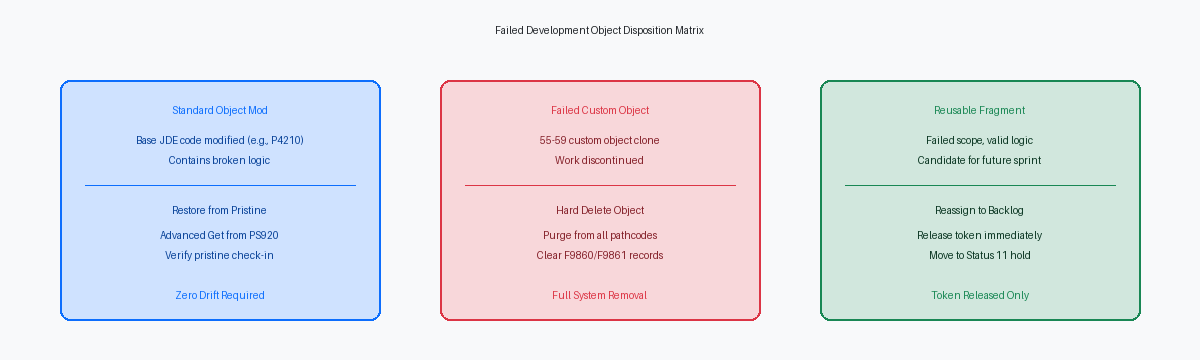
Restoring pristine specs requires an explicit Get from the unmodified central deployment pathcode rather than a basic Check-In. If a developer attempts a standard Check-In from their local machine to clear the project, OMW pushes their broken local specs straight back into the database. You must explicitly pull the Pristine specs from PS920 or PY920 into your active development environment, verify the local C compilation succeeds, and check in that clean state to overwrite Central Objects.
Failing to overwrite broken Central Object records before releasing tokens guarantees downstream build failures. The moment another project team checks out B4200310 or an associated data structure, it inherits those fractured spec pointers. When the next DV package build runs, the BusBuildBusiness Function Builder; the JD Edwards tool that compiles C source code and links DLLs. utility halts on unresolved symbols, breaking deployments across the entire development estate.
Execute the Orderly Token Release Sequence
Forcing a token release while an object sits checked out is the fastest way to corrupt your Object Librarian metadata. When a developer abandons work at Status 21 (Programming), attempting to downgrade the project to Status 11 (Pending Review) without addressing the active locks breaks synchronization between F9860 and F9861. If you strip the token while the user's machine still registers a check-out, the F9861 table remains trapped in an inconsistent Status 21 state. Central Objects will register the object as actively checked out to a user, yet OMW will show no valid token holder to manage it.
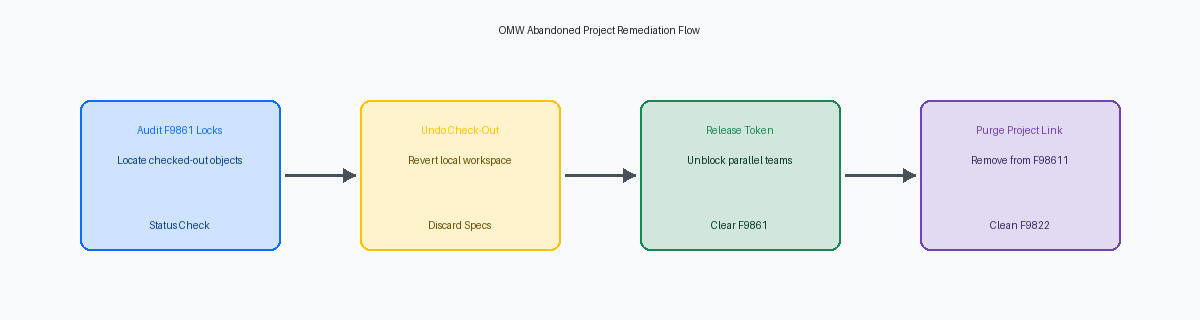
The mandatory UI workflow requires an explicit Undo Check-Out before any project status change takes place. Performing this action from the originating developer workstation purges the local spec modifications and cleanly resets the machine reservation flags in the pathcode. If that specific machine is decommissioned or the developer is unavailable, do not run rogue SQL against F9861. Instead, log in under an administrative OMW CNC profile configured with the proper security overrides in P98230The JD Edwards application used to configure Object Management Workbench user and rule-based security. to execute an administrative undo check-out through the standard EnterpriseOne interface.
With the check-out cleanly undone, clicking 'Release Token' either frees the object entirely or passes the primary token down to the next project queued in line. Administrative token inheritance must be monitored closely during this step. If a secondary project logged a token request months earlier and was subsequently forgotten, that queued project will instantly inherit write locks and primary development control the moment the token drops. Audit the object's token queue tab before hitting release to ensure you are not accidentally transferring write authority to an obsolete development initiative.
Remove Objects and Decommission the Abandoned Project
OMW will reject any attempt to delete or decommission a project container while child objects still hold an active token or an unchecked-in checkout status. The engine evaluates these dependencies at the API level before processing any container-level state change. Trying to force an abandoned project out of the system while a developer still has an object checked out locally will trigger a hard stop in P98220.
Strip every object out of the project container individually using the standard OMW interface. When an object is removed from the project window, OMW executes internal C logic that purges the project-to-object cross-reference records in the F98611 table. This GUI-driven removal severs the link between the object name and the project identifier while leaving Central Objects untouched, ensuring relational integrity is preserved across your system tables before you touch the project header itself.
Taking a shortcut via direct backend SQL to wipe F9822The Object Management Project Header table, storing project names, descriptions, and statuses. project header records invariably corrupts OMW for every user assigned to that project. If orphaned rows remain in F98611 pointing to a missing F9822 project definition, the OMW tree view throws memory allocation or invalid pointer errors upon user login when initializing the project hierarchy. You end up spending hours running database traces and writing manual cleanup queries against Central Objects to fix an issue that takes a couple of minutes to handle properly through the application.
Once the project container sits completely empty, transition the project status code rather than executing a hard delete. Move the container to Status 01 (Complete) if corporate change-control policies require maintaining the historical trail of logged actions in F98210The Object Management Logging table, recording historical actions and project status transitions., or advance it to Status 99 (Purged/Closed) if your internal governance rules mandate permanent retirement. Either status removes the container from active developer dashboards without breaking the object management framework.
Purge Local Specs and Reset Developer Workstations
Admins who wipe tokens in Central Objects often assume the cleanup ends at the enterprise server. It does not. When you administratively strip a token server-side, the developer's fat clientA dedicated Windows developer workstation running locally installed EnterpriseOne binaries and compilers. retains the exact state of that failed build in their local spec repository. Whether the workstation uses local Oracle Database Express Edition (XE) or the modern SQLite engine (spec.db in E920\DV920\spec), the local machine still treats its cached records as valid. If that developer opens OMW weeks later and takes a fresh token on that same object, the client can inadvertently push those obsolete, half-baked specs straight back into DV920.
Neutralizing this risk requires clearing the local footprint entirely. A developer can remove an individual object's footprint by navigating to the object via OMW Advanced options and executing a local spec delete. When an abandoned project involves dozens of interdependent objects, wiping the local spec repository directly is faster and less prone to human error. Drop the local SQLite tables or delete the spec.db file while EnterpriseOne is closed; the client runtime will automatically generate a fresh, synchronized database against Central Objects on the next login.
C business functionsCompiled C language programs that execute business logic and database operations in JD Edwards. carry an additional failure point that database purges will not resolve. Stale .h header files, compiled .obj binaries, and lingering .pdb debug symbols stay parked in the workstation's local include and bin32 directories. Developers must launch BusBuild, select the affected DLL, and run a clean rebuild rather than a standard incremental build. This purges orphan header declarations and ensures the local C compiler links strictly against pristine server definitions.
Prevent Stalled Projects with Governance and Auto-Auditing
In most CNC operations I inspect, 40 to 60 percent of open status 21 projects have sat untouched for over six months. EnterpriseOne includes no native background monitor to flag an idle development project; as long as an object holds an active token, the repository assumes legitimate engineering is underway. Developers move to urgent hotfixes, prototypes stall, and half-finished business functions remain checked out until someone tries to build a package.
You can stop this cycle by running a scheduled SQL audit or custom batch UBEUniversal Batch Engine; the report writing and background batch processing system in JD Edwards. directly against F9822 (Object Management Project Header). Query for records where project status (OMSTSO) equals '21' and the last modified Julian date (OMUPMJ) is more than 30 days old. Piping this query into an automated weekly notification to the development manager immediately surfaces orphan risks and gives the team a clear prompt: advance the work, or release the tokens and drop the project back to status 11.
Tie this monitoring to your sprint boundaries through stricter OMW activity rules and team governance. If your delivery cadence operates on two-week sprints, establish an administrative policy requiring project manager approval for any token hold that crosses two consecutive iterations. Token hoarding is rarely intentional, but enforcing this governance gate forces developers to check stable objects back into Central Objects or scrap the effort before dependencies entangle other streams, eliminating the emergency triage sessions that routinely derail scheduled DV package builds.
If you are sorting through orphaned tokens and broken save locations after an aborted mod, the related guides on OMW activity rule configuration and package build failure diagnostics walk through the exact spec integrity checks required before your next full build. For larger cleanup initiatives where abandoned modifications have compounded over multiple Tools Releases, the technical portfolio documents several enterprise repository purges—detailing how to script the isolation of inactive F9860 and F9861 records and safely retrofit hundreds of conflicted objects without destabilizing your Central Objects data source.
