




Every seasoned JDE developer has at least once obliterated several hours of custom Event RulesThe proprietary scripting language in JD Edwards used to attach custom business logic to application and report events. by clicking "Get" when they meant "Check Out," or poisoned a package build by checking in uncompiled C business functionsCompiled C-language routines in JD Edwards that execute high-performance business calculations and core logic.. The root mistake comes from treating Object Management Workbench (P98220)The central change management application in JD Edwards used to develop, track, and promote software objects. like Git. OMW is not a distributed file repository with merge protection and staging branches; it is an active specification engine. When you execute an action in OMW, you trigger immediate database transactions directly against local spec databases or Central ObjectsThe shared database tables on the server storing authoritative application designs, event rules, and metadata for an environment. tables like F98741 and F98760.
That architectural reality means operational errors do not wait for a pull request—they wipe local buffers or corrupt pathcodesDefined environments in JD Edwards (like DV for Development or PD for Production) holding specific versions of application specs. instantaneously. Having JDE OMW save, restore, get, and check in explained at the specification level is the difference between safe custom development and emergency rollback calls at 2 AM. Once you track the movement of spec records and tokens between the developer workstation and the central database, you stop treating OMW buttons like casual file transfers and start treating them like the live schema operations they actually are.
The OMW Architecture: Local Specs vs Central Objects
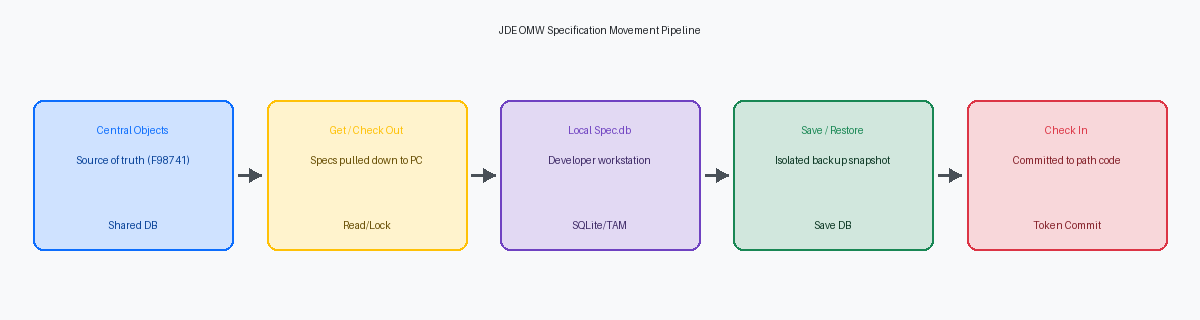
When a developer opens an application in Form Design AidThe visual design tool in JD Edwards used to build and customize interactive application screens and logic., they are never working directly against the enterprise database. JDE EnterpriseOne enforces strict isolation by executing design modifications inside local specification repositories—historically flat TAM filesTable Access Method files; legacy flat binary files used to store local specifications before modern SQLite databases., and on modern Tools Releases, local SQLite Spec.db databases housed directly on the Fat ClientA Windows developer workstation with installed JD Edwards development tools, compilers, and local specification databases.. The authoritative, multi-user source of truth resides in the relational Central Objects tables on the database server, where tables like F98740 store serialized form definitions and F98741 holds the compiled Event Rules specifications for each path code.
Governing this separation is the metadata layer. Object LibrarianThe master system catalog tracking all software objects, definitions, and locations across JD Edwards EnterpriseOne. master table F9860 establishes the global identity and object type across the entire enterprise, while F9861 tracks object existence across specific path codes like DV920 or PY920. Simultaneously, OMW relies on F98222 to record project assignments, user roles, and development status tokens. When an engineer initiates an action in OMW, these metadata tables are queried first to validate checkout states and permissions before a single byte of spec data moves across the wire.
Under the hood, every design transfer executes low-level C API routines within the JDE runtime engine. These APIs extract, serialize, and physically transport binary specification blobs between the local workstation runtime and the Central Objects database schemas. Spec corruption almost always boils down to a fundamental misunderstanding of this plumbing: developers conflate saving their local workspace with committing to the path code. Understanding whether an action writes to the local machine, the Save repository, or the shared Central Objects path code is the only reliable way to avoid spec corruption and prevent accidental code overwrites.
The 'Get' Operation: Safe Synchronization and the Silent Wipe Trap
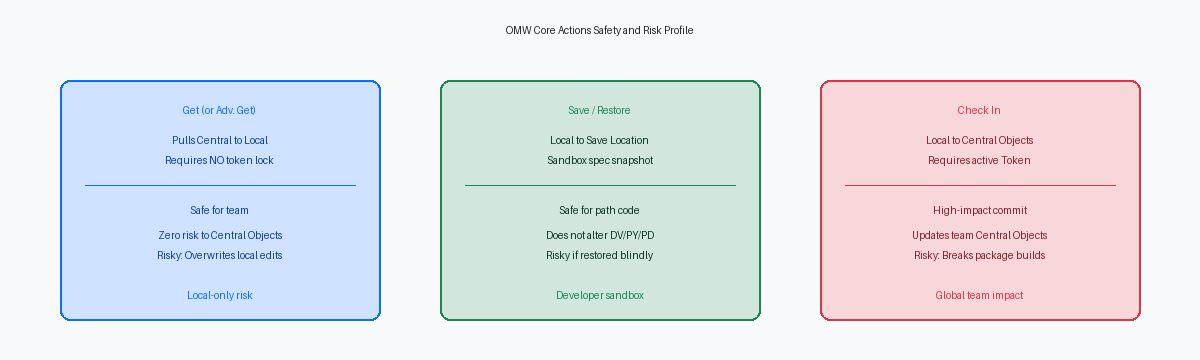
A standard Get downloads the latest committed specifications directly from Central Objects in your project’s path code into your workstation Spec.db, requiring neither an active checkout nor a project token. Because the operation creates zero lock records in the F98222 table and touches no records in the Central Objects data source, it is completely invisible to the rest of the team. Multiple developers can execute a Get on P42101 or R42565 simultaneously without generating a single database lock conflict or project validation warning.
The danger of Get is strictly local, but it routinely burns unrecoverable hours during development cycles. If an engineer opens Form Design Aid (FDA) or Report Design Aid (RDA)The visual tool used to create, layout, and modify batch applications (UBEs) and reports in JD Edwards. without an active checkout, writes event rules logic, and subsequently clicks Get in OMW to pull an updated data structure, the client performs a silent, destructive spec replacement. EnterpriseOne assumes Central Objects is the absolute source of truth; it raises no confirmation prompt, writes no rollback cache to your local disk, and instantly wipes the uncommitted local specifications.
When troubleshooting a defect introduced during a retrofit, Advanced Get provides a clean path code override. By launching Advanced Get from the row exits, a developer can pull an unmodified, pristine object definition directly from PD920 Central Objects down into their DV920 local spec repository without altering the active OMW project context. This enables immediate comparative analysis between production logic and broken development specs right on the fat client, keeping the local workspace intact while eliminating the need to log into a separate environment.
The 'Check In' Operation: Committing Code to Central Objects
Executing a Check In moves your serialized specs and source files from the developer workstation directly into the target pathcode's Central Objects data source, such as Central Objects - DV920. OMW immediately overwrites the server-side spec records—replacing rows across F98741 for event rules, F98762 for report specs, and related repository tables—and records the status update in the F98222 project detail table. The central database instantly recognizes your local changes as the authoritative environment baseline, making those specs available to any developer or package engine pulling from that pathcode.
Treating this operation as an intermediate work-in-progress save is how development environments get corrupted. If an engineer checks in a C Business Function or an updated NER without executing a local clean build of all associated data structures, that broken code enters Central Objects unchecked. When the nightly package build runs, the busbuildBusiness Function Builder; the JDE utility that compiles C business functions and links dynamic link libraries. utility fails on unresolved external symbols or header mismatches, killing the package build and halting deployment across the entire team the next morning until someone traces the broken commit.
A successful Check In releases the workstation spec lock, but it does not automatically release your OMW token. Unless your environment's activity rules explicitly enforce token relinquishment upon check-in, that token remains tied to your project until you manually release it or advance the project status—such as moving from status 21 to 26 in F98220. Central Objects is your shared integration line, not a scratchpad. Never check in simply to pack up for the evening; execute the operation only after functional verification on your local web client.
The 'Save' and 'Restore' Mechanics: Workstation Safety Buffers
Every developer refactoring a several-thousand-line sales order Named Event Rule should hit the Save button before modifying a single line of logic. When you trigger Save in OMW, EnterpriseOne extracts the object's active specifications—either from your local workstation or directly from Central Objects—and serializes them into the designated Save Location data source configured in P98230. In standard multi-foundation architectures, this target routes to a dedicated Save path code or an isolated spec database, entirely partitioned from development path codes like DV920.
Executing a Save requires zero token ownership. You can capture a precise spec freeze-frame of production-grade code or an in-flight modification without locking out peer developers, modifying Central Objects, or manipulating OMW project statuses. It functions as an unmanaged spec sandbox. When you need to strip down complex C business functions or rewrite deeply nested table event rules, having that uncorrupted rollback point sitting in the Save Location prevents hours of reconstructive work if an experiment fails.
Restore executes the exact mirror image by pulling the archived specifications out of the P98230 Save Location and repopulating the developer's local Spec.db or target path code. The structural risk emerges when developers treat Restore as an alternative to Get. If a colleague checked in an ESUElectronic Software Update; an official software patch delivered by Oracle to fix bugs or update JDE objects. retrofit or an urgent bug fix to Central Objects while your work was saved, restoring an outdated Save snapshot reinstates your pre-patch spec into your local workspace. If you subsequently check that object back into Central Objects, you wipe out their production fix without triggering a single collision warning.
Token Dynamics: How Check In and Get Behave Under Lock Contention
Every development collision in EnterpriseOne traces back to a single row in the Object Management Workbench tables. The OMW token is essentially a database semaphore registered in F98222, ensuring that exactly one project holds exclusive commit rights to Central Objects for an APPL, UBE, or BSFN at any given moment. While development activity rules frequently permit a secondary developer to perform a non-token Check Out and alter local specs in parallel, OMW blocks Check In outright until the active token holder releases or transfers that lock.
When two developers modify the same interactive application—such as P4210—without strict governance, the non-token holder paints themselves into a corner. Executing a Get after the primary developer commits new code to Central Objects will wipe the non-token developer's local changes instantly. Even when local specs survive, joining those parallel development tracks requires a line-by-line spec merge using Visual ER CompareA graphical comparison utility in JD Edwards that highlights differences between two versions of Event Rules.. On a complex form with well over a thousand lines of event rules across events like Dialog Is Initialized, that manual ER reconciliation easily burns 4 to 8 hours of senior technical time re-aligning variables and structural ER flags.
The worst-case scenario occurs when an administrator forces a token transfer to expedite an urgent hotfix through to QA. Stripping the token from the original holder without developer consensus breaks spec lineage. When the reassigned project checks in, it treats the local delta as authoritative and commits it over Central Objects, silently overwriting preceding bug fixes that were never back-ported to the overtaking workstation. In dozens of upgrade audits, regressions in core order processing or financial posting routines trace back directly to an administrative token override that bypassed spec reconciliation entirely.
Defensive OMW Protocol: The Five Rules for Clean Deployments
Every broken package build starts with a developer who treated Object Management Workbench as an undo buffer rather than a live database gateway. Before touching Event Rules for an extensive refactor, or applying an incoming ESU that touches modified custom code, execute a Save to your local backup location. That local record is your only zero-downtime rollback when a spec merge collides. Similarly, firing a Get operation on an object currently checked out in your local workspace silently overwrites your uncommitted work. If you must refresh, export your local changes first or confirm they are intentionally discarded before pulling from Central Objects.
Check In must serve as a verified release gate, not an intermediate workbench save. Before committing code to Central Objects, validate ER syntax and execute a local busbuild compile across all dependent C business functions using the local nmake utility. Verifying that the code links cleanly on your fat client prevents corrupt data structure pointers or missing typedefs from poisoning shared path codes. Pushing uncompiled specs breaks the nightly package build for the entire team, turning a routine cycle into hours of CNCConfigurable Network Computing; the underlying architecture and administration discipline for JD Edwards EnterpriseOne. spec triage.
When troubleshooting production discrepancies, use Advanced Get to pull PD920 specifications directly into a distinct research project rather than checking out and altering development objects. This isolates your diagnostic work from active DV920 branches while letting you step through production logic locally. Finally, release your OMW tokens the moment code stabilization is verified. Holding tokens past active development stalls automated promotion paths from DV920 to PY920, blocking automated package builds and stranding downstream QA cycles behind artificial lock contention.
Treating OMW operations as direct database transactions rather than casual file synchronizations protects shared path codes from corrupt specs and unvetted code. If your engineering team faces persistent package build failures or code collision issues across distributed development environments, contact our JDE practice leads to audit your development workflow and stabilize your release pipeline.
