




Most development disasters I am called in to rescue are not caused by flawed C BSFNBusiness Function: A reusable package of business logic written in C or Event Rules in JD Edwards. pointers or edge-case UBEUniversal Batch Engine: The reporting and background batch process engine in JD Edwards. logic. They happen when two developers touch the same application—say, P42101 or a critical custom billing function—treat OMWObject Management Workbench: The core change management and source control interface in JD Edwards. tokens as bureaucratic red tape, and trigger an uncontrolled project promotion that obliterates days of Central ObjectsCentralized database repositories that store the master application specifications and event rules. specs. Tokens are not advisory flags or cosmetic project tags; they are physical database locks recorded in Object LibrarianA set of system tables that catalog all objects, locations, and ownership locks in JD Edwards. tables that dictate which project holds exclusive change authority across your path codesDesignated environments or file locations (such as Development or Production) housing specific code sets..
Establishing rigorous token management protocols is the only reliable way to maintain repository integrity on an active team. Once you have more than three engineers modifying code across DV and PYDevelopment (DV) and Prototype/Testing (PY) lifecycle environments in JD Edwards., token discipline ceases to be an administrative preference and becomes the primary engineering control that prevents silent specification overwrites during promotion cycles.
The Mechanics of Object Tokens in Object Librarian
OMW does not manage concurrency through an ephemeral in-memory lock; it relies on relational state across the Object Librarian schemas. While the F9860 table stores the core object master definition—tracking the object name, type, and description—the concurrency lock is managed inside F9861The Object Librarian table that tracks object locations, tokens, and checkout statuses.. A token is represented by an active lock flag (SIOBTOKN = '1') tied directly to a single project (SIPRJNAME) and user ID. Querying F9861 for an object like P554210 reveals the baseline rule: regardless of how many developers have added the object to their personal OMW projects, exactly one project holds that active flag at any given moment.
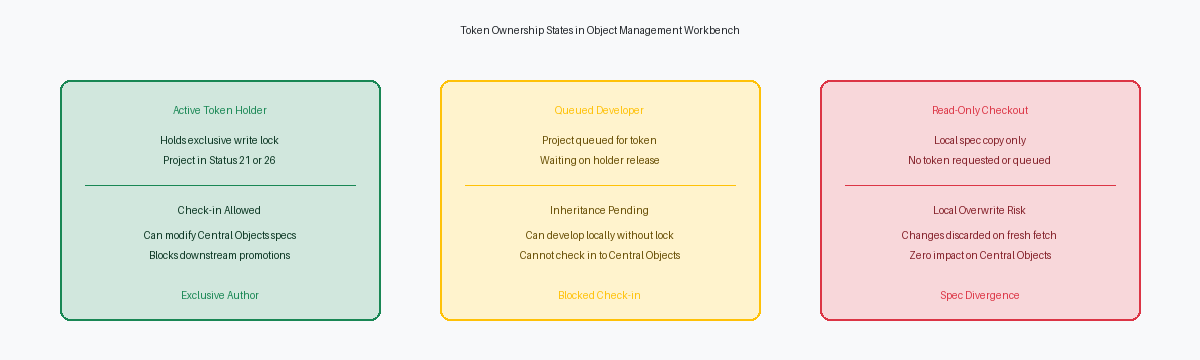
Developers frequently confuse holding local checkout specs with holding a token. You can execute an advanced get or check out specs to your local machine—populating your local SQLite spec database—without owning the token. That local spec copy allows runtime debugging in DV920, but it grants zero promotion authority. The architectural distinction is absolute: checking out specs only isolates your local workstation runtime, whereas holding the active token reserves sole authority to modify the central repository. Operating under the assumption that a successful spec checkout guarantees promotion path safety is how uncommitted EREvent Rules: JD Edwards' proprietary scripting logic triggered by application and interface events. overrides occur during build cycles.
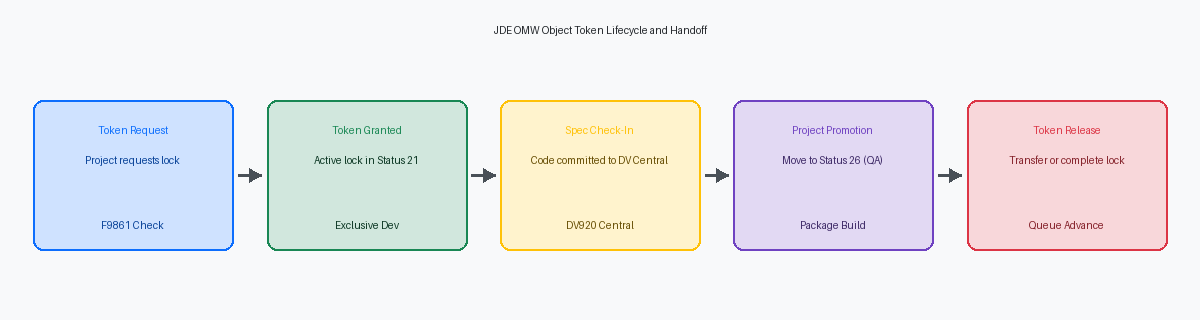
OMW enforces this boundary whenever an object transitions through development phases. At project status 21, the engine validates token ownership against F9861 before permitting any check-in back to the central deployment server. If a developer attempts a check-in from a project that merely holds the object without the token, the runtime rejects the transaction instantly, preventing central spec corruption. Before initiating extensive Event Rule refactoring on complex objects, verify that your project actively holds the token rather than sitting queued in position two or three.
Token Checkout and the Phantom Modification Trap
A developer can check out an object when another project holds the token, and OMW will issue a routine warning while still copying specs to the local machine. In Form Design AidThe visual design tool used to construct and customize interactive application screens in JD Edwards. or Report Design Aid, EnterpriseOne allows you to alter controls, rewrite event rules, and run local unit tests, breeding a false sense of security. Central Objects remains locked against your check-in attempts. You are operating on borrowed time inside a disposable sandbox.
The real disaster strikes complex C business functions like B4200310 (Sales Order Processing). A developer checks out B4200310 without the token to adjust line-defaulting logic and edits b4200310.c locally. BusBuildBusiness Function Builder: The JDE compilation utility used to build C source code into shared libraries. compiles the DLL cleanly, allowing local testing via P4210 to execute the custom logic without a hitch. The local source files diverge silently from Central Objects while the developer assumes the work is virtually complete.
The trap snaps shut when Developer B, the legitimate token holder finishing an unrelated pricing fix, checks in their project. The moment Developer A runs an advanced get, rebuilds specs, or fetches an update to test an adjacent object, OMW overwrites the local directory. Days of custom pointer arithmetic vanish in seconds, leaving zero recovery traces in the F98222 project log.
Enforce strict checkout discipline across your technical roster: inspect the OMW project tree for the active token glyph before opening Visual Studio or writing a single line of Event Rules. If your project lacks token ownership, treat the object as strictly read-only. Until the primary project advances status and transfers the token, writing code without the lock is an unforced error.
Managing Token Release and Queued Developer Conflicts
The OMW token inheritance queue is where spec collisions happen silently. When a second developer adds an object already held by another project, OMW logs that request and places the second project directly into an inherited token queue. Developer B can view specs or even check out locally if development rules permit, but the gate to Central Objects remains locked to the original project until Developer A surrenders control.
Disaster strikes when developers treat token release as casual task cleanup. If Developer A manually releases the token while leaving their project sitting at Status 21, OMW instantly shifts active token ownership to Developer B's queued project. This leaves Developer A's Central Objects specs completely decoupled from an active promotion package before the work ever advances to Status 26 or Status 28. Developer B then checks in new modifications against that shared object, overwriting Developer A’s unpromoted baseline and creating an undocumented collision that regular package builds cannot detect until runtime testing fails.
A clean handoff requires deliberate coordination rather than an unmonitored release. When two projects must touch the same object—whether a complex APPL like P4210 or a core business function—both developers must walk through joint code reviews before any token shifts. The incoming developer must execute ER CompareA visual comparison utility used to analyze and merge differences in Event Rules across versions. for event rules or an external merge tool for C source and header files, diffing Developer A’s checked-in baseline against their own branch before writing new logic.
Never release the token manually at Status 21. Keep the token anchored until Developer A promotes the originating project to Status 26, ensuring the specs transfer cleanly to the test path code. Once promoted, the inheritance queue passes the token down, allowing Developer B to perform an advanced get to sync their local specifications and build upon verified code.
Promotion Control and Multi-Project Token Handoffs
The fastest way to derail an active release cycle is misconfiguring object token behavior in Object Management Activity RulesConfiguration tables governing object behavior and permissions across project lifecycle status changes. (P98230). A common misstep is setting the project status transition from 21 (Programming) to 26 (QA/Testing) to automatically surrender the token. When promoting an object into Status 26, the development project must retain its token whenever downstream remediation is expected before final production deployment. Relinquishing control at this gate strips the development team of their baseline safety net.
Surrendering the token at Status 26 flags the object as immediately available in DV920. A secondary project waiting in the queue can instantly seize the token and check out modified specs into development. While QA engineers validate the initial build in PY920, an unrelated developer is already rewriting event rules in DEV. If QA logs a defect, the original developer cannot check out the object to apply a fix without either forcing an emergency rollback or absorbing unverified code from the second project. That scenario creates phantom bugs and irreproducible defects that routinely waste 20 to 40 hours of cross-team triage.
Managing multi-project token handoffs across concurrent release streams demands strict sequence enforcement verified directly in the Object Management Workbench (P98220). Lead developers must audit project dependencies and verify queue priority before any project advances past Status 26. If Project B depends on objects modified by Project A, Project A must clear Status 28 (Staging) and complete deployment to Status 38 before releasing its locks, unless both initiatives are formally merged into a single release container. Configuring P98230 to forbid token releases prior to Status 38 guarantees that specs remain isolated until code is proven stable in Production.
Emergency Overrides and Administrative Break-Glass Rules
Administrative token release in P98220 is not a routine housekeeping task; it is an irreversible override that severs an active development branch. When a CNCConfigurable Network Computing: The architecture and administrative role managing JDE environments, packages, and servers. administrator or lead architect strips a token from an active project, Object Librarian immediately drops the checkout lock and assigns control elsewhere. Every enterprise shop encounters stalled projects when contractors roll off mid-sprint or abandoned tickets sit locked in inactive queues for six weeks. Without a documented approval workflow signed off by the development lead, taking that token by force creates far more operational friction than it resolves.
The technical damage happens on the developer machine. Breaking a token leaves the previous holder's local work orphaned in their local repository. Because EnterpriseOne validates checkout states against the project header in the Object Librarian tables, those local checkout specs can never be checked back in cleanly. Attempting to force a check-in after an administrative override throws immediate validation errors in OMW, risking object record corruption or, worse, silent spec mismatches between the workstation and the central path code.
Before executing an administrative break in P98220, CNC must preserve the stranded code. The standard operating procedure requires capturing the local developer specifications directly from the developer workstation's spec folder or pulling the latest commit from their workstation Git mirror. Enforcing this formal break-glass protocol eliminates developer friction across deadlocked releases while guaranteeing uncommitted business function source, event rules, and data structures are not wiped out. Once specs are safely staged outside OMW, the token can be reallocated, the object cleanly re-checked out, and the changes merged deliberately.
A Senior Developer Checklist for Clean Token Discipline
Most blown deployments start with a developer modifying a local specification under the assumption that a token was granted. Before you launch Form Design Aid, Report Design Aid, or touch a BSFN data structure, check OMW's project object list to verify the token icon is solidly assigned to your active change request project. Scratchpad projects—default user projects where objects accumulate during quick investigation—have no place holding tokens. If an object is checked out in a personal workspace rather than an auditable change project tied to an approved ticket, CNC cannot track promotion readiness, and downline developers sit locked out of dependent objects for weeks.
Spec collisions remain the quiet killer in multi-developer environments. Five minutes before clicking Check-In, run ER Compare directly against Central Objects in your target path code, or perform a manual diff against the pristine repository if you are handling C business functions. A developer who works locally for two weeks often assumes their baseline matches the server, only to overwrite a hotfix deployed mid-stream by another team. Spotting an unexpected delta in event rules or header includes before check-in preserves hours of regression analysis and prevents clobbering production parity.
Do not release the token the moment your check-in completes. The token remains your insurance policy until the assembly makes it through a full or update package build and passes smoke testing in DV or PY. If a build fails on an unreferenced data structure pointer or an unresolved BSFN dependency, holding the token allows you to remediate instantly without re-queuing behind three pending requests. When your code clears the build gate, or when a formal project handover requires passing control to an awaiting developer, release the token immediately so the queued user can pull current Central Objects specs into their local environment.
Tight token discipline in OMW is what separates a stable deployment pipeline from concurrent checkout collisions that corrupt DV object specs. When your team enforces strict token queues, retrofitting several hundred custom objects across concurrent upgrade streams becomes a predictable, repeatable process rather than a perpetual emergency.
